
TuneUp Brings Its iTunes Cleanup Wizard To The Mac
by Jason Kincaid on December 11, 2008

TuneUp, an iTunes plugin that helps correct wrong or missing song meta data and album art (and also offers a number of complementary features) has released a Mac-compatible version to the public.

We originally covered TuneUp last May (click here to see our full overview of the features), and since then not much has changed in terms of the plugin’s functionality. The application sits as a sidebar alongside iTunes, allowing users to simply drag and drop songs from their playlists into appropriate boxes to have their meta tags ‘cleaned up’ or cover art downloaded automatically. The sidebar also includes a panel called ‘Now Playing’ that features YouTube videos along with album and song recommendations related the song currently playing. Finally, there’s a tab for ‘Concerts’ which offers a listing of upcoming concerts in your area.
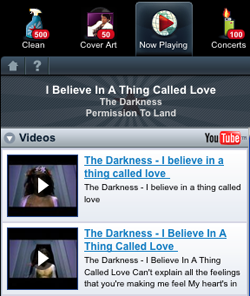
The free download includes 500 free song corrections (which fixes meta data and album art), as well as 50 free album art corrections (which just fixes album art and ignores meta data). After that, the service costs $12 for an annual subscription or $20 for a lifetime membership. Data lookup generally works well, and uses information licensed from Gracenote.

When we covered the Windows application earlier this year my biggest concern was that few people would be willing to pay for what for many will be a one-time fix – TuneUp does offer some value after fixing your library with its ‘Now Playing’ and ‘Concerts’ tabs, but most people are just concerned with cleaning up their libraries, which only needs to be done once. TuneUp’s Andrew Kippen says that while this was a major concern for the company, the conversion rate from free to paid users has actually been five times higher than expected (though he wouldn’t give any specific numbers).

Advertisement

Comments rss icon

  • Let’s be honest… this is mostly going to be used by people who have ‘acquired’ their digital music rather than bought it. Ripping straight from a CD generally does all this for you, and digital downloads are already fully labelled up 99% of the time.

  • Let’s be honest, 99% of the people out there have music “acquired” rather than bought.

    I disagree that digital downloads are already fully labeled that much…I would put it at less than 75%.

  • That’s not necessarily true. I’ve ripped several hundred CDs into iTunes, and a good number of them have mismatched album art or broken tags. Provided it works correctly, this program would be fantastic for someone like me.

    • agreed. especially if the music is pre 1950s; like everything i listen too.

      i million different collections from many, many publishers with a lot of track overlap.

      i’ll give this a shot for sure.

    • Ditto. I ripped a ton of stuff a long time ago and never got the album art. I’m using the product now. Not perfect, but very good on matching albums.

  • We did this same thing over at VentureBeat, but we don’t want to leave out TechCrunch:

    Check out FixTunes.com. We’ve been working on this problem (fixing music) for a while and have been through a lot of different versions as we’ve tried to find the easiest way to help people fix their music.

    If you enter the discount code TECHCRUNCH on the purchase page at http://www.fixtunes.com, the first 100 people can have the program for free (it’s normally $25). Go nuts. And email me with any feedback (kelly@fixtunes.com).

  • Oh look, another app only for Intel macs. My computer works fine, except it can’t run a lot of this new software.

  • @kelly Hey! But Fixtunes runs on a PowerPC Mac! woot!

  • Thanks for the free Fixtunes! If it’s good I’ll send money anyway :-)

  • Doh, the free fixtunes only works if you’re in the US.

  • @Kelly thanks, I’ve got a mess of audio (5 years of college radio and tons of audio that was unreleased, live, etc) that will certainly put you to the test but I’m with Chris, if this can get even a fraction of the chaos in order you’ll get payment anyway

  • @shelfoo It works everywhere. You’ll want to go to the purchase page and type in the discount code and it will allow you to begin using it!

  • this is a company/service owned by Gracenote, that should tell you everything you need to know. Because Gracenote is the reason for the incorrect tagging, this is THEIR solution to get it right finally. All fed by the user of course.

  • Finding an accurate music database with which to clean files is one of the hardest parts of creating an app like this. We looked in to some of the proprietary music databases (like Gracenote) to use with FixTunes but found their accuracy didn’t justify the cost.

    FixTunes uses multiple data sources and is constantly comparing and filtering the data in an effort to get the most accurate song details. And user-entered data is never the starting point. Using just Gracenote or just Amazon or just FreeDB won’t get you too far.

  • I have been using TuneUp for a while. In general I am happy with it, however my main problem is that often times, the Album that it assigns to your song is not the original album that it appeared on. For instance, Juke Box Hero likely won’t get tagged as being on Foreigner 4, but rather “Greatest 70s Hits Vol 8!”

  • Sounds worth playing with…

  • My experience with TuneUp was less than spectacular. The interface is slow and unresponsive. It doesn’t play well with Expose either. When I dragged ~300 songs over to have them cleaned up I got the spinning beach ball for 30 minutes with random updates and errors happening in the application window. It didn’t even let me click on the OK button for the error. I finally gave up and had to Force Quit.

    Relaunching shows the identified tracks but scrolling up and down is really really slow. This is on a MacBook Pro with 4 gigs of RAM.

    I think I’ll pass until they chalk up a couple of minor version numbers.

  • Gabe Adiv here, CEO of TuneUp.

    First off, thank you to TechCrunch for the write up.

    We’ve tried a number of other music/metadata management programs and found them either really difficult to use or inaccurate which is why we created TuneUp. Our feedback so far has been overwhelmingly positive, but we are not without issues. That said, we are working day and night to address them as quickly as possible.

    For those of you that are having a less than positive experience with TuneUp we truly want to help. Please contact me directly at gabeaATtuneupmediaDOTcom – I want to hear about your experience and I’ll coordinate with our engineers to make sure we take care of each TuneUp user.

    We are not owned by Gracenote. We license their MusicID technology for our “Clean” feature. This decision was made after a lot of testing of multiple services. We’ve found that our users have been extremely pleased with the results that they’ve gotten. That said, we are constantly working with them to make sure improvements are made based on user feedback.

    As far as the “Original Album” issue, this is at the top of our list. We will have a fix for it soon.

    Thanks again for all of your great feedback. This sort of stuff is really important as we’re constantly improving our product

    • Are you kidding me? There have been plans for months now to release an UPDATED version of TuneUp that addresses the concerns voiced in your forum. Time has passed, and there has been no update.

  • Holy crap, after using TuneUp for a week or so, I realized that the issues on my Mac, with respects to performance, have been entirely as a result of TuneUp. What a pig! Avoid it, for now anyway.

  • Tuneup is powered from the Gracenote database … so is Winamp. You can right click on a song in Winamp and send it to “Auto-Tag.” Since Tuneup is slow, so very slow, in their release scheduling, use Winamp in the meantime if you want Gracenote.

Leave Comment

Commenting Options

Enter your personal information to the left, or sign in with your Facebook account by clicking the button below.

Alternatively, you can create an avatar that will appear whenever you leave a comment on a Gravatar-enabled blog.

Trackback URL
bugbugbugbug
Techcrunch on Facebook