
Microsoft’s Live Labs has just released Thumbtack, a web clipping service that allows users to compile links, media, and text snippets into online storage bins for future reference. Users can also share their Thumbtack collections with their peers, allowing them to collaborate by adding new clips and notations.
To add a photo or snippet of text to their Thumbtack canvas, users can either highlight the text and paste it in manually, or use a browser bookmarklet (the service works fine on IE7 and Firefox, and isn’t OS dependent). Each of these clippings can be sorted into folders called ‘Collections’, which can be published to the web via RSS, embedded in blogs, opened to friends for collaboration, or kept private for safe keeping.
Thumbtack also allows users to customize their experience by offering a set of ‘gadgets’. At launch available gadgets include an Address gadget that can identify addresses in clips and find them on a map, a Properties gadget that allows users to assign a price value to a specified item, and a Layout gadget that allows users to change the organization of their Thumbtack workspace. In the future the team plans to offer gadgets that can suck data from Office applications, and may eventually release a sandbox environment allowing developers to create their own gadgets.
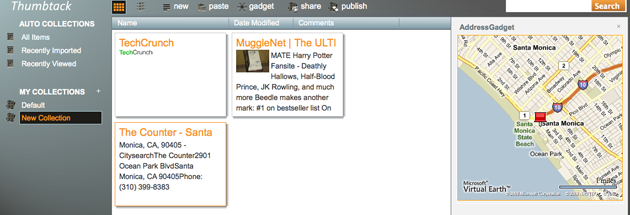
There are a number of sites that offer some very similar functionality, including Google Notebook, Evernote (covered here), SimplyBox, and Snipd. There’s also Twine, a web clipping service that can automatically categorize items using semantic sorting technology. The Labs Team has tried to explain what differentiates Thumbtack in its FAQ:
While there are several applications that overlap with functionality in Thumbtack, they all serve specific constituencies related to list making or note taking. Thumbtack focuses on being a repository and crossroads for user collected content from across the web. It emphasizes the activities that follow the act of gathering – archival, research, sharing and publishing. Thumbtack stands apart in its ability to introspect on incoming data in order to automatically classify it and extract structure from it using machine learning…
Thumbtack may be able to eventually separate itself from these competitors, especially if it does open the platform to outside developers. But for now it still has a ways to go – in my testing I found it to be pretty buggy (one of my collections seems to endlessly copy and paste the same TechCrunch logo whenever I open it). And the interface isn’t as sleek or intuitive as some of the other services I’ve tried. Still, as a Live Labs project it’s inherently a work in progress, and given some of the other projects that we’ve seen from them (like the very cool Photosynth), Thumbtack is definitely worth keeping an eye on.
http://images.video.msn.com/flash/soapbox1_1.swfVideo: Thumbtack Introduction