Free: Pack Of MySpace Branded Playing Cards »
Netvibes Adds Slick Magazine Layout Options; Supports OpenSocial
by Erick Schonfeld on December 8, 2008

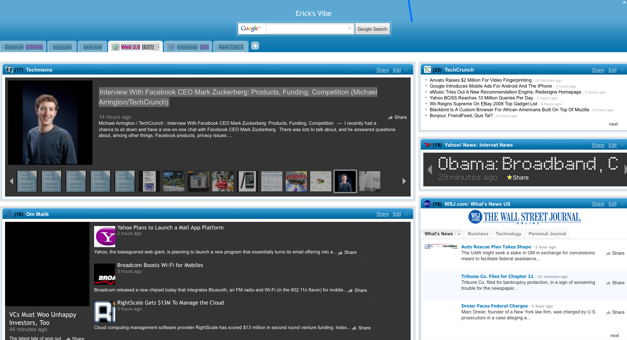
The widget is ready for its closeup. Today at the LeWeb conference in Paris, Netvibes announced a major step forward in how widgets are presented on a start page. Instead of the standard jumble of boxes filled mostly with text-only feeds, Netvibes members can now arrange the different widgets they subscribe to in different layouts that help to break up the page. And within a given widget, they can choose different viewing options for how they see each feed, including carousel view, magazine, streaming ticker, and normal text-headline views.

Maybe I’m just excited about this because I’m a former magazine guy, but I always thought Netvibes and most other start pages were way too ugly. The problem with start pages, visually, is that once you add more than a dozen or so feeds, all the boxes meld together and it becomes difficult to see at a glance what has changed. Simply changing the layout to emphasize more important feeds, and then tweaking the look of adjacent widget boxes, makes it much more pleasurable to read.

Netvibes is not alone in thinking about how to present collections of widgets in a more graphic way. In October, Google added its wide, canvas view to iGoogle gadgets. Just because information is coming from different sources doesn’t mean that it cannot benefit from a well designed layout.

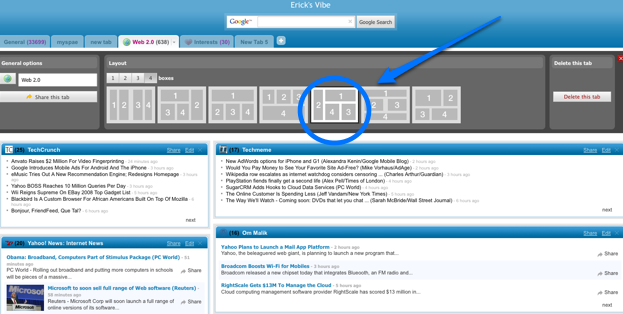
To change the layout of an entire page within Netvibes, you click on the option pull-down menu arrow on each tab and pick your layout. To change the layout of an individual widget, you click on “edit” within that widget, and then pick the view you want. (You can read more details on this Netvibes blog post). Netvibes pulls images from the feeds as well, although they tend to be a little fuzzy.

And a year after promising to do so, Netvibes is now finally supporting OpenSocial. Any widget created with its Universal Widget API can be turned into an an OpenSocial app. The developer sandbox to test OpenSocial apps will be here. (Last month, Netvibes implemented Facebook Connect features that lets users share any feed item, widget, or tab with friends on Facebook, or on Twitter as well).

The two (silent) videos below show the new tab and widget layout options and how they look:


Netvibes : Flexible Layout from Netvibes on Vimeo.


Netvibes : Feed views from Netvibes on Vimeo.
Advertisement

Comments rss icon

  • ıs there any differences between vimeo and netvibes?

    http://www.iamlittle.net

  • Does the new Netvibes layout come with that sexy Mark Z picture by default? If so, I’m in.

  • It looks to me less like a “magazine layout” proper and more like a “take these same boxes and change their size”. I do see there are a couple more viewing options as far as not JUST having a list of headlines… but this is not as cool as the headline is… hehehe… i wish it was. :-)

    The open social thing is cool however… smart move by netvibes as they will be struggling to maintain relevance as fresher options begin to emerge.

  • I’ve been an avid netvibes user for years now and I must say the new layouts are awesome.

    After playing around though I have one complaint.

    In normal mode once I click a link/read a feed there is a visual difference between the headlines of those I have and havent read. However in a mode like magazine, I have no clue which feeds are new and which ones I’ve read. Which doesnt sound like a big deal, but when you’re skimming a couple hundred, it makes it pretty annoying

  • I use netvibes everyday and I love. But sometimes when I am fed up with the mess and I want a magazine view i love using feedly http://www.feedly.com .
    It really looks cool and you have a lot of options. You can add a semantic layer that adds information to your feed.
    Netvibes is still really cool though.

  • This looks cool! Also, nice work with facebook connect. works perrrfectly.

  • +1 Nicolas. If you are looking for a magazine-like experience, I also recommend feedly.
    Thanks

  • Once a long time ago I used netvibes a lot. for feeds, taking notes, saving bookmarks I even added my gmail account there. I used to keep it open whole day, so whenever there is an update I knew it immediately. I was like one of those RSS guys, who wants to import everything via RSS, and is pissed if his new favorite website does not deliver content over rss.
    But now everything has passed, i feel that this whole RSS thing is not for me, a regular user, good old gmail, delicious and docs do everything for me.

    • I was only able to use each of these customizable pages for a day or two, and I was fed up with boxes of news that I will never finish. I guess people tend to keep adding stuff to the page which not only slows scrolling of the page down to an unacceptable speed but also makes it very mind-tiring.

  • I normally don’t post with a fake name but to avoid any prejudice coming from a certain group of users I will, this time. So Netvibes has new layout features (or themes) and that’s worth an extended review? I always thought this was standard in terms of personalization. iGoogle has it, Pageflakes has it. Now Netvibes has it too. That’s ground breaking.

  • It is good to see that Netvibes is stepping towards a more magazine-like experience. If you are a firefox user and want to experience a true magazine-like experience, take a look at feedly http://www.feedly.com

Leave Comment

Commenting Options

Enter your personal information to the left, or sign in with your Facebook account by clicking the button below.

Alternatively, you can create an avatar that will appear whenever you leave a comment on a Gravatar-enabled blog.

Trackback URL
bugbugbug