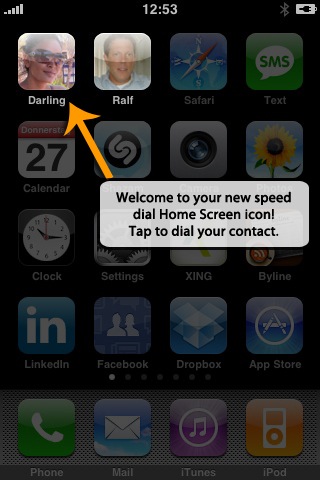
This may be my new favorite iPhone application – Visual Dial lets you add a picture of a friend to the iPhone home page (as if it were an application). Click the picture and it acts like a visual speed dialer to that person.
Simple. And very useful.
The video sort of says it all. The application is still under review by Apple, we’ll update when it becomes available. They are letting a few people into a private beta before approval – details are here.
Visual Dialer is being created by Straight2Market.
Update: the app is now live. Get it here.


Nice app
G1 has had this app from the launch it is nothing new.. Wouldn’t that just be common sense? I mean it’s not all that complicated its like a shortcut on a desktop… Well the Iphone doesnt have a desktop (super fail).. Just go buy a G1 and you won’t have to pay to have a short cut on your desktop because all the apps are free:)
G1 is a wanabee iphone
the programmer will earn extra 250k dollar for it every year. http://www.iamlittle.net
Cool …really cool app
tenks buddy it will hep me
http://www.eskibirsaat.com
Looks very similar in function to FaceCall [ App store link: http://148apps....m/app/290447776 ] which has been out for about a month now.
Nice idea, but I don’t think its been executed all that well.
This is cool. But I agree. Not a perfect execution yet.
Apple should just build this in.
and ps. this Techcrunch commenting system seems kinda crappy. it doesn’t keep me signed in. and it doesn’t work with 1Password
I really like it. Combining an iPhone app with a web app. It’s simple but clever. Really good!
http://twitter....om/ollieparsley
Note that this app requres internet connection to work.
Great app. This is the kind of speed dialler the iPhone needed. Hope it’s $3 or less….
yup i agree with jeff scott, this app is similar to facecall.
Chandra
http://www.myjil.com
simple and to the point. great app.
Does everyone HAVE to include their URL in every comment? Even if their comment is utterly worthless to the discussion? It totally makes reading comments a drag for me, as I have to sift through trying to find which ones are genuine opinions and not link bait.
Arrington please consider limiting URLs or something in comments!
i second that motion
I 3rd it
So you provide a person’s phone number, name, and photo to some random website for them to store in their database?
Seems kind of sketchy to me.
We actually NEVER send any phone number, name etc. to our servers. The only thing we’re sending is the image. This is required to generate the Home Screen icons. The contact details remain on your device only.
-Ralf
http://www.24100.net
You call that simple? Way too many steps!
I’m sorry, but that is way too complex, and there is no reason why a icon -> dial app should involve external servers.
I really don’t see the utility in this app over the favorites menu. Sure, it reduces the click count to call, but at the cost of introducing more icon clutter.
Well, whether five taps are simple or complex is up to the reader’s capabilities.. .
I’ve commented the “external server” concerns at http://www.24100.net .
The servers are only in the game to process the image. NO PERSONAL DATA and NO CONTACT DATA is actually transmitted to our servers at ANY TIME. The servers are also not involved at DIAL TIME. Only during the initial, one-time creation of the icon.
The primary reason for this is that Apple does not allow to generate custom Home Screen icons other than by using Web Clips. That involves a server task.
Even the icon data is send over the wire via SSL encryption!
Hope this clarifies stuff.
-Ralf
Exactly my opinion and although the functionality is there I prefer to press an extra few buttons than have 10+ pages to scroll through!
Nice app, love it…..
This is cool, I’ll put it on my phone as soon as it’s available.
BTW Mike, has TC lost its humor through the recession? No more Friday spoof competitions etc. ? The Smibs team is deeply missing the Friday video / comment pranks.
way to scam dude… u’ve read a few seth books, haven’t you… cause your product sux and you know it does.
l like iphone
http://www.eskibirsaat.com
Just one more reason to want an iPhone. The appstore is proving more and more powerful a value proposition … brilliant, as usual, from Apple.
Http://tinyurl/cwebshare
Linen & things going out of business
In parking lot
Pic is geo tagged. Going in to raid
Sorry link was wrong
G1
Http://tinyurl.com/cwebshare
Damn trailing slash http://tinyurl.com/cwebshare/
I just finished
Back in my car. Check out the booty 130 for fleece and ureban sh!t. Plus popcorn I am the bandit.
Http://tinyurl.com/cwebshare/
Hail the bad economy!!
First, to the person complaining about having to be on the internet to do it. This app adds “add to home screen” bookmarks which their app constructs then tells the user to perform through safari. How else would you expect them to construct it?
I must have this.
Very nice app.
Cool.
You can already do this with the Android by using the AnyCut application.
what he said++
Nice but…
1. requires Internet (could slow process)
2. not scalable (unless you only have a few people to call)
3. visual acuity and manual coordination required in car
I’ve become really attached to the Melodis voice dialer. I’m pretty sure TC (or you personally) have covered it. Works for my entire book, easy to operate while driving and seems VERY accurate.
http://www.melo...ialerDemoVideo/
@David: It’s okay for me that you highjack this thread to advertise another solution.
But I’ve got to reiterate the facts:
- It does not require an Internet connection when you DIAL.
- Internet is only required for the initial creation of the icon because we do some server processing with the image. Subsequent dials can be done entirely without an Internet connection!
great dialer
There was a hack to do this even before the app store and the new software came out. You could even use an icon. The only drag was that it opened a Safari page to dial each time you clicked it.
http://www.zeigen.com/dial/
But it works, and is free.
Shocking, really, that this wasn’t native in the first version of the iPhone software. Don’t most of us make most of our calls to a handful of people? I was figuring Apple would have made a button to add “favorites” to the home screen as soon as we could edit the home screen. Oh well.
Great application for 1-3 people called most often. Beyond that, it doesn’t make much sense.
Doubletap the home-button -> choose favourite
This app is useless.
No way, Michael, are you dating a girl that pretty.
Michael, how can a complicated app like that be your favourite when a simple, free and truly useful app like this was just released:
http://itunes.a...684798&mt=8
From iTunes: Connect has integrated phone tree maps of almost 1000 of the most popular companies in the USA and Canada. Using these maps, Connect is able to get you immediate and automatic access to a human operator or to the department you require with the press of a button!
IMHO facecall has a cleaner and easier process to create the icon, and doesn’t have the glare effect, their icons look sharper
but hey, I’m comparing a youtube video with an actual app: http://itunes.a...447776&mt=8
Nice try hijacking this thread to advertise another solution.
Looks pretty desperate to me, though.
Well, facecall is okay for what it does. It doesn’t have the advanced image features we are offering, so any photo you might have taken with your camera in landscape mode will not work for an icon. HUGE disadvantage.
And by the way, the version of Visual Dial which is currently under review by Apple does NOT have the glare effect. You can optionally switch it on and off.
And: It doesn’t require an Internet connection AT ALL!
Major advantages versus facecall. That’s maybe, why TechCrunch picked Visual Dial as opposed to any other solution? (hint, hint, hint)
Cheers,
Ralf
Did you pay to have this article written or something? Clearly, you are not familiar with tech crunch comments. It’s only natural to discuss alternatives to any product mentioned here. What makes you think this area should be for an exclusive discussion on your product? It sounds terribly “desperate” on your part to be bashing ordinary people that are providing information with the intent of helping others.
Well if you have must be having some good looking friends to make most out of it.
Sorry this is idiotic. What are the number of people whose face is really worth placing on your “eye phone”?
Additionally, image 200 contacts …does this scale? Is it navigable via search when you have 400? So this is a little gimmick to place the photo of 4 or 5 family members on your desktop. Whoopee.
Michael this was a thoughtless post on your part. This truly adds no value to iPhone users aside from children.
I only have about 5 people I speak to (on the phone) on a regular basis, so that would be great. I would give a few spots for speed dialing that quick. Of course, I hit the phone button and those people are right on my favorites list, so maybe it’s not overly necessary. We’ll see.
Jake
NoteScribe: Premier Notes Software
This is great, but is there any way to do this with text messaging? I want to click someone’s face on the home screen, have it launch the sms app with a new blank text already set to send to that person.
People are saying it needs the internet: presumably only to set up the icons?
Yap. It’s only required for the initial, one-time setup of the icons as we are doing some image processing on the servers.
No personal data (contact info, phone number, etc.) is ever transmitted to our servers. Nothing is stored.
Dialing works perfectly fine offline and does not require nor use any Internet connection!
Can it be linked to Facebook mobile? Imagine having clients, colleagues or friends on visual speed dial? Imagine going into facebook, clicking on a person’s profile photo and dialing them? So hawt!!!
Great idea! Why don’t you contact me via http://www.24100.net and we’ll discuss further?
-Ralf
very cool! I would use it!