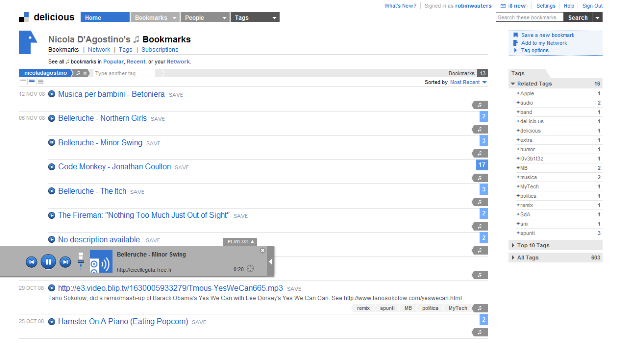
Social bookmarking pioneer Delicious (they recently turned five years old) pushed out a couple of updates to its Internet Explorer and Firefox add-ons yesterday, fixing a couple of bugs and adding some features. But it looks like Delicious has also integrated a useful feature they didn’t mention in the blog post announcing the updates: a brand new audio player to play your MP3 bookmarks inside the browser.
TechCrunch reader Nicola D’Agostino spotted the new media player quickly, and he subsequently got a confirmation from a community manager of the Delicious team in the comments of the company blog post, adding that they’ll talk more about it soon.
Update: they’ve now blogged about the new media player on the Delicious blog as well as the Yahoo! Music blog. As our previous update below already suggested, the media player is in fact Yahoo’s FoxyPlayer. By using the “system:media:audio” tag, you can filter most views on Delicious to look for playable audio files. Enjoy.
I just tried it out, and while it’s not a groundbreaking feature, it’s a welcome addition for people who are used to bookmarking and tagging MP3 files with Delicious. The audio player, which pops up in a subtle horizontal bar, sports back/forward buttons, an integration with Yahoo! Search, a timer and a playlist.
Update: a trackback from the blog of former GM of Yahoo! Music Ian Rogers teaches us a little more about the background of the player, which is fact the Yahoo! Mediaplayer.
It’s very cool in that it is a single line of javascript and reads simple, easy to author, HTML on the page to create the play buttons. The page author needs only add the single line of javascript, then wrap an MP3 link in an href and voila, you have an inline player.
Note that the latest Foxytunes player also inserts this player in the page in a Greasemonkey sort of way. Very very handy.