Google Chrome Claims Facebook May Be A Phishing Site (Update: Safari Too)
by Robin Wauters on December 3, 2008

Conspiracy theory lovers are going to have a field day with this one: when you try to access Facebook using the Google Chrome browser today, you’ll get a warning that the social network may in fact be a phishing site.

You can still use the site if you click the button to continue, but you can also go ‘back to safety’. It worked fine for me until earlier this morning.

Is everyone seeing this?
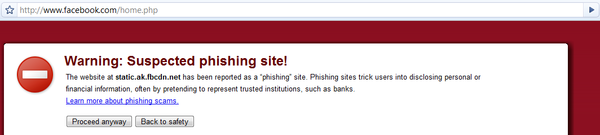
Update: this blog says the problem occurs in Firefox as well, but I don’t see it. (I do see it when I try to visit http://fbcdn.net/)

Twitter is buzzing with people getting this notice as well.

Update 2: the domain name fbcdn.net is effectively a domain registered by Facebook.

Update 3: now Safari seems to be claiming Facebook is a suspicious site as well when requests are made on the social network.

Looks like this is more of a problem on Facebook’s end than a browser-related issue. We’ve seen phishing scams targeting Facebook users in the past, on multiple occasions, but this is something completely different.

It could have something to do with Facebook Connect (which they just started rolling out with a bunch of launch partners), anyone have any good theories about that?

Update 4: the issue is topic of discussion in the Facebook Developer Forums (here and here). An administrator acknowledges that fbcdn.net was listed as a phishing site but that the problem has now been resolved, yet I’m still getting the warning message.

Update 5: The issue has now been resolved.

Advertisement

Comments rss icon

  • It just happened to me too.

  • Yeah, I tried that too. What version of Chrome are you all using?

  • img392.imageshack.us/img392/9941/01012007000655xu7.jpg

    A few weeks ago, Chrome warned against Google itself

    • excellent! funny… they’re just confusing ppl and getting us distracted with their browser. If they wanted to give a value to the market they could continue developing Web Accelerator for Firefox.

      This way I’m in gap…should I use Firefox or Crome, it’s faster, but I do not have all extensions that way…just jumping from each other I stay slower than using only Firefox.

      Will stick with Firefox in future.

  • No… no one is using Chrome :D

  • YUP
    http://twitpic.com/ptfe

    Chrome (imo) is slowly falling apart…

  • Happened to me also 20 minutes ago.

    I was logged in in Facebook (start page) and when I clicked on another link this message appeared. I logged out and tried again. The same message appeared and sellected continue.

    Pountzas Th.
    Patras, GREECE

  • Same thing in Safari. Not on frontpage but when going to request: http://www.face...ok.com/reqs.php

  • lol… i got the same message… Google’s just trying to take over social networking

  • it looks like problem of “static.ak.fbcdn.net”, i try to visit robertmao.com, it also appeared

  • Interesting results for Facebook. Has there been any comments from Facebook regarding this alert?

  • I got it too. I still think Chrome is a great browser.

  • Facebook is working just fine in every browser for me. Chrome, Firefox, IE and Opera. Either they “fixed” this already, or I’m too drunk to notice. Pretty sure it’s not the latter. :-P

  • I got it too.
    And on a wall.. Facebook also told me that a certain message was posted “at 3:43am tomorrow” !! :)

    Chrome is great, nevertheless!

  • Happening on Safari. Most probably a malware virus that have been spreading for a while.

    Happened to me on 4 of my sites last week. Pain in the ass.

  • Happening on Safari. Most probably a malware virus that have been spreading for a while.

    Happened to me on 4 of my sites last week. Pain in the ass.

  • Getting it with FF on http://fbcdn.net as well.

  • Aren’t all those browsers getting their phishing info from Google in the first place? IIRC Firefox gets it there. So if Google says “FB = phishing” then all who use that SVC will say so.

    fbcdn.net is simply the FaceBook ContentDeliveryNetwork .

    • Yes. Safari definitely uses Google’s phishing domain DB, and I’d be surprised if Firefox didn’t as well. So it makes total sense that if this happened in one browser, it’d happen in all of them.

  • I am the owner of the blog that documented Firefox blocking the Facebook domain fbcdn.net

    Take another look at it I added a screen shot of Firefox displaying the Phishing blocking. This domain is what Facebook uses to deliver the JavaScript that runs Facebook. This blocking basically denies the use of Facebook.

    The URL is not listed in any blocking RBLs that I can find, so I do not know where the blocking is coming from. Unless Google and Mozilla have listed Facebook Connect themselves as dangerous and unsecured due to the phishing possibilities within Facebook Connect.

    Oddly enough this comes as Google just started opening Google Friend Connect to blogs tonite.

  • Glad I ran across this post. I was wondering why Chrome have been giving me the red screen today.

  • Good. Google wants to rule the world. Maybe later they’ll start redirecting everyone that goes to facebook to orkut.

  • It is probably just a number of people not knowing what fbcnd.net is, reporting it and then that number has gone over a threshold and Google think’s it’s a phishing site. It’s only the Facebook Content Delivery Network domain. Does it matter that much?

    • It seems that it affected the whole Facebook site, lot’s of reports coming in that Facebook lack of functionality was throwing errors.

      I could not get a cookie to log into Facebook, chat was down, lots of things, then it spread to Safari. I spotted it as I was working towards a Facebook Connect app myself.

  • interesting how the headline really doesnt get to the nub of the issue, which is probably a few domain and DNS issues which the browsers and sites need to resolve.

    that said Facebook is the biggest Phisher on the interweb, given the average user give more personal information to the site that they would any other public service – meaning Facebook phishes for personal information and behaviour traits that can be used for many purposes…

    hmmm let me guess the NSA would be interested in some of the activities, your local employer, your next future employer, the stalker you dont know about, lots of places – well yes, obviously – so in a sense the Phishing headline is probably about right.

    Just depends who FB decide to sell the data too, that when it gets interesting

    dt

  • Same thing on slideshare.com

  • They are all using google phishing filtering.

    Quote:
    How does Phishing and Malware Protection work in Firefox?
    Phishing and Malware Protection works by checking the sites that you visit against lists of reported phishing and malware sites. These lists are automatically downloaded and updated every 30 minutes or so when the Phishing and Malware Protection features are enabled. The technical details of the safe-browsing protocol are also publicly available: http://code.goo.../Protocolv2Spec

    http://code.goo...s/safebrowsing/

    Safari uses the same thing – it has google logo when displaying warning.

    • @Zoran, good links and good point, but the public RBL that Firefox uses did not list the domain.

      @HatLord, there is a exploit in ALL anti phishing services. That is the problem with them and we are going to see more of this.

      If I had not been thru it with Trend Micro blocking my site, I would not have know what was going on.

  • Or there could be an exploit with Google’s Phishing Service!!! :D

  • It’s DEFINITELY a phishing scam. After I ignored the phishing scam warning in google chrome I got a notice on my facebook frontpage that my email settings have “disappeared” and that I needed to update them. I also received an email from the domain facebookmail.com with the exact same instructions.

  • Nothing of the sort has happened to me on Google Chrome. Wonder why ? But Opera behaves funnily whenever I try to visit Facebook.

  • Happened to me as well. Facebook and Google just arent compatible :)

  • I’ve seen this annoying notification before .Generally they mention the reason for it .They also provide you with detail like “on which date and what time” they (Google generally)inspected the site.

    I don’t think it has to do anything with facebook connect .

    Here’s my theory:

    Problem seems to be in the criteria codes that are used to determine whether its a phishing site or not.
    maybee those scripts rely too much on Keywords/Identifiers.

    Anyway go to options and select option like “Don’t bug me (I can’t remember the name exactly :( ) and you’ll be free to visit these sites .I know everyone knows that .

    • Actually it goes more like this:

      Facebook is the domain you are visiting, even when logging into a site that uses Facebook connect. That is the domain in the address bar but not the site you are sending requests to.

      However the domain in the blocking is the domain Facebook uses to run code and deliver back things like the friends of someone logged into a Facebook Connect enabled site.

      Hence, the visitor seem to be one site, but are sending back code from another. That is indicative of a phishing site.

      Server side redirects from a form throw errors and false positives to anti virus browser plug-ins too. That is what got me when Trend Micro blocked my site.

      If you do not find out about this immediately you never know this has happend, your business online just stops. Then the really bad things happen when you send to your email lists. Your own subscribers see the phishing warning, then they click the spam button on you.

  • I was like “holy sh*t, facebook hackz? my facebook hackz or domain hackz? facebook has you?” and sh*t my pants kinda, but hell yeah chrome is a little child getting paranoid of random stuff at times.. It will grow up eventually, and overcome its fears, give it some time!

    It’s annoying tho, to press “proceed anyway” button every single time.. It’s time consuming, plus you feel worried although you know nothing is going to happen.. google is trying to dominate our lives, acting like a mom.. I guess soon enough, google maps will give us warnings when we want to go to places that it thinks is unsafe and be like “got wepon?” or “get in hobo disguise”.. yayuh!

  • Happening here as well. I believe Chris lang said. For those using Chrome it also pops my Blog as a philshing site. And all

    http://ricky-ca...n.blogspot.com/

    And i did add Google friend Connect on my blogger account yesterday. And i recieved a Google Friend Connect invite yesterday!

    So i think Chris Lang is right.

  • Is everybody thinking what I am think about this? http://www.youtechno.info

  • Before you attack chrome (and since I don’t use windows I can’t run it yet so I have no opinion) – have you considered the possibility that maybe Facebook IS a phishing site and that the Gbrowser is the only one with the balls to call it like it is?

    • It is not the browser’s fault not does it get credit. All phishing filters use a underlying database, browsers do not have the ability to see phishing sites.

      Either the domain is green, or it comes up bad, the browser has a list, it checks it and then renders the site. No thinking, it is done by the parent database supplying the list.

      Internet Explorer did not block Facebook’s fbcdn.net domain.

      Chrome, Firefox and Safari all did.

      Microsoft back Facebook and Facebook Connect.

      Google has the Google Social Network supported by Friend Connect.

      You call it, I ain’t going there…

  • I am not getting any message anywhere GC or FF.

  • That is the new “you’re not in college, use a grownup’s network and stop looking at 15 year old girls profiles” filter. It has the same result on myspace and the eurotrash networks.

  • Ok,
    That’s funny, the browser even block google it self, I bet there are sill updates need to be done :)

  • As of this week I have had all sorts of sites requiring an Exception in Firefox. Including my own banking website which I use on a weekly basis.

  • Last night when I logged in and clicked on a link in facebook to see a request I had, Safari warned me that Google listed it as a phishing site. Freaked me out and I tried to look for a way to submit something to Facebook but that would have taken some hard work since it’s damn near impossible.

  • Coincidentally, a friend was using Chrome when he visited my website and told me about this. Firefox did not give me this warning. I traced it to a facebook icon I used for content recommendation to Facebook. This is the link.

    http://static.a...con.gif?2:26981

    I just host on my server instead. The warning went away.

  • yep, problem solved. i was surprised to see that message too.

  • I consider them phishing sites as well!

  • Maybe MS also keep phishing site warning for google.

  • Update 6: Do your reporting before hitting the publish button.

  • Chrome also told me that deviantArt was a phishing threat.

  • @Chris,

    You bring up an interesting theory as to how and who reported FB as a phishing site and got it placed into the anti-phishing software’s databases.

    Also, a good question is how many times does a site have to be reported before going into the database? Is there a human review?

    Or can a competitor just go in and call someone a ‘phisher’ and mess up their business?

  • i’m not sure if this is the right place to post this but i still can’t log onto facebook , comes up with static.fbcdn.net at the bottom of the page

  • i just click proceed anyway

Leave Comment

Commenting Options

Enter your personal information to the left, or sign in with your Facebook account by clicking the button below.

Alternatively, you can create an avatar that will appear whenever you leave a comment on a Gravatar-enabled blog.

Trackback URL
bugbugbugbug
Techcrunch on Facebook