Taglocity Aims To Improve Microsoft Outlook By Making It More Like Gmail
by Robin Wauters on November 13, 2008

As a Gmail power user, you don’t need to convince me about the advantages of handling your email avalanche through a fast, web-based management system instead of a bloated piece of desktop software. I’ve long kissed Microsoft Outlook goodbye, although there’s no denying that it is still extremely popular in business environments, to the extent that it may possibly remain the dominating professional email management software for years to come.

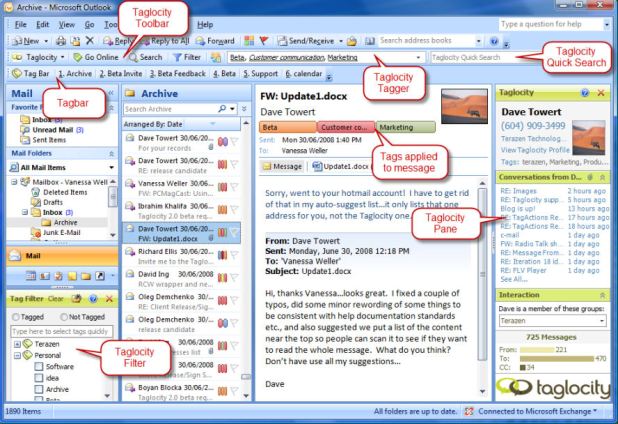
Now TechCrunch 50 DemoPit alumnus Taglocity is releasing version 2.0 of what they say marries the best of both worlds. It’s essentially an add-on that is supposed to enhance Outlook 2003/2007 with a number of key productivity and knowledge sharing features.

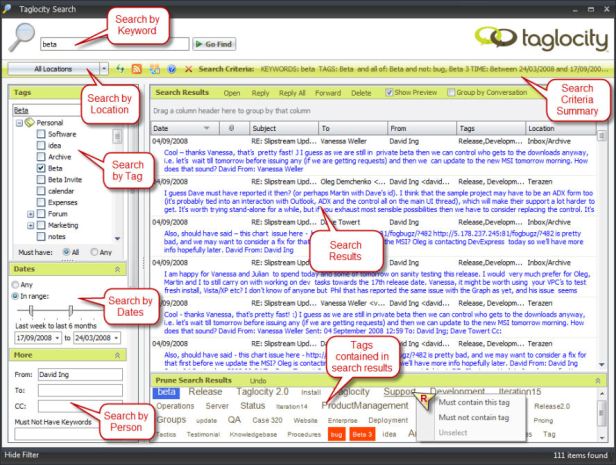
Hate that folder system? Taglocity 2.0 will turn messages, contacts, calendar entries, etc. into taggable items or virtual folders much like Gmail does with labels.

Don’t like the default search functionality? Taglocity 2.0 will provide additional context to keyword searches so you don’t spend so much time looking for that one message or contact.

A fan of threaded conversations? Taglocity 2.0 can bring all emails related to a certain conversation in a single viewer in blog-like chronological order, and enables you to group them together.

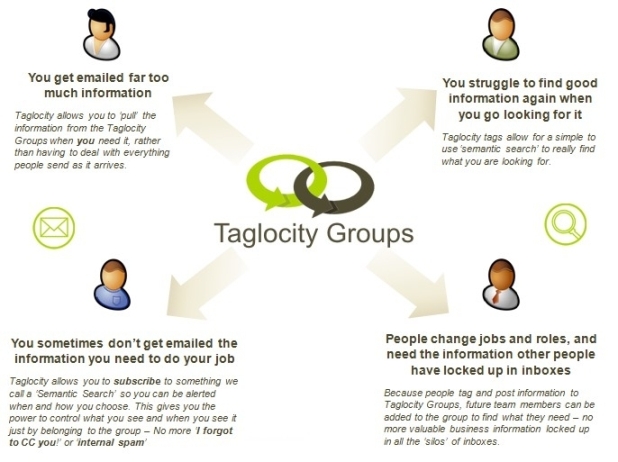
Taglocity 2.0 for Outlook also offers integration with another product, Taglocity Groups, which they refer to as an “Enterprise Web 2.0 inspired email collaboration service for groups” enabling users to share information, reduce email overload, and improve productivity.

You can find out for yourself what that means: get Taglocity 2.0 here, free of charge (there’s also a premium version with advanced features at $99 per user).

A big challenge the startup is going to face is that people are required to tag all their existing items in Outlook manually, which is bound to take a lot of time for those who use Outlook a lot (i.e. Taglocity’s core audience). Maybe something like TagCow could come in handy here, too.

Other companies trying to make Outlook better include Xobni and Add-in Express.
Advertisement

Comments rss icon

  • Lets ban the antiquated term “bloated” from these pages. It is ill-defined and advances in hardware have the size of a program of vanishing importance.

  • Wow, everyone is trying to be like google now.

  • My firm won’t allow Gmail use for work email, and forces Outlook on us. Tried Xobni, but it ate up my PC system resources. So this plug-in may be worth a shot.

  • I used Taglocity in the past, but not the v2.0. It is a great way of orgaizing emails with tags and I loved the idea, but here are some problems:

    1. it eats a lot of resources – outlook is normally resource consuming when you are using it over an ipsec vpn and taglocity adds to that.

    2. when you create new tags in taglocity, it basically creates a ‘category’ in outlook. Except for the gui where you could choose to tag emails when you send/receive them, its basically adding the email to a category in outlook.

  • Do they have threaded email concept ?

  • I tried Xobni too and had the same system resource issues even on a fast PC. I’d consider Taglocity but if it’s as heavy as Xobni, it’s useless to me.

    Also, is there anything that extends the functionality of Outlook’s Tasks? If anything is in need of an overhaul, it’s that!

  • Seen the application but its very heavy on resource and it need quite a lot of refinement anyways hope for the next release would solve them…

    http://dabberde...mple-works.html
    -

  • Thanks for the review Robin/TC team. I work at Taglocity so wanted to provide some feedback to any questions here.

    Yes, a big part of 2.0 was to make it very light on resources, so please do give the new version a go – we realize how important that aspect is and have just come out of a 3000 user beta program.

    In this version we also have some new ‘Tag Auto Assignment’ features, so the amount of manual tagging should be hopefully a minimum, especially if your share your tags with others.

  • Ha! Is this a parody?! That’s got to be the most overcrowded, least user-friendly, ugliest interface I’ve seen in a long time. Just add another taskbar and a few more essential buttons on the bottom and I’m all over it.

  • Hi Chad – the screenshots with the red labels are not really how it looks for day to day use. It’s the ‘everything you can think of on’ picture we provide just to show what you can configure and use.

    Normally we are just the small ‘tagger’ area at the top and take very little room.

  • As others mentioned above, user experience has been underwhelming.
    It consumes far too many resources. It is hard to see anything that boosts individual productivity here.
    There are a few other add-ins that can help users with categorizing emails that aren’t resource hungry.. (Alladin’s Categoriz, for example). As far as productivity goes, TechHit’s Simplyfile wins hands down.

  • silicon valley dropout - November 13th, 2008 at 11:40 am PST

    looks incredibly bloated

  • I may give this a try again — looked at a version long ago and didn’t care for it. I’ve used Alladin’s CategoriZ – but it has given me random errors and the usability of it seems to distract me from my normal flow of inbox processing. I am also using SimplyFile from TechHit — and it has been a HUGE time saver for filing mail. If I could get the smarts of SimplyFile along with tagging, it could help.

    But if my company would just allow us to use GMail with GTDInbox I’d be thrilled!

  • Just spent the good part of 2 hours ‘tagging’ up my mail box. A pain but I can see the benefits. Good work guys.

  • Thanks for all the feedback. Just wanted to add that if you want to see it in action quickly we have some screencasts here:

    http://www.tagl...com/videos.html

Leave Comment

Commenting Options

Enter your personal information to the left, or sign in with your Facebook account by clicking the button below.

Alternatively, you can create an avatar that will appear whenever you leave a comment on a Gravatar-enabled blog.

Trackback URL
bugbugbug