The blogosphere quickly showed interest for ScreenToaster, a new simple solution that creates screencasts from your browser, although it was not really launched. The service is still in private beta but is releasing today a new version with a new set of features. After recording (by just pressing Alt+S), you can add a voice over, change the thumbnail preview and include subtitles in the video. The user experience is quite simple and makes creating screencast a very easy task. It works also for creating screencast outside your browser (as long as Screentoaster site is open). The only disturbing aspect in the experience is that you need to have Screentoaster site open in a tab and launch the recording from there. I have no doubt they will come up with a browser applet or plugin for compulsive screencasters.
Below a screencast with the new features
Their websites includes also a few changes: screenscasts can be indexed and searchable or just published in private mode. Screentoaster will have most popular navigation features you can find in typical online video services: most popular ranking, most viewed, ratings, comments, tags, categories and of course embed modes.
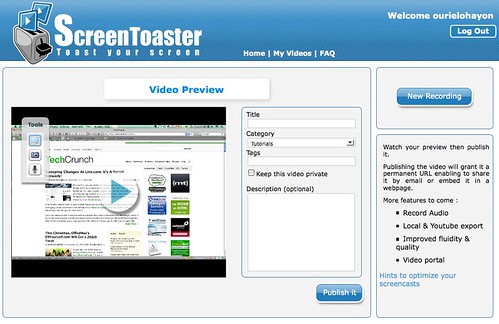
I have tried ScreenToaster and was nearly happy with it. There are endless free/non free, browser based possibilities out there for creating screencasts but this one is quite simple and efficient. I must warn you that the version is still buggy with Mac and i would like to see a few more editing options (like add in video URLs, or cutting and mixing). A one click upload to YouTube would also be welcome.
ScreenToaster has been created by Iteria a new French Startup, based in Paris.
We have exclusive 500 invitations for Techcrunch readers. Just register with the code TECHCRUNCH and drop us a line in comments with your impressions.


See all


http://www.ioj.com is a very similar service to this (except requires a download) but is about as simple as file / image / screencasting can get.
So far so good. It seems pretty slick. This is going to be a lifesaver for me with all of the family members I have scattered that need help at random times. Thanks for the invite!
The rate of growth for such tools appears limited, it caters to niche segment of power internet users. How do they plan to monetize??
It would be great to have voice over in there. I don’t like silent Screen Casts!
Does not work at all under Firefox3 on an Intel Macbook Pro (thinks Java is not installed). Under Safari it starts, but does not record the correct window. It might work good on windows, but in it’s current form is worthless on an Intel Mac.
I’m running an Intel MacPro with Firefox 3 and have no problems. Very seemless, and smooth. Not sure what happened during Robert’s test above. As far as I’m concerned is functioning on OS X perfectly.
I take that back, I’m actually using Minefield. Should be identical results on Firefox 3 though, right? I’m using the latest stable build.
This is cool! I just created a quick little trial video and it worked as advertised. Creates a video and lets you publish immediately! I think I’ll be using this a lot more.
Not a great experience to start off. I registered and IE 7 immediately crashed. Running IE7 on Vsita.
I’m amazed at the full screen quality and size of the videos that it creates. Be sure (if you registered and created a video) to look at a full screen preview of a video after you publish.
Nearly lossless quality!
We will DEFINITELY need to have voice recorded while the screen is being recorded, but from their FAQ, it looks like this is the plan. Once that is done, I’m definitely moving to this from Camtasia Studio.
Since it’s full screen, you don’t really need to be zoom in on things since the viewer can watch a great full screen preview. However, I think I’d still like to have this option to zoom in on areas sort of like Camtasia’s “smart zoom”.
nit: downloading a java applet is not exactly zero download.
Doesn’t work on my Mac Pro yet as the java app crashes. Seems pretty cool though so let’s hope they get it working.
yes mac is a bit buggy like i said in the post
works really well.
Works okay to get a movie…but there is no functions to edit or add voice. Which is very important for training purposes. If there were more editing and a way to remove the logo for a more profesional look that would be great.
Check again. they just added a feature to add voice AFTER the recording of your video session. Could be more obvious but it is there
It’s a great application. It could be perfect with “video export” feature. I don’t see it
There is also the Wink freeware
I’m afraid that without real-time voice recording, this doesn’t add a lot to the mix. Ironically, the demo features voice (which, I assume, had to be dubbed?).
The invitation’s expired :’(
Too bad, “Registrations are closed for this invitation key.”
I have just registered using the invitation key. Try it again.
techcrunch reg key worked for me.
it is really fun and intuitive. i got just what i needed from this service (and it was screen capturing quick and simple)
This is a GREAT Application and I’ve been neediing something like this…Have some recommendations for improvement but boy the VIDEO is unbelievably clear…Saw someone add a ScreenToaster to WordPress.com?? - How do I do that…??
Now…They sent me a KEY yesterday but I had to impress them with a little something…something..Send me e-mail and I let you know how…ArthurB1955@yahoo.com
Skoffer.com provides such a service free for everyone without the need to register anywhere. The screencasts can have an unlimited resolution and length a don´t get downscaled. Skoffer provides a simple API to build own application with it. Get the plugin for your desired website software and 30 seconds later you are able to record and insert screencasts (including sound and directly out of your website´s backend) into your website content easier and faster than images. Warm regards, Stefan
PS: A WordPress plugin is available from http://www.stefanschulzesteinm.....ss-plugin/
Testing out connect …