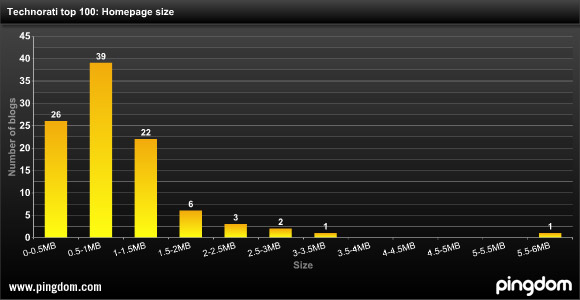
As blogs grow and try to cram more and more stuff on their homepage, load times are becoming a bigger problem. According to Royal Pingdom, 74 of the top 100 blogs have home pages crammed with so much stuff (more than 500 kilobytes) that anyone without broadband might be frustrated by the load times. TechCrunch falls into this category, as does the Huffington Post, Engadget, Gizmodo, Boing Boing, Lifehacker, and even the Official Google Blog. The homepage of the New York Times, for comparison purposes, weighs in at 750 kilobits.
And 35 of the top 100 blogs have home pages of more than one megabyte. Even with a 1 megabit/second broadband connection, it still takes 8.4 seconds to load a 1MB page. (And 22 seconds with a 384 kilobit/ second connection). That is way too long.
Sadly, our home page weighs in at 1.2 megabytes. But you should have seen it before the redesign. It is about five times faster now. We are still not satisfied and are working hard to get the load times down.
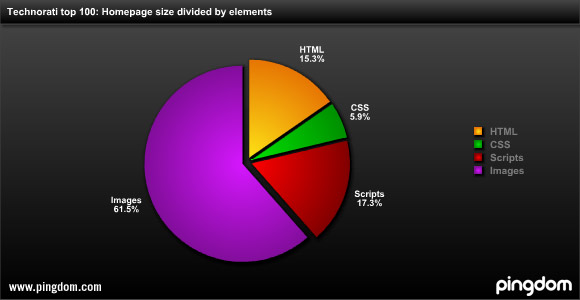
Across all 100 blogs, the biggest factors contributing to load times is too many images (61.5%) and scripts (17.3%). Those are the big culprits on our home page as well. But we are not going to get rid of all the images, we are working on better ways to automatically resize them. And for scripts, we’d like to get it so that we load only the ones we need at any given time instead of loading all the scripts on the page at once.
Below are the 26 blogs with home pages smaller than 500 kilobytes:


you guys should be ashamed of yourself crashing folks with dialup pc’s.
Kill Da JavaScript !!!!
oh wait…. that’s supposed to save mother russia
I think maybe compressing the page content before its served in the http response could maybe get the load times down some more.
Remove snap shots … it’s annoying as hell.
Agreed. Let’s get rid of snap shots.
Agreed. (not that user comments are a valid polling method… )
Agreed
I couldn’t agree more. Snap Shots are as annoying as pop up ads. Please kill them. TechCrunch loads painfully slow (relatively speaking) even on broadband. It’s embarrassing that a site which is supposed to be so leading edge crawls when you visit it. Maybe a 5th column of ads would help.
Agreed – assuming they add a significant amount, I’d happily see them go.
I have to agree with Aaron Snapshots is annoying as hell.
Ajax is our savior and killer. Too many bells and whistles slows it down. You might have a CSS problem though…
YSlow also gives TC a ‘F’ performance rating. You could improve things slightly by making sure all components are gzip’d and have expires tags.
My biggest gripe is the lack of an iPhone theme.
When I visit TC on my iphone (and i’m on 3G) it takes FOREVER to load up – mostly due to the stuff (ads) being pulled on the right from what I can tell.
How about a mobile friendly version, mirite?
Yea I am on the 3G network too and when I visit techcrunch it still takes quite a while. I second the vote for an iPhone optimized site.
One woraround is to use the iPhone-optimized Google Reader site. This way you only load the content you want.
8.4 seconds may be too long, but I usually don’t notice it when reading blogs that are properly designed. The top content is rendered and the rest of the page is being loaded below my screen. I’m a good reader but I usually spend that 8 seconds looking at the first entry at the top of the page…
Rich
So the interwebs invented a format called RSS…
Remove Snapshots!! They must have paid TechCrunch a lot of monies.
Snapshots must go!
While I am all for efficiency, I don’t think it makes sense to worry too much about dialup users or those on <1mb connections.
The real issue is Google ad sense. Every farking millimetre of space between content is crammed with ads. Load times increase significantly when it takes three or four or more ad servers to deliver their content.
Personally, if I visit a blog where the first part of the content is actually ads, I immediately move on. The proliferation of Google ads on blogs where people hope to make a few bucks is killing content.
When EVERYBODY “monetizes” their blogs, nobody wins…nobody except Google, of course.
Yeah, I love those blogs that don’t make any money. I love seeing their authors give up and quit, and never posting anything anymore.
Curse you, revenue!!!
Um, WTF? I don’t have any issue with someone making a buck, but I can “vote with my feet” and leave a blog that pushes ads, which are slowing down page loads, into my face before I get actual content.
Pushing ads is a major hit on load times, and waiting for a page to load only to be forced to scroll past a column or two of ads is a double-whammy against the blog being successful.
Just my opinion. YMMV.
AdBlock Plus. Solved.
i second adblock. or just use your favorite feed reader.
most blogs faithfully crash my iphone – ads & widgets are the main culprets.
Get a host that locates the MySQL database on the same server rather than a different one and you will see an increase in speed.
I’m with Hostgator who does this. Load times are faster than on a host who has the DB on some other server.
It is PAINFULLY OBVIOUS that you have no clue what you are talking about.
ya, please dont post if you are unsure what you are talking about.
It’s a known fact that latency is decreased by having the DB on the web server.
photoristan, like I said about, please get a clue. You really are making yourself look stupid.
It is a known fact that increasing your case fan speed by 5rpms will decrease your CPU temperature by .0001 degrees F. This reduces latency, so why fight it?
Congratulations on building your first dynamic website, though!
phototristan: I’m sure Twitter has a job opening for you.
ROFLMAO! Love the Twitter reference. Your killing me!
Nice affiliate Hostgator link *rollseyes*
Techcrunch has too many advertisements. When did money become a priority over load times and a great user experience?
Dwayne.
http://probablysucks.com
The only problem I ever have loading TC is the “sharethis” graphic. Takes forever to load about 25% of the time.
That’s an external image. If it was on the local server, it would load much faster.
Wrong; images on a external domain will be faster. The average browser limits the requests to a certain domain, so having some resources on another domain will speed up the loading of a page. If you had 40 resources (css/js/images) on a page, and split them between 10 domains (even served from the same server), you would have a faster page than serving all 40 from the same domain. Never tested it to see if the speed improvements would be worth it, but in theory it would be faster.
Its great your interested phototristan, but you seem to me like you think you know a lot, when in fact you are completely misinformed on how HTTP and related technologies work.
The load speed of their blog isn’t too impressive either.
how did http://scobleizer.com/ get under 500k.
Check out Lazy Load. It will only load images that are visible to the viewer as they scroll down the page, thus speeding it up.
This pretty bad Techcrunch.
You are loading the entire full size images for article thumbs, then relying on browser resize. This causes excess load time and depending on browser resizing capabilities can distort the image (simple web design 101).
For example, on the homepage today every user is loading the CNN map graphic which is 170kb and 598 pixels wide (http://www.tech...akamai-peak.png). However you are forcing the browser to load the 170kb image and scale to 175px wide. If you would just publish the resized 175px image as the thumbnail, users would only have to load a 10-20kb file.
I’m assuming this is just the default settings of wordpress, however still should be fixed.
I agree; not using thumbnails is embarrassing. By default Wordpress does not resize the image for you (painfully obvious on TechCrunch), but there are many plugins that do this for you, one of them is Flexible Upload. I wrote about it in the included link.
/me fails internet comments
blurb about wordpress plugins
Snapshots are annoying…remove them.
http://vidsonly.blogspot.com
paid content takes about a minute to load. 10000x worse than any other blog
How do I know what size my homepage is? Is there a tool I can use? Thanks
If you have Firefox, download the Firebug extension. Then click on the little bug in the lower right corner and go to the “Net” tab. If “Net” monitoring is enabled, you can see the individual files and a sum of all load times.
The TC homepage for me is:
52 requests – 707 KB – (659 KB from cache) – 2.73s
This is meaningless because the real metric that matters is how long before the first headline comes up. No one cares about total page load time, they care about “time to first story.”
Blogs give up fast load times in order to have 5-20 stories on one long page. It is actually faster for users to have one long page loaded than have to–like on CNET for example–load five pages for one story.
… at least that is the conclusion we came to at Weblogs, Inc.
Soooooo right. And the most important thing and often biggest bottleneck (especially on highly trafficked sites) is the server-side render time of the page. This is the part where the web application is making all the calls to the database and doing all the clever stuff to build the page even before the *first* byte is sent to the browser.
I’d say that actual page size (including graphics) is 3rd behind this and other super simple things like turning on gzip on the server and setting the expiry tags on all of the js/css/images. Use YSlow to work out what’s missing.
A simple CSS edit / rule for techcrunch will remove all the problems
My dev toolbar helps me with this.
Use Firefox with the Adblock Plus extension and the load time is considerably better!
snapshots is TERRIBLE and your page load times suck, too.
@berrystone – You forgot your blog link…
Is 20 articles on the homepage really necessary? Will 10 do?
Combining and gzipping the CSS and JS files will drastically improve load times.
As mentioned previously – YSlow for Firebug will help find the bloat.
There are far too many external HTTP requests that also contribute to the slow load time.
I look forward to seeing future improvements, until then I remain in RSS.
Another option to help speed up the site is to group your small images (16×16 icons) which usually have about 4KB size into a sprite sheet. Do a search for sprite sheet CSS and you’ll understand what I mean. For site with such heavy traffic, this might actually help
look…
way back in the day. we dealt/talked about this at akamai. if you don’t give a damn about your readers, you keep soing what you’re doing now.
if you do care about your readers, and the fact that ads/3rd party apps are screwing up their load times, then you might try to find a system that more or less does a local cache of all the static “stuff” your site pulls in from other sites/apps.
if nothing like this exists, then there you go, you’ve now got an idea for a biz to speed up the fetching of the data from the 3rd party sites, via a local proxy kind of server….
matter of fact… might be an interesting little project to put together!!!
-peace
Too bad Royal Pingdom can’t measure how much your content sucks.
Plus you crash my iPhone browser (as does Engadget, Huffington Post, etc). For me, it is the ads…not sure why they are so heavy and so slow to serve.
Remove snapshots. That will help a lot – I tried them recently on our website recently and the slowdown I experienced outweighed the functionality of that feature. It is probably good on a page with 1-2 external links but not on TC’s front page where there are tons of them.
I don’t think 500KB is really that bad to be honest. I think the problem you should really be concerned with is why is bandwidth in the US so damn slow compared to other countries. Why should sites limit their user experience because the US is slugging compared to the world in bandwidth speeds. 500KB won’t be anything once Comcast rolls out their double speed packages for the same price, + 22 Mbps Ultra speeds, + 50 Mbps. Then you’ve got to consider Sprint + Clearwire is getting into the game too so that will help increase the speed or competition.
Overall lets move forward with high quality image content, video content, and cool scripts. If your on 300kbps or less it’s time to upgrade people.
I would like to note though when sites list out 50 posts on one page it is a little hectic so lets use some proper content management as well shall we.
They have pretty charts. Out of curiosity, anyone knows how they are made (which charting library) ?
Else if this analysis could lead to an improve of blogs loading time, that would be nice.
Just get rid of all the shite ads on the home page and the load times will increase.
Easy.
The consultancy bill is in the post.
oh wait…Folks… thats not gonna happen. Just use adblock!
Just to keep your site as simple and clear as it should be.
I like the snapshots
How many people here actually click on a snap shot? The click through rates must be awful
Yslow report for this page: http://i37.tiny...com/1zefbpe.png
Performance Grade: F (30)
Unbelievable. Blame bulky WordPress plugins (1, 5, 6, 9, 10), wrong server configuration (3, 4, 13), and ads (1, 3, 9).
Especially scary: when you go to this page you’re loading stuff from 18 different domains (see 9).
Drop me a note if you want suggestions on how to get rid of some stuff (I’ve just went thought for one of my WordPress sites) — I will be happy to help.
Remove the adds, blog network cross promotion stuff and actually thumbnail the images in the blog posts and things would be way better.