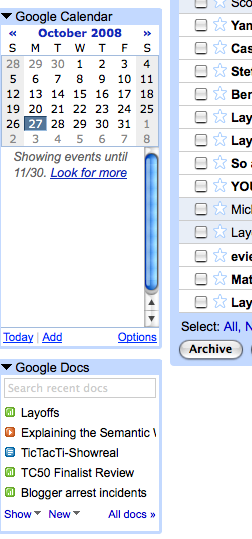
Google is adding more sidebar options to Gmail. Now you can add gadgets on the side that show your appointments from Google Calendar and your last five documents in Google Docs. In the calendar gadget, you can see any calendar you subscribe to and add events directly from Gmail. The Docs gadget gives you a few different view options (only spreadsheets, only presentations, or only documents previously opened by you).
Gmail Labs is also releasing another experimental option that lets you cut and paste the URL of any Google gadget and turns it into a sidebar item. So if you don’t like iGoogle’s new wider look, you can squeeze those gadgets into the sidebar of Gmail.
I personally would prefer to have them in Gmail (because I am constantly in that app), but with the option of expanding them into more screen real estate when necessary.
These gadgets are new entry points into Google’s other apps. I’d expect to see more cross-fertilization like this in the future as Google finds new ways to tie its apps together in deeper and more intuitive ways.


This is awesome. I was waiting for this feature for a long time.
What I’m really looking forward to is the day when we can use a web-based email application to embed images in our outgoing email texts. That would be wonderful:)
I do it using Google docs that I can easily add pics in the doc and mail the doc to myself or anybody else.
A complete waste of time and space. I would like to know the mass of people who were clammering for this. Ugh.
pretty nice. nice features. great adds to the best email out there. gmail
Google knows that email is still the center of online communication, so it makes sense to make Gmail into an online communications center. I thought iGoogle was clunky and lame before. I like the wider screen, actually. I completely live in Gmail, so I’m happy to see this.
Michael – you may like xoopit’s easy to use tools that would make living in Gmail a lot nicer. (xoopit.com)
Very handy. I love it.
Adding Google gadgets to the sidebar is nice idea ,but does this slowdown loading of Gmail
So can’t you take advantage of the new cut/paste feature and start writing Gadgets for Gmail? I imagine that’s the end goal, but this is a decent start.
There’s one piece missing with good reason – interaction between Gmail and a Gadget. For example, being able to customize what the gadget will display based on the email you’re reading. Yes there are security implications, but since you have a choice to install the gadget there’s some wiggle room here. I could see this being useful in the Google Apps world, with groups and companies wanting more customization and integration in Gmail.
Ya I think it is big for Google Apps. It brings the web interface even more in-line with the Outlook interface.
Nice to have the calendar right there. Makes it handy. Docs, well if I used it more I suppose. When are they going to merge Reader and GMail. I use both of those all the time, it would be great to have them both at the same place.
I’m one of those people who were clammering for this…well maybe not clammering, but I was definitely very happy to see it added. Although what I really want is a native Gmail app for the iPhone!
The web interface is pretty sweet. It took me a little getting used to, and it sucks that there is no message notification, but beyond that, it works well and loads fast. The native iPhone mail app can be a pain if you use stars in your Gmail.
Really nice.Great idea developed by Google.More enjoy more freedom..
Well done Google!
That is a nice little add on. Since I already open gmail throughout the day, i don’t have to switch to calendar for basic viewing purposes.
maybe later on, they will show your latest blog replies from your blogger account.
Where do I find the URLs to add in there?
This is a nice feature. It looks a lot like the sidebar panel plug-ins that have been available in AOL Webmail – including calendar. Great idea Google.
Yah I think this is great, for serious. I have been waiting for something like this for a long time — but instead of Calendar, I would prefer a To-Do list. It seems like the current implementation is buggy (successfully added a Gadget from a remote URL but it’s showing up weird in the settings tab/not displaying as a LHS widget); not sure if I’m going to waste time messing around, getting it to work now or if I’ll just late for a later release.
The Calendar gadget will be awesome once I get it to sync with my iCal. I know that Spanning Sync offers a (paid) solution; heard Plaxo has something, too. Thoughts, anybody?
(P.S. Another thing I think would be cool would be an option to ’sticky’ starred messages to the top of the inbox, instead of being in the ‘Starred’ filter. )
whats with the LAYOFFS document?? Is techcrunch planning some redundancies??
Folks, this has been in AOL & AIM mail for 2 years. And instead of simply linking off to a separate app like Gmail does, it links to their embedded calendar app which i find to be far more convenient.
No google for your domain support yet though (bummer)