
As more Web properties crop up, the number of usernames and passwords you need start piling up. In an attempt to alleviate some of those concerns and make it easier for you to login to your favorite sites, Mashed Life provides a secure repository for storing all of your usernames and passwords and lets you login to sites with just one click.
Once you register for Mashed Life—it takes about 30 seconds—you’re brought to your account page where you can input all the accounts you have on-file at other websites. Want to input your Digg account information? Go for it. How about Google? No problem. Mashed Life even works with ESPN and other “non-Web 2.0″ sites.
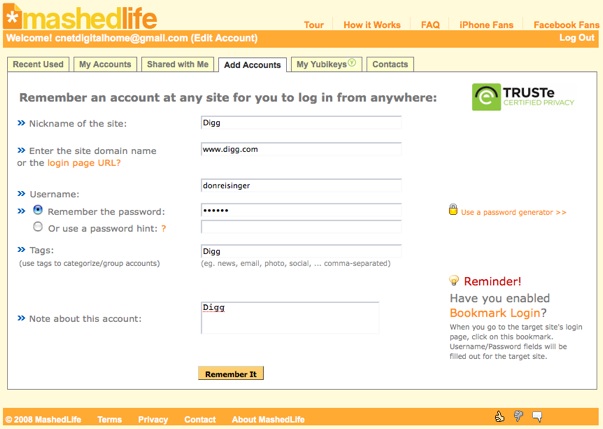
As you input your account information into Mashed Life, you’re asked to give each a nickname so it’s easily identifiable, as well as your corresponding username and password. As an added bonus for those who choose to do so, Mashed Life users can share their accounts with others on the service (once they add them to their Contacts) without letting them know the password.
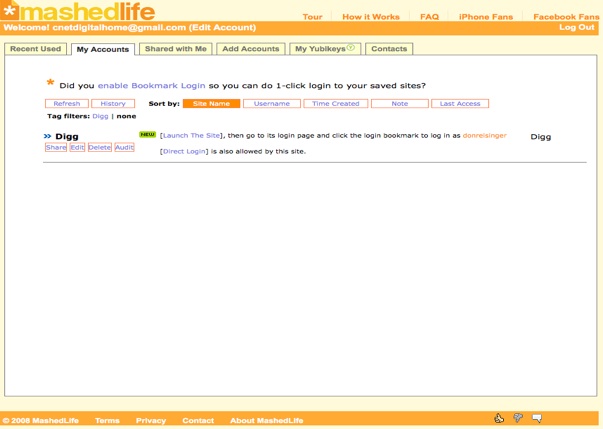
Once the accounts are added to the Mashed Life service, you add the Mashed Life bookmark login to your bookmarks. From there, you need only to surf to a service that’s already on-file with Mashed Life and click on the bookmark. In reality, that bookmark is a “bookmarklet,” which is a small Javascript code that sends the login information for the particular site directly to the login page over a secure HTTPS session once it verifies that you are logged in to Mashed Life. And in case you’re a Facebook user, the site has a Facebook app that lets you access Mashed Life directly from Facebook.
It’s that focus on security that Mashed Life believes will set it apart from similar services like Verisign’s Personal Identity Portal.
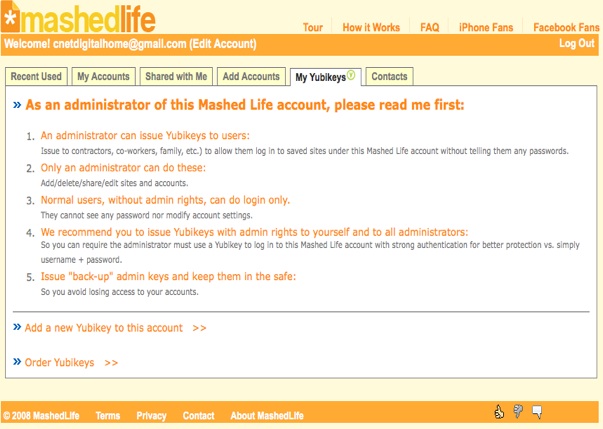
Mashed Life, which was founded by former Verisign employees, has certifications from Truste, the Better Business Bureau, and Verisign itself to ensure security and even offers Yubikey integration. With Yubikey, a USB-based password generator, you can create 128-bit random passwords that can be used to log into Mashed Life itself. The company also follows the Federal Information Processing Standards (FIPS), which it has certificates with. And if you’re concerned that someone may be breaking into your Mashed Life account, the service has an “audit” pane, which will let you see when the account was accessed during the past month.
I had the opportunity to use Mashed Life for the past day and so far it has proven to be an all-around useful service that works as advertised. With a click of the mouse, I was logged in to the sites I provided to Mashed Life and it was much quicker than inputting the information myself. That said, if you’re someone who uses the “remember my password” feature, you’re probably not going to find reason to use Mashed Life, since your passwords are already stored on the sites you visit.
But if you’re looking for something more secure and don’t want to waste time inputting usernames and passwords for all the Web properties you visit each day, Mashed Life is a fine solution.


Man I need something like this. But I’m going to wait and hear what others think before I sign up.
Andrew beware.
MashedLife is simply not a serious company. They have copied Passpack (my company, yes) in all aspects except security.
Please compare their “privacy promise” copied word for word from ours.
In their TAC they even forgot to do a proper find and replace - (search for “Packing Key” - a Passpack term). And they also claim the ” courts having jurisdiction in Rome, Italy” … That’s where Passpack is based, certainly not MashedLife.
The cherry on top? Have a look at their bookmarklet. It’s a pure code rip-off. They simply changed our function prefixed from “PP_” to “ML_” … oh, and of course, they removed all the security functions as well.
Sorry, I treat valid competitors with respect — Clipperz, Roboform, my.1password etc. . . ML doesn’t to fall into that category.
Wow, just wow. I grabbed screenshots in case there is a denial.
Could you please clarify what you mean by “security functions” regarding the bookmarklet?
Wow, hey Tara, that is amazing! So much for the Better Business Bureau, huh? I thought the functionality seemed incredibly similar to yours, guess I was right!
Tara, you know you are probably the 500th startup doing password management services. Google was probably the 300th startup doing Internet search. If you insist living in last century whining about Windows copied the Macintosh GUI, your startup goes nowhere by being grumpy.
WAKE UP! THIS IS THE WEB!
@Hardware Crypto Believer
Passpack copycats are to be expected - doesn’t surprise or upset me. We’re one of the first products out in the industry. The me-too’s always pop up at some point.
But let me ask you a question - a Californian company that forgets to change “Rome Italy” in a copied TAC… doesn’t that sound a tad superficial to you?
And how much attention do you think they paid to making the service secure if they can’t do a proper find and replace?
Hello Phil.
MashedLife is not a Host-proof Hosting application (HPH is a data privacy pattern). You asked about the bookmarklet, so let me answer. If you have a look at Passpack’s autologin button (I chose the simpler version without 1 Click login for this example, but both are Host-Proof Hosting) the code looks like this:
function() {
_PP_ = {
k: ‘8kcAJohMbBtCY6JfC4cmOEfNiFqwzE5E’,
u: ‘https://www.passpack.com/’,
l: location.href.toString(),
h: document.getElementsByTagName(’head’)[0],
s: document.createElement(’script’)
};
_PP_.s.src = _PP_.u + ‘autologin/?t=1&g=1&u=’ + escape(_PP_.l) + ‘&v=1.1&r=’ + Math.random();
_PP_.h.appendChild(_PP_.s);
}
As you can see, there is a parameter “k” that is a user specific key that the system needs to encrypt the data. This because the autologin process is encrypted by the browser and the server doesn’t know what it is sending to the browser.
The MashedLife button doesn’t contain local encryption keys:
function() {
_ML_ = {
u: ‘https://mashedlife.com/bm/’,
l: location.href.toString(),
h: document.documentElement.firstChild,
s: document.createElement(’script’)
};
_ML_.s.id = ‘__ML__’;
_ML_.k = Math.random();
_ML_.s.src = _ML_.u + ‘autologin.php?u=’ + escape(_ML_.l) + ‘&r=’ + _ML_.k;
_ML_.h.appendChild(_ML_.s);
This means that the login data is sent by the server to the client *without* local encryption. First, this means that server can read all the user’s logjns. Second, it’s very unsecure. If someone were to capture the user’s session using XSS, he could connect to all the sites activated in the users account without any problem.
Tara,
TechCrunch, as its name suggests, is a place for exchange of tech ideas. If you have bitter legal complaints, please, please go straight to the court room.
I find I’m wasting time reading your accusational comment threads here. That’s quite non-TechCrunch.
Go find a legal form to vent your comments and seek for legal advice there.
You don’t belong here.
Thanks
Tara,
You should tame your panic reactions which strongly
indicate how unconfident you are with Passpack. That
reminds me of the old guy in the Presidential debate.
Your image & focus win your fans in the old-fashioned
conservative crowd.
Mash life is catering the web 2.0 Obama crowd.
I really like both Mash life and Passpack and think
about investing in either of you, or merge you two
corps which are complimentary in your features and user
base. I expect in 2 years you will get acquired by Google
or Symantec or VeriSign which all dream about such an innovative
way to harness user identity management.
But if you lose focus on the audience that like you and
try to mimic Mash life, you will get nowhere.
Best Regards
Tara, I think you are wrong.
As a networking guy in Cisco, I have a lot of tools to probe a web site’s infrastructure….
So I found Mashed life is a very serious in terms of their networking infrastructure, much better than any others you mentioned here.
My rough estimate is that Mashed spends 3 times more money than all others in their data center.
That’s the place to spend money for a start-up, they spend money on the right thing to deliver the better services to users.
I watch what people deliver rather than what they say. You better buy Cisco equipments to beef up and to protect your web site (just kidding, small ad).
I took a glance at PassPack and I turned away immediately. Amazing they even care about putting themselves on PC Mag? You folks are so old-fashioned. It is your style that is completely obsolete and annoying.
And everyone knows you pay $30K then you can get your product covered by PC Mag. So go back to complain on your PC magazine.
TechCrunch is neutral, you can’t BUY it. Understand? The world has changed totally from your time.
I use 1Password (Mac) to manage my usernames and passwords. It works great, and I’m a lot more comfortable than giving all my info to a third-party.
Wow, pretty interesting. I wonder how this will stack up against Roboform, which is what I currently use.
Its cool and really fast
A Very simple idea implemented but its worth it ..
“Want to input your Digg account information? Go for it. How about Google? No problem. ”
Does TC have high school interns now? Fantastic journalism here…
it’s a blog not a newspaper.
no, you’re confusing a myspace page with a blog. this is (supposed to be) a professional source of journalistic information. Especially when on a weekly basis they bash traditional print media outlets calling them outdated.
MashedLife looks ok, but it seems very similar to Passpack, which I’ve been using for a few months successfully. Mashedlife does have iPhone access and this hardware key support, neither of which Passpack has yet, but I for one wouldn’t want to make all my passwords vulnerable to a hardware key getting lost, or more likely stolen. Passpack also has a couple of different ways to keep your password store (encrypted) on your local machine via a desktop client, so that Passpack the company could go away temporarily or permanently and you could continue using it. You can also export your password list to cleartext and put it somewhere safe….
Actually, you can use a hardware token with PassPack if you sign up for Verisign’s Personal Identity Portal and associate it with your PassPack account as an OpenID login.
password anti-pattern.
elaborating for the lazy:
this is a horrible idea, and this site enables bad behavior. You should never give your passwords to a third party.
Hackers will be delighted. Get into someone’s Mashed Life account, and you’re into everything. That reminds me, is PayPal on the list?
Comparing to other password managing methods, this site is so easy to use . I like it, especially there is way to share the account with others without disclosing your password to other people.
Try the share an account function, it is fun.
All these logins are INCREDIBLY ANNOYING. Logging into my bank accounts (which JESUS, require THREE PASSCODES!), plus all these ‘web2.0′ service websites, mail accounts, Google this, Google that — each one individually is annoying enough in itself, and for god sakes together they all add up to a crisis of aggravation and wasted time. Personally, my fingers are so tired from entering these stupid things all day to the point I can barely even type them accurately anymore.
Meanwhile, PC makers like Apple, HP and Sony have (with nobody really asking) taken upon themselves to build WEBCAMS into nearly every machine built! Which nobody even uses. Gosh, why not put those webcams to real use and have them do a quick facial recognition when you sit down at your machine? Master unlock — set — and BINGO! All these login pages are WIPED CLEAN.
How nice would it be to just visit a website and begin your session without having to suffer through the painful ‘login’ rigmarole?
Webcam or not, passwords which are requested again by web browsers within an operating system which as ALREADY REQUESTED A PASSWORD TO LOG YOU IN moments early are NUTS. I am logged in. I am ME. There is no doubt. I have no fear that I am not me. So jesus Google Chrome and Firefox, stop bugging me for these damn passwords!
I like your comments. Usability is king. Logging in to websites is out-dated. There are ways to have the browser continuously authenticate you to all sites you visit. (See my blog for a proposal I wrote back in January.)
Auto facial recognition is interesting. How can you avoid replay attacks, for example holding up a photograph in front of the camera, without messing up the user experience?
I avoid them by temporarily unchecking the option below “Accept cookies” which says, “Use facial recognition to log me into web sites”. After your antagonist is divorced, fired, imprisoned, or found dead, I check the box again and move on with my life.
@randy- You are so in your own head and unable to relate to others it is amazing. Do you think most people understood what the hell you were saying?
I think you misread: “The company also follows the Federal Information Processing Standards (FIPS), which it has certificates with.” I think the site says its people have gone thru FIPS certification in previous lives (e.g., with VeriSign).
WONDERFUL SERVICE! The site really delivers without hype. It’s a blessing for me because:
* 95% of my online accounts are not-so-important accounts (download, news, forum, bookmarking, social, …)
* Every month I add 3 - 5 accounts and I DON’T want to use the same
passwd everywhere. And I DON’T want to lose them.
* More and more, I use my iPhone to digg or do more work, logging in to sites from Mash Life is a timely plus!
Before using Mash Life I’d skip most of the sites and forum/social invitations that require me to sign up to use them. Now I’m in control.
Keep the good work, guys!
So all this does is store my passwords and give me a link?! Lets see, I have to go to Mashed Life, click the “Favorites” tab or whatever, THEN click a link to take me to Facebook or Digg? Is it just me, or shouldn’t I go ahead and just go to Digg in the first freaking place? If you are going to try and be an “aggregator,” at least give me some function.
Shameless plug: Gruvie.com brings together your sites and email accounts, and actually lets you INTERACT with them (crazy idea)! You can send messages to friends on different networks, see wall posts from all networks in one place, even see all your friend lists together.
http://www.gruve.com
I’m a believer that Crypto Hardware Security is necessary. A PC has very little protection of your privacy or online accounts.
But h/w security is DARN HARD to work smoothly with a PC or Internet, until I found Yubikey in April and started using it, every day on Mashed life. The life quality online is enhanced to a different scale - easy, very easy and elegant. So I bought 4 Yubikeys for all my family members who stopped driving me crazy to recover their passwords.
You really should use Yubikey + Mashed life.
Wow !!! One great way to hack all accounts at same time.
Simply awesome… Spammers, Hackers will love it
Why go for something that is protected and monitored at ML. There are now more than 1 billion unprotected Internet users and each has an average of 25 unprotected login accounts. Just go for these 25 billion unprotected login accounts. That is more simpler!
HHOTT is now using MashedLife APIs to add the “loginmark” features to its award-winning HHOTT View toolbar. In addition to the addictive time-saving clickless and safe-browing features you can get from the free HHOTT View toolbar, you can easily add an account from any login page (without going to MashedLife first), access any login account from the loginmark dropdown menu, and login/manage/logout your MashedLife account with just one selection. All these plus enhanced single/dual monitor support and IE/FF support will be released in the HHOTT View 2.0 version by the end of this month. Stay tuned for our announcement!
And the day I trust a company called “HHoTT” with my passwords is the day I start shooting heroine.
I guess you also do not use Hotmail or Hotjobs
Or you can shoot heroine while using them.
This sounds like a convenient and useful website for those of us that have dozens of websites all across the web and have trouble remembering usernames and passwords.
However, I do feel a bit weary about having all my usernames and passwords in one place, regardless of how secure the website is.
I think it would be only fair of TechCrunch to post an article on PassPack too. Afterall, users are now quite malinformed about who-is-who in the password storing world, and it might also appease PassPack heroine Tara Kelly’s fury.
“if you’re someone who uses the “remember my password” feature, you’re probably not going to find reason to use Mashed Life”
I use the password feature and get lost every 6-12 months when I install a new OS or distro to try beta software. It’s the same benefit of using gmail or online bookmarks.. just loging a resume even if you format the HD.
@nyiti
mashedlife is a californian company.
passpack is an italian company.
techcrunch simply confirms its style.
Please watch your attitude and take back your words and apologize for such nationalist accusations!
Does that simply defines how narrow-minded a Passpack supporter is?
Wow! This is turning sore…
Yes California is full of pirates, starting from Steve Jobs taking the Xerox GUI idea and make Apple. And we are VERY proud of it. So what? It DOESN’T MATTER as long as you have a strategy of what you do! iPod is not the 1st mp3 player, iPhone is not the first phone of its kind, either.
I DON’T BELIEVE TechCrunch is biased like you said otherwise it won’t be what it is today, you guys won’t even care to leave a comment here or even visiting it at all.
Should you reflect that Rome & Italy are famous for Mafia and Farcists and pickpockets and that’s probably why Italy can never have a good site like TechCrunch.
This post will definitely bring more people to passpack than mashedlife which is a copycat.
Everyone,
I didn’t hurry to comment until I tried it for 10 days before making my comment below on Sep 30.
First, be open-minded on the web! Don’t make yourself a jerk.
To be fair to all, I really think Mashedlife is much more innovative in their marketing message and they know EXACTLY WHAT I NEED. That means a lot of marketing surveys and homework they did. And Bookmarklet is just 1 among their 10 major features (in http://mashedlife.com//dream2.php)
Be open minded, that will do you more good.
This is one of the best articles I read this month.
Keep the good work!
John
I’ve been using PasswordSafe (not advertising for them) from 2002 but felt somehow it’s awkward for today’s web world. I found Mashed Life today and I’m glad to say I have been waiting for such a god-sent solution for years.
Also I tried Passpack during the weekend but I gave up in the sign-up process, which is giving me more troubles than convenience.
I don’t see the copycat argument here. Mashed life’s iPhone and Direct Login are innovative to me that I don’t see elsewhere. Facebook part, I’m not sure why they don’t use Facebook Connect.
And the “Sharing” feature is truly unique and very useful for me. And I’m sure other password managers will start copying these innovations from mashed life.
Any way, good job! Mashed and Passpack guys, you will find your fans I believe. The web is too big a world that you should not worry about competition or copycat for now. Eventually when you are as big as Google and Yahoo then eventually you will find overlapping and competing.
Even Google didn’t complain Yahoo copying its Ajax Map, did them?
My advice - Focus on giving users better services! And start to think about how to make money.
Impressive! Bookmark login is very cool! I love it!
Is the bookmark login technique easy to copy? Can you guys shed some light about where can I get some samples?
My company MetaPass, doing enterprise single sign-on, can defenitely learn a chatper fro you web 2.0 guys.
Many thanks for this article!
Dave
This idea is more than COOL! Brilliance in Mashed Life is that they aim at a better life online, not just a security junkie. I’m sick of those gloomy-faced security vendors which sell based on your fear factor, just like those who try to benefit from 911.
I bought a Yubikey to use Mash after reading your article 10 days ago. What a brilliant gadget it is!
By using Yubikey + ML I haven’t typed any passwords or even bother to open up the browser for days.
If ML can integrate with Roboform I have many accounts stored, that will be my perfect dream!
Many thanks for this article!
Mashed life is so far the only one that gets it that web 2.0 users are seeking a key to a stylish life style online. I have been waiting for this kind of “key” for a long time and now I find I’m addictive to it.
Especially when I start using it from my Facebook & iPhone! I can’t live without it any more.
The only problem is that their business model is not convincing. I do hope mashedlife guys can survive the recession and don’t stop the key to my web 2.0 lives.
Maybe you can start asking for donations, from me and from vCs. I don’t mind putting in $10 for it since I use you several times a day.
Today’s vCs are much less venturous and a lot more Capitalists.
My sincere best wishes & luck to this venture!
Great article!
I’ve been thinking about building such as service myslef since my number of passwords explodes beyond my contro. But now it is there. I’m totally bought by it!
Mashed life is indeed, as the author says, just works, solves a real daily problem I’ve been facing, and incredibly simple, very fast and reliable so far.
Their support team is also responsive to my questions and concerns.
2 thumbs up, oh, no no no. 4 thumbs up! With my toes!
Mashed life is impressive indeed.
But I think the most impressive thing is not 1-click login techniques but their adoption of Yubikey. Yubikey is a true innovation for trust of the net and all services on the web which makes my eyes wide open.
I tried mashed life.com since I wonder why this article attracts such a crowd! Obviously I admit Mashed life is very cool, but I’m not the web 2.0 type and I’ll not use it now for my accounts in ADP, FedEx, QuickBooks, Paypal, BigStockphoto. Due to the issue of trust, I’ll use it only when it is hosted on a private VPN such as Remobo, so nobody except my private Mashed Corporate Life is visible “only” to my approved VPN clients.
I mean if it can be deployed on a private VPN such as mycorp.mashedlife.com, then the trust & privacy & security issues are basically gone. This site is only visible to me and my contractors scattered everywhere.
Before I used a Google shared doc to share all login accounts I shared with my contractors for them to do their work.
For privacy concerns, then I moved to use an enterprise wiki page to store all my usernames/passwords to those working sites.
But they are all very awkward, very time consuming, very risky since every time I change a contractor, I need to change > 20 passwords to all my working sites.
And the wiki tools are not meant for password management anyway.
All the password managers are not very usable, not corporate friendly. Until I found the sharing feature here, that’s exactly what I want. If it can be deployed on a VPN network, I’ll pay to use it!
Any plan to start a corporate mashed life on a private VPN?
Kudos!
I saw this cool site from TC and started using it weeks ago… That indeed change my life dramatically in many ways.
One example is that…
Today I found by surprise that I can eat my burger breakfast, at the same time use just one finger to log in to any of my sites to view my emails & stock accts. This is something impossible for me to do before when typing my long & weird passwords.
The experience is great, just like shifting from manual to automatic gear transmission. I got one free hand to do other things I want to.
You indeed bring a better life to everyone by smart use of technology!
Thanks a whole LOT
I got attracted by their sign up page:
https://mashedlife.com/signup.php
Why nobody cares to mention/discuss this fun innovation?! I absolute hate today’s captua that makes my eyes sore and hands hurt.
I tried both Mashed Life & Passpak… I wonder if the pp client key really makes you more secure or more vulnerable? Since Pp puts the client key inside the bookmark, which everyone can see in case other access my PC or if that’s synced to my social bookmarking.
PP actually is more vulnerable in my use case study. Or I can always remove my login bookmark after using PP, that is a huge hassle.
Mashed life doesn’t have that problem at all. So my conclusion is that Mashed life is more secure, and much easier to use.
My 2 cents, hope that helps
Toally agree! I feel mashed life is pleasant & easy to use, and robust as my Windows XP. Passpack is like Windows Vista, trying to add lots of walls to pretend to be more secure, but it turns out it’s highly risky to store my client key and exposed in my bookmark. A bookmark itself should NOT carry any secret. Passpack is just like Vista, making my life miserable! So I’m converted by this article.
It’s easy to use and generally a great website.