TC50: Swype, Truly Gesture-based Data Entry
by John Biggs on September 9, 2008

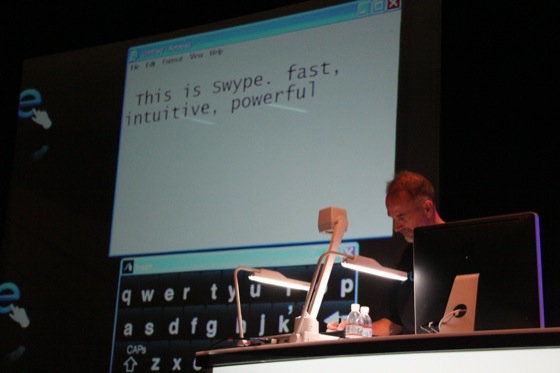
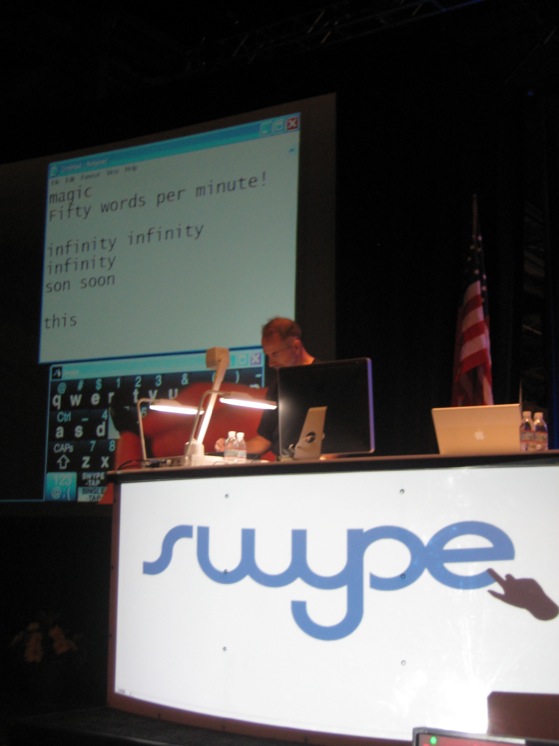
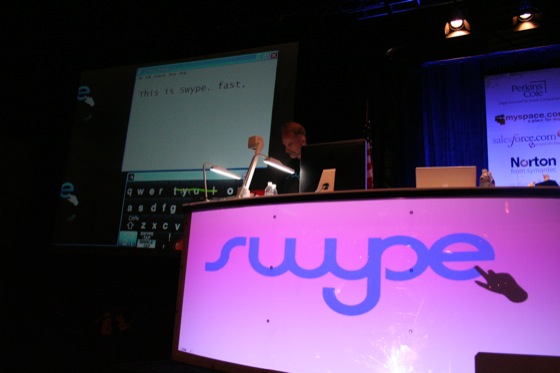
Swype is an amazing gesture-based data entry system that truly blew our collective minds at TechCrunch50. To type, you simply connect letters together using a stylus or finger and predictive text to pick letters and words out of seemingly unintelligible squiggles.

Above is a video of two of the judges trying out the technology for the first time. (VC Josh Kopelman, who tries it first in the video, doesn’t grok it quite as quickly as Twitter founder Evan Wiliams).

One of the founders, Cliff, created T9 and is well aware of the limitations – and possibilities – in the data entry space, especially in mobile. This is similar to the iPhone app Shapewriter but this system is substantially more robust and very powerful. It works on Windows Mobile and Windows right now and will soon be available for the iPhone.

In the demo it was clear that you could type about 50 words a minute just by scribbling on the screen. Because you don’t really have to hit all the letters and because the system has excellent error-handling, you don’t even have to hit all of the letters.

Click here to watch the video of the demo.
Advertisement

Responses

Comments rss icon

  • I think this is amazing. If possible, they should attempt to port this to the iPhone. Or convince apple to tear down the walls of the garden.
    I would consider moving away from my iPhone to use this.
    Great job guys.

  • Very impressive. This is something that either people will love. or hate.

  • I want this for my interactive whiteboard

  • Can they somehow implement this in Android?

  • The standard QWERTY layout for keyboards was designed to slow down touch typist because original layouts, such as Dvorak would jam the hammers on original typewriters. I think an optimization for Swype would be to allow other keyboard layouts. Layouts that are better suited to swyping. I was blown away and grateful for Techcrunch/UStream that they were streaming live. Best conference I’ve been to and I was in the comfort of my own den all day ;)

    • Other layouts may show marginal gains, but we aren’t going to change anytime soon. QWERTY is the standard, and it will remain the standard until someone can come up with some way to move your fingers that’s 100% faster. Below that it just isn’t worth the time it takes to re-learn how to type all over again. Not to mention the fact that you’d have to keep two different keyboard layouts straight in yoru head if you want to function with the rest of the world.

      Error correction on another layout is going to have a whole different set of algorithims for common words. It just isnt’ worth the time or effort.

  • Very impressive guys!

  • its looks like they will be winners witthout competitors. really cool!

  • so can someone explain in greater detail exactly how that was impressive? I sure as hell wasnt impressed with what i saw in the video.

  • OK, I am the biggest skeptic of this TC Echo Chamber. This is the first awesome application I have seen in a long time. Awesome. Stupendous. Wonderful.

    Way to go.

    Skeptic from UK

  • Pffft! Forget this! I´ve seen an app in the iTunes AppStore already doing something like this. Founded in 2003? Wow, they are faster than light!

    Better invest in development of “Glancing Pad”, if you prefer innovations.

    http://www.crun...ny/glancing-pad

    More than skeptic from Germany

  • Hey themanuel: I’ve tried the app in the iTunes Appstore (not just seen it), and it doesn’t compare to this. This is the real deal. Maybe because they’ve been working on it for 5 years? Hmm…

  • Shumin Zhai invented this cool approach to touchscreen input quite a while ago at IBM. His team first brought it out on tablet pcs as part of a research project called “SHARK” at Watson Labs. Later they changed the name to the more memorable “ShapeWriter”. I recently saw that it became available as an iPhone App called “WritingPad” from a company that looks like it spun out of IBM.

    Speaking of names, does the name “Swype” make anyone else feel as if they should check to see if they still have their wallet?

    I made a fairly serious attempt to adopt the ShaeWriter style of input over a several-month period a couple of years ago. I came to learn that there are many subtle ways a real keyboard facilitates user control of input well beyond just being a means to enter a series of words. What you might gain in input speed, you much more than lose in other sorts of control. Also, since many English words have very similar shape-patterns on the keyboard. This system, as well as ShapeWriter, must give users a way to disambiguate gestures. We’ve now seen multiple attempts over many years to have input system aid disamabiguation through a predictive interfaces. So far, the score is: 0 widely-adopted. The best I’ve seen, and (perhaps a begrudgingly admitted) counterexample, is the iPhone’s keyboard system.

    The original ShapeWriter team recognized that QWERTY was not optimal and researched a keyboard layout called ATOMIK. Easy to learn and fun to use.

  • @wowed Yeah, I´ve tried the app, too. It doesn´t matter for me, if it doesn´t compare to swype, because I don´t really see a big thing in this. Of course, it could be good for small mobile devices, but I also think people don´t write much text on the go. Do you know this “Glancing Pad” thingy? Why should someone build a technology, when there are actually better possibilities and benefits within?

    Still more than skeptic

    • @themanuel You must not have teenagers who text on their phones. ;-)

      My first bill convinced me the $15 per month unlimited text option was something I needed. My kids (three teens) are texting more than 2000 messages per month each. Text input on mobile devices is definitely a big thing for the up-and-coming…

      Glance Pad is intriguing. Learning curve would be a barrier. Plus – how do you get that on a small mobile device?

      • True that, I don´t have teens who text on their phones. :)

        You don´t have to build “Glancing Pad” inside a small mobile device, because it works remotely. I think the only problem could be, how to get to the point where you start writing with the “Glancing Pad”. On a mobile device you have to go to the field for writing, same with blog/email/openoffice and so on, but this could be solved. Maybe Glancing Shortcuts?

        Learning curve would be a barrier? I suggest reading this explanation http://yanooshr...es.com/learning , because the swypehype needs some space here, too. ;)

  • it takes more effort to do that than the normal way.

  • A few more thoughts. As written above, I think people could use swype on mobile devices.

    At http://www.swypeinc.com they show something like a keyboard and a bigger screen including swype. The problem is, that you have to watch your gesturing, while using swype, and there are a few people on earth, who can write on a simple keyboard, in front of a bigger screen, without watching their own hands. The real challenge is to build a technology that can be used to type everywhere, without watching your hands and this is where “Glancing Pad” is at.

    I´m not affiliated with the developer of “Glancing Pad”

  • I dont get how this is faster ? i.e. typing on the iphone with two hands is 100% faster than this method would ever be. It doesn’t beat speech and you cant really use it while driving.

    More so, I would be interested to see how people with “fat fingers” (ahem … most of the USA) would go using this service and whether it would be able to dechiper what the person is “swiping” using fingers without a stylus ….

    My 2 cents ….

    Clearly I am missing something …. ?

  • It looks very promising, I was personally very impressed with the speed they demonstrated this thing with on their computer.

    Not so much on the phone but I assume it’s smart enough to stop prompting for word corrections over and over and fast enough to not slow you down by ‘processing’ (phone they demoed this on is a processing beefcake).

    Awesome product.

  • I think they should test a direct sales revenue model, while they try to get mass adoption. I do think it is viral and if you love it you will tell your friends.

    Can it be downloaded or does it have to be hard coded? I am clueless at that, but if there is demand there is a way.

    I want to buy this and download it as an application. I think it will save me hours a month which is hundreds of dollars. . I would be willing to pay 19.99 for it on my iphone.

  • Sounds good . Webmob-ad, is a new start-up that just came out . It is a pioneer in the automation of mobile and web advertsing by creating the only self serve and fully automated marketplace for CPC and CPM advertising . It supports all types text ads, banners and video ads.For publishers , it offers the highest split of earnings you can find out there and much more. It caters to web and mobile Publishers and Advertisers . Web and Mobile Publishers can earn money easier than ever and registering is FREE. Please check it out : http://www.webmob-ad.com. We would like to hear your comments , please drop us a line .

  • Sounds good . Webmob-ad, is a new start-up that just came out . It is a pioneer in the automation of mobile and web advertsing by creating the only self serve and fully automated marketplace for CPC and CPM advertising . It supports all types text ads, banners and video ads. Please check it out : http://www.webmob-ad.com. We would like to hear your comments , please drop us a line .

  • Thanks, everyone, for the supportive comments – we’re thrilled by the reception of the audience, press and analysts to our launch at TechCrunch50 today.

    The technology has been under development for nearly 5 years; it is absolutely “for real” as several hundred individuals who were able to input text on a phone or tablet at the Conference can now attest. If the video looks like magic, its even more magical in your hands. We really hope to revolutionize text entry on any display/screen (mobile devices, phones, kiosks, car nav systems, game controllers, TVs, surface type projected displays…).

    We’d love to meet with the Android and iPhone teams – just haven’t had the time to get in front of them.

    While our target is device/screen OEMs, we do anticipate having a limited alpha/beta program for end users. Sign up at http://www.swypeinc.com

    Again, thanks for everyone’s kind comments. We’re very excited by everyone’s reaction !

    Bill.Bryant at Swypeinc.com

    • Hey Bill,

      Cool demo. Do you guys think there may be patent issues given that IBM seems to also have developed a very similar process? Or maybe they are the ones who should be worrying about your patents?

      Tuyen

  • I think the technology is impressive but in terms of the benefits it brings – i don’t get it. I don’t see how it is faster nor any more convenient than a conventional keyboard. Even on mobile devices, how is this faster than simply touching the relevant letters with the stylus. Dragging the pen around the screen seems ridiculous to me.

    Someone enlighten me.

    • (I’m one of the Swype founders). Here’s the basic science of why it’s faster.

      Avg time to put your finger down on a key: .25sec
      Avg time to lift your finger: .25 sec
      Avg time to move to the next letter: .25
      Total per letter: 0.75 sec (of course this varies per person).

      So in that example, you’d type 80 chars per minute, or about 18 words per minute.

      With Swype, you only have the middle number – the time it takes to move from letter to letter. There’s no picking up or setting down, so you save that time. Add to that, the fact that you don’t have to stop at each key with Swype – you only need to pass through or near it in a wiping motion – and you get significant time savings.

      Dragging the stylus around the screen actually feels very natural. It’s analogous to cursive handwriting vs. printing.

      That’s the technical explanation. For you to really be convinced, you’ll have to try it yourself. We hope to make that possible very soon.

  • I saw the same thing a yaer a goo with a working demo and purchase option
    its called Dasur – SlideIT http://www.mobiletextinput.com

    there is also a Demo for Windows PC

  • Looks really promising. And with cellphones getting smaller and smaller we are gonna need all the help we can get.

  • (linkback) Thrive or Fail? Swype – a radical new way to enter data on a cell phone [VOTE] – http://www.thri...rfail.com/9099f

  • cabluj kjznr welufnq wlgcp swkrthmla ifec dijxstcz

  • So Real data assistance.com approach to online data entry is unique and we employ advanced technology to deliver highest levels of data quality, accuracy and quick turn around. Data entry service providers.

  • Simply awesome. Will make things a lot better.

Leave Comment

Commenting Options

Enter your personal information to the left, or sign in with your Facebook account by clicking the button below.

Alternatively, you can create an avatar that will appear whenever you leave a comment on a Gravatar-enabled blog.

Trackback URL
bugbugbugbug
Techcrunch on Facebook