A New Way to Search: Use Your Mouse
by Don Reisinger on September 8, 2008

KallOutHere at TechCrunch 50, there are a slew of interesting companies worth writing about on-stage. But I came across one in the Demo Pit that’s just as noteworthy.

Called KallOut, the service allows you to search the Web from a Word doc or email without minimizing the screen and going to the Web.  It replaces that with a couple clicks of a mouse. According to the company, its research shows that users can search the Web up to ten times faster by using KallOut. I’m not sure it’ll be that fast, but it’ll definitely improve efficiency.

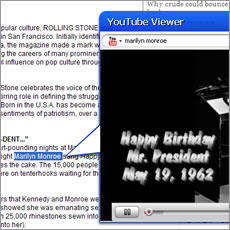
After installing KallOut, you can click on a small KallOut box over every supported term (there are 100 million of them) contained in documents, email, or websites. (The boxes are small, and not too distracting).   By clicking that box, a pop-up is displayed and shows the best search terms for YouTube, Wikipedia, Google, IMDb, and more. If you want to view one of those links, KallOut displays a small window bringing you to the site, while still letting you work in the document or online. It’s not too useful when you’re in your browser, but KallOut’s pop-up box could be extremely useful when you’re working in a Word document and you don’t want to keep switching between windows to input a search term into Google.

KallOut can search a slew of sites, including Twitter, The New York Times, and those mentioned above, and should offer more support for other services soon.

I didn’t have the chance to use KallOut just yet, but if it works as advertised, the service may hold promise for those that spend too much time switching back and forth between Word and Firefox.
Trackback URL

Comments

Interesting concept of bringing Search outside the browser experience.. Like the concept of thinking outsise the box!

We’d also launched our startup today, check us out at http://www.adexcel.com

AdExcel is “The Ning for Advertising Networks with more juice in Socialized Ads”..

Let us know what u think ;)

Best,

Darren
Cofounder of AdExcel

Here’s what I think: Your posting is a blatantly transparent attempt to get traffic for your site under the guise of posting a relevant observation about the subject at hand. And I think everyone sees through it and won’t go near your site.

Apologize for the inconvenience caused… Obviously it was not intended but perhaps it was a bad mistake …

Shall tone it down… And hope you will be jolly! It’s TC 50 ;)


And your /launch/ relates to this article how?


You’ve written about these guys before: http://www.techcrunch.com/2008.....n-the-uada—funny-money-for-a-virtual-facebook-app-roll-up-company/

Is this legit?


Generally if you use google toolbar in firefox and whenever you right click on any term it offers you to search the term in Google, the same way other features can be selected by changing the default search engine. KallOut just offers multiple options at once, nothing new for the web users.

Yes — but FF can’t do this from within e-mail or a word doc.


Neat application

At least a few keyboards also offer similar functionality…I know for sure the Logitech Dinovo Edge lets you set a hotkey to do lookups from any highlighted text in any app.


Interesting, there are plenty of browser plugins that already run searches nothing this useful. One of the few startups thats got me excited.

On a side note, their website does need a bit of work.


^

Thank you Robert Scoble.


Umm, this only works until MS, Apple and the Linux distros run it into the OS mainline.

I’m sure they’re gunning for an MS acquisition.


This is the kind of reporting/article that devalues TechCrunch… I’m just saying…


Nothing new here. Opera browser has a NATIVE tool like this since 2003.

Wakeup Opera’ Press Relationship team!


The company that is very interesting in this space is also at Techcrunch 50 - http://www.crunchbase.com/company/briteclick


Isn’t this similar to what IE 8 - Accelerators is supposed to offer?


Great application indeed. This application has the power to transform how we search the internet, especially the way how it is searched and the way results are presented. Google’s presentation of search result was the deal when it was first released, but I must say they lost out to Kallout. It is important to be in the context when search results are shown, and kallout tackles this in the most intuitive and the most efficient way. Way to go.


Ironically enough I thought we needed this very app a few days ago when having to open a browser to look up something in a word doc.

Don’t know if it works but it is a smart tool that I would use.


Hi ,

We wrote a FireFox extension that can help you easily embed links in your posts.With our extension you can:

-Get search results (Yahoo), and embed them as links without leaving your editor.

-Get link suggestions from your own blog..

While writing your post we mark key phrases in the text (people, companies, etc.), suitable for linking. When clicking “Shift-Right-Click” the suggested phrases (or text you select by yourself), a popup opens with search results for the phrase. You can select one of them to embed in your post.

You can try it at kaalga.com

Neat. It works in FF and is for bloggers. Monetization =$0.


Leave a Reply

« Back to text comment