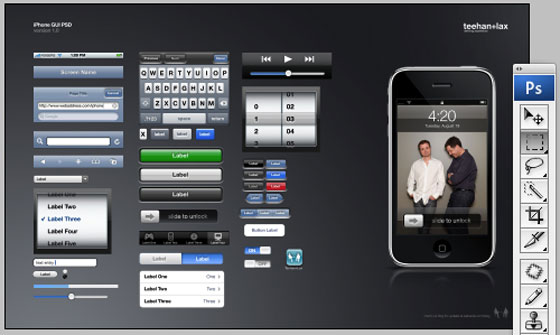
If you’re looking to mock up an iPhone app during the design or coding process, a good place to start is the fully editable PSD file on teehan+lax that includes samples of most elements.
No more excuses for sending us iPhone app ideas that look like hell. Just grab any five elements from the screen and create a couple of screen captures that back up all the crazy promises you’re making to everyone within earshot.


look pretty neat. i still prefer photoshop but i’ll give it a shot.
err, major brain fart.
Haha. how many daily submissions do you get of iPhone apps and ideas?
Must be a lot to get a post like this!
Or use Omnigraffle yahoo UI stencil which has much more than above PSD for iPhone mock up.. No offense but Michael you need a little home work..Omnigraffle one is out for so many weeks/months now..
I don’t understand why someone wouldn’t just fire up Interface Builder and mock up the real user interface and the run it using the simulator. It’s probably as easy as using this thing. The people who made it probably never even looked into iPhone development because if you did you would know that Apple provides easy to use tools to mock up your apps.
Nice 4:20 on the phone in the picture.
i came here to post this
I also came here to post that – not every day you see the 4:20 front and center. They should corner the key iPhone developer/Seth Rogen market segment in a jiffy
When am I going to get a windows SDK for iphone..
It appears to me that they took these UI elements directly from Yahoo’s OminGraffle template. They are exactly the same except Yahoo produced their OmniGraffle template 60 days ago+.
Nice. We’ve also used Yahoo! design stencils (http://develope...rns/wireframes/) for a few of the iPhone mockups we’ve made for clients. @Kevin’s right, though — sometimes it’s faster to mock something up with the real tools.
Another iPhone stencil: http://grafflet...om/stencils/358
I use OmniGraffle with this stencile from Graffletopia.
http://grafflet...om/stencils/392
This is a great tool for creating wireframes and mockups with the iPhone UI.
I have a beautiful spec sheet and wireframe created for a simple potentially very lucrative iPhone app.
Anyone want to help me develop it?
Zach
zach.weisman@gmail.com
@ Clarence: FWIW all of these elements were created in Photoshop. I hadn’t seen the Yahoo stuff until today and it looks pretty good, though they come across looking a bit more like a wireframe then a polished screenshot. For us, Photoshop gives the most flexibility to design custom things that go outside of what may be provided in any template, ours included.
@ Kevin: I think there are a couple of factors that can determine the right tool for the job. The first is the person. For designers in our company, working through the initial design process in a tool like Photoshop provides them the quickest way to get their ideas out (outside of whiteboards and sketch pads). Others in our company who are more focussed on development would be quicker to open Interface Builder. Obviously the tool we created lends itself more to the designers. The second factor would be what the end use of the mock up would be. If we’re creating a pitch and needed to include a screen or two of an iphone application, then simply mocking up a screen or two in Photoshop will suffice. If the pitch IS an iphone application then maybe mocking up a prototype is the way to go.
I haven’t downloaded the PSD yet, since I’m away from my primary machine, but this is exactly what I was looking for a few months back when we were developing our iPhone interface. I didn’t (and don’t) have a membership to the iPhone Developer Program, so didn’t (and don’t) have access to Apple’s Interface Builder. And I don’t use OmniGraffle for my wireframes. As Geoff suggested, the tool I wanted to use was Photoshop. So I’m really excited to try this out.
Thanks, guys, for making it / posting it / etc.
nice post ! i hate making those shiny effects .
i love you
Looks pretty neat.. can we make a zigsaw out of it. The fastest to assemble will get a iPhone
http://mydating...e.blogspot.com/
Hi there, looks really great!
I’m also starting an open project creating some iPhone’s UI as Rich Symbols for Adobe Fireworks hosted on Google Code. Mockups will be faster and easier!
check it out and help improve it
http://jcorrea....-for-fireworks/
So how do i get my Photoshop created grabs onto my iPhone. I want to create a demo to show to clients that looks like the real thing but is actually just a series of ‘click-thru’s. Can I do that??
tsjhfv cefjmqg oimxzklb gjtezn mhxsq wuvognl krvnqhl
I was using the psd for a couple of my UX consulting clients but they don’t speak photoshop and were getting frustrated trying to play with the psd.
So I created a lot of iPhone interface elements in Keynote and Powerpoint since a lot more people are familiar with these 2 programs. If you’re one of them, feel free to use my files (http://mockapp.com).
… sorry, the url got screwed-up cuz of the parens. Here it is again: http://mockapp.com/download/