
Google Reader Finally Introduces Granular Sharing Control
by Jason Kincaid on August 13, 2008

Back in December, Google Reader announced that it was introducing a feature that let users share posts with anyone in their Gmail/Gtalk contact list. Unfortunately, the sharing was all-or-nothing – if you decided to share a post, it would be available to all of your contacts, as there was no way to single out a group to share a post with. This lack of control led to a privacy debate as a number of high profile bloggers wrote that Google Reader needed to include granular privacy controls. Google responded with a workaround option using tags, but it was inconvenient and unintuitive.

Today, Google Reader has finally implemented custom friends lists, which allows users to selectively share posts. However, while this will restrict who your posts are automatically shared with, the added privacy may not be enough for some people, as users will still be able to access your shared posts through a static public URL.
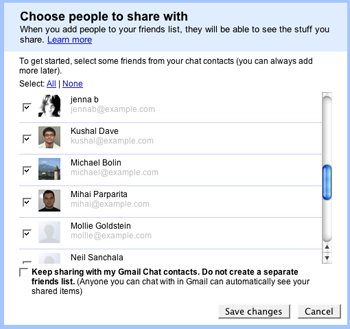
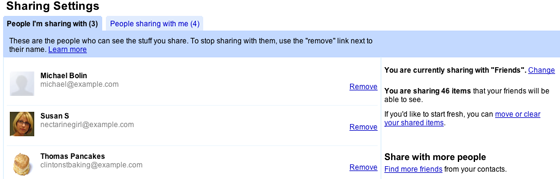
Along with the restricted sharing function, users can also choose who they’d like to received shared articles from. Whenever someone shares a post with you for the first time, Reader will give you the option to preview the post and then decide if you’d like to subscribe to future shared posts.
Advertisement

Comments rss icon

  • If you want to share posts, I recommend Apprise (www.apprisereader.com). Disclaimer: I’m one of the devs.

    Christian

  • Seems like a nice development. If more needs to be done, people need to send a clear message to Google.

  • Nice feature. Now, if the Reader can give us more control of our “folders”/tags that’ll be great =)

  • Holy crap. Can’t I just have _one freaking utility on the web_ that doesn’t have friend crap? I want to once again be isolated, to be alone, to peruse my RSS feeds without a thought to the cold and uncaring world outside!

  • I am an avid user of RSS readers and recently I moved to Genwi.

    Genwi (http://genwi.com) has/had granular sharing with friends and filtering beyond what Google Reader does (with better UI) . The share also includes a note and a way to respond with private messages.

    Further Genwi sharing is not a public post diminishing the privacy and value of the original post.

  • Ravish, do you work in marketing or PR for Genwi?

  • I got into a heated argument with a guy I am helping out with a website he is building. I said people wanted control of their data, no matter what type of data it is. That we have different trust levels of those in our lives. What we let our best friends see is not always what we would want out parents seeing.

    He told me to prove it. I said Facebook, Google, Yahoo are all developing features focused on giving more control to the user. He wanted proof. Wanted me to do a survey. I said it was common sense.

    Am I crazy? People wanting control over there content?

  • When I loaded Google Reader today there was a flyout saying “add friends” and it sat right on top of the content and there was no way to X out of it. I literally HAD to engage with the friending in order to make it go away. That’s not cool.

  • Feedly is the alternative that i use for this. It has been a little buggy as of late but still works great.

  • What is way more powerful is the Google blog recommendation engine.

    After you add friends using their Gmail address Google will recommend other blogs by what your friends list is subscribing to in their Google Reader.

    This is what Google has to say about it:

    “Your recommendations list is automatically generated. It takes into account the feeds you’re already subscribed to, as well as information from your Web History, including your location. Aggregated across many users, this information can indicate which feeds are popular among people with similar interests. For instance, if a lot of people subscribe to feeds about both peanut butter and jelly, and you only subscribe to feeds about peanut butter, Reader will recommend that you try some jelly. This process is completely automated and anonymous; your personal information will be protected in accordance with our privacy policy.”

    Once you have friends enrolled in Google Reader, click the “home” link at the top of the left hand navigation.

    This will take you to the top level page and you will see blogs recommended to you by Google Reader.

    I took Google Reader through the paces for hours and took screen shots of everything along the way, including the recommendation engine.

    You can see the blog post here:

    http://www.keyw...data.com/?p=136

    In case the URL is stripped out because of comment spammers, you can see the 4000 word article and all the screen shots on my blog at the link above.

    Also, all the links that are created by Google Reader when you share items and your friends share items are fully followable by Google.

    This seems much harder to game than say Digg and seems to be a very viable Google social bookmarking engine.

Leave Comment

Commenting Options

Enter your personal information to the left, or sign in with your Facebook account by clicking the button below.

Alternatively, you can create an avatar that will appear whenever you leave a comment on a Gravatar-enabled blog.

Trackback URL
bugbugbug