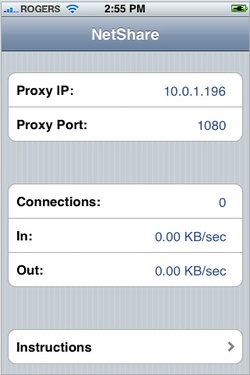
You can now grab Nullriver’s NetShare app, which lets you browse the web from your computer using your iPhone’s data connection , from this direct link. You’ll probably want to grab it quickly, as Apple may well pull it down again. Note: You need to use the direct link, the app isn’t showing up in search results.
Last night Apple posted the application to its App Store, but quickly pulled it down after only around 20 minutes. The application lets users of both the original (EDGE) and 3G iPhones browse the internet on the go wherever their cellular network has coverage.
Many phones with high speed data plans can already tether, but most carriers charge users steep fees for the service (AT&T typically charges around $30 per month). Such plans have never been available for iPhone users, and while users with jailbroken (hacked) iPhones have been able to tether for some time, it violates AT&T’s terms of service.
NetShare, which offers tethering for a one time price of $10, likely has AT&T up in arms, as it totally undermines their ability to collect fees on the service. Apple has a lengthy review process (or at least a long wait time) for each app, but it appears that this one may have somehow slipped through the cracks.


it’s nullriver, not nullsoft
Does this work under windows? There is a review in iTunes saying that is doesn’t work.
I am not seeing it in appstore anymore
Use the direct link above.
I dont think you can say it slipped through the cracks when it came out yesterday, was taken down, and then put back up today.
Clearly, there was a dispute between ATT and the developer, or Apple and ATT about the app. Well, I’m off to get the app right now.
http://blabtech.blogspot.com
Awesome, great spot! Its up there now, £6 well spent.
reluctant to spend $10 on an app that might cause problems with me and at&t…
Yeah. $10! Wow! God knows it isn’t worth taking a chance for a whole $10. That is two gallons of gas!
Can you get any cheaper, Jim?
He’s referring to the fact that he’s spending money to potentially break his contract with AT&T. Can you get anymore critical, Boberino?
Thanks TechCrunch! Just grabbed the app, syncing now.
posting from a tethered MacBook!
hehe
if you go to the appstore directly through your iphone you can search and find it there. a quick triple-tap of the $9.99 will get it purchased. done.
What a great way to make money on your app! Have iTunes take it down, so that when it comes back up, everyone rushes to get it, afraid it’ll disappear again.
Of course, it wouldn’t be easy to deliberately orchestrate this scenario!
Just picked up the app. I am keeping my fingers crossed on not violating AT&T’s terms of service
Jason,
Thanks for posting the direct link – I thought I’d missed the boat on this. It’s going to save me a bundle on WiFi hotspot fees at the airport, etc.
Can anyone link to some windows instructions?
It’s back in the Appstore and I can find it with search. Maybe they’ll allow it until AT&T sends a legal notice to Nullriver. We all know the Facebook Scrabble story, right?
Cool but not $10 cool.
$10 barely buys lunch these days you cheap bastard.
Have fun with your wasted $10 when AT&T bans this App.
No need for name calling, by the way.
I don’t think Nullriver would be the infringing party here – it’s Apple who is in murky water in their deal with AT&T by allowing this app to go up.
The quality of iPhone apps should be regulated by the technical ability or strategy of Apple, not AT&T’s business plan.
Maybe, but I think legally it’d be the users who are liable. From the TOS:
—
Furthermore, plans(unless specifically designated for tethering usage) cannot be used for any applications that tether the device (through use of, including without limitation, connection kits, other phone/PDA-to computer accessories, Bluetooth® or any other wireless technology) to Personal Computers (including without limitation, laptops), or other equipment for any purpose.
—
So they’d be OK if they have a data tethering plan, which I supposed you can add regardless of whether or not your phone officially supports it.
I wish AT&T would just get over it and not charge an arm and a leg just for tethering, but I’m not holding my breath.
However, doing the current (last time I looked) math…
$60/mo for most unlimited data card plans
(plus whatever additional $ if you want any data access without pulling out your laptop)
$30/mo for most unlimited smartphone plans
$30/mo for smartphone tethering
It’s a better deal to just pay for tethering…
It’s totally $10 cool — if AT&T doesn’t kill it.
My biggest reason for not getting an iPhone is that it can’t tether (without jumping through a lot of hoops). I would think this is true of many semi-business users currently on WinMo, Blackberry, or Symbian devices. (I would like a camera-less option too, and carrier choices, but I can deal.)
If I could tether without voiding warranties and violating TOS, I’d run out to an Apple Store right now.
I just bought it but it wont install! WTF?!
will this app tether via bluetooth or you have to have it hard wired with iphone-usb cable?
It does it using the Wi-Fi, no cables needed.
so you make a wifi connection between your phone and your laptop? that’s not how ANY of the other ones work.
Well, this isn’t exactly a well supported method. It’s more of a hack than anything else…
So does it provide NAT so you can use any type of application, or just a SOCKS / HTTP proxy?
the iphone tethers to the mac using wifi and not bluetooth…doesn’t this defeat the purpose of tethering?
Thanks Jason for the heads up! Just grabbed it.
$10 is chump change for something like this. I mean I spent $10 on a Chicken Sandwich, Roast Beef Sandwich, coke and fries at Arby’s today (I was that desperate for food). The only satisfaction out of that $10 is that I’ll get to puke later.
This on the other hand will pay for itself probably later tonight.
I’d pay $10 for this for just a long trip. F yeah!
This is just a SOCKS proxy. You can get the same thing for free using 3proxy or other free tools that you can run on jailbroken phones. Not worth $10 in my book
Writing this right now in Safari on my macbook, tethered to my iPhone. This really does work! BUT cannot get Firefox or other programs to use the iphone SOCKS proxy. Its cool, but not fully functional.
works perfectly for Safari on the macbook running Leopard, but unable to get other apps like Firefox, Transmit, or Skype to use the SOCKS proxy. Any idea?
awesome app…. too bad I don’t have an iphone… some awesome iphone competitor phones coming out in the fall holding off… i am excited for all you iphone users howerver… http://www.read...ex.php?RTA=web2
Just a thought. Apple better be ready to reimburse whoever buys this now when AT&T throws its weight and forces this app to be disabled (yes it can be done by revoking the distribution certificate).
Are we sure that it was Apple that made the decision to pull the application (if only temporarily)? I’m just thinking that perhaps there is a remote possibility that Nullriver pulled it themselves, in order to create the impression that it was controversial and open to being taken down at any moment, so as to get to generate further interest in the product and get people to purchase it sooner than they otherwise would have… ?
Well, it’s gone now… I got to keep on top of these things.
So a few things that no one is understanding:
1. This is a HTTP SOCKS proxy. That means that it will NOT forward the following protocols:
* DNS
* VPN traffic
* IRC
* SMTP/IMAP/POP3
* and so on…
I use NetShare and jailbroken apps to “tether” my laptop. I use “tether” loosely. It works great with Adium, Firefox, Twitter apps, and pretty much any app that uses HTTP AND (this is key) doesn’t rely on DNS resolution to resolve names. For example, in Firefox you need to edit about:config so firefox dumps DNS resolution off to the proxy, rather than your laptop’s defined DNS server(s). There are instructions for doing this out there. Use a well-known search engine to find them.
2. I am going to go out on a limb and say that AT&T has no easy way of telling if you are tethered. Here is why: It’s all IP traffic. How does AT&T know if the request came from your laptop or from your iPhone? They would have to do deep packet inspection, see that you are using a Mozilla User-Agent, etc. Since the packets are originating from your iPhone’s IP stack, even traditional methods to passively identify the device generating the traffic (e.g. TTLs) won’t work.
The easiest way to see that someone is tethered would be if they saw a ton of bittorrent, ssh, etc. traffic. Even if I moved 1GB of HTTP in a day, who’s to say that I wasn’t just using Pandora, Youtube, etc. I would make a wild ass guess and say that 95% of iPhone user’s traffic is port 80/443.
3. I have no legal experience and am not a lawyer. That said, I don’t think that using this app is against the letter of AT&T’s TOS. When I use this app, I am not tethering my laptop to the handset. This app is a PROXY server not a routed NAT application. The IP stack that is connected to AT&T’s network is still the iPhone’s. When I use an AT&T aircard or tether my old crappy 8525 on my laptop, that is different as my laptop is DIRECTLY connected to AT&T’s IP network. The snarky lawyer in me would argue that my laptop is merely asking the locally connected iPhone app to fetch something off the internet for me. It returns it to the iPhone, processes it in iPhone memory, then passes it to my laptop. I am just using an Apple-approved iPhone app that just happens to be controlled by my laptop. I rest my case.
4. Again having no legal experience, I don’t think that this app is against the spirit of AT&T’s TOS. Here is why. AT&T’s network engineering (this is key) folks don’t want laptop users to pull massive amounts of IP traffic over their network. It is the same issue that home ISPs are facing more or less. That said, if I visit http://www.espn.com from my Firefox and from my iPhone’s Safari, what is the difference? Maybe the total traffic downloaded via Firefox and iPhone Safari is 2MB. What is the difference? If I watch the same Youtube video in Firefox or Safari, what is the difference? The iPhone’s IP traffic “footprint” for HTTP traffic is nearly identical for most users using most HTTP-based applications.
Lest we forget that AT&T is a phone company with investors and employees to pay. The reason why they don’t want you to use this app is that AT&T sells laptop connect cards that mean $60/month revenue for them.
5. If you are really worried about getting caught by AT&T, use a Cisco IPSEC VPN to tunnel all your laptop’s traffic. The iPhone has a built-in VPN client. AT&T a.) Won’t be able to see what you are doing, b.) Won’t be able to tell if you are tethered or using the phone’s VPN client.
If I was AT&T I would make a bad-ass tethering app that does true routed NAT and charge users a nice monthly fee. Business users would eat this up without thinking and I think you’d see a ton of people signing up for unlimited “tether” plans.
6. Someone out there is going to port slirp (old school PPP hack) which will allow 100% tethering. The hacker community already did this for the last iPhone. What is going to ruin all of this is that the kids are going to fire up Torrents and AT&T will have a cow and start cracking down. Mark my words, you will see the headline “AT&T Blocks/Throttles Torrents for iPhone users” very soon.
It got pulled again.. what the crap?
sheesh…
This is so stupid! How could it possibly be any of AT&T’s business what device I’m using to use my expensively already paid for connection?
Amazingly stupid.
Not available in the Belgian store is it gone everywhere?
doesn’t work from australia
it price higher than other apps, if it is under 1$, I think i will have a try.
I’m narked, this would be really useful right now as I just moved home and there’s no internet there yet.
Unfortunately it is gone yet again. Apple is bumbling this.
Every instruction for this out there is for macs, how about one for windows? Or how about someone comes up with an app like PDANET for windows mobile where you have a program on your computer and it basically tethers you with one click. There no reason you should have to do all of these steps for something so simple. I dont really care of its in the app store, or for jailbroken phones either
I got my iPhone yesterday afternoon at 4:00 p.m. PDT. It was gone by the time I got home.
At one point I had an LG UMTS phone which I used, mistakenly, tethered to my laptop. The dumbasses at the AT&T store told me it was OK (I had the unlimited data plan…for the *phone*). My next bill was hundreds of dollars due to using my computer with the phone.
Any use of your computer through the phone will be considered tethering whether its by wifi, bluetooth (which is what I used with the LG phone), or a cable. If you have any question then don’t use the app and your computer through the phone. You’ll end up paying a hell of a lot more than $10.
To Anders Fredriksson: your kidding right? It’s AT&T’s network. It’s always their business. You’re paying for the privilege to use it and you have to play by their rules….which doesn’t include tethering if you’re not paying extra for it.
Nice post packetwerks.
It seems in the UK we were screwed for years with high broadband prices etc, but it seems AT&T are screwing the US charging $30 just for tethering!?
In the UK the likes of T-mobile have unlimited web and walk for £7 odd, even the pricier O2 are going similar things now. If they tried to charge extra for tethering I’m sure people would jump ship.
As packetwerks pointed out how could they actually check it was tethered / direct from the iphone. The obvious thing would be the useragent of the browser but that can be spoofed easily enough
Is there a way to hide your IP Address, then access the iTunes App Store for another country (say UK or France) and then purchase this applicaiton?
Just as a follow-up. from the iPhone TOS:
FURTHERMORE, UNLIMITED PLANS (EXCEPT FOR DATACONNECT AND BLACKBERRY TETHERED) CANNOT BE USED FOR ANY APPLICATIONS THAT TETHER THE DEVICE (THROUGH USE OF, INCLUDING WITHOUT LIMITATION, CONNECTION KITS, OTHER PHONE/PDA-TO-COMPUTER ACCESSORIES, BLUETOOTH® OR ANY OTHER WIRELESS TECHNOLOGY) TO LAPTOPS, PCS, OR OTHER EQUIPMENT FOR ANY PURPOSE.
How disappointing!