Yahoo’s Zimbra launches version 3 of its open source desktop email client this morning that is designed to compete with Outlook, Mozilla Thunderbird, Mac Mail, etc. This is a new iteration of their browser-based offline product announced in March 2007.
Zimbra Desktop, which is built on Mozilla Prism, is available for Windows, Mac and linux machines. It weighs in at 40 MB, about double the size of Thunderbird. The product promises the robust features of Outlook, which are lacking in Outlook Express and Thunderbird. Users can access Yahoo mail accounts, Zimbra accounts, or any Pop/IMAP supported email boxes. Zimbra Desktop also includes a calendar, contact list and other features.
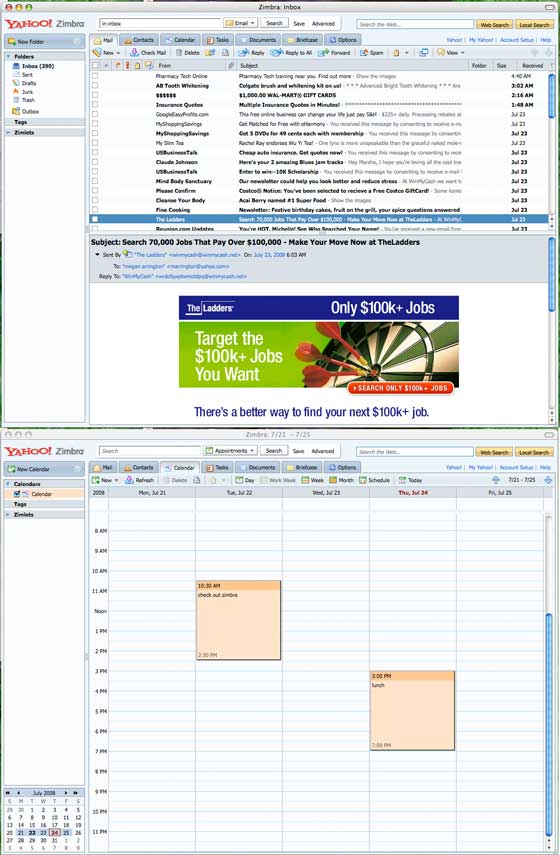
Based on limited testing (I set it up with Yahoo Mail only for now), the product is a winner. It’s responsive and quick, which is the most important feature for a desktop email client. I like the ability to tag items, collapse conversations, and perform web and local searches via the search bar in the top right corner of the app. If I wasn’t all Mac across the board to keep things synced properly, I’d use Zimbra permanently. Screen shots below.


RE: “If I wasn’t all Mac across the board to keep things synced properly, I’d use”: Yes, that “if” is the “it” that must be solved. When? Who??
I don’t understand that remark. It’s browser-based. It should run everywhere. Isn’t that the (only) reason to build browser-based apps?
Version 3? The lastest release is Beta 3 (Version 0.9 build 1249).
This man is correct, hear this man. This is Beta 3, for version 1.
If it syncs with Google Calendar I’ll ditch Outlook 2007 in a second.
Get Thuunderbird, install the ‘Lightning’ add-on and then the ‘Provider for Google’ add-on and hey presto - Google calendar sync in your email client.
Failing that, check out Calgoo.
I’ve used Tbird with Lightning and Provider before…I ended up stuck with Outlook because it syncs with my Treo.
Extensions / add-ons? OS integration?
Still pinning my hopes on TBird3.
There is no way to subscribe to calendars in this Zimbra desktop app? Really? I find that hard to believe (or just a very important thing to leave out).
The “desktop email client” link seems wrong.
@xxdesmus : Yes you can subscribe to calendars in Zimbra Desktop — right-click on the “Calendar” header in the left-nav, and choose the option
“Synchronize appointments from remote calendar”, then enter the location of that calendar.
I might be inclined to give this a whirl if it weren’t for the tacky Yahoo! branding in there.
you can easily change the theme to any of plethora of options. That’s a poor reason not to try something.
No way to stop yahoo mail syncing after config via the gui. You have to shut down the service using the tray icon. If you close the gui it doesnt stop syncing as expected. If you have a huge inbox…watch out.
Does not sync yahoo contacts
Does not sync yahoo calendar (does an iCal feed exist for Yahoo Calendar?)
You cant scroll to your next 50 messages in the email listngs pane…you have to click the next 50-100 arror button. weird.
I’ll stick with yahoo’s web-based stuff for now. Still hoping and waiting for Improved yahoo email (tags, conversations) and a web 2.0 yahoo calendar.
Anyone else worried what happens to this Exchange-killer owned by Y! if/when MS acquires Yahoo?
Yes, this is our company’s mail system and we can’t really afford Exchange. It’s open-source so someone will probably pick it up, but I don’t know where Yahoo stands on the licensing. You can’t get the Network Edition features for free via open-source.
see this is the kind of stuff Yahoo needs to be releasing if they want to get back in the game.
The massive “new folder” button is kind of strange …how often do people actually need to create a new folder? Not often enough to have such a massive dedicated button for it. Weird UI choice.
this software looks really beautiful!
Yahoo’s expending resources on a client-side mail application!? Doh?! Mail is going off-client into the cloud and mobile!
Better if they were to focus their resources on allowing their free clients more flexibility (like IMAP) and working on different ajax web-based client (their current one is a bit of a bloat, and too traditional).
Wouldn’t touch it - staff are fleeing the Yahoo campus in droves
Gmail reigns baby
Gmail is now the source of all spammers. We’re planning to stop accepting mail originating from Gmail.
Moronic statement.
Actually not surprised. I was wondering when the people that block hotmail and yahoo addresses would start blocking gmail. From what I have seen of the auto-gen gmail accounts, it’s time has probably come.
As previous comments have suggested, without Google Calendar synch, this is of limited use to many people.
I am looking for a client that allows me to add notes to IMAP synched folders (so the notes need to stay in the client only). Tagging feature seems nice and might work for this purpose. That will be my only reason to switch at this point from Thunderbird.
I’ll wait for a more detailed head-to-head comparison/review with Tbird.
I am realy curious why they decided to go with Mozilla Prism instead of Adobe AIR. Maybe this is something that TechCrunchIT can report on in the near future. HINT
If you’re stuck with Outlook at work (like 340 million other people) then why not use http://www.taglocity.com if you want to use tags on your emails- if you mention Zimbra then you’re pretty much guaranteed to get into the Taglocity 2.0 private beta - that’s what I did anyway and it worked.
I also heard that it´s having sync problems.
Michael,
I’m glad to see some positive Y! news written by you, and even focusing on a product too. This is great. I really like Zimbra, and while I think they can do several things to improve the experience (contacts, calendar, marathon syncing) I think this is a great move for Y!
C’mon guys, this soft is like 224MB on a hard drive (not to mention system memory) and I have already ecountered some serious problems with configuring few POP3 accounts. What is more, this stuff seems to be heavily JAVA based and I cannot imagine using it for going through some 10,000 e-mails on a standard desktop computer.
Anyway, some really tough work put on this one (some solutions seem to be used by bank systems) and a nice piece of software at the first sight. Maybe a good solution for a server infrastructure, but forget about using it on a single user machine.
What is the point in having a desktop email client when you can browse everything on the internet.
Is yahoo concerned about the unlimited storage space it provides for the email. With desktop application, the users would download emails on PCs. So yahoo do not have to worry about server spaces.
Cheers,
Santosh Puthran
The point I guess is to have your important data on your computer, which among other things gives you a quick access to it, no matter weather you have an Internet connection or not (imagine some business meeting for example and remember there are still places with no wireless Internet access points).
I really support solutions enabling you to work everywhere you go, e.g. ThinkFree Office which is really great for me, but still prefer working desktop to online.
I cannot comprehend this review at all. This client is an incredible resource hog, worse than Outlook. It’s S L O W overall, but it’s basically unusable with IMAP accounts with more than a few hundred emails (it slows so much that it’s basically frozen).
Yahoo’s plus web client is incredibly elegant and functional, and it’s little publicized IMAP functionality works great with both my iPhone and my N95. How they failed so miserably on this boggles my mind.
As far as a free solution goes, Thunderbird is so much better it isn’t even a contest.
Based on the review, I’m not surprised there’s some confusion in the comments. Here’s what’s up: Zimbra is a server software that competes with Microsoft Exchange, hosted by organizations themselves, *and* it’s also offered SaaS, by hosting providers, and soon enough I’d guess from Yahoo! itself (no comment) to compete with yes, Google Apps (not Gmail). So, there’s this Zimbra server software, and it’s good, scaling from serving small businesses to huge deployments like Comcast. It syncs with Treos, iPhones, and is even in beta with native BES Blackberry sync, and it’s open source based, with a commercial layer that enables enterprise stuff like, uh, backup, archiving and desktop sync with Outlook and the Mac desktop apps like iCal and AddressBook. It actually works great with Thunderbird, too (how I use it), when I’m not using its quite amazing web interface. So this Zimbra, get this, has been working on its own desktop software, called Zimbra Desktop. What this does, as far as I can tell, is enable you to stay within your web browser even when you’re offline, and still reach your addresses, calendars, email, and files stored and shared in Zimbra (briefcases). I haven’t actually tried it yet because our Zimbra host doesn’t recommend it for production, but I’m not sure what the big deal is. BTW, as far as speed, while I haven’t tried Zimbra desktop yet, it runs fast directly through the web in Firefox and Safari, with some exceptions for poor hotel connections, I log in in about a second and a half even traveling out of the country.
RE: Jim’s comment, above, too, Zimbra’s iPhone support is not just mail. Not only can you see your calendars and those shared to you using Safari on the iPhone with Zimbra, you can also use ActiveSync to sync over-the-air with Zimbra, your Calendar and contacts on the iPhone. Yes, it’s IMAP, so you can do secure IMAP to sync your mail, like with the Yahoo! plus service. But not only can you use 256-bit SSL for high security, you can also see email directories/folders that have been shared to you from other Zimbra users. Zimbra’s iPhone support is truly exceptional.
Not working from behind corporate proxy.
hi, andar here, i just read your post. i like very much. agree to you, sir.
I hated it. crashed all the time and the upgrade killed all my account info. deleted and went back to outlook.
Anyone know of a web-based pop3 email client that runs on your own linux server with mySQL instead of this desktop-based stuff?
I want something web-based, but I don’t want my mail on a third party server.
Any ideas
When you setup zimbra at home on your own desktop computer and you setup your pop account in it and it downloads your email messages - where are they for real? Are they on a Zimbra host computer or are they on your computer that you’re sitting at?