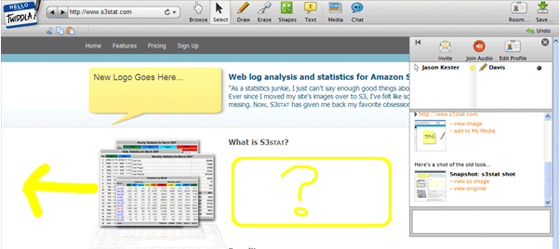
Twiddla, a free service that lets users draw and annotate webpages with their peers, has launched a new version of its site that introduces a number of new features. Compared to enterprise-grade collaboration software, Twiddla falls a little short – there’s no screen sharing or video chat, and the software seems a little buggy. But for ease of use and compatibility it can’t be beat: the browser based AJAX software is platform-agnostic, requires no plugins, and is free for everyone.
Twiddla launched earlier this year with the intention of helping website designers better communicate with their employers. Instead of giving vague descriptions (“make that button bigger”), Twiddla allows coworkers to relate their thoughts by marking up webpages with text, drawings, and images. Users can navigate between sites together using a “cobrowsing” function that is sort of like a limited shared desktop. The site also supports platform-agnostic voicechat through integration with PhoneFromHere, a free web based service.
Today the site is introducing support for a number of new document formats besides static websites that can be marked up with the same tools. Users can now markup emails, widgets, and documents (viewed through Scribd’s iPaper). The site has also implemented a number of usability enhancements, including a more robust chat function and standard hotkey functionality.
Twiddla probably isn’t going to be a big hit with its current feature set – there are countless collaboration tools, including Microsoft Groove and WebEx, that offer more feature-rich collaboration than Twiddla ever will. And sites like Awesome Highlighter and Fleck already offer website markup annotation. That said, the site could become a handy tool for users looking to set up impromptu meetings without having to deal with the hassle of plugin downloads.
If you’d like to test Twiddla out, try clicking the button below to doodle on TechCrunch.