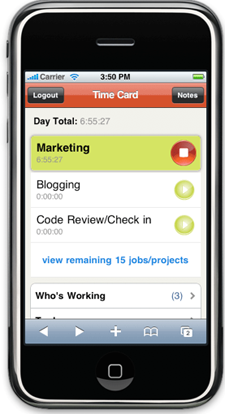
TSheets, a web enabled timeclock tracker, has just introduced an iPhone web app version of its site. The web application allows users to clock in or out of work from a remote location, and also gives professionals a handy way to keep track of their billable hours.
The app itself is very basic, amounting to what appears to be a stopwatch with categories – you can assign a label to each chunk of time spent so that your boss can follow what you’re doing. While the app displays a timer in real time, there’s no reason to leave the app open and drain your battery – the server will monitor the elapsed time until you reopen the app and clock out.
The ability to clock in to work remotely may seem counter intuitive (wouldn’t people be more likely to fudge their working hours?), but CEO Matt Rissell says that TSheet’s service has seen a steady stream of customers since the site’s launch last year. Besides the iPhone app, TSheet also offers integration with Jott, allowing users to clock-in over the phone. While this version of the iPhone app is limited to the Safari browser, TSheets plans to release one through Apple’s App Store in the near future.
There are a number of sites with similar offerings, which include Harvest and ClockSpot.


First!
“The ability to clock in to work remotely may seem counter intuitive (wouldn’t people be more likely to fudge their working hours?)”
True, but combined with GPS on the iPhone you could catch people trying to clock in from home. And/Or Arby’s.
@Zilzo:
GPS is not available via JavaScripton the iPhone… yet (hopefully!).
P.S. getmorehoney.com is like…
$25 bucks cheaper per year.
+ it has more functionality.
Congrats matt on the coverage. Keep up the good work!
Great Article – Thanks TC!
“The ability to clock in to work remotely may seem counter intuitive (wouldn’t people be more likely to fudge their working hours?)”
This is a great point and is mainly designed for mobile users i.e. consultants, construction workers, freelancers and sales people; however, the employer can restrict the clock in/out functionality from a computer or an IP address for the non-mobile employee too.
Nice!
I liked this technology better when it was called “pencil and paper”.
The TSheets iPhone interface looks really nice. Since you added a product round-up at the end of the article I wanted to mention our take on mobile time tracking http://keeptempo.com/tour – it allows remote time entry through the iPhone, Twitter, mobile web, email/SMS, and dashboard widget.
Clocking in for work without being at work? APPLICATION FAIL!
I’m a big fan of more ways to record time…since it helps to really track things accurately. Definitely a needed feature, and the timer’s a nice touch.
Andrew – I love the passion!
Again though, mobile clock in/out functionality is at the discretion of the Manager/Owner not the employee.
Yet ANOTHER mobile time tracker merits a TechCrunch blurb? Come on – there are plenty of products out there that do just the same thing – ClickTime, Quickbooks, Harvest, Freshbooks, etc. Is this company really going to be around in a year?
I wouldn’t say clocking every second is important, so I don’t thing this really is a killer feature (after all you can simply note – 30mins in your notebook, or plain remember it). Besides, I personally consider it ‘unhealthy’ to switch tasks more often than every 30 mins (it dramatically reduces productivity). Having multiple input options is a good thing though, I chose Tick just because it has a Mac dashboard plugin (even if tick is expensive and really has unintuitive UI) – their selling point is that what they charge is less than 1hr I forget about. And they’re right
@Zilzo @Andrew Ever considered that there is more value in gaining insight in your time spent per activity than actual proving you’ve done your time? Consider telecommuting and habit changing. What gets measured get managed.
Professional iPhone 3G video Converter has new released. This multifunctional iPhone 3G video Converter including 6 iPhone 3G format and can convert video to iPhone 3G MP4, MOV and rip video audio to iPhone 3G WAV.
This seems like a reasonable idea but I think the timer should be used as a helping hand to the user to send the time spent on a task to the system. I don’t think tracking the start and end time itself is useful for the market it attracts. We’ll be bring something like this shortly with 1time (http://1timetracking.com ) which doesn’t record start and stop time but how long you spend on the project.
for anyone that is interested check it out here : http://1timetracking.com
The ability to track time while not at work is a great idea, and is absolutely necessary for telecommuting or working in the field.
Check out another alternative hosted time tracking service:
http://www.myintervals.com/
LiveTimer also recently launched an iPhone interface to complement its web interface. LiveTimer lets you track time against multiple levels of configurable classifications, and includes billing rates in multiple currencies and many more features. It’s worth checking out if you need to do more than just clock in and out:
LiveTimer.com
Or you can go the FREE route and use “PHP Timeclock”
See: http://timecloc...ourceforge.net/
Sourceforge: http://sourcefo...ects/timeclock/