
Apture Gives Contextual Popups A Good Name
by Mark Hendrickson on June 30, 2008

I’m generally not pleased when a user interface does something I didn’t intend it to do. Such as when I click on a link but instead of taking me to a new page, it pops up an overlay with advertising or related content (see this Yahoo News article or any website “enhanced” with Vibrant Media to see what I mean).

So I really should resist the idea behind Apture, a startup founded by three Stanford computer science students that aims to improve contextual popups rather than ban them. But its technology and user interface is actually quite good, even if it does require users to change their expectations a bit.
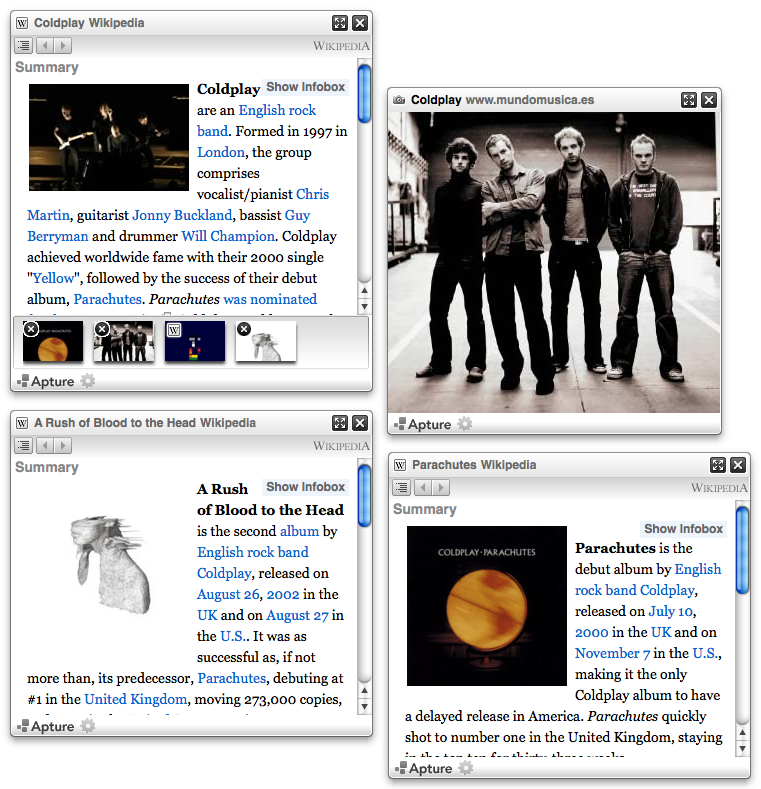
Publishers can use Apture to enhance their writing by adding links to popups (or HTML-based “overlays”) that display relevant media from sources such as Wikipedia, IMDB, Scribd, Google Maps, Hulu, ESPN, YouTube, Imeem, and Flickr.

Installing Apture is easy: just drop a snippet of JavaScript code onto your site and begin manually choosing the sections of your writing that you want to turn into popup triggers. Related media content can also be added between paragraphs as embeds. The publisher interface, like the end-user experience, overlays the page’s content, making setup a matter of point-and-clicking.

Let’s say I’m talking about Redmond, Washington or Family Guy or David Bowie. See those links? If you click on them, popups will appear that shed light on what they reference. And the popups will lead you off to other, related popups that can be used to learn even more.

Apture’s publisher tool has been available to 2,500 blogs (including a couple blogs run by the Washington Post) since April. Over the past couple months, the company has worked on improving the user interface and adding support for additional sources. The tool is now being made available to everyone.

As a publisher, there are a few concerns that come to mind when considering a tool like Apture. As mentioned before, it requires users to change their expectations. It also requires publishers to change their own habits (especially if they have to add these links after their content is live). And it might even cut down on page views when used to showcase internal media in lieu of hard links. Perhaps a way to get around two of these issues would be to make the link’s icon trigger an overlay but leave the link itself as a normal one.

Apture is based in San Mateo, California and has raised an undisclosed amount of angel funding since its founding in February 2007.

Advertisement

Comments rss icon

  • I find this post a little awkward, considering the number of Snap previews on TC. That being said, I think I’d prefer Apture to Snap.

  • The popups look less annoying than other popups. I went to their page http://www.aptu...com/experience/ to experience the popups .A mouseover on the ‘Death by audio’ produced a Wikepedia popup and Google map. Wikipedia page did not open in 15 seconds (on 256kbps). The google map opened up in 10 seconds.
    I don’t know if an average user (with average net speed) would be wanting to wait so long to see an ad…

  • @2: Sorry for the slowdown – we were still busy with updating the site and this story ran a little bit earlier than we expected. Everything should be back to normal now :)

  • Wow. That is very cool way of browsing.

  • Can’t say I’m dying to see even more ads on websites, but Apture certainly adds a little something in terms of navigation options.

  • Finally popups that are cool :D

  • I still don’t think that ads are a sustainable way to monetize the web long-term — no matter how creative advertisers get in serving them up to users. At the end of the day, the power of the web is its ability to spark [2-way] conversations and pushing one way ads at people won’t accomplish that or build relationships/loyal users that will ultimately drive revenue.

  • Cool pop-ups…
    will there ever be a limit to the amount of information that can be cramped into one page ?

  • These sort of lightboxes definitely have their place, but I would say more in an app setting (or help info when completing an online process) than on a normal web page. If they are included as links on a page, I think they need distinct styling, when you click on a link you expect to GO SOMEWHERE

  • “I’m generally not pleased when a user interface does something I didn’t intend it to do. Such as when I click on a link but instead of taking me to a new page, it pops up an overlay with advertising or related content”

    - Hey Mark, do you mean like the really annoying snap shot pop ups all over techcrunch that try to direct you to the annoying crunchbase site that no one really wants to go to?

  • I don’t think that anyone will feel any different to apature, Its still a pop up its just a popup with content now, instead of flashing lights and spyware. I don’t see the benefits of this product, I’d be just as annoyed of the scrollovers id have to keep clicking off.

  • This is really a bizarre post given it has a number of those Snap Shots contained within. Apture looks like the same product just 2 years later. Mark, why don’t you mention Snap, why no comparison to that product, features of both and market traction of the two, etc like Techcrunch typically offers? Which one of those two do you not want to piss off?

  • “Hey Mark, do you mean like the really annoying snap shot pop ups all over techcrunch that try to direct you to the annoying crunchbase site that no one really wants to go to?”

    THANK YOU! It’s like scanning a page for land mines.

    These lazy inline context plugins are just annoying. Feel free to junk up your site with them if you want but you had better give me a way to turn them off in the css, otherwise im out. I don’t need supplimental info pushed at me, if I want to know something more I’ll open a new tab. No more link mines!

  • “See those links? If you click on them, popups will appear that shed light on what they reference”

    That’s incorrect.

    The correct sentence would read:

    “See those links? If you MOVE YOUR POINTER OVER them, popups will appear that shed light on what they reference”

    And that difference is what makes them incredibly annoying.

  • I think this is pretty cool, as a website developer I cant wait to incorporate this in to my website. I like it better that you dont have to click on it but just put your mouse over it thats cool.

  • Revenue model? Also … would be cool to incorporate a definition/thesaurus function as well … I guess that would be more on the browser plug-in side of things. But it could be an interesting extension (for reach) for these guys.

  • konera came up with this kindof product 2-3 years ago. http://contentlink.com/ does the same thing. And yes, it is annoying.

    Changing reader’s browsing habits is not an easy task. Its like asking people to stop eating hamburgers and instead force them to go with Southbeach diet :)

  • @ Sandeep: Like Kontera? Did you watch the video? It’s a publishing tool with editor chosen content.

  • I think this is very cool, yes it requires you to get the pop-up = advertising association out of your head but I very often want to get some quick background info on something I am reading and having to go somewhere else is usually annoying and disruptive. The only thing that might be tricky is that the publisher might add links to thing I don’t need background on and vice versa. A feature where I as a reader can highlight a phrase and the right-click trigger a pop-up with that kind of background to the phrase would be ultra cool…. Maybe as a browser plug-in in combination what they’ve done so far.

  • This is an interesting idea, but I think they can take it further. Why not let the user select what they want? I can select a couple of words and a pop-up comes out with reference to those words.

    Maybe I’m not interest in Redmond, Washington but in San Mateo, California.

  • Like a number of people who’ve commented before me, I think that this quote is a bit odd considering the usage of Snap Shots:

    I’m generally not pleased when a user interface does something I didn’t intend it to do.

    This looks okayish. I like the fact that there’s a delay in the popups appearing on hover. But that could bode badly too: folks may be less aware of what’s made that popup box pop up. Also, the “close” button is hard to notice for someone less savvy.

    I think this is prossibly just a stupid gimmick. “Contextual Popups” and “Good” rarely go together in a sentence.

  • silicon valley dropout - June 30th, 2008 at 9:26 am PDT

    is this best a group of stanford computer science folks could do?

  • They don’t work in the google reader feed of this page, either.

  • I do think that the Snap previews could be improved, but they don’t exactly change throw user expectations off (links still go to pages). Btw, if you want to turn them off, there’s an option for that in the Snap popup.

  • I don’t see the links. I surf with the Firefox add-on “NoScript”, and I enable (usually temporarily enable) sources as needed in order to get the functionality that I want from a site — provided that I know the functionality is there to want.

    I don’t have the answer to this issue — it’s hard enough to articulate it — but if apture’s stuff is going to work, there should be something to make it evident that the links are there.

    It would/will be easy to say that it’s my loss, if I choose to surf with features turned off by default, but I do enable sources as I become aware of them, site by site, and finding a way to let me know that something is there and worth enabling would presumably be to the benefit of the page’s author/sponsor/developer/owner (whomever).

  • This is HOT and has good timing. Yahoo may have done this two years ago, but the feed content wasn’t compelling enough yet. Now the feeds to the videos, music and maps deliver inline quite nicely.

  • bringing back relevance to adds while providing value to readers is going to be the future of advertising. Free content will always be monetized in some way and for a publisher you want to get paid but not annoy your readers. It will be interesting to see where this goes

  • After seeing this demoed I was really impressed. I think it can genuinely add value to the content on the website. I almost missed the part of the article saying its open to the public now. I will try it out.

    However, I really dislike things that happen on rollover and believe that they should be limited to activation on click.

  • @Tegan
    Noscript it is!
    https://addons....refox/addon/722

    Everyone should customize their own web experience.

  • Protip: The settings button in the lower left of the Apture windows lets you:

    -Disable open on hover
    -Disable animation
    -Disable Apture entirely

    So there’s no need to continue whining.

  • Apture did a hell of a good job adding a layer of common knowledge on anybody’s blog. It’s a change in user’s habits, but aren’t we all 2.0 geeks here: I don’t see how a pop up window can scare us. It’s way less of a change than video commenting is, and I don’t see too many complaints there.

    Plus for publishers, in terms of traffic, visitors are not clicking away from their pages to see a related wikipedia article and getting lost in the abyss of the long tail. That makes a hell of a difference. I’ve been using Apture for almost two months now, and it really is a breeze.

  • Люблю посты в таком духе! Спасибочки :)

  • Какие положительные результаты :)

  • Does apture and SEO mix well ?

    http://apture.com

Leave Comment

Commenting Options

Enter your personal information to the left, or sign in with your Facebook account by clicking the button below.

Alternatively, you can create an avatar that will appear whenever you leave a comment on a Gravatar-enabled blog.

Trackback URL
bugbugbugbug
Techcrunch on Facebook