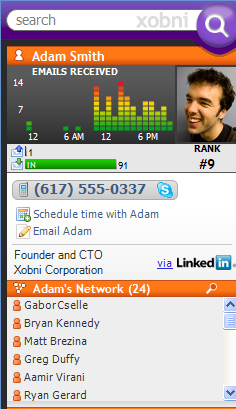
Xobni, the email startup that we’ve described as “The Superplugin for Outlook”, has partnered with LinkedIn to automatically pull contact information from the popular professional network. Xobni will now draw from public profiles on the LinkedIn network, displaying information about contacts’ employers, job titles, and pictures as part of the plugin’s sidebar.
Xobni’s sidebar helps manage Outlook email boxes by automatically threading email conversations, sorting attachments, and creating a network of related contacts within your inbox. Since its launch at TechCrunch40, the company has seen remarkable success. Earlier this year Bill Gates demoed the product at the Office Developers Conference, calling it “very, very, cool” – so cool, in fact, that Microsoft extended an offer to acquire the company for $20 million. After weeks of rumors, Xobni walked away from the deal, fearing it would just get swallowed up and forgotten in the Microsoft machine.
The partnership with LinkedIn makes Xobni even more useful. It’s too bad Xobni users are still limited to Outlook and Microsoft Windows (though there’s a web-based version for Yahoo Mail on the way). Hey guys, where’s the Mac Mail version? Seriously.


Wouldn’t it be nice if they do a few of these email ‘mashups’ and then use all that info to stop spam!
(or should I continue dreaming?)
If it wasn’t for you I wouldn’t be able to keep up.
Thanks
Ms Sparky
Xobni rules. I’ve been using it for about 7 months. It made my job so much easier. Everyone I show it to thanks me.
…..Meanwhile up in Richmond, Microsoft wonders “why didn’t we think of that?”
sounds like a fancy email widget. probably should have taken the 20 million. SuggestionLocator.com
I don’t get the appeal of xobni. While it’s neat, I find that it doesn’t have a very high utility. Why do I care when someone emails me most or how many times they’ve emailed me or I’ve emailed them?
Someone tell me why they love xobni.
I don’t hate it, just don’t find it that useful.
a total waste. Made my outlook slow, and the so called fast search is not that great. Outlook search is still better, and i dont get the logic of knowing who emails me at what time…
Yeah I never found utility in the stats or the information. Most of the search it does you can do with outlook already. I just think it takes out a few keystrokes in doing most of what outlook can do. It save me time and time adds up so I’m a fan. I don’t see that it slows my outlook down.
It might be better for sales people but for and IT guy like me, its not all that cool other than seeing who you mail (waste times with) the most.
How do you activate the linkedin crap?
This looks like it will be pretty kewl to try out if only it was compatibly with gmail
http://www.crunchnow.com
I tried using Xobni for a few weeks, but it keep slowing and hanging up my Outlook software. I ended up removing it because I couldn’t take the sluggish performance.
Anyone experience the same issues?
@Your Daddy
Did you try updating the software? There should be an opt-in preference.
I loved xobni but it did not love me back. Outlook crashed on the regular after I installed xobni. After two weeks, I had to un-install it.
Ill just stick with optonline.net :p
http://easysumm...y.blogspot.com/
I used Xobni for about a week. I found it quite useless and it was bringing down the speed of my Outlook
I had to uninstall it.
you guys were lucky. it corrupted my data file and really screwed up outlook. i liked the files exchanged view a lot. but this does not seem useful since i already know who the people emailing me are.
Still trying to decide if I can trust Xobni or not. The linkedin connection might just be the thing that pushes me over the edge to do it.
They slowed my outlook significantly. It is a very nice idea of productivity gain but extremely bad engineering. They should have taken the $20M. Atleast some smart engineers at Microsoft would have done a better job in building the product.
SG
Xobni is real cool…
Here is a (jogtheweb) track for those who want to jog through the Xobni site and beyond
.
http://www.jogt...php?trackId=151
I love Zobni. It is very useful in an environment where I have to be able to track details about clients and remember when certain events occurred, files exhchanged, etc. I am in a Help Desk environment.
Unfortunately, I have installed, uninstalled, and reinstalled many times hoping that there has been some relief on the massive amount of hangup I experience while using it. I am patient here because I understand the compleixities involved with indexing all of this data but it simply slows me down to a crawl in an environment where I receive hundreds of emails daily.
That being said, I am still excited about the product and it’s implications. I hope to keep hearing more about the product and will track in earnest once it can be used in Thunderbird.
Just downloaded Xobni. Looks good so far, however for some reason all of the new LinkedIn features that I’ve read about here are not appearing. It seems as though I’ve some how downloaded an older version. Is anyone else having this issue?
My outlook email is not the same as my Linkedin login..
Don’t seem to be able to configure Linkedin in Xobni..
I found Xobni to be a great tool/utility a ‘must-have’. But then I had to wait weeks before I could actually use it – and finally when they did launch, I installed it only for it to hog-down my system. The nifty utilities were really a borther after a few days and despite trying to convince myself that I need it – it was uninstalled in about 10 days time. Out of the seven people in our office, only one Xobni ‘die-hard’ fan still exists. Others just gave up on it and moved along with our lives.
Faisal
@#11
Same here, it messed up my Outlook big time. Had to uninstall it.
I tried Xobni because it seemed to be a good idea. After a while I realized that it was not so great. Furthermore it slowed down Outlook and I had to remove it. That is the story.
@ Kayembee. Really cool way to discover Xobni. Thanks (again). It’s incredible what you find using one of your tracks.
Installed it – to see if stability had improved from last try. Crashed outlook about an hour later. I guess not …
Again a feature that can be implemented in let’s say 4 hours…. but they took 6 weeks just to do it.
Xobni makes Outlook actually usable – I’ve had it for a few months. However, it does gobble up quite a bit of memory, and slows things down.
Motion seconded, regarding that Mac Mail version!
Sure the stats are useless bits of fluff, but there are two features that made xobni indispensable to me.
1. The network information, when I have to find that one guy that was cc’ed on an email to me six months ago, I just click on any email from the sender and all the people he has communicated with at the same time as me appear in his network box. Priceless.
2. Files exchanged, I’m no longer looking through tons of emails to find the one attachment I need. Sure I could do an advanced search or something, but it is just there with one click using xobni.
A guy I work with uses it… I’m #2 on his rankings. Cool tool, but with webmail taking over….what is the future of it?
Dear Xobni,
I think you and I could become fast friends. Do you think you could release an Entourage flavour?
Love Mac Users
I use Xobni for a while now. It makes certain things easier and looks fancy. Nevertheless it doesnt fulfills all my needs for email management. I still heavily rely on Nelson Pro for email management. Nelson Pro is an Email management software that also creates an search index, but offers more different views on your whole email content. It automatically creates virtual folders for each recipient that your write/receive emails, but other than xobni it allows you to combine two or more email addresses to one contact for better organization. I wrote some more comments about xobni a while ago. You can find it here:
http://www.lars...box-management/
A few other things in this most recent release, in addition to the LinkedIn integration:
1) Support for keyboard shortcuts.
2) Outlook .pst or folder inclusion/exclusion: there are many that use the “deleted folder” to store read messages. Now you can add deleted messages to our indexing. Or for those with massive archives, you can selectively remove PST files from our index. And for those that get tons of disto emails, you can exclude those folders, too.
3) Two speed improvements. We have improved the UI rendering significantly and we have resolved an issue with how we index recently sent and received email. This will result in significant performance improvements for selected users.
If you have never tried Xobni, I invite you to give it a try. It is a small download and installs simply. The new version is a significant improvement over our private beta version in performance, functionality and utility.
And to the hundreds of thousands of customers using Xobni every day to make their Outlook inbox much better, thanks for all your great support! It means a lot to the team.
Jeff Bonforte
CEO, Xobni
Hi all, I work with Xobni’s PR team. Just wanted to address a few of the comments here.
Re: performance, making Xobni run faster and lighter is always top priority. Speed and resource management was the chief reason Xobni was in private beta for nearly eight months. Dramatic improvements were made that led to the software running much faster and with way more stability. The vast majority of the issues have been resolved and now very few users continue to have Xobni performance problems, which is why we felt confident in opening up Xobni to a public beta. The goal is of course to make the success rate 100% and engineers at Xobni are working on that every day. I personally get about 100 emails per day and have never had Xobni performance problems. Some of my coworkers get 3-4x as many emails as me and performance issues I’ve seen were resolved during the private beta period. All of that said, we’ve made a ton of great progress and we’re still working hard on it.
@6 The thing most people tell us they love about Xobni is the ability to easily filter your email by people. For some it’s the functionality of email networks to quickly find your lawyer’s assistant’s name; for some it’s the threaded conversations that made them jealous of Gmail users, but with the ability to drill down and expand those conversations right in the sidebar; for some it’s automatically generated attachment lists in chronological order that mean there are no more version control issues when editing a document with a group. Overall the biggest problem Xobni solves is email search–85% people that use Xobni actually report searching LESS because the information they need is often presented to them already in Xobni.
@9 Xobni automatically updates the software in the background. Check the Xobni menu (Alt+X) and go to Options, you can turn on LinkedIn under the tab called Integration. If you don’t see it there try closing Outlook and reopening it. Let me know if you have any problems.
If anyone has any other questions I’ll try to get to those ASAP.
I like Xobni, but I had to uninstall it since it killed my outlook… everything slowed down to the point of reboot.
My Outlook has been running fine with Xobni and I absolutely love it actually. I can see all of my past conversations with a person, see their email attachments, see all email attachments. Anytime I have to dig into my inbox I got through Xobni.
I love XOBNI, in fact we developed a very simple version inhouse that works with our profiles servers and API’s before these guys did it. I even emailed these guys that we want to work with them since this will be very cool for our clients. this is not what my biz is about.
too bad.
The interesting thing is that I just saw a MSFT guy at the E2.0 show in Boston showing others their prototype of the same thing and it worked very, very fast. It was very cool since it was aggregating user data from various places like LinkedIn and Twitter I think.
I did get some errors on Xobni, but this will go a way with time. I would have taken the offer from MSFT, even at 20M if I were them. Now it looks like MSFT will just get their own plug in and kill them
Xobni is slow and not that useful. Data is nice but data only helps when it’s relevant and driving efficiency. Over displaying data can be detrimental when it’s just data for the purpose of data.
I like the idea of Xobni, but:
1. I didn’t get any value out of it. I couldn’t figure out what I was doing differently, and it didn’t improve my productivity.
2. it slowed down Outlook tremendously and made my Outlook experience unusable. I’m guessing it is because Xobni is also creating a full search index of my mail store, in addition to the windows desktop search that I already use. it would be much better if they would partner with Microsoft and build on top of the WDS existing index.
Xobni sneezed. Wait. Techcrunch article on how ‘Xobni makes sneezing more useful’. Seriously though, I’d like a bit more substance and biting criticism that made me love TC in the first place.
Xobni is a feature waiting to be implemented into outlook by MS. Their tech is highly reproducible and their days are numbered.
Been using Xobni for a few months now and love it. I’m an avid Linkedin user and really excited to play with the new functionality. Nice work Xobni team, keep it up.
First, Xobni slows down Outlook, both on load and during operations. There, I said it, I have to deal with latency I would rather not.
Second, Xobni has made using Outlook such a better email program, I don’t even know where to begin. It kicks Google integration to the curb.
When you deal with a high volume of different contacts and lots of files, Xobni provides a really robust search engine and functionality set. Can’t remember when you got a file from a colleague or what email it was in? Xobni pulls out files separately. Want to find a conversation stream on a particular subject? Xobni will show you threaded conversations via person or keyword. Curious to see how a contact links to other people or want to find someone who was cc’d on an email? Xobni shows the network of people via email communications in a separate section.
Xobni is useful, just would like its performance to improve. Maybe a different name too…
I tried Xobni for a few days and found it useless for my needs. I found all of its extra functionality more eyecandy than functional (reports, file attachment lists, etc.). I didn’t have any performance issues, but then I’m using a fairly high end computer.
My biggest issue is that it doesn’t do anything that Outlook doesn’t do in terms of core functionality. I have no problems with finding emails extremely quickly in Outlook, and my archived email is an IMAP folder with over 10,000 emails in it. In terms of attachments, I can find attachments easily, too. Not sure what some of the other commenters are doing that makes it difficult or require outside software.
Finding CC’d people and other information is also easy with Outlook searching.
Honestly, I really wanted to like Xobni, but it just looked more like flash than substance from my experience.
I wish techcrunch would write about more innovative companies like Lookeen that do a much better job at search without slowing down Outlook or corrupting your email files. techcrunch has written about all the california email companies xobni, xoopit, clearcontext, zenbe, etc but has ignored lookeen because they are european based. there are more good companies out there than just the california ones.
i came, i saw, i uninstalled
there is no value add, it takes up valuable screen real estate, looks fugly and slows down outlook.
should have taken the 20…
Just got updated to the Linkedin version and already love it (udate happened automatically). I’ve been using Xobni since the private beta. It has always been great for helping me remember how I know someone, but this Linkedin addition will help with new people I’ve never emailed. I work in biz dev, so this happens a lot. In the past I always opened a browser to Linkedin to check someone’s company and background – now the information is right there with the email and I can click over for more details if I need them. I’ll be able to quickly decide if it’s a 30 second response of a 5 minute response… BTW, I’ve never had any issues with performance.
Evan Salomon –
If I have a different Outlook email address than the email address that I use for LinkedIn, how do I get it to work?
@ Sterling Wise, hey, we’re in New York City!