Widgets are the most consumer-friendly means toward data portability. Users who want to establish a “centralized me” – whether that be on a blog, personal website or favorite social network profile – often just need a simple way to highlight their identities as maintained elsewhere on the web.
Webjam’s new profile badge is remarkable in how well it enables users to do this. Unlike other badges, which tend to show only basic information (names, headshots, birthdays, etc), Webjam’s badge streams your most recent activity, lists your networks, and displays your friends.
Compare this widget to the profile badges found on other social networks, such as Facebook:
Ning:
And LinkedIn:

The Facebook and Multiply widgets can be set to point out recently contributed items like photos and posts, but beyond that they’re pretty static representations of one’s presence there.
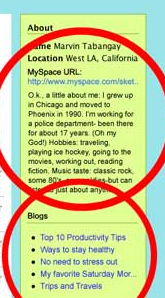
Surprisingly, MySpace doesn’t even have a profile widget, and it’s an empire built on widgets. The Data Availability initiative appears to be a way to provide widget-like functionality through APIs (see the mockup to the right). Why they’ve decided to skip over embed codes is beyond me.
Other social network sites like Vox, KickApps and Grouply also lack profile badges.
If the smaller social networks (and social networking platforms) are going to compete with the likes of Google Friend Connect and Facebook Connect in the long run, they’ll need to beef up their data portability initiatives – and widgets are a good place to start.
Perhaps they could look at the widgets provided by social media sites like Last.fm for inspiration:
table.lfmWidgetchart_b30d36750713c11127e701b08c041e2f td {margin:0 !important;padding:0 !important;border:0 !important;}table.lfmWidgetchart_b30d36750713c11127e701b08c041e2f tr.lfmHead a:hover {background:url(http://cdn.last.fm/widgets/images/en/header/chart/recenttracks_regular_red.png) no-repeat 0 0 !important;}table.lfmWidgetchart_b30d36750713c11127e701b08c041e2f tr.lfmEmbed object {float:left;}table.lfmWidgetchart_b30d36750713c11127e701b08c041e2f tr.lfmFoot td.lfmConfig a:hover {background:url(http://cdn.last.fm/widgets/images/en/footer/red.png) no-repeat 0px 0 !important;;}table.lfmWidgetchart_b30d36750713c11127e701b08c041e2f tr.lfmFoot td.lfmView a:hover {background:url(http://cdn.last.fm/widgets/images/en/footer/red.png) no-repeat -85px 0 !important;}table.lfmWidgetchart_b30d36750713c11127e701b08c041e2f tr.lfmFoot td.lfmPopup a:hover {background:url(http://cdn.last.fm/widgets/images/en/footer/red.png) no-repeat -159px 0 !important;}
| http://cdn.last.fm/widgets/chart/friends_6.swf | |||
|
|
Of course, we here at TechCrunch love widgets. Just see below.