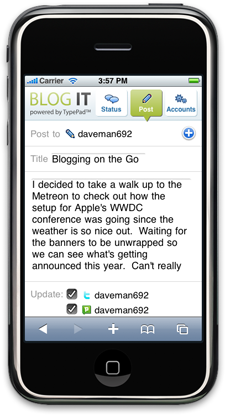
Six Apart has introduced an iPhone version of their BlogIt software, which allows users to quickly post updates to their blogs, Twitter, Pownce, FriendFeed, Jaiku, and Facebook. The current version of BlogIt is a traditional iPhone web-based app, though we can expect a native version on the way (Six Apart announced a native version of TypePad at Apple’s WWDC conference earlier this week). You can reach the app by pointing your iPhone’s browser to http://blogit.typepad.com/.
The company originally released BlogIt as a Facebook app in April. Both versions currently support posting to Movable Type, TypePad, Vox, LiveJournal, Blogger and Wordpress, along with the social networks mentioned above.
The app works well enough, but the release so soon before the release of Apple’s App Store is curious – it will be outdated in a month.


I find it PAINFUL to type anything more than 2 or 3 sentences on my iPhone. I can see this for small quick posting….but for anything of substance….does not seem useful.
@Dan, the past few weeks when I’ve been playing around with Blog It for iPhone as we’ve been finishing it, I’ve found that I mainly use it to update my status. What I really like about it for doing that is that I’m now able to update multiple services at once (beyond just SMS’ing Twitter) and I now have an idea of how close to the 140 character limit I’m getting. Bloggers use these sorts of tools in many different ways; for some being able to post to their blog will be wonderful while others will primarily use Blog It for iPhone to update their status.
for doing short, text-only posts (from conferences and other tech events, for example), I find I can use my iPhone to Twitter them pretty fast — and I mean many posts from a given event…20-30 posts or more…but it’s fast because it limits me to 140 characters
nonetheless, I could see using this app (or the forthcoming Typepad iPhone app) to get my short posts onto my Typepad blog….but then, uh, my tweets already show up there in my sidebar….so what’s the diff?
like, how many content-entry tools dies a blogger need?
OK ok Now I’m jealous. As a wordpress cultist I’m like, darn Typepad beat WOrdpress to this. But then again, WOrdpress is probably looking to see what Typepad does right or wrong with this and most importantly what’s the uptake on this.
So like Wordpress, I’m adopting a wait and see attitude
@Graeme, Blog It for iPhone allows you to post to your blog (hosted on a service such as TypePad or WordPress) but also lets you update your status on services like Twitter, Pownce, Jaiku, Facebook and FriendFeed. Take a look at http://icanhaz....om/mobilestatus for an example of this.
Cool innovations in Personal Technology makes life really worth living and enjoying every moment while staying connected with the community and family.
Cheers!
Rajeev
http://tekno-wo...ld.blogspot.com
@Ingrid, glad you like it! Blog It for iPhone, just like Blog It for Facebook, works with both WordPress.com and WordPress.org blogs as well. We want to make blogging better for everyone no matter what publishing platforms you use.
Dabble in video upload,
Hack in a cut and paste function,
Sprinkle in voice recognition,
And you’ll have me blogging away my 35 pageview posts (or my one post wonder, ‘9 VCs You Don’t Wanna Meet’ http://tinyurl.com/5hbw3c)
“Which allows users to quickly post updates to their blogs, Twitter, Pownce, FriendFeed, Jaiku, and Facebook” Wohh cool.. this sounds good.
Yes, I too agree with Dan it’s painful to type more than 2-3 sentence, but for short posts this rocks.
Deepa (dooyt.com)
Dabble in video upload,
Hack in a cut and paste function,
Sprinkle in voice recognition,
Cool innovations in Personal Technology makes life really worth living and enjoying every moment while staying connected with the community and family
OT-I hate the camouflaged spam comments like #’s 10 and 11.
What about receiving replies from the “micro-blogging” apps? Twitter is not about one-way communication and SMS-threading is lost using this for such.
I REALLY hope that wordpress is working on an iPhone app like typepad. Does anyone know anything about that?
Wow I love the idea of always being able to be with in a few second search of a blog, or be able to up date mine. Last year when i thought the the apple iphone could not get any better they go and release 2.0.
Hi there Expert, I am glad I pressed harder enough until I found 321 copy dvd platinum x, because this post on o.us poetry was extremely helpful. Just last Thursday I was pondering on this quite a bit.
Are people simply not reading, or would they just prefer a wordpress-branded app?
It ALREADY works with wordpress blogs, what’s with these comments?
Now we need one of these to be connected to the iPhone and Michael and his crew can be on the road all the time… http://www.proj...store/main.html
@1 Dan, good point; hoping to fix that soon.
Can totally see the value in updating statuses and I can see how having something like this would encourage me to blog more often. Quite often I’m inspired when out and about but it’s kind of gone again by the time that I get home. If only those iPhone keys weren’t such a hassle for any length of text
I think it also brings back the question of what content splits to which format – i.e. short posts to be condensed to twitter and chunkier topics to be saved for blogs… either way it’s a good development, but I’m still excited for the new iPhone to see how that changes things.
Or you can just use native email on iPhone and blog it from your email compose using MessageDance. MessageDance will let you blog by using your email itself (along with blog from Facebook message compose, YouTube, Digg, Google Reader,Amazon and many more). No need to go to any app by opening up a browser.
http://www.mess...p/blogpost.html
@ David. How does this differ from sites like ping.fm, etc.? There are a # of services that will toss out 1 post to all my social sites.
i’d LOVE something that helped me write longer posts using my iPhone when I am mobile and away from my lappy.
@Dan MessageDance would let you do that. Keep typing your message in your iPhone email and once you are ready go back to your iPhone mail and send it to blogs @ messagedance.com and thats it. Like BlogIt it would also notify to your social destinations (which sounds like you do not care much.).
SO hard to type, but I think they will do well with this application
@ Rajesh I do message a bunch of networks at once…just was saying that the “blogging” portion is tough to do.
@Frank Good point about Twitter being a two-way communication tool, but Blog It comes in handy when you just need to send updates out and don’t need or want to read what other’s are saying.
I was in that situation last week on AIDS/LifeCycle, a 7 day, 545 mile bike ride from SF to LA. I used Blog It all week to post updates for my friends, family and coworkers at Six Apart. I did look in on what other’s were posting here and there (and I like Twitter’s mobile interface), but I was mostly just posting quick updates at rest stops. Blog It also saves your status update so when Twitter was down it would try posting it for me later, because I wasn’t going to sit around and keep retrying.
I did a few longer blog entries and will echo what everyone else has said about it being a pain to write more than a few sentences on an iPhone, but Blog It let my post my wrap ups and let me automatically update my status accounts with links so I didn’t have to.
Blog It doesn’t do everything, but it doesn’t really need to. There will be exactly what you need and it’s another tool in the arsenal for when you do need it.
@DavidRecordon thanks, Dave – definitely gonna use it….and please say hi to Chris Alden for me
Graeme
http://www.tech-surf-blog.com
SO hard to type, but I think they will do well with this application
Nice blog, i have added it to my favourites, greetings
thanks