
The only thing you can count on with most projects is that they won’t come in on time. And the more people involved, the greater the uncertainty grows. There is no lack of project management software out there to try to contain this uncertainty: 37Signals’ Basecamp, Clarizen, Daptiv, Huddle. Wrike, Viewpath, Microsoft Project. But one that is launching commercially today after a few months in private beta, LiquidPlanner, is specifically designed to account for unplanned events and delays. Explains LiquidPlanner CEO and co-founder Charles Seybold:
Henry Gantt created the Gantt Chart in 1910. It is a single point estimate, and it doesn’t actually work. Project management is always broken. Two thirds of projects fail to come in either on time or on budget.
We fully embrace the idea that project management is a social application, It is not about one guy in the back room with a super calculator. Project management has to be personalized to each person in the project.
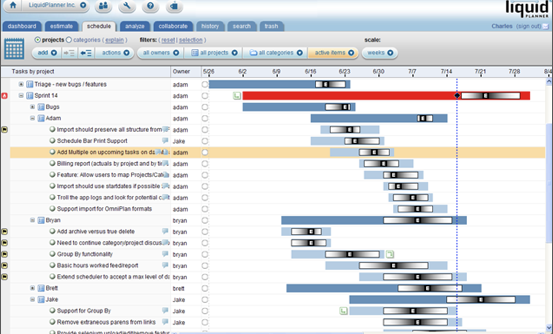
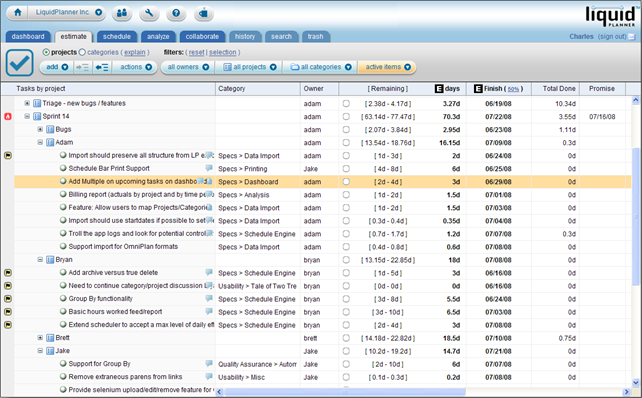
With most project management software, everybody on the team gives an estimate of when they will be done with their part of the project. As people start to miss those deadlines, the whole project gets delayed because someone is always waiting for that unfinished piece of work before they can start their part. Instead of asking project members for single-point estimates, LiquidPlanner asks for estimates in the form of a time range. Like the familiar Gantt Chart, it displays the overlapping ranges in bar graph form.
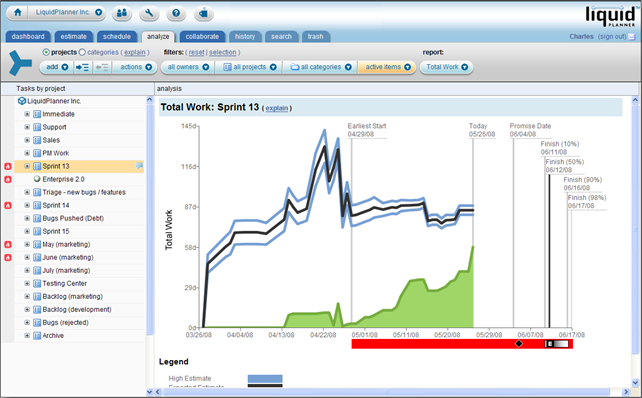
But Seybold calls these “Uncertainty Gantts.” Project members can adjust the range estimates as their work progresses or stalls. When one person runs into trouble and his estimate extends too far, it shows up in red so that a product manager can deal with it before it jeopardizes the rest of the project. Everyone on the project can also see how much work has been done on the project over time and how much has been completed. Managers can see who is completing their work on time, and who the bottlenecks are.
LiquidPlanner is free for up to three people. Companies start paying once they add a fourth person ($35 per month, per member, or $300 per year). Paying subscribers get 50GB of storage. At each phase, participants can add links, documents, images, videos, and other attachments. And e-mail notifications are built into the system to remind people when a deadline is approaching or when a task has been completed.
The startup is based in Bellevue, Washington. It was founded in March, 2006 by Charles Seybold and Jason Carlson, who led software teams at Expedia. Seybold ran the core software engineering team at Expedia and was in charge of project management. Before that he worked on Microsoft Project. (He estimates Microsoft Project is now a $1.2 billion-a-year business). LiquidPlanner raised $1.2 million in January, 2008 from angel investors in Seattle (including Seybold and Carlson, who put in more than half the money themselves). The service already has attracted over 10,000 users since launching in private beta last January.


There is a big difference between project planning tools and project collaboration platforms. Planning is all about gnat charts, time estimates and resource allocation. Collaboration is all about communication, sharing and getting things done. I haven’t seen anyone succeeding in both disciplines with one product / service.
I think we’ll give it a go with our next app
Could TC cover my search engine, http://www.z-portal.uni.cc/
In our recent internal investigations we found an open source server based application that incorporates:
-Project management software
- Collaborative software
-Issue tracking system
-Project Portfolio Management
-Resource Management
It is called Project .net and runs on both Windows and *nix systems (source is available at sourceforge).
We also looked at an open source desktop client that integrates with Star Office, but it didnt meet our needs fully; otherwise it looked pretty good (OpenProj, also on sourceforge).
Geez the liquidplanner system looks ugly, you would think they could tart it up with the amount of money they have.
You forgot about ProWorkflow! *tsk* *tsk* we use them really extensively and they are the best we have found so far, gantt charts are ugly and get confusing for people, whereas pwf uses nice pretty timelines instead.
You guys should check them out, admittedly the communication in the system is a bit lacking but they beat people in all their other features.
$10 cheaper than liquidplanner too! (what’s good enough for google & myspace is good enough for me
)
save your money… these guys are going to the deadpool…
go open source…
here are a couple of good FREE os project management solutions.
Liquid planner’s twist could easily be coded by the developers in future releases…
http://en.wikip...gement_software
Wow, MS Project is in trouble. Sort of.
Trying it out now…but man is it ugly.
update…
too ugly for use am afraid. They’re better off going with a no graphic only text route thatn what they have now.
Certainly welcoming some timeline flexibility without “braking” project completion deadlines (obviously when the skew is temporary). We use Clarizen and are happy with it. Once you start working online, it’s easy to agree that MS-Project is broken.
Kind of worrying that either the author of this article or the guy who’s just “reinvented project management” (he hasn’t; he’s delivered an ugly app that implements Three-Point Estimation) doesn’t know how to spell Gantt.
I like aspects of it–I used it off and on. But it’s very slow–just went back to check to see if they improved it. Every click results in a delay–the little swirly thing comes up.
The UI can use some improvement, but that’s not a ton of work. If the performance were better, I’d be using it today, instead of using Excel. Yeah, I know. But I hate Project…
I use MS Project, and give liquid a try…and will continue to use MSProject. After 5 failed attempts to upload a simple test project from MSP2003, if gave up. Started to create a new project, and found it to be not all that usefull.
I looked for a MS Project alternative for a new project. After looking at some of the tools that Michael mentioned started working with LiquidPlanner about 2 weeks ago.
What really won me over was the ability to deal with uncertainty. In the initial stages, talking with engineers it is near impossible to get good estimates. However everyone is comfortable in saying that a task could take 2-4 weeks. Plug it all in, and out comes a schedule that looks realistic compared to previous projects – in a time muc less then using MS Project, where you tweak forever to get there. Plus having this online is a HUGE bonus. Now I can get the engineers to review everything and provide their comments and take back some of the responsibility that is mostly with the project manager. I see this cutting down the planning meetings where you track who did what significantly. Either way – I am excited about what I saw so far and rather do this then going back to MS Project.
@andrew: I’m one of the developers at LiquidPlanner and wrote the import code, I’ll take a look at our logs and see I can help you out if you’re interested. You might check our guide on exporting MS Project data (http://www.liqu...ms/2/topics/121).
I’m just one of the developers, but if you’re having problems importing data, or problems in general feel free to either post a question in the forums, or email me. I’m adam at the aforementioned dot com. We’ll get it all sorted out
Wow, a start-up with a plan to make money from the get go. You don’t see this very often these days. Kudos to them!
$35 per month, per member, or $300 per year –
per user? really? how about per project (and allow a few more users…)?
Erick listed a bunch of hosted Project Management providers but left off a real winner: @task. My agency, Modea, just concluded an exhaustive evaluation of several providers and At Task came out on top as the clear winner. If your company can afford to pay ~$35/mo per user you should take a serious look at these guys. In another week or two you can check out my blog for an in-depth review.
This site looks just like MS Project. And MS Project is software that does not work and cannot be changed anymore because too many people are used to it.
Project Management is a very important part of work, and is even more important than before because of collaboration across countries.
All the software I see just keep doing the same thing over and over again, and you know what? It DOES NOT WORK. It’s not efficient, it’s not fast, it does not create clarity in your projects.
I’ve solved this problem. No, really. On my desktop right now, I have designed and developed a tool that will change project management for a particular type of project. I use this tool internally, and I’ll release it in a few months, and trust me, you’ll see what I mean.
I’ve been working with many projects for many months and I know the problems I faced. I went to my local university, took 5 months of project management courses, read a few books, and then took out only the relevant parts of all I learnt and integrated it into a web tool in a manner that solved all the management problems I had. This is not a basecamp style tool, which I feel is more for collaboration, this is a tool to _manage_ a project.
I’ll give techcrunch a buzz when I feel my tool is ready for wider use. I think everyone who has this problem will be pleasantly surprised.
Peter Urban (1st comment) brings up a great point. Project Planning and Project Collaboration are two very different approaches to project solutions, covering very different functionality. Whereas Project Planning is Project Manager centric, and start and ends in the planning phase of a project, Project Collaboration (or Execution) goes the whole 9 yards into the actual execution phase of the project where most projects fail or go over budget and run late. Failing to cover both phases of the project life cycle is the main flaw in current solutions such as MS Project.
Fortunately, for companies such as Clarizen (yes, my employer) this has created a wide open opportunity to provide a collaborative-centric Project Execution solution that takes the entire team (not only the Project Manager) through the entire project cycle in a very web 2.0 way (integrated docs, chats, wiki notes, graphic interfaces). Team adoption, usability and simplicity will eventually set the stage for the leading solution providers in this space.
Kudos to LiquidPlanner and other companies that are taking advantage of this opportunity to introduce a very refreshing approach to Project Management, an area stagnant and dominated by Microsoft Project for many years now.
@Robert – Thanks for taking a look at LiquidPlanner and sharing your hands on experience. I invite anyone interested in a quick look to browse our video tutorials at LiquidPlanner.com/support.
@Gil – I could not agree more. The days of pasting printouts on walls are gone and the realities of today’s teams are not served by classic project management tools (ie. try to do a Scrum project and manage a Marketing backlog simultaneously in the same MS Project plan). Rapid development, shifting priorities, and constant change require much more flexibility. Our responsibility as tool makers is to integrate the tool set and put more relevant capability into the hands of the whole team. If you think about it, these days everyone is a project manager at some level. Fortunately the big guys have been focused on building big sales teams allowing us little guys to focus on innovation.
We internally use ActiveCollab for tracking milestones, issue tracking, discussions, time tracking document sharing and a lot more. It’s been good so far. Active Collab does not have a planning tool right now but that can be handled using MS project. I am not sure how will you baseline a plan in this case, track “Planned” Vs “Actual”. Some of these metrics are necessary for CMM assessments and internal ISO audits.
Last point – ActiveCollab is $400 one time license fee that’s all. For my 25 people tech team if I use this tool I will end up paying $7500 / year. That’s a lot.
Projjex.com is the one we like. And they say they’re adding free time entry/tracking soon which will be the perfect compliment to the core PM features.
Please don’t forget about ProjectsCenter.com which lets you perform flexible project planning and collaboration at a very low price.
After trying a number of methods ranging from Excel spreadsheets, MS Project and even some open source project management packages (most open source packages have horrific UIs) we gave LiquidPlanner a go.
It has been working well for our distributed team – having everyone share the same application and track effective progress in real time has been very useful. In a way – it prevents you from being ignorant and optimistic – as any planned work that lags gets flagged up and more importantly, the project impact is shown in real time.
When we started the beta the program was not snappy – now it is much faster. Also – they have been constantly adding features – which is the most impressive part after dealing with the MS monolith and bi-annual updates.
I think we will stick with them while keeping an eye on this ever-changing field…
Project management software is critical, but don’t forget about requirements management as well. There’s a site called http://www.gatherspace.com that we use to manage requriements that could augment how liquidplanner is used.
What’s the difference between this and dotproject? dotproject looks more robust and easier to use.
Isn’t this quite like Fogbugz!!
Agile-based project management solutions (like my company http://www.acunote.com) are designed to deal with uncertainty from the get go. That’s one of the appeals of Agile processes.
Who knows which of these solutions include effective support ticket management ?
Traditional project management software, like MS Project, was not designed for collaborative or bottom-up management. That’s true. Traditional pm software does not offer enough flexibility. That’s why tools like Wrike are so popular. They bridge the gaps in project management for many companies, making them more productive. These new tools represent great opportunities for businesses to become more competitive. Those who will be the first to adopt the new project management technologies will be the most successful.
There are really a lot of options in this space, mainly because everyone has a different style of managing workflow. Another web-based project management service to throw in the mix is Intervals. Somewhere in between project management and project collaboration, Intervals excels at time tracking and task management.
@Ben
http://www.comindwork.com includes effective ticket and task management
Thanks Godzhesas,
interesting solution indeed. Might be a bit too complete for my small company though. Something more simple including only ticket management would do actually. Any idea ?
Ben i know from experience that sooner or later usually company will need other features beside ticket management, so i would go with a feature rich tool, the features you don’t need now might come in very handy in the future. And in that case you won’t need to go for yet another tool.
Been using MS Project for 15 years and couldn’t stand it anymore. Found a great product for both collaborating and project management called AtTask (attask.com). Don’t know if i’ll use it forever, but as for now and for the past 5 months, it has been a breath of fresh air.
Anyone else used it?
Although it doesn’t offer such detailed Gantt functionality, YouFig (www.youfig.com) offers a rich set of collaboration and admin features for collaboration within your company, such as documents, spreadsheets, file sharing, calendars, with an unlimited number of workspaces, users and storage. It’s great and helps us get the team on-board when needed. Recommended.
Alot of nice recommendations on this page. My designers and I use web software called “CollabTRAK” from http://www.collabtrak.com to keep up with our projects and give customers access. It gets the job done for us.
I have been preaching this analogy for awhile now. Projects are alive, yet all of the PM solutions out there clone it, kill it and splay it open to see all the parts. By time you have dissected it, the project has already changed. We’re a MS Project shop, but we’ve dropped LiveProject, http://kadonk.com , on top of it so that we can get everyone involved to “see” the project without their having to buy a license for MS Project. It definitely helps us to see what’s going on and doesn’t force us to switch gears to some fly-by-night PM solution.
verygood web service~
We’ve listened to 1000’s of customers to develop http://www.proworkflow.com and will continue to do so as they’re the ones who have the needs. PM software companies often try to put their spin on the PM process or guess needs.
It’s simple, ask the end users and deliver what they need. We try to do it well!
Julian – CEO
http://www.proworkflow.com
This is becoming a crowded space. Loads and loads of different services.
This one is more focused on planning tools rather than collaboration.
I tried it and like the “please forecast the end date” feature which – if used – keep the plan in sync with the reality which is a common problem for PMs.
I don’t know if it’s crowded really. If it was crowded, you’d see these companies offer a little for free. Like a 5 man team kind of free.
Even LiquidPlanner seems like it has a 30 day trial, but no “free”