
Backblaze: Online Backup With Time Machine’s Finesse
by Jason Kincaid on June 2, 2008

Every year millions of people lose their photos, documents, and music to the mechanical squeals of hard drive failure. Despite the consequences, few people ever get around to actually backing up their data - it’s just too much of a chore.

For many, Apple finally hit the nail on the head with Time Machine, which lets users plug an external drive into their computers and forget about it. Backblaze, a new startup out of Palo Alto, is trying to take Time Machine’s simplicity and apply it to a cloud-based online backup solution. The service is currently Windows only, with a Mac version expected in the next few months. You can grab one of 500 invites to the private beta here.
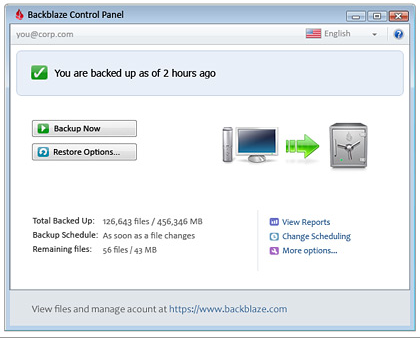
Backblaze advertises a “3-click setup” that forgoes many of the customization and file selection options commonly found in backup programs. Instead, users simply click “Backup Now”, and Backblaze will upload the entire contents of the hard drive (minus system files) to the company’s servers. After that, a small program runs in the background and monitors files for changes. Recovered files can be delivered through an online interface, USB disk, or a DVD.

While Backblaze has tried to keep the amount of user interaction required to a minimum, more advanced features like bandwidth throttling or file exclusion can be found tucked away in a separate menu. Users can try out the service free for 15 days - after that, the price is $5 per month for each computer for unlimited bandwidth and storage.

Unfortunately Backblaze is plagued by the common enemy of all online backup providers: slow upload speeds. It can take weeks (or more) for users to upload their massive media libraries. And while a slow backup is infinitely better than none at all, many users may be put off by a “two weeks remaining” progress indicator.

Backblaze will see competition from a number of well established players in this space, including Mozy, Carbonite, and SugarSync. The $5 monthly fee is nice, but it isn’t unique - most of the other providers have plans with similar price points.

Trackback URL

Comments

Hope Techcrunch offers more quality beta trials like this in the future.

If possible, consider putting up a seperate directory or TAG for all of these services for easy exploration and archiving


Great idea for a new pricing strategy:
Prices should be aligned with value. Value is delivered when a restore is made, why not charge per MB restored? ($0,10/MB???)… They will make huge money!


you forgot about http://www.jungledisk.com who are using Amazon’s servers and are the most reliable by far.


Looks like a nice quality service.

In the event that im paranoid about backing up my data I juss might go wit dem.


Cool service, strange / limited restore options.

1gig zip file
a DVD for $99? WTF
a 160gig USB drive for $189?

How bout pick and choose file restoration. And it’s really not restoration since you have to download the file from their website via zip format, then copy it back to your PC. Don’t see how u can call this a Time Machine when it’s nothing like it.


Thanks for the invites techcrunch. This seems like a great service.


It won’t back up files over 200MB and by default excludes e-mail files such as MBOX and PST. So my Outlook PST (very possibly the most important thing for me to backup) wouldn’t even be backed up.


The idea of continuous backup is flaud when you’re a developer who is constantly editing source files. You’re saving new files sometimes many times per minutes, you don’t want each save immediately backup. At least with time machine, its once per hour, not 3 times per minute!


Here’s a free idea for those in the online backup business. Provided for free too
Please build in your desktop client software some dvd burning technology.
Things would work like this
1) backup software looks at your hard drive and what is present on the online backup server and selects not already backed up files
2) backup softwre backs up files to DVD (as many as the user can provide), all files encrypted and not readible by anybody else but the backup server.
3) print free post letters, provide netflix type return enveloppes
4) company receives DVDs, can decrypt files to the user accounts, company saves a ton on bandwidth cost. User saves weeks isntantly. ISPs cheer

if the dvd is lost in the post or intercepted then it is useless as it was encrypted with 128bit AES.

of course this method is mostly useful at the beginning to get everything uploaded. after this incremental back ups should suffice, but in case big files get dumped then periodical DVD updates should be allowed too.

First one to provide this kind of service will make me a lifetime customer.


And what happens to my files when this startup lands in the deadpool? Seems like the same results as if my actual HD fails.


I am currently using S3 Servers (Amazon) to backup all my files using JungleDisk as an interface. It’s cheaper than Backblaze for a normal user and my upload speed was close to 400K/s which allows you to backup a large quantity of files. No restrictions in any ways and we can almost be sure that Amazon will exists even after we’re nuked ;) http://www.vincentcassar.com/2.....-headache/


Hello TechCrunch,

I work for Backblaze, and hope I can answer some questions.
To Mik: Backblaze right now keeps watch of changes, but does not push the files immediately. Instead it waits a few hours before doing a batch of backups.

To James Paden: We plan on removing the 200 MB limitation soon. There are lots of important files I have that are over that size I want backed up including some family videos
We also want to be smart about backing up database type files like Outlook PST files. Pushing your entire PST file whenever you get an email is not effecited. This is something we really need to work hard on.


i tried the new upline service by HP figuring that finally someone I can trust for quality backup. After 3 weeks, still no successful bakcups, file type restrictions and being down for a few days. Not a good experience and they gave be 2 years of FREE service. Funny thing is I still don’t know if I can afford it!

Data backup is everything now. I’ll stick with multiple drive backups for now.


Another Jungledisk user here, tried Mozy, Carbonite and others and went with Jungledisk. Can’t say enough good things about it, their responsive forum/support is top-notch.

What’s great is having a locally mapped drive to your bucket. The new Jungledisk 2.0 (in beta) is well-worth looking into with their bucket schemes:

http://blog.jungledisk.com/200.....verywhere/


Jason: There are so many backup companies coming into the market everyday, it’s hard to know who to trust. Carbonite’s CEO posted a blog entry about how difficult it is to figure out how to do online backup right. With the recent news of the security firm that hacked into a bunch of online backups (Carbonite and Mozy were the only ones who denied them), I’d recommend sticking with a company that’s been around awhile and has everything figured out. I think companies like Carbonite and Mozy know what they’re doing and do it well.


I use Mozy right now and it works quite well, but I’m interested in BackBlaze’s FSCAN technology that they claim is barely noticeable when running. Mozy works, but it’s a resource hog when it’s actually doing a backup. Can anyone compare BackBlaze to Mozy at this time or is it too early?


SugarSync is currently down - for 8:21 maintenance?
I just signed up and the thing is already broken. Yikes.


Online backup services are great but don’t replace your own sequential backup systems you should develop at home on external hard drives… even if it’s dragging/dropping to USB HDs. I would use online as a last-hope in case my house burned down with all my backups but short of that… and a good safe, these online services shouldn’t be used as your primary backup.

Jon
http://dreamclue.com …get the message!


The online backup market is getting over saturated, new companies getting in the band wagon daily.

Just check out the review site, BackupReview.info and see how many are listed and also check out the daily news.

I am not sure if any new company entering the market today will be here next year.


I’m president of Remote Backup Systems (RBS). I’ve been watching the remote backup market since I wrote the first software for it in 1986 for use over 1200 baud telephone modems. Contrary to Peter’s opinion, I see the current market as ripe for new Service Providers like Backblaze. RBS starts about 200 new Service Providers a month, and right now we are watching them grow by leaps and bounds. I am sure Backblaze will, too. From all I can see, they’re doing everything right.


i’m sure its not long before google release some sort of g-drive, google docs already allows a good deal of remote reliability for documents, and with the recent addition of PDF support just about any print media can be converted and uploaded, albeit not so easily or automated


I use backupanytime which has an auto select feature which you can use to ensure you do not miss and files (current or new) regardless of location. You can read about it on http://www.backupanytime.com/whitepaper.htm or see what users say on http://www.backupanytime.com/blog
Kevin


How impossible. Would anyone trust their files to internet operated systems? What if the system is down etc etc. Why not develop something for people themselves? Apple seems too understanding.


Leave Comment

« Back to text comment

Commenting Options

Enter your personal information to the left, or sign in with your Facebook account by clicking the button below.

Alternatively, you can create an avatar that will appear whenever you leave a comment on a Gravatar-enabled blog.