http://widgets.musestorm.com/=Hvlk2MJSxvR7/widget.swf
The small screens of mobile devices are blurring the lines between webpages and widgets. So it should come as no surprise that MuseStorm, hitherto a platform for developing widgets for syndication across the web and onto desktops, is coming out with a tool for making iPhone-ready websites.
To be precise, MuseStorm isn’t exactly debuting a new product. Rather, it’s adding iPhone support to its existing Widget Studio, which can be used for a variety of environments ranging from the Facebook platform to the Mac dashboard. But unlike these other environments, the MuseStorm Widget Studio will be free for iPhone developers.
This is a peculiar departure for MuseStorm, which makes its money from charging large corporations on a per-impression or bulk campaign basis. In contrast, widgets made for the iPhone won’t even display advertisements or branding – just the MuseStorm URL.
The creation of MuseStorm widgets for the iPhone consists of the same PowerPoint-like interface users have come to expect. It’s not terribly novice-friendly, since there’s very little in terms of visual aides, and any moderately advanced customization requires knowledge of CSS and access to a server that will host your image and style files (MuseStorm offloads most of the content within its widgets).
I created a test widget for TechCrunch that exhibits the ever-so-stylish “Lazy Day” theme (one of 5 that come pre-packaged) but looks pretty crummy in a desktop browser. Pros of the tool include the ability to work on a live widget and publish changes in bulk. Deep analytics also tell you how many people have viewed your photos, watched your videos, clicked on your RSS feed items, etc.
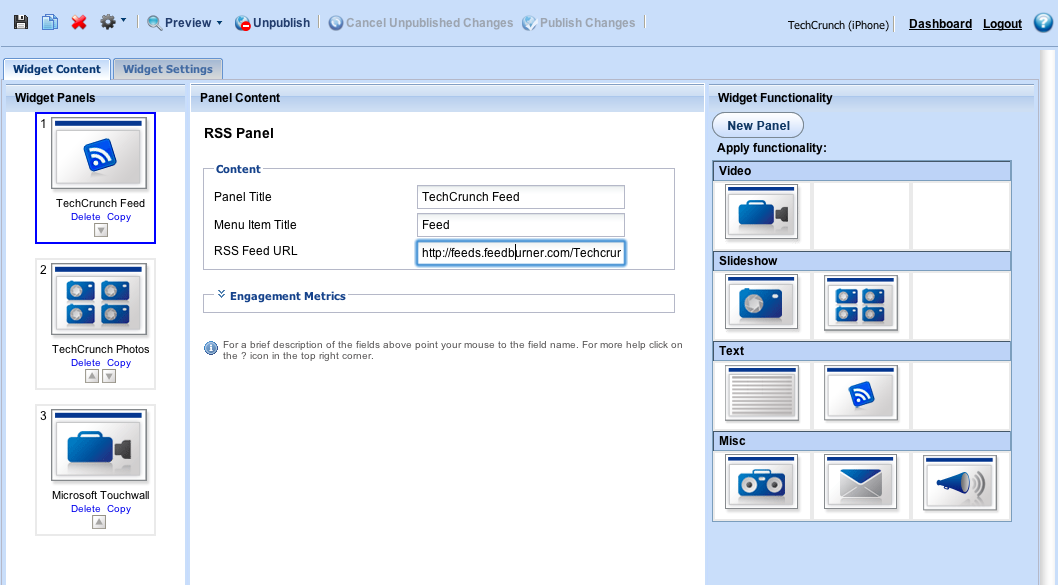
On the con side of things, the fade and slide transitions chug slowly and there’s no way to have a fixed header (every user interaction involves a complete page change). It would also be good to have a point-and-click CSS editor and custom URL mapping.
If you’re a publisher or marketer looking to reach iPhone-empowered audiences, signup for the service’s private beta period here. The first 250 registrants will get in before public release.
Also see MoFuse, a service for porting websites – and blogs in particular – to the iPhone. More serious developers can also use frameworks like Safire
Consumer-oriented alternatives to MuseStorm include WidgetBox, Wix, and Sprout (although good luck getting the latter two working on the iPhone; they’re based entirely in Flash).