April 9, 2008

YouTube Updates Layout, Now With Tabs And Statistics

Duncan Riley

48 comments »

newtube.jpg

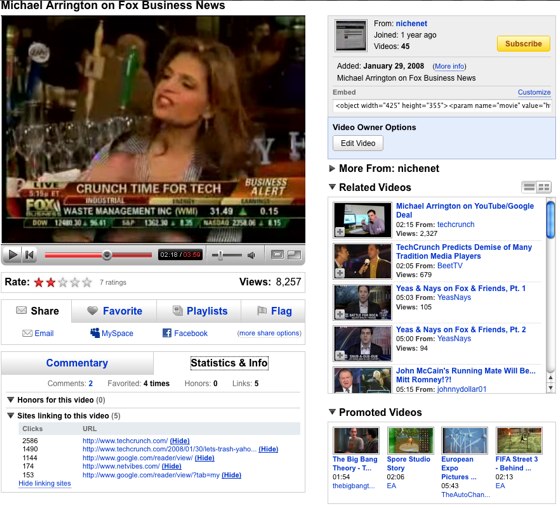
YouTube has quietly launch a new layout on video pages with a new tab focused layout and video statistics (pic above).

The first change in the consolidation of Share, Favorites, Playlists and Flag into a dedicated tab driven box. The share tab expands out to give a more extensive range of sharing options which includes social bookmarking and voting sites (notably including Mixx), the ability to post a video to a blog, and send to the friend via email.

Commentary (comments and video responses) is now offered in a tab next to “Statistics and Info.” Statistics provided are video honors (YouTube awards) and video referrals. It would appear that users can hide site referral statistics but they are turned on by default, at least for existing videos hosted on YouTube.

(thanks to Rahul Kumar for the tip)

  • Sphere It

Trackbacks/Pings (Trackback URL)

  1. » New YouTube UI
  2. Actualizaciones Menores en Youtube.: Tecnologias-Creativas
  3. Youtube update layout | zoomz - Alles over internetvideo
  4. din zona de video sharing… » Scarlatescu.ro
  5. Thai Brothers Sharing » Blog Archive » User Interface Updates at YouTube
  6. digacultura.net
  7. YouTube Adds Referrals, Changes Layout « NewTeeVee
  8. YouTube con nuevo diseño, tabulaciones y estadísticas
  9. TechCrunch Japanese アーカイブ » YouTube、レイアウトをバージョンアップ、タブと統計をサポート
  10. Youtube cu layout nou | above the rim
  11. Youtube Stats and Layout changes | Entropy
  12. Another Round of YouTube Changes « Internet Marketing Blog by NoonanNight
  13. Cambios en la interfaz de Youtube
  14. April 11, 2008 | TechTV Update
  15. Blastr.tv » Blog Archive » Blastr EPISODE 35 - Flickr, now with Video
  16. Google blog» Архив блога » User Interface Updates at YouTube
  17. Blastr EPISODE 35 - Flickr, now with Video
  18. Blastr EPISODE 35 - Flickr, now with Video : Teen Bloggers Network | The First and Original Blogging Network by Teens for Teens
  19. » Links For May 13, 2008 » InsideGoogle-part of the Blog News Channel

Comments

RSS feed for comments on this post.

  1. nobosh.com

    Still no revenue answer.

  2. browse

    unnecessary bigass buttons?

    it screams LOOK AT ME IM THE ORIGINAL WEB 2.0!

  3. hunter

    hi duncan -

    the referral stats have always been part of the display so just a new display there, not new info.

    one additional note about the new sharing changes - they are now also contextual to the logged in user, so for example, if you use Digg a lot but not Facebook, Digg will be elevated to a persistent top-level display instead of Facebook.

    There are some other small changes around the site but i’ll let you and the users find them :) or just wait for our post on the YouTube blog

  4. Derrick

    They probably are leveraging on Google’s expertise for all those site statistics and referrals.

  5. Jon

    Wow… all I need to do is add tabs and statistics to a website to get an article written by TC about it? (running into the basement)

    Jon
    http://dreamclue.com …get the message!

  6. Mystery CEO

    haha Jon - funny…

    for anyone actually USING youtube to generate traffic and earn revenue (like me) - the stats are cool, the new interface is nice too - not sure if it’s all that big of news though.

  7. Duncan Riley

    Jon
    when your the largest video site on the planet, yes.

    Hunter
    never noticed them before, oh well.

  8. Peter Vidani

    They’re devoting exactly 25% of the screen captured area to the video, excluding the video controls, if anyone was curious.

  9. YouTube Power User

    One more little change:

    Now selected videos have the option to view either “Standard” or “High” quality version. This option is not new, but in the past it was displayed in a text notice right underneath the video, now it is in the shape of a small TV icon.

    For instance, go to YouTube home page now, click on the “Jennifer Connelly in charity: water” video, and right under the video player you will see a little TV icon, click on it, you get the option.

  10. Sunil

    Nice change.

    Stay updated with Technology

    http://feedshub.blogspot.com

  11. 113.com

    Nice.

  12. Will

    Just updated my youtube video only script:

    http://userstyles.org/styles/4051

  13. amay

    youtube video nice

  14. amay

    Commentary (comments and video responses) is now offered in a tab next to “Statistics and Info.”is error

  15. amay

    I like it

  16. artip

    this layout is so ugly. it was good the way it was clean and efficient. no huge buttons cluttering your screen. is there an option to keep it the way it was?

  17. Rushabh Choksi

    Wow! I had logged in the morning and didn’t notice the change.

  18. web hosting

    I like the video statistics display & the sharing options ability to post a video to blog.

  19. John

    Finally, a tool for the producers. Wonder how many people watched these videos of Ashley?…. Oh no, the second one is not on Youtube.

  20. vjczar

    I love the new look of YouTube! Cool!

  21. vjczar

    Go YouTube! Get modern!

  22. Jon

    @6: Mystery CEO

    Take a look at Revver, Viddler, Metacafe and especially TubeMogul.com for ease of uploading if you are in the “video revenue/traffic generating business”… youtube isn’t the only game in town and I can say these other sites give me more direct traffic then youtube.

    @7: Duncan

    #1 at something huh? No problem… give me a few years ;-)

    Jon
    http://dreamclue.com …get the message!

  23. Will Johnston

    The thing that I noticed was that none of the sharing options listed are Google owned. (At least, I don’t think so; I don’t really keep up with Furl).

  24. Will Johnston

    Oh, and Mike, you look a lot better in that screen cap than you do in most of your pics ;)

  25. Angel

    i don´t like the update.

  26. Death Star

    I really dislike the new look. The old look was so much easier to navigate and use. Why did you not tell us YouTube? Is there a way to go back to the old version?

  27. Andres Santos

    I also noticed that the boxes’ title color got screwed on youtube’s personal pages (www.youtube.com/asantos). They are all #000000. Hope they fix the glitch soon.

  28. Tom Pilsner

    If you like Youtube, then you must check out TubeSucker - YouTube Video Downloader. You can download it here.

    http://www.newrad.com/software/tubesucker/

    It does everything. Batch Download videos, Batch Converter to all formats like MP4, MP3, FLV, AVI, MPG, 3GP for cellphones, etc. You can also edit the videos, and send clips to your friend’s cellphones. Easily email youtube video links months later, as the links are stored in TubeSucker’s database. Batch Download videos of you MP3 Collection with one click.

  29. mirPod

    How to search and watch to videos from YouTube in a different way : this is mirTube (Beta version):
    http://www.mirpod.com/mirtube_videos/