Yahoo Maps Get More Local
by Erick Schonfeld on March 6, 2008


yahoo-maps-sushi-small.png

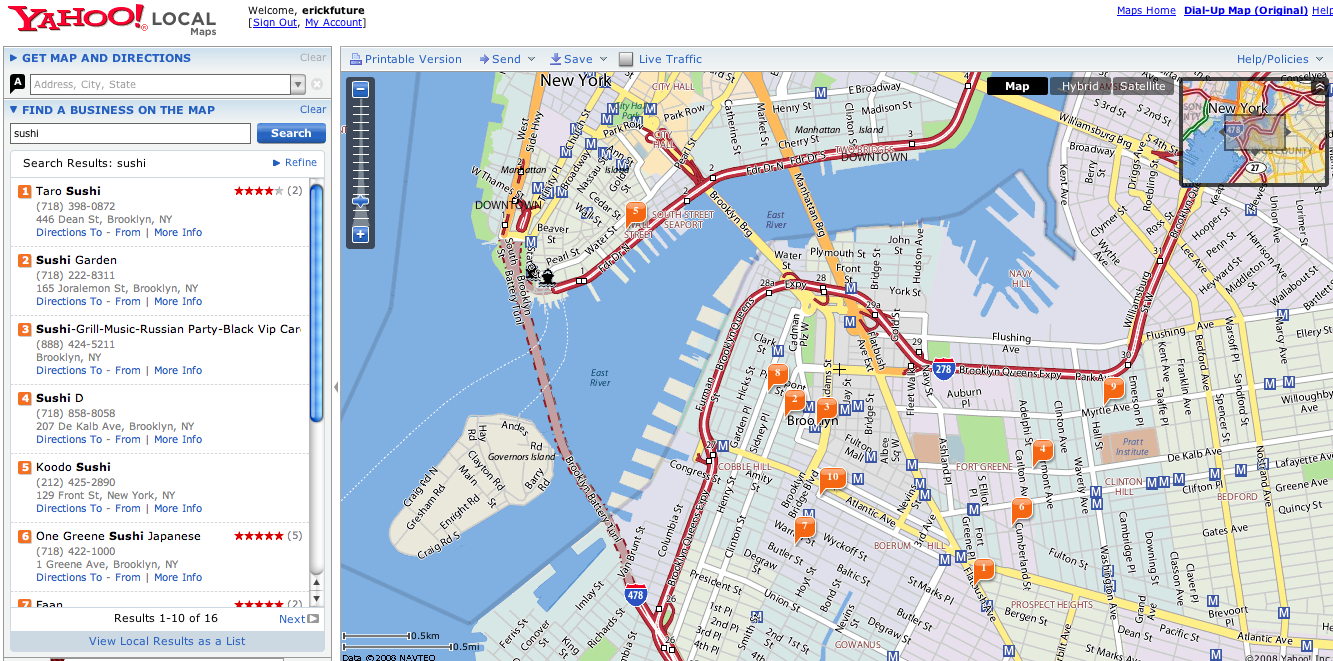
Yahoo released an update to Yahoo Maps with more data at the neighborhood level. The Yahoo Maps team added 12,000 new neighborhoods in 300 cities. The maps now denote neighborhood boundaries with subtle changes in the background color. And points of interest such as schools and subway stops are marked.

Yahoo Maps has always had a different look than Google Maps, but these changes help define that difference even more. The background colors are lighter and there is an attempt to provide a lot of information visually. I like being able to see the neighborhood boundaries, but there is a risk of being presented with too much information. The best UI for maps is to keep it simple and then offer different layers of information that can be turned on or off depending on what you are looking for. That said, too much information is better than too little. I’ve become completely addicted to online maps, even in my car.

What can Yahoo (or Google) do next to make their maps even more indispensable?

Advertisement

Comments rss icon

  • what is next for yahoo and google – i would say live traffic updates (no later than 5 mins gap ) that would do wonders for both.

  • What’s Next? One of them (Yahoo! or Google) should allow me to send directions from my computer to the XM navigation system in my car. Now that would be awesome.

  • yahoo does have live traffic, im looking at 4 minute gap right now no yahoo

  • Yahoo maps is suspiciously like Google Maps. I wonder whether this was a deliberate ploy to take attention away from MS’s offer?

  • this neighborhood thing is awesome, way more detailed than google maps

  • Live Maps is way more superior then yahoo or google maps…

  • “The best UI for maps is to keep it simple and then offer different layers of information that can be turned on or off depending on what you are looking for.” – The best example I’ve seen of this is Mammoth Mountain’s Interactive Flash Trail Map: http://www.mamm...ail_map/map.cfm

    Click on any of the menu options on the bottom of the page to add/remove this feature from the map.

  • @2 Mikel said:
    “One of them (Yahoo! or Google) should allow me to send directions from my computer to the XM navigation system in my car.”

    The terms of use (at least with Google) prevents that from happening because of their terms with Navteq. Navteq provides a lot of the gps directional systems on the market today. If Google permitted that, it would be easy to build a free product that undercuts Navteq’s business.

    From http://www.goog...terms_maps.html:
    “Except where you have been specifically licensed to do so by Google, you may not use Google Maps with any products, systems, or applications installed or otherwise connected to or in communication with vehicles, capable of vehicle navigation, positioning, dispatch, real time route guidance, fleet management or similar applications.”

    What sucks is that the limitation in doing that has nothing to do with sufficient technology, it’s strictly a data licensing issue.

  • Wow did they just lose a lot of credibility with me! They completely messed up Chicago’s neighborhoods. Whole areas have been wiped off the map, boundaries bizarrely redrawn, new names given to some areas, and other shocking errors. Looks like I’ll be turning to Live Maps or Google Maps from now on. Yahoo! Maps cannot be trusted.

  • I am happy lately about all good review on new yahoo products….seems in all the clouds of ms-yahoo deal, yahoo is progressing well.

  • What can Yahoo (or Google) do next to make their maps even more indispensable?

    How about provide bicycle directions based on bicycle maps/lanes?

    Please sign the petition if you’re down:
    http://www.peti...r/petition.html

    More info available here:
    http://googlema...sbikethere.org/

  • Yuck. Y! Maps still seems to rank bottom on my list of mapping sites.

    The road map UI still seems akin to the 90’s.

    There’s no way to make personal maps, or any advanced tools to customize with.

    The graphical ads, like you guys said are annoying.

    And when you zoom in too close, you lose site of any business listings, even if Y! did show it a few zooms higher.

    Live Maps is far better. It does all the good stuff that Y! Maps does (if there’s any) and has other extra features.

    And Live Maps also does a lot of mapping updates, as they say on their blog a lot. Though DS doesn’t mention it much.

    I only like Y!’s marked points icon. That’s it.

  • I like it, although I still think Microsoft Virtual Earth is the best.

  • Didnt Yahoo and BMW do a demo a while back where you could send directions to your car’s GPS?

  • Actually it was Google and BMW. Here is what I found on a quick search: http://googlebl...end-to-car.html

  • that’s a good question, Erick… I’m completely blown away by online maps now-a days… some times on the interstates around the twin cities i’ll see people with map-quest maps printed out… i want to cry for them. i know their experience in perusing those directions was miserable… why aren’t they using google, yahoo, or even ask… all seem a century more advanced than the old crap maps of yore….

  • omg, thank you for sharing!! Would you love to view my cute photos online? If yes, welcome all here to search ‘xhot’ at mixedfriends . com.

  • iwas trying to fine a map so this sit did not help if anyone has a map please send it to me
    thank you bet

Leave Comment

Commenting Options

Enter your personal information to the left, or sign in with your Facebook account by clicking the button below.

Alternatively, you can create an avatar that will appear whenever you leave a comment on a Gravatar-enabled blog.

Trackback URL
bugbugbugbug
Techcrunch on Facebook