 Semantic search applications are finally starting to gel this year. Tonight, Adaptive Blue is releasing the latest version (dubbed Indigo) of its FireFox add-on, Blue Organizer. Put simply, Blue Organizer lets you surf things instead of Web pages. It recognizes when a Webpage that you are browsing is about certain classes of things: books, movies, music, stocks, recipes, restaurants, blogs, wine, clothing, electronics, celebrities, musicians, hotels. And it creates shortcuts to other Webpges about that same “thing” (or object). If you are reading a book review on a blog, for instance, Blue Organizer will let you jump directly to the page on Amazon about that book, or AbeBooks, Alibris, Barnes & Noble, eBay, and more. You can also go to a custom Google page that only searches book reviews for that book. For each different class of things it recognizes, you get a different set of contextually-relevant options.
Blue Organizer was developed by Alex Iskold, a frequent contributor to ReadWriteWeb. He raised $1.5 million from Fred Wilson at Union Square Ventures back in February 2007, and is going to try to raise a B round soon.
 Baked into Indigo is semantic search technology that acts more like a discovery engine than a traditional search engine. It is limited in what it can recognize, but it does recognize certain things and concepts and matches those with other Webpages about the exact same thing. You never have to go to a search engine, you just have to surf the Web and hop from concept to concept. The software can make inferences about entire Web pages, text inside those pages, and links inside those pages.
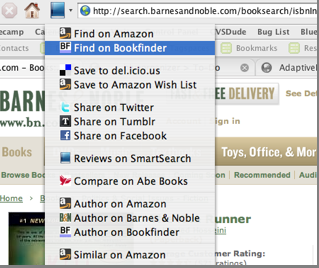
When it recognizes that a Web page is about a book, a movie, a recipe, or some other thing, the Blue Organizer icon at the top of your browser changes to an appropriate image (book, movie reel, chef’s hat) to indicate that it has identified an “object” on the page. And it offers a series of appropriate links, such as the Amazon page for a book or a list of reviews, as well as other links based on the way you use the Web, such as “Save to Delicious,” “Share on Facebook,” or “Digg This,” options. The software studies your Web history to surface links to Websites you already frequent. And Adaptive Blue has created a customized Google search engine for each class of objects it recognizes for more relevant search results.
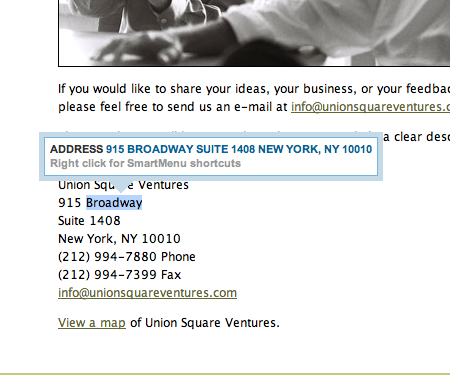
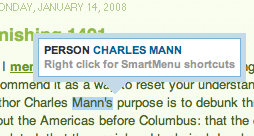 Within a page, if you highlight the name of an author or a movie, for instance, a little SmartMenu box will pop up with links about that person or thing. If it recognizes the name of a book or restaurant that is already hyperlinked, a little blue folder icon will be embedded right next to the word. Click on that, and you get a bunch of associated “SmartLinks.” The SmartLinks also appear in search results pages, much like the Stumbleupon icon does when a you have the StumbleUpon Firefox add-on and you come across search results which have been rated by that community.
As with the previous releases of Blue Organizer, you can also save objects in the slide-out sidebar. This is a bit different than just saving links because you define what kind of “object” you are saving (blog, book, image, stock, toy, etc.), and you get the associated SmartLinks, custom search pages, and other categorization that goes with it.
Thinking of the Web in terms of things instead of Web pages does not come naturally. I installed the old Blue Organizer add-on more than a year ago, and have maybe used it twice. It was too advanced and didn’t fit into the flow of how I use my browser. (It is not just me—the add-on has been downloaded 1.3 million times, but only a couple hundred thousand people use it actively). The new features in Indigo, however, surface the utility of the application implicitly as you surf the Web. You don’t have to remember to save anything. You see a little blue folder, click on it, and get helpful links about that concept. You see the toolbar icon change, and you click on the pull-down menu to do something useful.
Complex apps need easy entry points, and Indigo has plenty of those. There is a lot more to this app than I can go through here. It makes it easy to create smart widgets, supports microformats, recognizes common names and addresses, and lets you highlight any text and send it as a message on Twitter, Tumblr, or Lijit. You can find more details on the Indiigo release here and here. Check it out and tell us what you think.