January 9, 2008

Xobni: The Super Plugin For Outlook

Nick Gonzalez

71 comments »

xobni_logo.pngAnyone who depends on email to work, knows how surprisingly bad Outlook is when you get beyond about ten contacts; conversations easily become jumbled, and keeping contacts up to date can be a pain. Xobni’s Outlook plug-in solves these problems with a sidebar that automatically tracks contacts and organizes emails into fully searchable threaded conversations linked back to those people. They were a TechCrunch40 startup - see our coverage here.

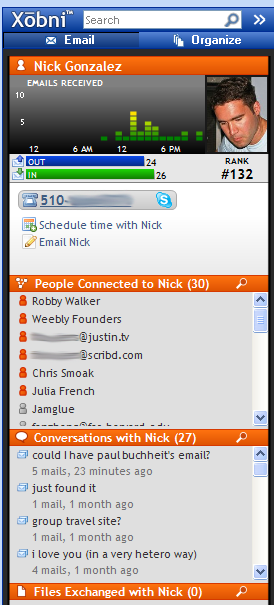
xobni_screen.pngBeing the only guy with Outlook in the office, it’s been a personal favorite of mine. Xobni’s sidebar has improved Outlook for me by offering faster search, and automatic organization of my email and contacts. Their search function alone has saved me time by just being faster and more comprehensive than Outlook’s native search. Emails can be searched as independent threads or viewed in the context of a contact’s profile (pictured right). The profile shows basic contact info (automatically updated) and a full history of threaded conversations, files, and people they’re connected to (the email “social graph”).

Today Xobni is greatly expanding their closed beta by adding everyone on the waiting list (14,000 people). They will also be giving each registered user 5 invites to give to their friends. However, 200 TechCrunch readers can download the program by entering a special invite code , ‘techcrunch’, here as well.

The latest version is the product of three more months of work, which includes speeding up the algorithms, usability improvements, and the beginning of web integration. No, it’s not the anticipated webmail version of the tool, yet. Xobni’s first step is to search the web (via Yahoo) while you search your email in an effort to find more information about what your query and provide a possible revenue source through referrals.

  • Sphere It

Comments

Interesting stuff (other than inbox spelled backwords)…


Tried their beta, turned it off after few days. It took a while to load especially when you have large number of emails. Also most of the data on xobni are not that useful. Outlook by itself serves it purpose. Unless Xobni provides networking elements, I personally do not see the purpose behind it. Then again with Yahoo Life, and Gmail Email Network, to have a purpose Xobni will need to add better networking elements.

Sidenote: I am not sure how they can monetize their product. At least I don’t see it now.


Right, load time was dreadful.


This is Gabor from Xobni. Thanks for the nice writeup. We’re excited to be adding all these users now.

Chris: We’re experimenting with various monetization strategies, out of which web search integration is one (see our blog post). Web search is easy to monetize because you can share revenue for ad clicks with the big providers.

We don’t want to make Xobni yet another social network, but watch out for more networking features soon :-)


Suddenly I can make sense of my contacts! And find files much more quickly. Thanks for a great product


Real value add will be in the web integration. Xobni can be a great product if they can somehow extend their analytics model to other web based communication tools.

There is a great potential in making Xobni fun tool to improve productivity.


I guess I am going to have to try this out. Thanks for the heads up.


The social network part was fun to look at but I uninstalled it because it was too slow and I couldn’t figure out how to use it in a way that helped save me time. I do think that it could turn into a useful product worth trying again if it incorporates some of the features these other startups are doing in Outlook: http://gigaom.com/2007/11/28/outlook-add-ons/. One request for the Xobni team - please don’t put Yahoo or Google ads in my Outlook!


The Mozilla’s (ie., Foundation + Corporation) were able to monetize like $100M a year from Firefox… (though, of cos, after it’s been downloaded half a Billion times, and with particular blessing from Google for search referral fees)…

But, in any case, the future belongs to both the Webtop, *and*, the Desktop.
It’s also obvious that Desktiop 2.0 will pick up soon.


Can Xobni put Yahoo or Google ads into Outlook? Presumably YPN and Adsense are not allowable into Windows clients in general (than than web search in firefox, per google’s double standard.)


>(than than web search in firefox, per google’s double standard.)
(other than web search in firefox, per google’s double standard.)


Just installed and, first impression, great little app. I’ll give it another week to gauge my usage in a normal environment to determine if this stays or goes.


I tried it, and had it installed for a while, but it seemed to slow things down. I did like the “Files Exchanged” box, but found the rest didn’t offer much. And it really did seem to slow things down.

I’ve switched to Thunderbird anyway now, Outlook doesn’t offer much for me. Thunderbird allows me to see threaded conversations, and (with add ins) keep my Google calendar linked, which I use all the time.

Geoff


Change, you want me to change? Eh!

Looks like it could be cool, but it isn’t from MS……o well


Wow, this is fantastic. This is the organizational solution I have been looking for for a long time. I am blown away by the intuitive way it pulls disparate information together: files exchanged, scheduled meetings, current conversations, one-click calling…amazing.


I installed it and liked it a lot… except that my outlook plugin SyncMyCal (gmail -> outlook sync app) quit working. Dunno if it’s a xobni prob or a SyncMyCal prob. Also, it seems to keep outlook from shutting down properly.


Xobni rules. The fact that a small startup can take Outlook from crap all the way to “pretty good app” is incredible. If the Xobni team has a few minutes, can you also make Word, Vista, and Powerpoint not suck. MSFT should pay you guys to write this stuff.

sweet.


I think Xobni is simply amazing .. if u can stop clicking on different emails to check out their ranks :-)

Cool product .. definitely recommended!


All I can say is ..all plugins sucks with Outlook..I have tried many plugins..but found nothing good.


Jeff,

How is Outlook crap? To tell you the truth Microsoft Office product is one of the best products Microsoft has put out. Vista is a complete different story. Even Mac is trying to match their iwork with Office especially Word and Excel. Apple’s version on Powerpoint is actually really impressive, but to call Outlook crap is really immature in terms of technology. Xobni just provides few additional tools to Outlook, even that, only a number of those tools from Xobni are useful, the rest you can live without.

Jeff, can you explicitly detail what feature from Xobni are simply incredible. Personally I do not find anything great. But that is just my view.


Can you expand on the “webmail version of this tool”?


It sounds like all Xobni does is Outlook more Gmail-ish: “faster search” and “organizes emails into fully searchable threaded conversations.”

If that’s the case why would I add a potentially buggy beta add-in to an already buggy Outlook, when I could just use Gmail? Plus with Gmail you don’t have to worry about oversized .PST files (arggh) and backup.


as i wrote about before, xobni killed my outlook every time - they sit in active ram even when outlook isn’t running - i could never close outlook without removing the service each and every time and it pushed outlook to higher amounts of ram when xobni was running.

when i removed xobni, all the issues above immediately disappeared.

http://www.centernetworks.com/.....ram-sucker


Allen, I had exactly the same problem. Unless they don’t bog down Outlook, I don’t foresee them impressing many people. At the same time I wonder how can so many people be totally impressed by the product. Even if it weren’t so slow, it definately didn’t “revolutionize” my in-box.


Ryan - you have to remember that most of the office world are tied to Outlook as their “corporate solution” - therefore anything that makes it better (and it’s not bad in itself) is going to be well received…


Nobody ever said integrating with Outlook was going to be easy. It is a tough battle, but we think it is worth the fight.

We’ve made massive improvements to the performance of our application since our early beta was launched at TechCrunch40.

We have a lot of happy users who are using Xobni for 4,6,8,10 hours/day. As we continue to improve we hope to fix the problems some users have seen.


The special code,’techcrunch’ is not working anymore. I tried downloading and it tells me that the code’s use has surpassed the number of times allowed. Does anyone have a different code that I can use?


great tool, but to slow… it takes a long time to load..
hope it gets better


I’m only slightly amused by the people who bitch about software that is in BETA screwing up their system.


Nick,

You mention in your article that you’re the only one in the office that uses MS Outlook. What does everyone else use to manage their email?

Kevin


Maybe you should just try learning how to use Outlook properly? This bloatware offers nothing Outlook doesn’t do natively. RTFM…

SSabmud
(that’s Dumbass spelled backwards)


Why Outlook sucks:

(by request for “Chris”)

Chris, it is not controversial to say that Outlook sucks. But if you need a list, here we go.

1) Outlook Search is terrible. As others point. Cumbersome, slow and clumsy. Xobni fixes this.
2) Outlook threaded conversations are weak, and when you use them, they are slow. Xobni fixes this.
3) Outlook address book is clumsy. It can passively collect emails from people to whom i send and receive, but it makes a mess of my addressbook in the meantime.
4) Attachments with Outlook and basically all email is clumsy. Xobni makes this MUCH better.
5) Outlook doesn’t “get” relationships of people I am emailing. Xobni does.
6) If I am in Sales or partnerships, Outlook doesn’t make me “smarter”. It is just a giant list of emails. Xobni does make me smarter. It helps me know when and what is going on with key people in my business life.
7) Outlook is slow where it matters. When I sort or search, Outlook is slow. Xobni may add some time to load, but when you use Outlook it dramatically speeds things up.
8) Outlook is socially stupid.

Anyway, I think we could get everyone to chime in here with why Outlook sux.

Xobni is a beta, but it already makes Outlook better. I was at a conference recently and watched a guy in front of me with Xobni running. His words, “Xobni is the new Crackberry”. (he was a VC it turns out).

Lastly, to the person that said, “Why not just use Gmail?” For 350M users, Exchange Server makes using Outlook necessary. And, even companies like, say, Yahoo! users Exchange + Outlook (much to the dismay of many employees who would prefer to use Y! Mail Beta).


So what’s keeping Microsoft from integrating all of Xobni’s functionality / features into the next version of Outlook?

(By the way, from what I’ve seen of Xobni so far, I think it’s pretty cool!)


I use it solely for the Files Exchanged functionality when viewing a contact. The days of manually checking individual emails for a spreadsheet sent last year are long gone.


Xobni looks great, though I’ve heard it crashes or slows Outlook often - too frequently.


product looks awesome - please give me the option to remove the web search part of the search. it’s unnecessary.


I’ve started to use Xobni on my work computer. I very often deal with 20-30 emails involving a particular topic (which I may have to refer back to 3-6 months down the road).

Xobni can definitely help out in this respect, as long as you know who sent the original email to you. I would much rather prefer the “conversations” tab to work on a per-subject basis (by parsing out RE: and FW:). This way, if I was looking at a particular email I could quickly see all of the related messages to this email (a threaded conversation view would make me jizz). Yes, I know Outlook supports something similar by default (”Find related messages…”) but it only works for your primary account - I happen to have 4 mailboxes open.

Xobni’s working well within this 4 mailboxes as well - it works as you’d expect, understanding that although the from header reads a different title (not my name) it is still an email from me.


I’ve been trialing the Xobni product for a few months now. I’ve realized a massive time savings / ease of use in finding attachments, looking up phone numbers quickly, searching for old emails and threads. The Xobni guys are getting it right. Keep it up…


I’ve been using Xobni for a few months, and I haven’t noticed it causing my computer to slow down.

The most useful Xobni feature for me is ‘Files exchanged with this person’: you click on a message in Outlook and see all the files you’ve exchanged with that person. This feature saves me a lot of time.


28: hey Hernan Parra , I can send you an invite..give me yr email address..mine is ’sachinjain99 at gmail.com’.

(I am trying Xobni,lets see)


I’ve tried xobni for 2 weeks. It works great:
- It recognizes easily threaded conversations
- I loved the people list who haven’t been in contact with you for a while

but I had few issues (already reported to xobni team):
- Outlook doesn’t close correctly my PST file with xobni in place (thus everytime I started MS OUtlook I had to wait to repair it … and it takes ages)
- Xobni does not understand company picture attached to the email signature. So for every email in my inbox I had x times the same attachment (completely useless) so any useful attachment is lost within tons of the same picture
- Display Options: It will be nice to have the ability to select/de-select section/panel to display. For instance: hide organize tab, hide appointments, etc.
- RSS Feeds: One of the major drawback with Outlook 2003 there is no RSS Feeds reader. Instead of installing many readers including this into your tool would make my Outlook experience better.


PLEASE SEND ME AN INVITE!!

Oh my dear lord, I have wanted something like this forever. I am one of the last people using outlook and this would help me greatly. I used to use thunderbird but at the office outlook is so much more practical.


Useful and it works.

No noticeable issues under Outlook 2007.

Thanks for this post!


Can someone send me an invite for Xobni at hkit786atyahoo.com
TIA


This program slowed Outlook down to a crawl and then crashed my computer several times.


Oh, my god, thank you for this. Xobni has instantly changed my life. I’m sitting here getting used to it while working through a project that involves a lot of email back and forth and when I decided we needed a phone call - whoa! there was the number right in front of my eyes.

It installed easily and is working beautifully on Outlook 2007.

With all the other information, this is the best thing that’s happened to me and my laptop in a long time.


someone, please post an invite to ag.uanic at gmail.com

thanks.


xobni is excellent for exactly what it is designed for: people who are wedded to Outlook. There are millions of them (many in the workplace, like myself). Personally I have used thunderbird, evoloution and even others (pegasus etc). At home I generally like Evolution, but it needs to stabilize a bit. Outlook is atrocious when you end up doing 90% of your work out of it (like I do) with hundreds of attachments and 3+ years of correspondence about complex technical concepts that you need to reference frequently. Also as my office seems to be unwilling to use any sort of CRM or Document Management, spreadsheets and email rule the roost here.

for the first time in years, I actually have felt like I can manage my inbox reasonably. It seriously has saved me at least 2 or 3 man hours in the 2 days I have had it installed. It is unlikely I will use it at home as I have gmail, and yes I can in fact do 90% of what it does out of gmail with gtalk thrown in… however if they create a similar plugin for Evolution… (nudge nudge)


Sooo good to read about this beta! Thanks for the writeup. I would give my right eyetooth for an invite — anyone willing to send one?

email is dakuansuper88 [at] yahoo.com


Indeed Xobni is a good plugin…but it should not crash outlook..so Xobni team can work on this..and it will become very popular.


Somebody please send me an invite too at
prateek[dot]ja[at]gmail[dot]com

TIA,
Prateek


This thing is great. I would recommend this to anyone using Outlook. I could not imagine using Outlook without it and makes you wonder why MS didn’t come up with something like this years ago.


Could anyone (hopefully the Xobni developers) shed some light on how this plug-in really works. Can it search for all the emails in my Outlook account even they were deleted (and permanent emptied out) of my profile? or does it just search for whatever currently in my account? Also, does it search in my Archive files too?
This looks very great app and i think it will be very useful to Outlook users big time. Thank you!


I like Xobni… so I removed “lookout” for being redundant. However, I couldn’t completely close Outlook, it just stays in the system tray. I can only kill it by “process explorer”.
Anyway, it’s still in beta, hope it gets fix.


I can’t close the outlook normally and the load time is longer.

I just installed this little app this morning. Except hang once trying to re-maximize Xobni bar right after the installation, everything’s fine so far. I like this app and found it very useful for ppl who have to use outlook at work. With it I can easily find my conversations. I am satisfied with it for the time being.


For developers: I get an “email address or exchange address not allowed” message when updating pictures for some email addresses.
…otherwise… Xobni’s a Fantastic outlook plugin!


Sorry, the comment form is closed at this time.