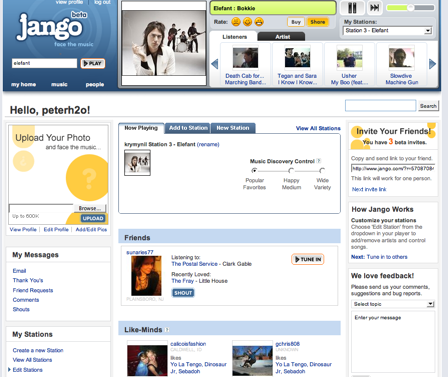
 Say hello to Jango. No, not Jenga, though, that’s a bitchin’ game to play when you’re having a few tasty beverages, but I digress. Jango is a fresh and interesting spin on streaming radio. It brings a social networking dynamic that can be found elsewhere, but it sets itself apart from the rest of the pack because of its music-centric nature. The social network is just an added bonus. As you can imagine, you have the option to add friends and listen to their playlists or ‘tune into’ their stream whenever you like. Build a rockin station and see who is listening in, but don’t stalk them. That’s just weird. Well, you can stalk their stations, but not the people. Editing your stations is neat since you can add artists to an existing station or delete suggestions from Jango and then rate songs from each artist so you hear what you want to hear and not what you don’t.
Another outstanding feature is the simplicity with which you navigate and interact with the site. Have an artist you need to look up? Type it in without ever signing up and you’re already streaming. It is really easy to further customize a station by checking off similar artists that you like or don’t like. You can even rate songs individually from each artist. There are 200,000 songs (and growing) in Jango’s catalog, and 10,000 artists from all the major and independent labels. I also like that new windows don’t pop up when you navigate from one page to another and your stream of music is never interrupted
What I like the most about Jango is the ‘similar artist’ algo that’s being used. It just works. I get to listen to artists that are ultimately in the same league as the artists I like. For example, I like the Brazilian Girls and Jango spits out artists that are similar unlike Pandora, which gives me music from Brazil. WTF?! I don’t want music from Brazil, you jackass music genome.
Now this isn’t to say that Jango is perfect. It’s pretty damn close and it’s only in Beta so you can see what is possible for the future. The artist base is constantly expanding so bug the Jango folks about artists you can’t find. That’s the gloriousness that is Public Beta. Another thing I’d like to see is a ‘previous list’ of songs, like, the last five tracks, which I’m told is in works as we speak. Because we love you so much Jango, an angel-backed startup based in New York City, has agreed to give us unlimited invites for all TechCrunch readers right here. The general launch is on November 12th, and look for embedded apps for Facebook and Myspace after that.