
We’ve always known that Google has wanted to challenge Microsoft’s desktop dominance in a number of areas, but to date we didn’t know that extended to gaming.
Hidden inside Google Earth is a secret Flight Simulator that takes full advantage of Google’s extensive satellite imagery.
To access the hidden feature, open Google Earth and hit Command+Option+A (note it must be capital A) or Ctrl+Alt+A if you’re using a Windows Machine.
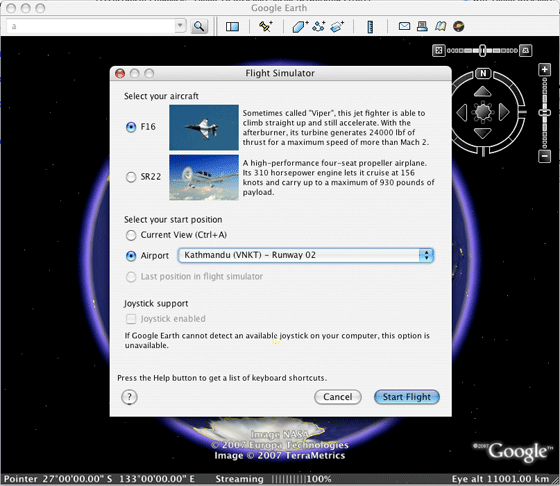
The Google Earth Flight Simulator comes with two aircraft options, a F16 Viper and the more manageable SR22 4 seater. Players have the option of commencing the game from their current location in Google Earth or can pick from a list of pre-determined runways. Control instructions can be found here.
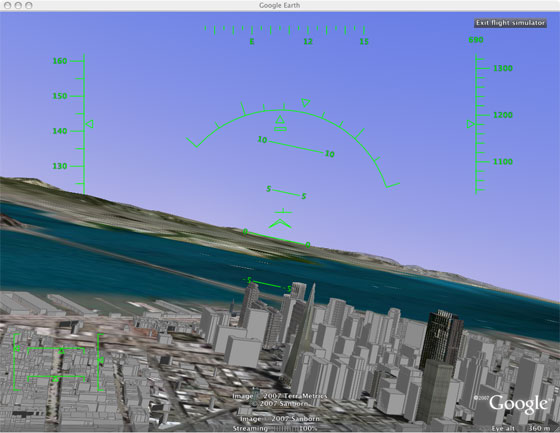
Overall the game play is fairly simple in terms of control, but the striking difference is flying over real pictures of locations. I took a quick flight from San Francisco International, headed North to the Golden Gate then turn back over the city before heading towards the Valley. It wasn’t perfect, but it was as good visually as the paid Microsoft Flight Simulator, and in terms of actually presenting real objects it was better.
Thanks to Marco for the how-to.


That’s pretty neat, and kinda scary from a perspective of all that Google does and knows.
Wow, that sounds totally cool, I guess I’ll re-install the google earth.
Mike, you did not fly *under the Golden Gate?
I mean Duncan
This is really neat. However, on the Windows machine I tried this, the command to activate the Flight Simulator is Ctrl-WindowsKey-A (and there’s no need for a capital A).
acutally all you have to do is go to tools on the toolbar at the top and its in the dropdown bar
its not all that complicated as they make it seem on this website
Wow that looks awesome, I’m gonna have to go install google earth now.
Zoli,
no, I was flying the F16 at the time and I couldn’t get it that low, later perhaps
That’s been in there for quite some time hasn’t it? I recall flying something exactly like it before, last year or when Earth first came out for the Mac.
PXLated
not that I’m aware of. It’s a traditional Easter Egg as well: it’s not easy to find unless you know what to press.
jai envis d apprendre a voler pour ce la
It doesn’t work for me with version
Google Earth
4.0.2742
Build Date
Mar 13 2007
Build Time
13:43:16
Renderer
OpenGL
Operating System
Microsoft Windows XP (Service Pack 2)
Video Driver
ATI Technologies Inc. (00006.00014.00010.06568)
Max Texture Size
2048×2048
has anyone tried flying around the world yet?
Yes, I did. Because I have that much time on my hands.
I didn’t manage to do it though, because I worked out my route first of all, with all the places i would start/stop each day, and as these locations were in my ‘My Places’ folder, and i forgot to CONTINUALLY CREATE BACKUPS, i lost all of them when GE crashed AGAIN. It is not very stable for me.
Yeah – I just did a circumnavigation from my home town (Brisbane Australia) north-east across the pacific over Mexico, central USA, Canada, Iceland, around the pole, then south east over Greenland, Ireland, England, France Switzerland, Italy Egypt, Arabia, Ceylon, Indonesia, and back over Australia to Brisbane.
I just paused it each night or when I wasn’t at the computer, and tracked my lat/long on Google maps to keep an eye on my course.
It’s not a trivial task, but the extra effort required makes it a lot of fun.
Hint: You need to adjust the trim of the aircraft to keep it above 700 knots.
I stacked it landing back at Brisbane airport. No one was hurt though
on vista its Ctrl+A (no Alt)
and i think the controls are lame, i feel myself drunk:) actually after some point you cannot control it and what you can only do is to prevent it from moving to the directions u dont want it to go so that it ‘may’ end up going where you want:)
Very Cool! Kind of hard to control with a keyboard though. Now if you could network with your buddies and chat with them in their own aircraft this would be awesome.
Watch out Duncan, I just took off from Sydney in an F16, there’s a good chance I’ll be crash landing somewhere!
Awsome they picked the Cirrus SR22– Great “newer” Company — I met Alan Klapmeier in July — great “people” – a real business success story.
It’s not much of an Easter Egg if you can find it by going to “Tools | Enter Flight Simulator”. As for it being as good as FSX, don’t think so. The graphics don’t compare. Yes it is nice that it incorporates real sat images and objects but there is a long way to go for it to become a real flight sim.
Dave
that option isn’t available until you open the Easter Egg, I checked prior to running it. As for the Windows commands, apologies, as you can see from the screenshots I tested it on a Mac, I’ll take the various commenters word on it.
i think this does not work with this version 4.2.0181.2634 (beta)
Very Primitive, jerky, … I don’t like it or Gaggle!
http://fakestev...er.blogspot.com
rebby
I’m running the latest Mac version, not sure about older versions.
I just updated Earth to the latest version, and after installing I could not get flight sim to work. Pressing Ctl-Alt-A did nothing.
Then I tried something. I completely uninstalled, then re-installed. The first time I had unchecked the box next to “Can Google collect use data?” This time, I left the box checked.
It worked. Google is using this nifty flight simulator as reward/bait/compensation for allowing them to spy on us!
Check out this YouTube.com Video on the Google Earth Flight Simulator:
http://www.yout...h?v=O7z6Yxs69rQ
GE for you if you have google-analytics.com in adblock
The Flight Simulator controls are limited, simplistic.
@tom
i just installed it with “Can Google collect use data?” unchecked and it worked
i don’t think so it will work with old version mac
its crashed. its tragedy for ne %)
Wow. I think this could really be fun, because the majority of people who comment on these things say bad things just to mess people up.
Ctrl+Alt+A is simply
Ctrl+Alt+Shift + a
Why not just write it?
HOLY SHIT!!!!!!!!!!!!!!!! ASSHOLE
Wow thats a cool discovery. Thanks!
You suck balls shit ass! Go and suck sombodys dick. AHHHHHHHHHH! Boom bitch getout o da way! All yall fuckin sycopaths!!!
It doesn’t work on Ubuntu.
This is fantastic! Thanks for sharing this easter egg. I think it works great, particularly considering that Google Earth wasn’t _designed_ to be a flight sim. Try choosing the SR22 and, after takeoff, ease back on the throttle a bit. It’s quite controllable (it flies a lot like the point mass model I wrote for testing at Link Flight Simulation years ago). As you could expect, flying with a keyboard requires a light touch, but it went right under the Golden Gate bridge for me (and it is sorta funny what you see below you when you do this).
Dosen’t work on a Mac, nothing does!
BTW
The brown Zune is the hottest thing out there and it even squirts!
http://fakestev...er.blogspot.com
It’s laughable that you could even compare this to ms flight simulator. Kinda like comparing notepad to office, or paint to photoshop. Sure they both fly planes and use real imagery, but that’s it.
I think that the question is if google some day would be interesting in creating its own gbox…
Surprising game, i’ll install the google earth to try it.
Oh _come on_… comparing this to FS is absolute tripe. What GE has is sat imagery and a few models for specific landmark objects; there is no generic solution for the literally millions of objects which pepper the world at large, so everywhere outside of heavily populated (or popular) areas is a barren wasteland. They obviously had a developer on staff who at some stage had experience making sims and used a sliver of code to represent “flight” over their terrain. It’s a gimmick at best; they know it and everyone else should know it too. A clever Easter Egg, yes. Comparable (as the writer states: (> ) to FS? Not a chance.
Unbelievable I will give it a try.
It’s gonna take me awhile to get used to the controls.
Totally agree with Elethiomel.
While I’m no MSN lover, I’m also no big fan of Google. I feel like I can talk about both companies in an objective way. They both do certain things well and I do believe that Google is a real long-term threat to MSN, however, Google is really a search engine and a giant ad server. That’s it folks. For those that keep hoping they become more — I think you have more time to wait. They are merely going to building advertising delivery vehicles. Sometimes these vehicles will look like reall apps and sometimes they won’t. The flight simulator may create some additional downloads of Google Earth. Google Earth is their long term local ad play – simple as that.
This is cool but don’t let Muslims play it, you know they might get to plottin somethin after playing a flight simulator game, espeically if they can simulate flights through prominent skylines……….
Racist Bastard
suckkkerrrrrrr
It didn’t work for me, I’m running it on my Mac Book Pro, Command + Option + Shift + A right?
On my PowerMac G5, 10.4.10… with the lastest Google Earth available for Mac, it doesn’t work…
is it?
- alt+option+shift+a
- alt+option+a
- alt+option+caps+a
in most case, I hear the grab sound.
Am i alone with that pb?
Running the Linux version 4.2.0180.1134 (beta), I had to go into Tools -> Options -> General and tick ‘Send usage statistics to Google’ before I could get this to run. The keyboard shortcut is Ctrl+Alt+a
How did you get the 3D buildings? I have them enabled in Google Earth, but as soon as I switch to the Flight Simulator, they disappear! Makes flying under the Golden Gate an underwhelming experience…
Same here. very Frustrating
A Flight Sim hidden inside Google Earth. Nice. Thank you.
If interested, can visit Home Owner Insurance Company Rating blog.
Clever, but once again the TechCrunch writers venture into areas about which they know little to nothing. This thing is a fun little toy which in no way remotely compares to Flight Simulator, which is a highly-complex and evolved system capable of training real pilots.
This seems to happen over and over on TechCrunch. You editors must have hundreds of friends and associates. Would it kill you to fire off a quick fact-checking email before making such indefensible–if not ludicrous–statements?
this is great, this will really catch on!
also, you can go to options-general-send usage statistics to google if you didn’t let them have it before.
Lots of suckers out there tonight.
http://fakestev...er.blogspot.com
I got it to work on XP SP2 using Ctrl+a
I enjoy trying to do aerobatics over the runways and making “airshows” and all that fun stuff