
Google Earth’s Hidden Surprise: A Flight Simulator
Duncan Riley
136 comments »
We’ve always known that Google has wanted to challenge Microsoft’s desktop dominance in a number of areas, but to date we didn’t know that extended to gaming.
Hidden inside Google Earth is a secret Flight Simulator that takes full advantage of Google’s extensive satellite imagery.
To access the hidden feature, open Google Earth and hit Command+Option+A (note it must be capital A) or Ctrl+Alt+A if you’re using a Windows Machine.
The Google Earth Flight Simulator comes with two aircraft options, a F16 Viper and the more manageable SR22 4 seater. Players have the option of commencing the game from their current location in Google Earth or can pick from a list of pre-determined runways. Control instructions can be found here.
Overall the game play is fairly simple in terms of control, but the striking difference is flying over real pictures of locations. I took a quick flight from San Francisco International, headed North to the Golden Gate then turn back over the city before heading towards the Valley. It wasn’t perfect, but it was as good visually as the paid Microsoft Flight Simulator, and in terms of actually presenting real objects it was better.
Thanks to Marco for the how-to.
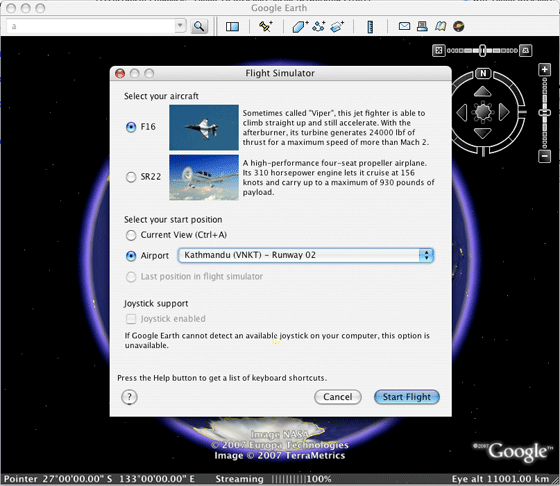
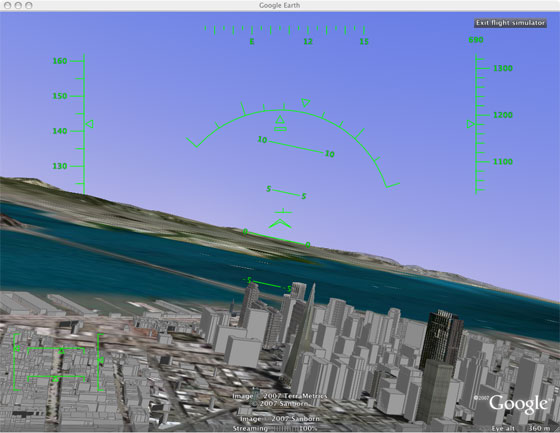


That’s pretty neat, and kinda scary from a perspective of all that Google does and knows.
Wow, that sounds totally cool, I guess I’ll re-install the google earth.
Mike, you did not fly *under the Golden Gate?
I mean Duncan
This is really neat. However, on the Windows machine I tried this, the command to activate the Flight Simulator is Ctrl-WindowsKey-A (and there’s no need for a capital A).
Wow that looks awesome, I’m gonna have to go install google earth now.
Zoli,
no, I was flying the F16 at the time and I couldn’t get it that low, later perhaps
That’s been in there for quite some time hasn’t it? I recall flying something exactly like it before, last year or when Earth first came out for the Mac.
PXLated
not that I’m aware of. It’s a traditional Easter Egg as well: it’s not easy to find unless you know what to press.
It doesn’t work for me with version
Google Earth
4.0.2742
Build Date
Mar 13 2007
Build Time
13:43:16
Renderer
OpenGL
Operating System
Microsoft Windows XP (Service Pack 2)
Video Driver
ATI Technologies Inc. (00006.00014.00010.06568)
Max Texture Size
2048×2048
has anyone tried flying around the world yet?
on vista its Ctrl+A (no Alt)
and i think the controls are lame, i feel myself drunk:) actually after some point you cannot control it and what you can only do is to prevent it from moving to the directions u dont want it to go so that it ‘may’ end up going where you want:)
Very Cool! Kind of hard to control with a keyboard though. Now if you could network with your buddies and chat with them in their own aircraft this would be awesome.
Watch out Duncan, I just took off from Sydney in an F16, there’s a good chance I’ll be crash landing somewhere!
Awsome they picked the Cirrus SR22– Great “newer” Company — I met Alan Klapmeier in July — great “people” - a real business success story.
It’s not much of an Easter Egg if you can find it by going to “Tools | Enter Flight Simulator”. As for it being as good as FSX, don’t think so. The graphics don’t compare. Yes it is nice that it incorporates real sat images and objects but there is a long way to go for it to become a real flight sim.
Dave
that option isn’t available until you open the Easter Egg, I checked prior to running it. As for the Windows commands, apologies, as you can see from the screenshots I tested it on a Mac, I’ll take the various commenters word on it.
i think this does not work with this version 4.2.0181.2634 (beta)
Very Primitive, jerky, … I don’t like it or Gaggle!
http://fakesteveballmer.blogspot.com
rebby
I’m running the latest Mac version, not sure about older versions.
I just updated Earth to the latest version, and after installing I could not get flight sim to work. Pressing Ctl-Alt-A did nothing.
Then I tried something. I completely uninstalled, then re-installed. The first time I had unchecked the box next to “Can Google collect use data?” This time, I left the box checked.
It worked. Google is using this nifty flight simulator as reward/bait/compensation for allowing them to spy on us!
Check out this YouTube.com Video on the Google Earth Flight Simulator:
http://www.youtube.com/watch?v=O7z6Yxs69rQ
GE for you if you have google-analytics.com in adblock
The Flight Simulator controls are limited, simplistic.
@tom
i just installed it with “Can Google collect use data?” unchecked and it worked
i don’t think so it will work with old version mac
its crashed. its tragedy for ne %)
Wow. I think this could really be fun, because the majority of people who comment on these things say bad things just to mess people up.
Ctrl+Alt+A is simply
Ctrl+Alt+Shift + a

Why not just write it?
Wow thats a cool discovery. Thanks!
It doesn’t work on Ubuntu.
This is fantastic! Thanks for sharing this easter egg. I think it works great, particularly considering that Google Earth wasn’t _designed_ to be a flight sim. Try choosing the SR22 and, after takeoff, ease back on the throttle a bit. It’s quite controllable (it flies a lot like the point mass model I wrote for testing at Link Flight Simulation years ago). As you could expect, flying with a keyboard requires a light touch, but it went right under the Golden Gate bridge for me (and it is sorta funny what you see below you when you do this).
Dosen’t work on a Mac, nothing does!
BTW
The brown Zune is the hottest thing out there and it even squirts!
http://fakesteveballmer.blogspot.com
It’s laughable that you could even compare this to ms flight simulator. Kinda like comparing notepad to office, or paint to photoshop. Sure they both fly planes and use real imagery, but that’s it.
I think that the question is if google some day would be interesting in creating its own gbox…
Surprising game, i’ll install the google earth to try it.
Oh _come on_… comparing this to FS is absolute tripe. What GE has is sat imagery and a few models for specific landmark objects; there is no generic solution for the literally millions of objects which pepper the world at large, so everywhere outside of heavily populated (or popular) areas is a barren wasteland. They obviously had a developer on staff who at some stage had experience making sims and used a sliver of code to represent “flight” over their terrain. It’s a gimmick at best; they know it and everyone else should know it too. A clever Easter Egg, yes. Comparable (as the writer states: (> ) to FS? Not a chance.
Unbelievable I will give it a try.
It’s gonna take me awhile to get used to the controls.
Totally agree with Elethiomel.
While I’m no MSN lover, I’m also no big fan of Google. I feel like I can talk about both companies in an objective way. They both do certain things well and I do believe that Google is a real long-term threat to MSN, however, Google is really a search engine and a giant ad server. That’s it folks. For those that keep hoping they become more — I think you have more time to wait. They are merely going to building advertising delivery vehicles. Sometimes these vehicles will look like reall apps and sometimes they won’t. The flight simulator may create some additional downloads of Google Earth. Google Earth is their long term local ad play - simple as that.
This is cool but don’t let Muslims play it, you know they might get to plottin somethin after playing a flight simulator game, espeically if they can simulate flights through prominent skylines……….
It didn’t work for me, I’m running it on my Mac Book Pro, Command + Option + Shift + A right?
On my PowerMac G5, 10.4.10… with the lastest Google Earth available for Mac, it doesn’t work…
is it?
- alt+option+shift+a
- alt+option+a
- alt+option+caps+a
in most case, I hear the grab sound.
Am i alone with that pb?
Running the Linux version 4.2.0180.1134 (beta), I had to go into Tools -> Options -> General and tick ‘Send usage statistics to Google’ before I could get this to run. The keyboard shortcut is Ctrl+Alt+a
How did you get the 3D buildings? I have them enabled in Google Earth, but as soon as I switch to the Flight Simulator, they disappear! Makes flying under the Golden Gate an underwhelming experience…
A Flight Sim hidden inside Google Earth. Nice. Thank you.
If interested, can visit Home Owner Insurance Company Rating blog.
Clever, but once again the TechCrunch writers venture into areas about which they know little to nothing. This thing is a fun little toy which in no way remotely compares to Flight Simulator, which is a highly-complex and evolved system capable of training real pilots.
This seems to happen over and over on TechCrunch. You editors must have hundreds of friends and associates. Would it kill you to fire off a quick fact-checking email before making such indefensible–if not ludicrous–statements?
this is great, this will really catch on!
also, you can go to options-general-send usage statistics to google if you didn’t let them have it before.
Lots of suckers out there tonight.
http://fakesteveballmer.blogspot.com
I got it to work on XP SP2 using Ctrl+a
and X Plane is superior to MS FS :-p
Works great with Ubuntu 7.04 and the latest Google Earth (4.2.something or other). It looks a lot better if you fly out into interesting terrain and/or enable 3d buildings.
Bit of fun and CTRL + WINDOWS START KEY + A worked for me.
Cannot be compared in any way to MSFS, which is far superior. Particularly when you add in Flight1 products like FS Global for accurate terrain height, plus the highly realistic flight dynamics and aircraft system and panels in add on aircraft.
To reply to 13, Steven, if you try MSFS using http://www.vatsim.net you can fly online and talk to your friends plus have real world air traffic controllers talking to you in voice.
There is a massive flightsim community around.
You can even go into Second Life and visit the Flight1 Pilots’ Club to meet other simmers and attend lectures in flying procedures.
Google Flight sim is a good bit of fun but not a serious simulator.
Sorry and forgot to mention using VFR photo scenery which uses high resolution photographic images so you can fly over the real ground photograph.
it desperately needs proper instrument panels, a wider choice of aircraft and an autopilot… with the ability to create flight plans
at the moment, it’s just a curiosity and is almost unflyable
Um, just for the record, an F-16 is officially called a “Fighting Falcon” - the use of “Viper” is a common pilot nickname.
Now we just need a rocket sim in Google Sky
I had to upgrade to the latest beta (Win XP, SP user).
The CTRL-ALT-A worked… but I had to do them one after the other (hold CTRL, THEN… while holding CTRL press the ALT… THEN…). It didn’t work to hit all three at once in a cluster.
After that upgrade to beta and key presses - the option now appears in my menu.
Joystick doesn’t seem to want to work with my Saitek, however, in spite of the joystick option being available.
I got ti to work with caps lock on
command+option+A
on my iMac G5.
It refused to start up just holding the shift key.
HURRR DURRR MS FLIGHT SIM IS BETTER!
Well no kidding. This is an easter egg in Google Earth, not a full-fledged game you fucking idiots.
This is no MS flight simulator. I can’t believe techcrunch even compared the two.
Testing a post
Wow. If you think this is anything close to the quality of MS flight simulators, you really must be a fully bought-and-paid-for Google whore.
This is about the same quality as MS Flight 1996…back in the days of Windows 95.
But it’s still a cool feature, nonetheless.
It would be cool if I can fly the A380 in google earth.
See games here: http://freediamondpokedex.fora.pl
Works perfectly under Ubuntu but takes a long time to load for the first time in windowsXP, which is weird since the Linux version is just a wine port
Improvements needed,
much longer range prefetch of textures so flying fast still looks good
3D aircraft
wow i thought this was a hoax but i got it to work by hiting control alt window key….next up googlelinux …like captin planet with ubuntus force conbined thaey can take down the evil doers micro$$$ukx flip em the bird say areo this
beryls in town …oppps im sorry i just indext DX10 dang it eat ur food tina
I couldn’t get my joystick to work with it . . . but I did manage to fly under the Golden Gate Bridge
I’d love to see a way of integrating MS Flight Simulator with Google Earth. I’m learning to fly, and in addition to using MSFS to practice, I like using Google Earth to preview the routes I plan to fly - it helps me recognize landmarks & terrain during a real flight. It would be great to do it all in one program.
Linux version is not a wine port. It works without wine installed on my Fedora Core system.
well it does work.. ctrl+windows key+a
but very fiddly for me..
will try more…
cool find…thxs…
Would not come up.
Then I tried ctrl alt b
Got the big globe
then I tried ctrl alt a
and it worked
Another amazing thing from google.
They just keep finding new things to do online. What’s next from them? I’d like a home ironing service but I think I might be asking too much.
does not work for me: V4.0.2722 ,windowsXP pro
Also if it doesn’t work, click Tools, Options, Navigation, place check mark in Flight Control (Ctl-G)
It’s Truly Great! I Did Fly From New York To I Toronto In It. Why SHould I Pay 40/50 bucks for FSX? It’s free and it gets updated imagery! Good job Google!!
WARNING
I installed the Google proggy and got it working, no problem there.
BUT, when I checked my registry, it had altered the path for my fs9 key to point to the Google earth installer.
so please check your fs9 registry entry
To check this, for the ones that do not know where to find the key,
goto Start, Run, type regedit in the box and hit Enter
look for :
this Computer\HKEY_local_machine\software\Microsoft\Microsoft Games\flight simulator\9.0
when you open that folder there should be a exe path key and under data it should show the right path to your fs9.exe
the default path should look like this: C:\Program Files\Microsoft Games\Flight Simulator 9
IF you have installed fs9 in another location, it should point to that location, you wil know yourself where you placed your main fs9 install.
IF the path is faulty, rightclick the key and type in the right path
I don’t know about fsX as I don’t have that
Good luck
For those who are curious about what all those flight control words mean:
http://en.wikipedia.org/wiki/Flight_controls
I didn’t try it yet but, I was looking up for the same type of FREE simulator to play. will try soon …
visit http://arbololo.act4trees.com to save the Amazon
WOW!!!!!!!!!!! This is fantastic! Thank you Google Team…………………….
Joe @ 40:
Go suck a tailpipe.
Unbelievable…….
Really awesome…….
it u=is the purly like google
Does it have “eight meters of documentation?”
The Google Earth Flight Sim Easter Egg > FS.
It’s much better than Flight Simulator. Cuz it’s free.
It’s as much fun as Flight Simulator.
It’s not bloated like FS from MS, so I agree it is better.
wow this is hot i’ll have to try it when i get home..
I can not get it to work with Mandriva 2007.1 Spring Edition. Installed the newest version and still no joy. Maybe the Ctrl+Alt+A does not work neither the WinKey. However, worked with WinXP.
Maybe is not as polished as MS FS but one thing is good. Is free and you can beat that! Why bashing a product that you did not paid for? I think MS FS sucks since you have to pay for it but no one complaints if does not work right. I will be really pissed if I pay some $$$ and does not work right. On this one, is free, does not works right or needs some polishing? So be it. I did not paid for it, did you?
Good job Google, 10+ on my book
Cool trick, but completely unflyable via keyboard.
To #68: There is a program called Tile Proxy that imports internet satellite imagery into FS. You might be able to use that though the program is relatively slow to load the tiles and can be a cpu resource hog.
http://sourceforge.net/projects/tileproxy
It is good to know that Google Earth is finally is easter-egg compatible with Excel.
For those of you who can’t get it to work with Windows make sure the search dialogue box doesn’t have focus when you try the cntr alt A. Meaning if you open up google earth look at the top left of the screen and click where it says Search. That will take focus away and close the search toolbar. After doing that then try the cntr alt A.
WOW, thats kool. How do you folks get to know such hidden stuff
IL faut avoir vraiment la derniere version… et quand on installe il faut cochez oui pour etre espionné par google… appuyez sur Ctrl Alt a… puis ca marche !!
Tried all the key combinations told above but none worked
I have Win Xp pro , and Google earth pro latest
Cool trick, but completely unflyable via keyboard.
To #68: There is a program called Tile Proxy that imports internet satellite imagery into FS. You might be able to use that though the program is relatively slow to load the tiles and can be a cpu resource hog.
http://www.topix.net/forum/us/T5RMIGD101QR3NGDJ
This is so unreal.
Lack of detail on sim is made up for with the maps.
FLY OVER SWITZERLAND!!! FLY OVER SWITZERLAND!!! The whole country is in high resolution and the scenery is breathtaking! There’s snowy mountain peaks, rocky crags and deep green valleys all over the place! Use the fighter, set cockpit view down one notch (Ctrl+down arrow), and set rudder to one side. You’ll go round in a large circle but this will ensure all high res scenery eventually loads, and it really looks awesome. Can’t wait till some more countries are photographed as well as this.
http://darking1985.d-host.ru/p.....kemon.html
Cool trick, but completely unflyable via keyboard.
To #68: There is a program called Tile Proxy that imports internet satellite imagery into FS. You might be able to use that though the program is relatively slow to load the tiles and can be a cpu resource hog.
not Ctrl+Alt+A
it’s Ctrl+ window Key+A
oh…my God~
wen i first tried this i though it wasn’t working, but after persistence with repeatedly pressing alt gr+ctrl+a i finnaly got it workin yey!
awesome
google sucks
http://vidsonly.blogspot.com/
If its laggy…your PC is lame.
FSX would be MAXED if it used the
sat images and had as many 3D buildings.
btw: this thing runs in openGL and FSX runs in DirectX.
DX is not very good for frame rates.
Anyone know how to change between the 2 aircraft?
Doesn’t work for me
worked fine for me
MAC HOW TO
I downloaded the latest version of Google Earth (4.2.x).
The trick that took me ages to find is that the key combination is _not_ just Cmd + Option/Alt + A
You have to put Caps Lock on to get the capital A and then use the combination above.
Al