
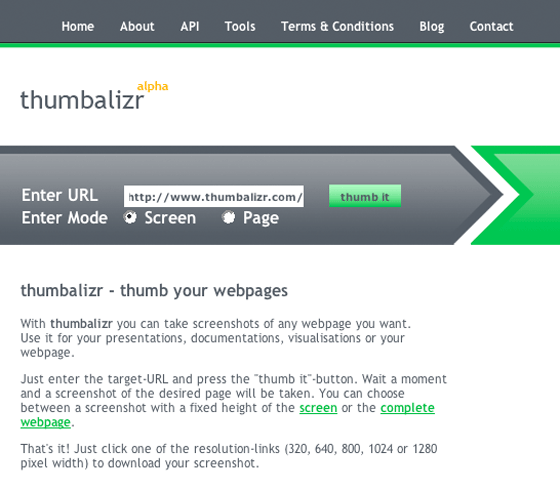
Thumbalizr is a newish online image tool that allows users to take screen shots of web pages.
Users can customize the dimensions of each screenshot taken, from standard sizes through to a custom option. Screen shots can consist of an entire page, or just a standard screen shot. To use Thumbalizr, users simply type the URL of the site they require a screenshot of, and hit the “thumb it” button. The image is then available for download in various sizes by pixel.
Thumbalizer is a really good idea; I’m a regular creator of web page screenshots so to not have to manually take a screen shot, open it in Photoshop, crop it, resize it, save it then upload it appeals to me, as I’m sure it would to others who frequently create screenshots. There is only one significant problem with Thumbalizr: it regularly doesn’t work. It happily made screenshots of TechCrunch, but it failed on a range of other sites. Hopefully they will fix the issues shortly.
![]()


See all


Wow, any site with a web 2.0-like design will make TechCrunch these days. This can be completed on a windows machine in about 10 minutes by someone with a bit of knowledge, thus making the API nearly useless for any real website usage.
If you need something that works try the firefox extension at http://www.snissa.com
It saves PNG files for any webpage.
You don’t use firefox? Well, install it
i actually like this. Mac OSX and Vista kind of have screen images nailed, but it is good for XP users.
I use firefox extension called Save As Image. It is really cool. Just right click on the page you want to create a thumbnail. And set it up as you like. Then save to your disk. As easy as 123 and abc.
I do not like Thumbalizr, it is useless for me. Sorry to say this…
The award for the most useless website in 2007 goes to this one. I speak unequivocally even though we still have 4 months left. This sort of functionality is best left to an actual program, maybe one of the 74 applications available on Tucows. God, Firefox even has an extension to do this.
Its nice,
so, nowadays for a site to get noticed it has to end with *izr.com ?
Huh, looks like thumbalizr got “techchrunched”… I only get a “Service unavailable” when i visit the site.
I use Faststone capture to capture anything on the web or on my computer.
Cmon Alaska
surely you can cite more useless services than this, you’re letting me down.
Seriously though: this at least has a practical use.
I use Skitch and Paparazzi on the Mac for this.
http://plasq.com/skitch
http://www.derailer.org/paparazzi/
I use Screengrab on Firefox ( http://www.screengrab.org/ ) very easy and powerful.
If you really take lot of screen shots, then you know that this site simply will not cut it. Try out Snagit from Techsmith. Its cheap, it lets you take custom sized shots, rolling screen shots, video shots, etc and then easily modify the images before they are saved.
Perfect for debugging, documentation, and instructions. I won’t use anything else these days.
Many times installed software is 100 times better than a web 2.0 platform.
screengrab is a great tool, i use this a lot too, just that it does not capture flash content,
I also use http://www.faststone.org/ it’s easy to use but if I can get the same functionality as FastStone (resizing, color changing etc.) online (not as a downloadable app) it would be much better.
Check out the ‘Pearl Crescent Page Saver Basic’ extension for Firefox. http://pearlcrescent.com/products/pagesaver/ You can save the whole page or only the visible section.
I like this topic. Thanks for the useful information.
Duncan - the service says “Alpha” - if it doesn’t work here or there, that’s the point right? Get the product out, let the users test it, etc. Not sure why you bashed it with a title that is so misleading and not fair.
I tried this service on a few websites and it worked like a charm.
-Saeed
I also use the Firefox extension “save as image”..
This is really useless..
It looks like they’re using asp.net (http://builtwith.com/default.aspx?http://www.thumbalizr.com/), I wonder if there is a way to do this in a LAMP environment, anyone know?
http://www.picnik.com has a very cool firefox plugin that allows you to take a screenshot and also save the entire page (regardless of what is viewable.
Here’s a similar tool:
http://webthumb.bluga.net/
It doesn’t look as cool as Thumbalizr, but basically does the same thing (and actually works).
Like Adam, I just Picnik plugin. Works great. Also, remember that ideas mean nothing in Web 2.0
hey Duncan, you wanna review my site here. http://www.picmage.com. I bet you it will beat Thumbalizr and win the “most useless site award of 2007″
Paparazzi! (for OS X only) is the best free web page screenshot tool out there. It does everything.
http://derailer.org/paparazzi/
The real value of this is the API. It will be interesting to see how they monetize the API. Over the past few months, a couple of other companies that sell this service have approached us with their APIs.
ask.com was probably the biggest user of a service like this (they used it to show thumbshots of the web results).
Why not just use Jing? Works for anything, not just Web pages. It’s not perfect, but it’s pretty damn good.
oDesk’s screensnap tool enables annotation, drawing and cropping, and the result can be uploaded instantly to a public URL on odesk.com OR copied to clipboard for use on the desktop. An example is here: https://url.odesk.com/jcxp3.
Requires downloading oDesk Team or oDesk Share (a small, free SysTray application). http://www.odesk.com/community/downloads
(Disclosure - I am a product manager at oDesk)
Another vote for SnagIt. SnagIt is the #1 favorite piece of software among Wetpaint’ers.
–Ben
Use this firefox extension, Pearl Crescent Page Saver, it has been useful for me. Allows you to save visible portion or the entire page.
For crying out loud, it’s clearly marked as alpha. You guys do know what alpha means, don’t you?
Loving the shill comments. I think we’re seeing the business version of “Thanks for the add!!!11@!”
“I heartily endorse this product or service.” –Krusty The Clown
This has been done before by webthumb (webthumb.bluga.com) which was mention above, webthumb also provides an API. I will give thumbalizer credit for being able to support flash!
http://www.thumbalizr.com/app/.....amp;w=1024
Why not drop $30 and use the best software on the market http://www.snagit.com does it all. Or if you need video try the free http://www.projectjing.com just out.
Snagit.
Use SnagIt…best thing I’ve seen.
Sangit is hands down the best app for capturing & editing screen shots & it’s cheap. The scrolling feature to grab the entire page instead of just the visible is indispensable for my work
[prnscr]
Shup is way better than SnagIt. It uploads to multiple and custom hosts, has a built-in image editor, and lets you connect to the Ignite network (for collaboration, like a multiplayer Shup).
Plus it loves you.
Hey Dan,
In what ways would you say Shup is better than SnagIt?
SnagIt, too, has a built-in image editor.
Seems like a pretty good idea…I’ll keep it for when it works.
For screen shots I love Captura. I can just grab a section of the screen and it’s freeware.
I’ve been using this software regularly, and it was fine until it went into Alpha. Hopefully over the next couple of days they’ll fix the bugs.
Frankly, I’m a little surprised that it shot my myspace page in German and presumably from and IE/Windows perspective that doesn’t anti-alias the fonts.
Appropriately, one of my comments did read: GroB Dich, Herr Block. Was ist dein Geburtsort? Tschuss, Frau Fisk.
Another nice tool for free (if you remember to use it when you need it..)
But is there any business model behind this initiative?
Are they waiting for Google to take over for X billion dollars when they have captured enough screenshots ?
Wow… I guess this was still such a new concept back when this post made it’s debut.
Nearly ever person who commented on this post completely missed the point.
If you install a plugin to a browser to MANUALLY capture website thumbnails, then you simply don’t get it. We’re talking FULLY AUTOMATING the process here, folks. That’s the benefit.
Cheers,
Brandon