
Billeo Bar for Paying Your Bills Online
by Nick Gonzalez on July 16, 2007

billeologo.pngPaying your bills online has grown in popularity. It cuts out the delays and frustrations of mail and about three quarters of US households are doing it.

Billeo is officially releasing to their bill pay toolbar to make managing these payments and even online shopping a little easier. The toolbar (IE, Firefox) stores your payment credentials, payment receipts, and reminds you when bills are coming due through an alert flag and email. A lot of payment services offer easy recurring payments by credit card, so it may not be for everyone.

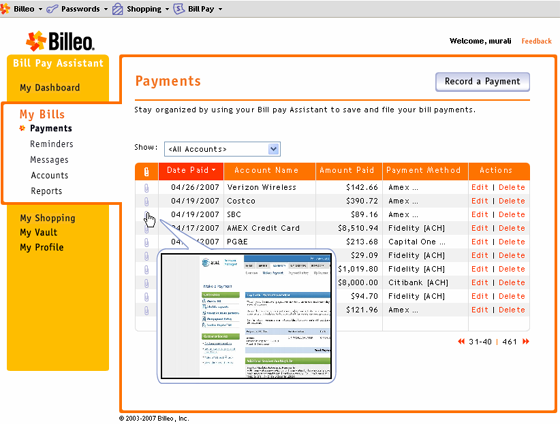
With the toolbar, you bookmark your bills as you surf the internet, specifying how often Billeo needs to remind you to pay. Whenever you come to a payment page, Billeo recognizes when you are on one of their 6,000 payment points and offers to fill out the form. It works for bill pay and shopping sites alike. When you get to the confirmation screen, you can save the receipt. Billeo will cache it as an image on their servers. Your Billeo account will also register the payment so you can look at your billing trends over the months and see how you compare with the average spent by everyone on the service.

Billeo’s toolbar seems to be in a good position to solve at least part of the personal finance problem, monitoring your payments online. Billeo can easily track all of your online payments, whereas services like Billmonk and Buxfer need to have the info imported. The major drawbacks for the service are the need of a toolbar to use the system at all, as well as the failure of previous form filling programs like Microsoft Passport.
billeoscreen.png

Advertisement

Comments rss icon

  • Too bad about the toolbar. Last thing I need is another toolbar.

    I like the auto-tracking of webpayments. That could be convenient.

  • The quality of this post is a befuddling mix of Proust and Baumgart. For what it’s worth, I can’t say which it most approximates. Perplexing, yet intriguing.

  • It’s funny how every new web site ends with the letter ‘o’.

    jg

  • Seems like a good concept, but I already pay bills online directly from my bank. Why would I want to add yet another service to the mix–especially when it directly effects my money.

  • You screw up security - July 16th, 2007 at 2:26 pm PDT

    Dear, Billeo…

    I’m telling you. You need fu*king mega firewall, secure website, and maxium security. These hackers and corporate crooks know how to break people’s account and steal personal information without premission. They know how to make jokes and lie to people. These criminals aren’t stupid.

    They have people search engine to steal tons of info and scamming people millions. They use money to buy illegal weapons and drugs into ship into U.S. They are facts.

    You can check out people search engine. I have no idea why they put it there. You really really need monterous firewall protection.

  • I WOULD NEVER TRUST A THIRD PARTY SOLUTION.

    These guys have built a nice UI and I am sure have done a lot of work compiling all that 6000 payment points.
    But,
    1, I would not want to install another toolbar.
    2, I would never trust any third party site, especially with the name like Billeo with anything that has to do with which bank I use and etc.

    I would have trust it more if it was backed by my bank, and maybe ebay or google.

    At the end of the day, this product has more to do with trust than anything else, and they will need a lot of money to build a brand around it. They are better off selling this technology as an add on to a bank, maybe even lendingtree or someone like ebay or maybe even google who has an establish trust with consumers.

  • Why don’t you just go to your bank’s website to pay your bills? I was surprised that the post said “growing in popularity”. I don’t think I have gone to some physical location to pay a bill in 5 years and had already forgotten that such a way even exists.

  • I have used PayMyBills.com (now Paytrust.com) for years and I *love* it. It handles snail mail bills, too.

  • why would i want some unknown entity to handle my money?

    no thanks. bye.

  • Anything that helps me pay my bills. I am all for it.

  • This product (and this company) make almost no sense — perhaps a clever product 5 years ago — but with bill-pay being offered for FREE from just about every single bank website, every single financial site, and every single portal site . . .and they at least consolidate all my bill sin one place — with this POS I have to visit every one of the billers sites. WTF?

    I come here to read about innovative technologies — not five year old “toolbar” downloads — you’re slipping — or this was a seriously slow news day.

  • I like the concept, but I really just want a bank that will allow me to centralize all my accounts in them – checking, savings, credit card, give me good returns and some cash back on the cc.

  • I, like many others, pay my bills via CC and earn points doing so. Why use a svc like Billeo, while convenient on the surface, is unestablished and collects tons of personal info.

    If a company like IBM can ‘lose’ employee SS#s why would anyone in their right mind trust a startup w/personal info…

  • If you are mentioning bill payment/management tools, I have two more for you to review.

    An oldie but a goodie: moneycenter.yodlee.com
    They are a portal to all sorts of accounts (bills, banks, credit card, stocks, even air line miles), and display it all nicely, concisely and allows you to do billpay from any account to the other.. etc etc. I like the dashboard, networth screen, expense reports, bills calendar, etc. Looks like their main business is selling this service to other bank sites, but you can use it for free here. So you might already be using this without knowing it. But if you go to the source, you won’t be tied to a particular bank, nor a particular bank’s possibly garish styling on top of it.

    Another is paytrust.com
    I was really excited about this one, but not so sure any longer ( they have been bought by Intuit, but don’t seem to be really innovating much). They are useful because they will receive your paper bills, scan them and help you manage and pay them easily. But if you only have a few bills or they are all online, you can just stick to yodlee or some other online bill pay system..

    hope this helps.

  • seems like a 98′ish business model;

    – a toolbar? how did that get past the ”real-o-meter”

    – you know the meter that says – this idea is real, here and now, hip… new?

  • I use this service, and I find it to be quite useful. I was previously using MyCheckFree.com. Companies began dropping from that service, so I was having to go to each site to pay bills. Billeo keeps a list of my accounts and with 1 click on my Billeo I am at the website I want to pay my bills. I also had to pay bills in advance previously. If I had forgotten to pay a particular bill, I would not be able to do it the same day it was due, because of a processing lag time. Billeo takes me directly to the bill site, so generally I can pay the bill on the same day it is due. I run a busy household and many times I’m a last-minute sit-down-at-the-computer-and-get-organized kinda gal.

    I receive reminders at times that I schedule. I like having a reminder to keep me on my toes … again, I run a busy household. I don’t have to use them, but I do like having the option. I can look over my reminder list and see what’s coming up, when it’s due and plan ahead with that knowledge.

    I keep receipts of all payments. No need to print this stuff out any more. I like to cover my back and be sure I have proof of payment. My filing headaches are now gone too, because of Billeo’s receipt save feature.

    I can insert reminders for my paper bills, too. Just because I enter an account into Billeo does not indicate I have to make an online payment. It’s mine to configure as I’d like in that respect.

    I’m happy with the service and am currently in the process of moving most of my bills to one centralized location, which is with Billeo.

    Oh, yea btw, My bank charges a monthly fee for online bill payment. I’m tired of paying my bank. They used to pay me AND provide me with service. Now I’m doing more and more to save them on payroll, and they’re charging me more and more.

  • I work at Billeo and I’m enjoying the discussion so far. Just wanted to clarify a couple of points that have been raised:

    - We don’t store your usernames and passwords or other sensitive data on our servers, they are stored on your local machine in an encrypted vault (using industry standard 128 Bit AES encryption)

    - We have been in business for nearly 3 years and have developed a trusted network relationship with over 40 banks that now feature our product e.g. Visa, Bank of America, Wells Fargo.

    - 50% of people who pay bills at their bank also pay bills at company websites, we are looking to make it easier for people to maintain flexibility over when and how to pay their bills

    Hope this helps?

  • Oh yea, and customer support at Billeo is extremely responsive and helpful!!

  • I like the autosave feature. I use it alot for saving webpages, ticket confirmations, itenaries, and other online articles as well.

  • I am ready to try another one of these services b/c yodlee and mycheckfree fall WAY short of the mark.

  • Like Rochelle, I’ve been migrating over to Billeo from MyCheckFree. I second all of her points and would like to mention my 2 favorite features: The Fill Form and Save & File.

    Fill Form works on almost all the sites I’ve tried it on. What a tremendous convenience to have something that works darned near perfectly — I hate having to type out my ridiculously complicated address!

    Save & File saves me having to print out another sheet of paper — that I probably will never have to reference — just to stick it in my file cabinet (or lose it in my pile).

    And like Jarlath says: Your info is only stored on your machine, so I’m not worried much about Billeo ‘losing’ my credentials.

    Oh yeah, I almost forgot — I really like the password thing. Maybe I’m late to the party on the sort of program that automatically puts your username and password in on web sites. I used to use a program called Whisper32 where I’d store all that stuff — and then have to reference it and manually type it in on the site. To have something do that for me is very cool!

Leave Comment

Commenting Options

Enter your personal information to the left, or sign in with your Facebook account by clicking the button below.

Alternatively, you can create an avatar that will appear whenever you leave a comment on a Gravatar-enabled blog.

Trackback URL
bugbugbugbug
Techcrunch on Facebook