
Free: Pack Of MySpace Branded Playing Cards »
Track Every Click with Crazy Egg’s “Confetti”
by Nick Gonzalez on June 18, 2007

Crazy Egg LogoOptimizing your website can be tough business since you can’t “see” your customers online. Analytics packages like Google analytics do a good job letting you see how many visitors are coming and going on your site by tracking every page request. However, another breed of analytics focuses on optimizing how they’re using it, by tracking where visitors click. Crazy Egg, one of these optimization services, now has a new feature “Confetti” that lets you easily see where every visitor clicked on your site and what brought them there. We’ve covered their previous overlay and heatmap features here.

Confetti overlays your site, showing each visitor’s click as a colored dot. The colors stand for the categories you sort the clicks by: operating system, browser, window size, time before clicking, and what search term brought them to the page. It even shows you clicks that weren’t on links, so you know if your users are expecting a link where there isn’t one. You can see the results in aggregate as a bar chart or click on individual dots to find out more information about a particular user. For instance, you can use Confetti to see how users from different referrals behave, and settle the debate over exactly how many of those Digg users click on your ads.
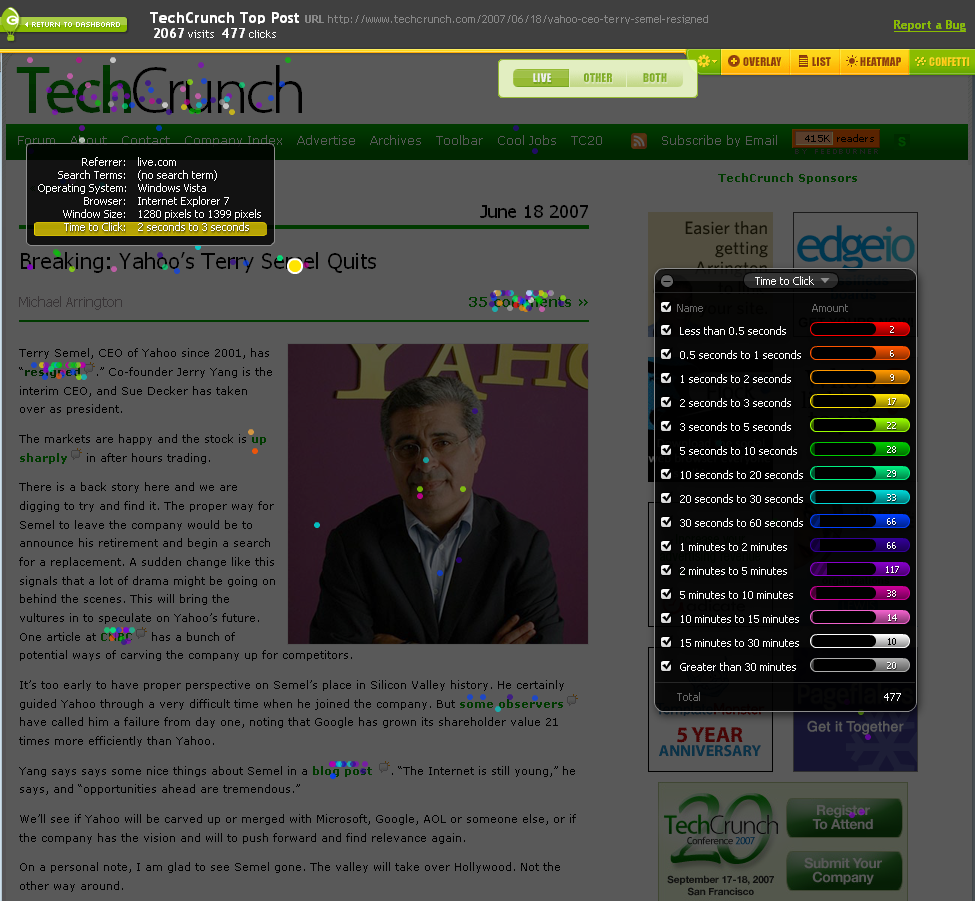
crazyconfettismall.pngCrazy Egg has been implemented on over 250,000 sites and is free if you just want to track up to 5,000 clicks on 4 pages at a time each month. But if you upgrade to a paid account, you can track more clicks over more pages with real time data. The limited number of clicks tracked may seem restrictive, but analytics from Crazy Egg are meant to run for a short period of time on a specific url to grab a sample of how your users react to design changes.

There are a couple other optimization services out there: Map Surface, ClickTale, and Click Density. Click Density was one of the first services to show each unique click on your site, but Crazy Egg has added a simpler point-and-click interface for drilling into your data.

Crazy Egg is based in Orange County California and has reportedly been in acquisition talks.

Advertisement

Comments rss icon

  • Yes, the free version would defintiely allow you to optimize certain types of pages. Also, I imagine it’s got to be relatively heavy JS running so I normally don’t want it running everywhere anyway.

    It’s pretty sweet stuff, I think.

  • umm…ClickTale any 1?

  • Doherty, ClickTale is a great product, but a bit different then Crazy Egg. Crazy Egg lets your understand how users are interacting with different elements on your site. We try to provide actionable data in a easy fashion so that you can improve your conversion rate. Whether that maybe people clicking on ads, or purchasing products, the goal of Crazy Egg is to allow webmasters to test their website and improve based on the results.

  • Love the idea, will have to try it out. Great find.

  • I always though CE was a great product but hadn’t seen any updates out of them for quite a while. Being able to filter clicks based on all those criteria is a really cool idea and brings the service to the next level. Nice work guys.

    doherty – ClickTale is an entirely different product. It produces movies of your individual visitors using your site. CrazyEgg shows the overall trends of where your visitors are clicking. Both have their place and target audience, but are vastly different.

  • Doesn’t Google has this feature?

    Anyway, I’m trying it out right now.

  • Jan2x, Google does not have this feature.

  • I just tried this out and it is very well done. Easy sign up, followed by insertion of a single line of Javascript, and it just works.

  • Not many people seem to be clicking on the Ads on Techcrunch.. LOL

  • The new and updated Google Analytics has this feature. It’s called Site Overlay. Go to Content>Site Overlay (last item on the list). I am looking at it right now for my web sites. It works great and pretty powerful when use in combination with all the other metrics.

  • Basicity, yes Google has a site overlay feature and Crazy Egg also has that same feature. Confetti is a new feature that Crazy Egg released today that Google currently does not have. Try it out and you will see the difference.

  • google again! Neil how do you compete with google? It is not that hard for them to add more features to their existing product!!

    any IP around confetti?

  • This is very useful. I don’t do a lot of technical web design, but to get an understanding of how my visitors interact with my site is very important. I like the new additions. Keep up the work, I’m sure you’ll get acquired soon.

  • Nice article, will try this stuff.

    Greeting Recognize

  • Looks nice.

    Just because the initial post sounds a little biased, thought it was worth pointing out that clickdensity has had similar ‘filtering’ options (although not with coloured blobs) since launch, 12 months ago. This includes filtering by click time, screen resolution, link/no link, browser, goal page, etc.

    This is certainly an interesting space to be competing in.

  • I’m assuming metrics like these will be biased as soon as people increase their text size (like I do every time I’m reading an article)?

    That must be putting a lot of noise into the statistics… anyone any experience with this?

  • As Neil has mentioned, ClickTale provides a different but a very important service of recording visitors’ interactions with the website. However, this is not correct to say that we only provide movies of browsing sessions. On April 2007 we have launched our first aggregative reports which are displayed as a heatmaps (http://blog.cli...ktale-heatmaps/) and we have more aggregative reports in different design and development stages.
    I want to congratulate CrazyEgg with the release of “Confetti”. It looks great!

  • Tim,

    Text Size doesn’t put “a lot of noise” into these statistics, mainly because very few people change their default text size:

    http://www.clic...izes-Study.aspx

    Either way, it’s easy enough to filter out.

    Dan

  • The big difference between CrazyEgg and “other Heatmap apps” is that CE tracks things on an element level and then matches up the elements again in the reports. So it doesn’t matter if your users all use different font sizes and window sizes and screen resolutions or if you use a liquid layout or even rearrange some elements on your live site while your CrazyEgg test is running. CE can handle it all.

    All those other ones that try to do Heatmaps track clicks on a page basis, which means that if users have even slightly different font settings, window sizes, etc… it makes your data totally meaningless since they can’t match those clicks back up to the elements that got clicked.

    I know that seems like really basic and necessary functionality, but those “other guys” take the easy way out and then add all these other random features to compensate for the fact that their data is total carp.

    ClickHeat is a great example of sometghing that looks like it works, until you actually try to use it, then you realize that the data is absolutely useless.

  • mike use it for more than 5 minutes on TC / and watch your bandwidth

  • great idea – will check it out.

  • Sorry , but I expect from Techcrunch to write unbiased news. This post including the comments from the CrazyEgg/Pronetadvertising team looks like a cheap promotion(”Crazy Egg is ….free….But if you upgrade..and…. and has reportedly been in acquisition talks”).
    Not sure what your motivation is, but it is just too obvious.

  • Thomas – just a quick clarification; clickdensity also tracks at element level!

    And, even with tracking at element level, font-size CAN have some effect. For example, a text hyperlink will change size with different font settings, but tracking X/Y relative to the link will not negate the different dimensions of the link. Which is why we also record the font-size setting as one of our metrics.

  • Open Web Analytics (http://www.open...ebanalytics.com) is a GPL licensed, open source package provides this for those that don’t want to run a third party service or need to customize the logging/analytics for their application.

  • Between CrazEgg, Clickdensity, ConceptShare and Protonotes, there seems to be a nice growing suite of valuable tools for web designers/developers that are cheap/free.

  • Dan, you track font sizes based on what? The original font size as delivered or modified in CSS? Can any of these products compensate for someone who changes their font size on the page while viewing the page?

  • This looks to be a very interesting piece of software. How does it compare to let’s say, Google Analytics?

  • For CrazyEgg, font size, window size, liquid layouts, dynamic content, etc… really really don’t matter. Really!

    When you click something, we figure out what you clicked and where on that thing you clicked it. We don’t use absolute x/y pixel coords, but a scalable relative coordinate system.

    Imagine a picture of a car that scales dynamically. Every single visitor would see that image at a slightly different size and shape. Now imagine that all of them clicked all 4 of the headlights. Maybe they even resized their window every time they clicked.

    Now when you view your report, you should expect to see that the headlights have been clicked no matter what size the image renders for you in the reports. And that is exactly what you’d see. Even if you resize your window, change your font size etc…

    Our reports dynamically watch for things to change their positioning while your even viewing your report and then update the positions of the data accordingly. Without having to reload your reports.

    And the system we use for images and links and divs and everything is the same. So font sizes and window sizes and dynamic content and everything else REALLY doesn’t matter. We don’t just fudge the data afterward to make it seem like it’s following the elements. Our system doesn’t even have to think about it. It just works.

    Just try it for yourself.

  • yea..acquisition for techcrunch relationship and digg network to get on the top! in google analytics any click can be tracked..you just call urchintracker on click of anything you want to track.. check merchantcircle.com to see how it is done..what’s the competitive advantage..what’s the business opportunity..what kind of site host this..how many paid?..whoever acquires is just stupid..

  • 250.000 subscribers. Almost as many as Google Analytics had when they started. Statcounter and others have 1 million clients collected over the last decade. Who believes this crap?

  • Bryan, we have deals with large hosting companies that enable us to leverage their user base and grow at a rapid pace.

  • Jun 27 Wed User Behavior Over The Rainbow:
    Utilization of Heatmap in Web Analytics
    CrazyEgg and ClickTale presenting Heatmap in Silicon Valley will be able to further explain their technology.

  • Great post – Looking forward to hearing more about this company, their biz model is smart. I think the approach is a winner – smalltime website owners aren’t going to want to fool with Google Analytics, and if its a service offered by their hosting company why wouldn’t they just turn it on and see what’s working. The heatmap of clicks may be all an SMB wants to see anyway. The money is in the volume, think if 1&1 and GoDaddy got on board, no small chunk of change. BTW – Crazy Egg will be presenting at the Under The Radar Conference next week, June 28th, in Mountain View. Should be a cool session.

Leave Comment

Commenting Options

Enter your personal information to the left, or sign in with your Facebook account by clicking the button below.

Alternatively, you can create an avatar that will appear whenever you leave a comment on a Gravatar-enabled blog.

Trackback URL
bugbugbug