
Do not panic. We accept late submissions for TechCrunch50, but please submit soon. »
Rescue Time: Automated Time Management meets Web 2.0
by Duncan Riley on May 4, 2007

rescuetime.jpgTime Management as a distributed concept is not new, from long corporate training days with free lunches (the lunch often being the highlight) through to earlier software packages, and even through to today, with a wealth of Web 2.0 options focusing on providing the user with the tools to better manage their own time and that of team members.

Whilst I’ve been a user of a number of packages over the years, notably Basecamp more recently, the structure of these offerings are mostly reliant on manual user input. In the pursuit of more efficiently managing your own time you’re actually using this time to input what you are doing, and in my case thats often only resulted in one thing: that I don’t have enough time to input the data and use the time or project management tool.

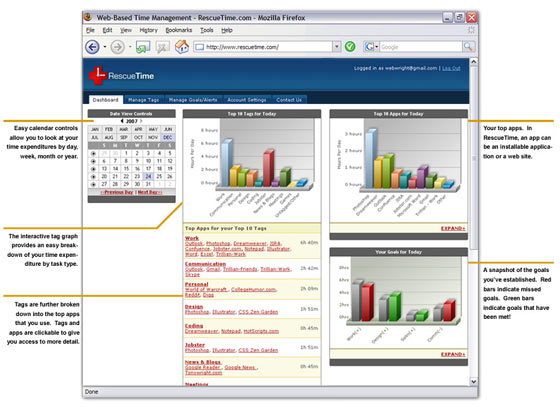
Seattle based Rescue Time actually tackles the issue of having to input data into a time management tool for the time poor head on by offering a web based personal time management service that takes its input via software. The software tracks what you are doing on your computer at any given time, then uploads the data to the service for later review.

Tony Wright from Rescue Time, now on his third startup, having sold Jobby to Jobster in 2006, told me that core mission of Rescue Time is to allow information workers to understand how they spend their time in an easy way. “We feel that the knowledge of how you spend your time will make you more productive and will nudge you in the direction of spending your time more deliberately and thoughtfully”.

He asks a very good rhetorical question, one I know many readers will relate to: “Every information worker has finished a day saying, “Where the heck did my day go? I got a lot less done than I thought!”, Rescue Time gives users the ability to understand where the day went.

The service is more than just activity tracking. Goal setting is built in with the ability for the system to send alerts, both based on excessive use defined by a user in one area, or conversely improved use, for example if I was spending too much time browsing Fark one week, and the next week that time dropped, an automated pat on the back can be generated.

Collaboratively, users are able to compare their time management skills with others, for example developers might like to see how they compare on average with other developers.

Whilst I find personal interest in the individual time tracking functionality, Rescue Time also comes in a corporate flavor: RescueTime for Groups and Business. The tracking software can be rolled out across a business or team with data centralized for group tracking. It sounds a little Big Brotherish, however I’m told that focus is not to track individual time usage, but overall team tracking, a good tool in being able to measure work place policies and even Change Management by providing feedback to Management on the net affect of their business decisions.

The backend runs on Ruby on Rails and SQL, with an open API platform currently in development. The site is currently in closed Alpha testing but will be open to the public later this month.

As a business idea, it makes a lot of sense. The promise that technology will make our lives easier has never held true, most of us are more time poor than ever before and the marketplace reflects this: site such as LifeHacker gain their popularity off the back of a global desire to be able to do things more efficiently, simply and better. Rescue Time holds a great deal of promise in becoming a must have tool in the never ending quest to better manage our time.
rescuetime2.jpg


Comments rss icon

  • While a distrubted time management tool sounds interested, I suggest that you, Duncan, should investigate a distrubted spell-checking tool.

    This is the second post with mistakes in one day…

  • at first i thought this was another attempt to commercialize ntp, but its not even that lame

    will it break down my porn surfing by bestiality, watersports, and bestial-watersports? here’s hoping it does

  • i’m wasting my time reading this

  • Lex,

    Was the typo in your comment above intentionally ironic?

    :-)

  • Duncan, nice to see you here :-)

  • The foundation is quite similar to Wakoopa, based on tracking application usage. But what happens to us Office 2.0-converts, whose only app is FireFox?

  • Thanks Zoli, although I’m not sure the anonymous spelling nazis would agree :-)

  • Hey Zoli- RescueTime pays attention to individual sites that you spend your time on. It treats your favorite web application just like it treats any other web application!

  • Sounds like a brilliant idea. Does it give me the option to expose some of my data or reports to others? e.g. If I’m a consultant, can I show one of my clients how much time I spent on their project, or selected parts of their project?

  • I signed up. While Big Brother watching might be an issue at work, this app could be useful in another way in corporate environments. I know that I have run into too many IT staff people who want to tell me what apps I should be using to do my job or how many apps/windows I should have running at any one time. Their logic being if they think I only use these x apps and like too many people, run them one at a time in full screen mode, then I don’t need my computer upgraded with a newer OS, more memory, a better graphics card or whatever.

    Now, if this app works, it could trace what applications someone is using and could be a point of justification for an upgrade. I wonder if it can show how many application windows are open at any one time?

  • An application that does this already is Qlockwork from http://www.qlockwork.com

    Qlockwork writes your attention data into an Outlook calendar - which for my security conscious employer is much more acceptable than uploading it to a website would be.

  • I think tracking your time is an AMAZING way to ferret out efficiencies. I like the feature where you can set your goals because one big part of time management is planning what you are going to do.

    I used to run 10 projects at a time in my previous job and had to report time on them in increments of 15 minutes. I would just open up my calendar and block off the time I spent right after I did it. Then at the end of the week i’d have to spend 30 minutes gathering all the data into a spreadsheet.

    For me, and for a lot of people I know, time tracking is project/client based. I see a huge need to be able to tell this program how to tell the difference in what project/client i’m working on. If it did this effectively it would probably have saved me at least a couple hours a week in reporting time.

    Perhaps the user could just click a hotkey or something to tell the software to you are starting work on Project A, then another to tell it you started working on Project B. So you just keep telling it every time you switch to working on another project. That would work great since you would know within Project A, how much time you spent on each application. I really hope they build that feature in.

    Otherwise knowing I spent 3 hours on voip, 2 hours on excel, 3 hours on word, and 2 hours on outlook is only marginally helpful.

  • TimeSnapper (http://www.timesnapper.com) is a similar program that tracks all the programs you’re working with to help with the timesheets (along with taking snapshots - so it’s easy to analyze the days). It however doesn’t publish anything to the internet exactly because of privacy concerns.

    The next version due to be released later this month has exactly the same statistical features

  • That’s pretty neat. I’ve tried out a number of online time and task management tools, but the time required to set them up and keep them up to date is always greater than the time they save me. Maybe this one will be different.

    GJ

    http://www.60in3.com

  • This is good for time management. Really cool.

    rajan

  • At first glance, I thought it was a web traffice logger. Hmmm, time management upon web 2.0. Just don’t quite think so. If I have the willing to pursue an efficient living fashion, I wouldn’t have bothered to get to here to know about some time management gadgets. Really.

  • You missed the point with LifeHacker.

    The correct domain name is lifehacker.com, not wwwlifehacker.com.

  • Rescue time is a very good product, but a little limtied, in some ways, made the switch to Journallive, http://www.journallive.com and have seen an increase in my productivity, I find the reports in Journal live are easier to undstand and offer me a better way to correct my bad habits and inrease my effectiveness

Leave Comment

Commenting Options

Enter your personal information to the left, or sign in with your Facebook account by clicking the button below.

Alternatively, you can create an avatar that will appear whenever you leave a comment on a Gravatar-enabled blog.

Trackback URL
bugbugbug
The CrunchBoard
  • MediaTemple Logo
  • QuickSprout Logo
  • OpenX Logo
  • Cotendo Logo