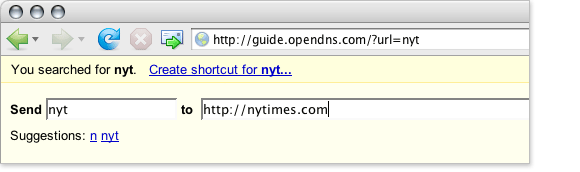
DNS is boring, but OpenDNS has added a new Shortcut feature that lets you visit URLs without all that nasty typing. Shortcuts are short, multi-letter abbreviations for your favorite sites. Instead of typing “www.nytimes.com,” you can just type “NYT.” You can also create short-cuts for popular search sites (”g monkeys” to search Google for Monkeys, for example).
Read more about it at CrunchGear.


Simple feature that should just be built into the browser. What would be even cooler is if it there were a social aspect to it where the keyword went to the location that was voted on most. Firefox?
This has been in the browser for ages. Create a favorite w/ your title (”NYT” for example) and it’ll do just that
It’s called “keyword” in Firefox, I believe. And yes, it’s been around forever. It’s probably my favorite thing about Firefox — and it doesn’t require sending all of your DNS traffic through a third party.
Things like “g monkeys” are also built into the Opera browser.
Opera does have a shortcut feature.
Or you could use http://yubnub.org/ for a cross-browser shortcut solution.
@Roj — Consistency is a good thing. Check out StumbleUpon for something closer to what you’re asking for. As for the address bar, you want it to be consistent, not “lucky.”
@Andre — There’s never been anything that a company can roll out to all their employees in one swoop. Have “HR” redirect to your corporate HR page, have “helpdesk” go to the IT department, etc. It’s even handy for people with multiple computers and browsers. Shortcuts work across them.
If I type NYT into a freshly installed Firefox, where do I go? This article could have used some elementary research first.
you obviously need to use the OpenDNS servers and login to the service first, Will.
The main “gimme” here is for network admins and home admins. You can set up a shortcut for everyone behind a certain IP, so everyone can get the same shortcuts. I agree that this has been in browser for a long time, but it’s the aggregation feature that is most useful.
hooray for dynamic dns updates!
John: Will meant that typing ‘nyt’ DOES take you to the new york times site, without the software.
John: you obviously DON’T need to register with anything to use that feature in Firefox.
just type any string and it takes you to the first google result for that string, which for “nyt” is New York Times website… same with Opera, as far as I’m concerned (my primary browser is FF).
and Opera has this “g monkey” feature of course, as well as a shortuts for other sites such as Amazon, Ebay, etc..
and yeah it’s been around for ages, it’s so surprising that you didn’t do any research before that, and it seems like you’re not using Firefox for some reason…
cheers!
or you can just (firefox):
CTRL + D
CTRL + B [find the bookmark that you just save]
Right Click -> Properties
Keyword -> NYT
CTRL + L
NYT
Enter
and for the ‘g monkeys’ stuff:
Add a bookmark with as url: http://www.goog...com/search?q=%s and as keywords: g (I use google)
then save it and hit “CTRL + L” type “g techcrunch” to search for techcrunch on google
Hail the browser that provides usable functions
John Biggs wrote:
“The main “gimme” here is for network admins and home admins. You can set up a shortcut for everyone behind a certain IP, so everyone can get the same shortcuts.”
John,
For a network admin is trivial to do that, for instance, on an enterprise environment. As long as that environment uses it’s own DNS server.
Not properly an innovation by OpenDNS. Actually, that add-on is rather ridiculous. If someone doesn’t know how to properly use all of their browser features, will they use another DNS server than the default one? Don’t think so.
Eitherway, as Will wrote, your article reveals both a lack of research and a lack of expertise in this area, which I think is a something you need to write this kind of articles.
Diogo,
It’s a new feature for a well-known and interesting company. I thought Web 2.0 was about offloading features from the browser?
I’m well aware of the options, and this is one more.
Does this feature make Mike A. all teary-eyed for his days at RealNames?
HA ‘p-air’ – I was just going to right how this reminds me of RealNames back in the day. I used to love their service. I paid for keywords with them actually for one of my businesses. I was very sad when they went under due to MS.
Well, perhaps these guys will stick around for a while.
Actioneer’s “Invisible Password Manager” does even more in response to entering a keyword. Type “nyt” and Actioneer not only navigates to the site for you, it logs you in to your account there. Type “nyt inflation” and it will navigate to the site, log you in to your account, and trigger a search for articles on inflation. Also works with non-password sites.
A portable version is also available that can be carried around on a USB thumb drive with all your passwords safely encrypted.
Both are available for free download at http://www.acti.../downloads.html
For “g monkey” thing I would prefer Firefox shortcut
I’ve been using OpenDNS for a while on both my home network, work laptop when roaming and my mobile device.
it’s quick and reliable (especially when my comcast service is having fun)
@Tom (#3 way back up there in the comments) – it’s just another DNS. No different to using your own ISP (perhaps more reliable)
I like openDNS because of its speed.. but for shortcuts I use http://www.sugarcodes.com .. never have to remember codes
Like their anti-phishing feature, this one is also of little use for me because Opera already allows me to do the same with bookmarks (Opera calls it nickname). I believe Firefox also does this (they call is Keyword).
I use OpenDNS simply because its faster than my IPS’s DNS. It also strangely solves some problems I have with torrent downloads.
I stand corrected. It is actually a lot more sophisticated than just nicknames for URLs.
http://blog.ope...shortcuts-rock/
I’ve been thinking about switching over to OpenDNS. Was actually reading up on it a bit yesterday…