February 14, 2007

Vyew Collaboration Suite Now Commercially Available

Marshall Kirkpatrick

26 comments »

Vyew is a new collaboration tool suite that lets users share a common online visual workspace and their desktops. It is impressive. The service came out of beta status today and is now offering premium accounts in addition to the free accounts already available.

Vyew is a little like WebEx and other high end conferencing offerings. It’s also a little like Thinkature and other easy collaboration tools. It’s definitely a company to watch, though I didn’t have the easiest time using it myself while testing it.

Free accounts allow the creation of two workspaces with 10 uploaded items. For $10 or $20 per month you can raise those limits substantially.

Vyew doesn’t require a desktop client to be downloaded by users. That’s key for quick and easy adoption by new users. Workspaces are shared in Flash and desktops with a Java applet. There’s text chat and with a single click Vyew will generate a unique login for participants to use for a free telephone conference call.

There’s a well produced, in depth screencast with a very earnest voice here.

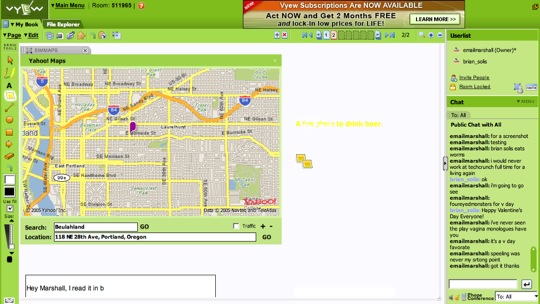
The workspace tools are on the sophisticated end of standard. Pointing arrows are unidirectional, which is a small thing but I’d like to have text to the right of an item and point an arrow left connecting the two. That’s not easy to do though and hardly anyone goes to the trouble in adding that to services like this. There are a number of alpha-plugins like the Yahoo Maps one in screenshot below.

How is the performance? The administrative functions are very well done - all the options available are a joy to use. In Safari I had some trouble with the workspace when the desktop sharing was turned on. The desktop sharing I found easy to start but a little difficult to use without any practice.

I would recommend trying out Vyew and seeing if you can get the use of it down. If you can, the price and features are fantastic.
  • Sphere It

Comments

I used this a while back (and I plan on using it again). This is an awesome service that’s pretty damn useful, especially if you’re a startup.


Wow! Gotta love the name - will take some getting used to.

*Seems* like the app is great. But they really need to work on making a clean video showing in 2mins how it will make my life easier.

Their current pitch of “Create. Collaborate. Communicate.” is too ambiguous. Show me why folks should pick them over someone else.

-Zaid


i don’t use collaboration programs - so i can’t comment intelligently about this

but after checking it out, it looks like it has key player-potential in this arena


If you are using livemeeting or webex why would you switch?


Garth - price, no download required and supports asynchronous collaboration by marking up documents and images outside the web conferencing envirnoment.


i’ve been using this in private beta for a while now, and i like it a lot. the screen capture feature is fantastic and seamless.


Garth;

Their main “selling point” for us was the price (free) and the ease-of-use. Just setup an account and go. I’ve never used “livemeeting” or “webex”, so I can’t really say much for them - but I will say that it will take quite a bit to get me to switch from Vyew.


I’m curious to know what would you use this for? I saw the listed applications for the product, but it seems like it would be really ineffective. From a user’s perspective, it’s nice visualy and the interface is fairly understandable - yet I felt pretty clumsy using it. And other than collaboratively reviewing a Word document or something similar, I don’t know what compelling reason people would use it for?


I used this in Beta too looked really cool, very ‘in’ but it really can’t match the high end tools. I use Genesys Meeting Center 4.0 which has just come out in its newest form, has a web participants view built in AJAX and meeting moderator now has a downloadable light client. Genesys MC also has built in VoIP and is better than Skype on that part. I guess it’s more for the enterprise, i think Vyew is a pretty cool alternative to get your appetite wet for something heavier later on.


hey…

wat do u think about tracbac…which came very early….http://www.tracbac.com/……its cool while compared to vyew….i think


Blah, this looks more like a business tool then anything else.


I have been using Vyew for an online webinar, and I totally love it. The chat thing is really nice for asking questions. I send an invitation every week to my people and we’re good to go. I’m sold.


@Beth
Are you the moderator of the webinar or a participant? I’d be most curious to know what the participants think.


For my business meetings, I’ve used WebEx, LiveMeeting, and a host of other services. A few weeks ago, I moderated a free webinar using Vyew. At the end, I asked the participants if they liked Vyew and they responded positively. I used it today for a quick demo. I think it’s a great service and I’ll continue to use it for webinars and demos. For moderators, meeting setup is much quicker than WebEx.


This tool has been a god-send for my marketing consulting business. I’ve used it to give sales pitches, review contract proposals, and as a way to post copy and graphic designs for client review/input/sign-off. There’s a nice list of other uses on their web site for those that missed it. In terms of competition, I was a participant of a few WebEx meetings and gave GoToMeeting a try before Vyew, and both I felt were a real pain to set-up and use. Vyew is much more painless, especially for my clients, and you can’t beat the price.


At first glance it looks a bit like Groove on steriods, need to play with it a bit more to get a clear picture though.


this is a great idea–but terrible implementation.
I upload my presentation last night and everything was great.
This morning I have a presentation at 930 and the site is not responding when you try and log in (the main site works)–no message –no warning.

This type of site requires high reliability (especially if you pay) and doesnt look like they are there yet or care–back to competition–at least you know if its online

rob


Related, http://www.Yugma.com launched in December, and it looks like http://www.Yuuguu.com launched this month.

All with a different twist in “easy and free” web collaboration.

Will be interesting to see how things evolve….


Pretty cool stuff… almost too much stuff. Might be easier to absorb all the things you can do in it if it was broken up into smaller packages. Still, I like how fast it runs. I also like that I can help fix my brothers computer without driving over to his house using the desktop sharing. :)


I am with Vyew responding to Hillman: the surge of traffic from TechCrunch’s converage of Vyew choked up the system and slowed it down. We are increasing capacity over the next couple of weeks. I think you will see the improvement if you try again, and it will continue to improve over the next couple of weeks.


Desktop sharing and collaboration has a long way to go. Good to see things like this. Will be interesting to see how the new RDC components that will become useable when Longhorn Server and Windows Vista are paired will impact this market.


Continuing problems.. Turns out another issue—after attempting to login their was a very long wait which Vyew told me was due to our site not accepting their cookies. Maybe so but I am sure many people (most) have some sort of firewall (ours is nothing special) and there should be an error message or timeout if site is unable to connect for any reason.

Great idea…not a great implementation


Ha. Works on the my Mac AND Linux laptop. Gotta love it!


Sorry, the comment form is closed at this time.