February 8, 2007

A Comparison of Live Hotmail, Gmail and Yahoo Mail

Michael Arrington

175 comments »

The Windows Live team announced today that they’re rebranding their new email beta to Windows Live Hotmail. We haven’t written about the application for some time, and this is as good an excuse as any to compare the current release to Gmail and the new Yahoo mail beta.

The three applications, along with AOL mail, make up the vast majority of the 500 million or so webmail users around the world (see chart included in this post). Most of these users are still using the old, tedious, Ajax-free Yahoo Mail and Hotmail user interfaces, requiring page refreshes for every click. The new applications, along with Gmail, offer a much richer experience, much like Outlook or Mac mail. When these webmail clients are performing well, their speed and ease of use is easily as good as a desktop client.

Overall we prefer Gmail over all other webmail applications because performance (speed) is consistently fast, and emails can be tagged making search much more effective. They also offer more storage and other features, and it’s free. However, Yahoo and Live Hotmail offer more mainstream Outlook-like user interfaces (although Live Hotmail does not allow you to access other email accounts from their application), whereas Gmail takes some time to get used to. If you are looking for speed and tagging is important, Gmail is for you. If you are looking for the closest thing to Outlook online, go with Yahoo Mail.

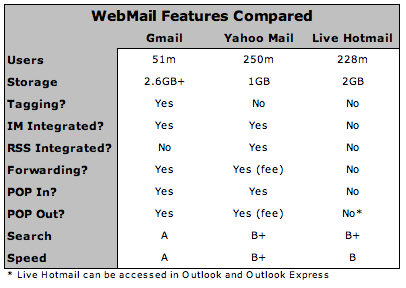
The following chart compares the services on a feature-by-feature basis. Note that the user numbers for Yahoo and Hotmail include legacy users still on the old platforms.

Gmail

Gmail groups emails in a thread into a single line in the inbox. Some users love this, others hate it. It’s not my favorite feature, but I’ve gotten used to it. The best Gmail feature in my opinion is the ability to tag emails for better organization and search. None of the other services offer this. Gmail also has integrated Gtalk into the GMail interface, and continues to add other functionality as well (such as integration with Docs & Spreadsheets). Gmail is consistently fast, offers the most storage and free POP-in and POP-out, meaning you can use Gmail to access your other email accounts, or access GMail from whatever email client you use. It’s a near-perfect piece of software, and has only occasional hiccups. The fact that Google is paired with Google Calendar, the best online Calendar application, doesn’t hurt, either.

Windows Live Hotmail

The new Windows Live Hotmail will be a welcome change to Microsoft’s 228 million webmail users, but it falls short of the Yahoo and Gmail offerings. They offer 2 GB of storage, better than Yahoo, but there are no POP-in or POP-out features at all. If you want to access your account outside of the web site, you have to do it via Outlook or Outlook Express. It remains the slowest among the three in our tests.

Yahoo Mail

Yahoo Mail is very good, allowing users to access other email accounts (POP-in), but only offering POP-out access for an additional fee. This is probably due to the legacy users who are already paying for this feature - Yahoo may not want to give up this revenue stream. Storage is on the low side - only 1 GB, which is less than half of what Gmail offers. Still, Yahoo Mail has recently been running very fast and offers an intuitive, Outlook-like interface. Instant Messaging and RSS integration is awesome.

  • Sphere It

Trackbacks/Pings (Trackback URL)

  1. THE SAVVY BOOMER
  2. Three Leaf Tech - Technology Blog
  3. Bitacora de Thomas » Blog Archive » Comparación: Live Hotmail, Gmail y Yahoo Mail
  4. Jennifer Aniston Obama and Zsa Zsa - Gossip, Sexy and Newsworthy links for 2007-02-11 at
  5. Google Services Roundup « Alpesh Nakars’ BlogosphereIT’s all about technology!
  6. Too Real
  7. Unikram, Paper, Recherchen & Software
  8. Enthousiasmeren
  9. mind this - by Lars Plougmann
  10. Lively Blog » Yahoo Mail Announces Unlimited Storage
  11. Ajax Girl » Blog Archive » The Do it Yourself iPhone
  12. השוואת שירותי מייל ואנטי וירוס
  13. «leftbraned
  14. KhmerAK* | a Phnom Penh Geek » Blog Archive » Good news for Yahoo Mail users
  15. Texas Tech Email Changes Are Stupid « Yostivanich

Comments

RSS feed for comments on this post.

  1. daniel

    Gmail does not have 51 million users.

    Its way less than that. Especially active users.

  2. Michael Arrington

    All we really have is the comscore data, which says 51m worldwide, 10m U.S. as of late 2006. I’ll get the more recent comscore numbers later today and update.

  3. DavidEzra

    With “Google Apps for your Domain” … I have to say that GMail “kicks @$$.”

    I just signed up a couple days ago, and I’m in heaven. I love having my own domain as the root and I love the POP in / out cause I’m lost without Entourage.

    (I’ve been using Yahoo for the past 4 years, but with no POP access, I had to find another solution - at least without having to PAY for it. My prior e-mail got dropped about a week ago - through which I had been using Entourage - and so I had to find another service … THANX TechCrunch for the heads up on Google Apps for your Domain a couple days ago. Too bad for Yahoo, if they had free POP access, I wouldn’t have switched.)

  4. Hornswaggled

    I use both Gmail and Yahoo. I have stuck with Yahoo though Gmails Fetch will allow me to make the change when and if I decide to jump ship completely.

    I agree that if you want something new go with Gmail but if you don’t want to learn something new stick with Yahoo.

  5. Jorge

    Your chart is wrong. Live Mail does integrate with IM contacts, as does Yahoo Mail.

    Live Mail does have forwarding, for a fee…it’s just a continuation of MSN.
    It also does POP in, though the feature is still in beta, and POP out (for paid accounts).

    As to speed, I can only assume a lower score is better, as Google is insanely slow in my part of the woods.

    Who prepared this chart, Google?

  6. Jorge

    I also like the part of the article that equates multiple day- and hours-long system crashes as “hiccups.”

    A minute or two, maybe even an hour, once a month is okay. GMail’s stability is not.

  7. Sean

    I really dislike the Outlook-style web mail clients. I see how it would make the transition easier for people who are used to Outlook, but people need to open their eyes and try something new. I didn’t think Gmail was anything special at first, but having used it for over 2 years now, I could never, ever use anything else. I don’t care about the tagging that much, but the integrated messaging, free POP, free forwarding, google search, and best of all, support for multiple email addresses from other domains, has changed the way I use email forever.

    I have a Yahoo account and have access to the mail beta (isn’t it over a year old at this point?), but I think it really sucks, hard. First, wow, it is sooo slow. I don’t have the world’s fastest computer, but it’s less than 2 years old so it’s not bad by any means. I play with it and it just seems like they’re trying almost too hard to make it behave 100% like a normal software program. Like the drag and drop for example, or the multiple tabs. It just doesn’t seem right, nor is it that fun to use, and I wonder how many people actually use those features. I never hear any buzz about the Yahoo beta, other than when it was first announced… does anyone even really use it?

    And who uses Hotmail anyways? :P

  8. Dalbir

    GMAIL does not currently offer Pop-In for all accounts =(. Can’t wait for them to open it up to everyone, but no one seems to know when that will happen.

  9. drew olanoff

    As I’ve learned with the recent Gmail hiccups, I rely on it a great deal. It has become the “killer app” that makes me the most productive that i’ve ever been. It’s a lifeline, its a management tool, its an environment in and of itself. Yahoo and Microsoft never “did it” for me.

  10. David

    I’ve been using Gmail to support my corporate email address. The reason isn’t for the email app itself, but for the add-ons like tight integration with Google Alerts, Google homepage and my Adwords / Analytics accounts.

  11. Zoli Erdos

    Gmail through GAFYD is really-really good. What I’m missing is Mail Fetcher - it seems to be available now for most regular gmail accounts, but not for GAFYD.

    As for the table - well if it’s correct, MS might as well call it Windows Dead Hotmail. :-)

  12. Garth

    I have gmail and have never used it much, the original yahoo mail works fine for me and I have had the address forever. I keep trying the beta and switching back.

    I think a lot of people have gmail because you have to have it for other google services, but it is not their main mail account. I have about 10 friends in my gmail, and all of them correspond with me through hotmail and yahoo instead.

    I did use gmail for a google checkout purchase and I had to remember to check my gmail account for the shipping info.

  13. matthew

    email sucks. 1 in 5 legitimate outgoing emails won’t reach it’s destination, no matter which snazzy webmail interface you use.

  14. aarrrg

    Why does Microsoft suck at everything they do on the web. Mybe they should stick with OS. But hey, there are too many suckers in this world I guess.

  15. Nemrut

    I’m somewhat ambivalent about the benefits of Gmail. For all it’s ‘Ajaxiness’ it still suffers from latency with just about every click.

    As for tagging and threading, i dont think many people have a good grasp of these concepts esp the former, which seems like an unintuitive method of categorization for most. Also, curious why Gmail forces users click on the ‘All Mail’ link to view current messages vs just displaying them upon login…

    Having used Eudora since ‘92, my email program of choice is Thunderbird portable configured to access all my pop accts including Yahoo. For calendering, i also prefer Planzo over Google as it is bare-bones simple and has an integrated Todo. Don’t know how Google overlooked such obvious functionality…

  16. Michael

    Michael,

    If you, or any other ‘industry insiders,’ wants to ’sneak preview’ scoop my new service, Litepost, sometime soon, just drop me a line. It’s not quite ready to go yet (our current website is so stealth it hurts), but it’s almost there, and I can promise you it’s ‘mindblowing’ (well, at least as far as email goes!). Otherwise, I will be in touch shortly through the ‘other’ appropriate channels.

  17. Nemrut

    btw, if anyone has a Scrybe beta acct they’d like to sell please let me know.

  18. Garth

    I have a suggestion for litepost, ditch the font that looks like Russian!

  19. Rehman

    Gmail is most irritating email interface I have ever encountered.
    I would get “Ooopps Server Failure” “Something is wrong” … message every now and then with Gmail.

  20. Amit Raman

    -Yahoo mail’s & Gmail’s speed score should be lower.
    -I’m not sure if Tagging should be listed as a benefit. Searching is just as good. Users may forget to tag an e-mail too.
    -There has to be more 228MM hotmail users. When MSFT bought Hotmail, they had 200MM users then.

    -Amit

  21. Vadim

    Gmail does not have RSS, but they have ATOM feeds. So I guess
    this checkbox should be “yes”.

  22. Brandon

    Those ‘user numbers’ are all seriously inflated. I personally have at least 3 hotmail accounts at this very moment — none of which i use. Yes, i know they clear them out occasionally, but for whatever reason i occasionally end up creating them for one-time use. Personally, I use and prefer gmail as my main account. I maintain a yahoo account solely for spam signups (my previous main account pre-gmail.)

  23. lemon obrien

    yahoo is the best; i wanna like gmail….but they go off the beaten path with simple stuff…and its like learning a whole new language just to do email. I never have used MS email; probably never will.

  24. Rishi Khaitan

    I’m going to go out on a limb and say that probably about 95% of webmail users don’t give a rat’s ass about features like RSS integration and tagging. I’m not saying that such features are useless, but it’s simply not somthing your average user cares about today.

  25. Amy Wilsch

    @Rishi I don’t really give a rat’s ass and have tried them all (and many more) and am still sticking w/ (old) yahoo mail :)

  26. km4

    rebranding ‘bloatware’ is what MSFT does best !

  27. webonics

    I’ve used all three applications, but I have to put my vote in for Yahoo’s New Mail (formerly beta). Its integration of contacts, calendar and email into a very visually aesthetic interface with lots of interactive features makes it, IMHO, the best of class. Although, the Windows Live platform seems to have duplicated many of Yahoo’s features, I still believe Yahoo’s app is still a better, more intuitive interface. I absolutely despised gmail.

  28. ...some Drifter

    i think hotmail and gmail will be the key players here, pretty much hovering next to each other for the most part

    with windows live mail trailing in a sizable diff.

  29. Paul Kerl

    I’m going to have to agree with webonics here, the new Yahoo Mail is excellent, and is definitely the most usable IMO. It really is all a matter of what a person is used to/likes using/taste/etc…

    I also like the search on the new Yahoo mail much more than the search through Gmail–the tabbed search is excellent–very very convenient. Definitely would switch their grades on search if I was judging.

    All in all, it’s great to have choices, much MUCH better than the choices a few years ago. I’ll thank Google for shaking up the business, the extra space provided by all the webmail hosts is great, that’s for sure. A little healthy competition never hurt anyone!

  30. Scott

    Michael - why not include AOL’s webmail in your analysis? It’s got a slick UI and pretty hefty storage?

  31. PohEe.com

    I support Gmail all the way. I even use their Google Apps services as my Email exchange services for my own domain.

  32. met

    No one likes the conversation style in Gmail? I use gmail just because of that and also the “data” is arranged in a nice way. I’ve never thought the ads were intrusive. Not so for the others.
    I prefer YahooMail’s new look over Live mail’s.

  33. Josh

    I’ll just stick with outlook.

  34. Kevin

    GMail does have RSS integration. They call it Web Clips and it is above the inbox.

  35. Dennis

    Of the three you discussed, I would say gmail is the best. The reason being the tagging. My favorite though is http://www.inbox.com/ which I have been using for a couple months now. The free version has 5 gig storage. Inbox included file storage, calendar, address book, notes, and photos in addition to email. If they added a bookmarking or tagging tab, it would make the perfect individual portal.

  36. Anshul

    Spot on comparison. But Yahoo integration is the best. GMail is fast and so is the search but I still like Yahoo’s interface.

  37. Jojo

    I have Yahoo & Gmail web mail accounts. I rarely use Yahoo these days as it is just filled with spam. Though they are doing a better job of identifying most of it. And their UI has gotten better also.

    I just don’t know about Gmail. I use it but the UI is pretty weird. You can’t create your own folders and therefore, organization of the huge amount of mail that they can hold is difficult. Also, there really doesn’t appear to be any way to contact anyone at Gmail via email these days. There used to be a contact form (after going through some help screens) but that seems to have been removed or buried so deep that it is near impossible to find. Everything gets channeled to a user forum where users have to provide their own support. For a company with the $$$ that Google has, it is damm criminal to refuse to provide email support. There are many questions that the user community just doesn’t have the answers for.

  38. Dave Greiner

    Don’t forget about ability to actually display mail properly. Windows Live Mail and Gmail both have shocking CSS support, whereas the new Yahoo beta displays emails perfectly:

    http://www.campaignmonitor.com....._yaho.html

    Readability and standards compliance are both important issues too. Nothing worse than receiving a HTML newsletter you’ve subscribed to and it gets garbled by the webmail client. Top points to Yahoo for getting this right.

  39. Rational Beaver

    I’d like it if Microsoft would think of some longer, more awkward product names. Maybe Ultra Special Windows Live In Action Now Steaming Hotmail Version One Mark II. Yeah, perfect.

  40. sms

    One thing you should have identified is the filters.
    Hotmail and Yahoo filters are from the past century, but Gmail UI is from another planet.

  41. Anatoly Lubarsky

    Some points regarding comparison:

    1) Gmail has less than 51 m.
    2) Hotmail is integrated with IM:
    It is just IM is integrated into OS and Hotmail is integrated into IM :)
    3) Gmail is still beta, while Yahoo is not.
    4) Yahoo is the best among all following SMTP protocol standards - 100% while Hotmail and Gmail do not follow standards 100%.

  42. paul

    A very solid day for TC. Great analysis, strong reviews of new products and a handy starting point for Yahoo Pipes (before they got clogged anyway). Thank you. I know how much work goes into each article like this one, and I wanted to give the team props for outstanding output. Maybe now that there is some snow in Tahoo you should shut things down for a ski weekend.

  43. Shilo M

    I’m sure a lot of Hotmail’s accounts came from people making throw-away accounts… especially spammers. I know I made a few back in the day to sign up at websites.

    I use gmail and thunderbird.

  44. Lucas McDonnell

    My one beef with all web-based email: I can’t log into two accounts from the same email provider at once. Since most people have more than one account these days, wouldn’t it be great to provide a way to toggle/link accounts?

    If someone’s wise to a way to manage this already, I’d love to hear it! :)

    - Lucas
    http://www.lucasmcdonnell.com

  45. tom

    Yahoo mail seems to be down at the moment. At least for me.

  46. Steve Yu

    Spam filtering ability is a feature I consider very important in a webmail application. For this category, GMail is the best among the three that I’ve tried - the occasional spam does get through, but probably only once a fortnight or so.

  47. nedders

    Shilo M - Don’t know thunderbird - sends me to a realtor site! Tell me more.

    You can try easy.la too (and get a better address there if you want).

    Also, for registrations you can use 10minutemail.

  48. xxdesmus

    You missed one important category if you’re going to include “tagging”…. how about folders?

    Gmail: no
    Yahoo: yes
    Live Hotmail: yes

    I HATE gmails organizational system.

  49. Alpesh Nakar

    Live Mail accounts do not work with Outlook 2007. You need Outlook Connector for Live Mail. No good downloading it. It is a paid subscription. Duh!

    Alpesh

  50. xxdesmus

    I wish I could edit my comment to add this, sorry guys.

    @Steve Yu

    You can’t really be serious? I have 5x the number of spam slip through Gmail’s spam filter as I see slip through on either Yahoo or Live Hotmail. Gmail’s spam filter is mediocre at best.

  51. xxdesmus

    grr…damn you, let me edit my comments.

    @Alpesh Nakar

    Don’t spread lies. Trust me, you can check Live Mail (Live Hotmail) in Outlook 2007 just fine …I check 2 accounts in Hotmail every day, and I certainly did not download or pay for the Outlook Connector.

  52. dave

    dude, this is THE weakest comparison of standard technologies that i’ve seen in quite a while…not only do you fail to clearly compare to apples to apples at a feature level, but you fail to cite sources and completely skip over the part where you actually use all three applications before rambling…if you bothered to use all three, then you would clearly see how integrated communications factors in, how leveraging a larger services offering factors in, and so on…just be careful, it is exactly this kind of posting that damages your credibility…

  53. Nate

    I have been using all three for sometime now…, live mail most actively. One think I hope Yahoo! and Google start to offer is an outlook type client.

    MS has their Live Mail Desktop Client.., its just like outlook, but consumer driven with a similar UI to the web interface. The sync action is fantastic and I have been using that about 90% over the browser interface.

  54. Berlin

    Gmail apps for your domain has been around for a while, but it’s lacking the API developers want.

    –98% of my users use Yahoo.

    –hotmail deletes inactive accounts. so even if you’re account is for spam, they will delete it if you don’t login.

    –I like the Gmail’s simplicity but it’s always down. Their spam filter also went down and everything went into my inbox. If there’s a way to organize your emails or sort them to go in specific folders automatically like Yahoo gmail would be perfect.

    AOL is the worst. Not only it’s slow, but email confirmations never show up on AOL. The USPS 2 day priority mail is faster.

  55. Arnold Leung

    I have been using Hotmail since I was a kid and GMAIL did not exist. But, I dont want to risk losing contact with my old friends by switching my email address. I currently use Outlook so that I can combine all 3 of my email accounts with my app.

  56. George

    Michael,

    interesting post and I like your general commentary although I would strongly disagree with this statement:

    “The three applications, along with AOL mail, make up the vast majority of the 500 million or so webmail users around the world”

    Comscore or any of these other US centric measurement sites do not really count traffic from Asia well at all. So I would consider your post a very American perspective.

    Take China and Korea for example…neither of these 4 applications have any dominance in these countries yet combined they are larger than the US and some European countries put together. If you were to add all of Asian internet users using e-mail and webmail and compare that to all of Europe, it would be larger still….infact AOL does not even exist outside of the US I believe….

  57. savvix

    Re: Gmail.

    Other than the lack of folders, apparently nobody mentioned that Gmail lacked the ability to SORT.

    What kind of arcane mail client is this? Any decent mail client would have the ability to sort at least by sender or subject. Only google fanboyz can defend such a HUGE deficiency.

  58. =bg=

    *Windows Live Mail is horrible. I consider myself pretty techy, and I could not come close to getting WLM to work properly. They invited the Windows OS–they can’t do better than this? Pass.

    *Yahoo Mail- i like their attempt. But I dont have time to wait 20 seconds each time for the page to load. I timed loading Yahoo Mail (and I have a fast PC—12 seconds to load it from the time I click the icon in the toolbar. Gmail–3 seconds, trying to access the same way. Case closed.

    *I have any Yahoo mails fwd’d to Gmail. About 99% of the spam I get in Gmail comes with my Yahoo add on it—I never get spam in Gmail acct addressed to that account. Ever.

  59. =bg=

    PS to the above.
    *INVENTED the OS. Sorry.

    *once you figure out GM, it’s great. Any mail you wont need again- delete. Any you want to keep, hit ‘archive.’ That way it comes back as part of the thread when that person writes again.

    But yes, that and the labeling system, are arcane. But the company’s IPO filing says, (thanks to John Batelle for the quote,) -”Google is not a conventional company…we do not intend to become one.”

    So go figure.

  60. Raj

    I use Windows Live Mail Desktop Beta, it allows me to access hotmail, yahoo and Gmail in a single Desktop client. It also support RSS.
    I think it is a great product if you want to integrate all of the three accounts.
    It is free!! It is fast.

  61. daniel

    How come you only compare those specific features? The 3 mail apps have way more features than that. This comparison is completely biased

  62. bluestardust

    Gmail is good ,but without folders
    live mail looks good

  63. Anand

    In my opinion, Yahoo mail has always loaded much faster then gmail..But, then, I am always ready to compromise that for the lovely features that Gmail has got..

    And as the first commenter poster, not many are active gmail users..Many create one in gmail simply to use other accounts like Blogger or orkut.

  64. BlogReader

    I run across email addresses all the time and less than 5% are from yahoo — I can’t believe there’s 250M yahoo mail accounts.

    Maybe if you could people that get accounts just to talk with the Yahoo IM or to join a Yahoo group. Not sure if those should be counted.

  65. Anand

    How about the forwarding feature in gmail..I see that not being discussed??

  66. yongfook

    In October last year I moved completely to Gmail and I haven’t looked back. Not once.

    Previously I was an Apple Mail user and very happy. However as time went on my mail intake vastly increased (more clients, more web service users, more blog readers, more friends etc - yay me) as did the number of actual email accounts I owned. It gradually became necessary for me to be able to check mail and have access to all my mail wherever I was, but with greater flexibility than simply using Apple Mail with IMAP.

    Switching to Gmail has been the best “switch” I’ve made since switching to a mac from a PC about 4 years ago. Now all my mail just gets forwarded to my Gmail account and I have Gmail set up to respond to the mails as if they were being sent from the address they were originally sent to. Not to mention the amount of spam I see has massively decreased.

    I highly recommend anyone who is battling spam and multiple email addresses to do what I did - it’s just a much more efficient way to handle my mail.

    And the “conversation” style structure? Love it. Makes SO much more sense to me than wading through hundreds of mails titled “RE: RE: RE: RE: RE: RE: RE: RE: RE: RE: RE: RE: ” etc.

  67. visible.mobi

    Gmail rocks !

  68. Chad Ellington

    G M A I L ………… all the way baby!!!! lol, how lame? a lot I know.

  69. Dempsey

    I’m backing Gmail, hands down better experience that the other two. They have a couple of features that threw the baby out with the bathwater. Having folders AND tags would be nice. You’d think with all the brain muscle in the GYM, somebody would come up with a better way to manage contacts.

    Oh yeah:
    “There has to be more 228MM hotmail users. When MSFT bought Hotmail, they had 200MM users then.” I can confirm the next day it was 200MM minus one.”

    How do the Y&M users stand the ads? Everyone uses Firefox with Adblock?

  70. Buda

    Have you ever been waiting for an email your are supposed to get?

    Do you click on refresh or inbox every few seconds to see if you get it or not?

    With Gmail, it shows up automatically without page refresh, that is a very good feature for me.

  71. Savvy

    I want to point out some mistakes you did in this analysis. I do like Gmail over the rest as you mentioned. But I do not agree Gmail on “fast” point. I found it pathetic in loading if you have many discussions happening in your mails. Infact the more you interact on email threads, the less is the performance you gain from Gmail. Yahoo is much better in loading your Inbox quickly.

    You forgot to analyze these services on SPAM protection. Gmail is doing very bad since long on spam protection.

    Folder management is one thing which was totally ignored here. How many end users know how to manage folders kinda stuff in Gmail using Tags and Archive, skip inbox features ?. You will have create a complex rule to do so. Yahoo and Windows Live are far better and users are very much happy with that.

  72. Ankit

    Yahoo india offers free incoming and outgoing to its email users.

  73. Michael Arrington

    good points savvy

  74. Stephane Rodriguez

    Gmail also opens Excel and Word attachments in Google Docs and spreadsheets without having anything installed on your computer and without taking the risk of running VBA macro viruses.

    To say that Gmail is above others is certainly an understatement.

  75. l

    These days I read only comments for better information. Article is just the starting point to drive comments that give better and more accurate info.

  76. t.a.m.s.y.

    I may be a little biased, since I openly want to have sex with Google, its products and possibly its staff, BUT:

    (1) It’s worth noting, I think, that Gmail offers what is easily the best mobile email product I’ve ever used.

    (2) I’m shocked — shocked, I tells you — that people are calling Gmail’s spam filtering anything less than excellent. Maybe two to three times a month, something improperly slips through — and even better, Gmail very nearly never blocks legitimate email as spam (the only exception being the occasional newsletter). In my experience, Hotmail’s success rate on both sides of spam filtering remains laughable. Cryable, even.

    (3) Your B+/B records for Hotmail strike me as a little generous — especially the B+ for search.

    I’ve never used Yahoo, so I can’t comment there — but to me, comparing Gmail to Hotmail is like comparing apples and orange-painted rocks. Covered in poison.

    Dean @ The Answer May Surprise You

  77. Johan

    Anyone who is serious about using e-mail should use (hosted) Exchange. This allows you to use Outlook, the best e-mail software and the best webmail, Outlook Web Access.

    This allows an unmatched integration of e-mail, calendar and contacts.

    Slap in a PDA/Windows Mobile phone with Wifi and GPRS and you will never ever think about sucky free webmail again.

  78. Pimpampom

    I cannot believe anyone would use Gmail with POP (or with any other webmail service), this just doesn’t make any sense!

    Downloading all your e-mail to your e-mail client? What’s the use of those gigs of online space then? So with your webmail you cannot reply to messages because these have all been sucked into your outlook at home??

    Hold on, you say, I can do POP and leave my messages on the server! Yeah right, what about your sent items folder, how on earth are you going to synchronize these messages?

    And what about the great webmail address book? Very cool, but these addresses are not available in Outlook or any other e-mail client so you will be having to update two address books!

  79. Andy

    You forgot folders, even with tags, folders are still a handy method of organisation.

    Gmail’s tag support has some problems with it too, for instance there’s no way of showing justl the untagged emails.

    imap support would be another thing that gets my vote.

  80. Michael Arrington

    Andy,

    As far as I know, none have IMAP support.

    Folders are fine, but taggins is so multi-dimensional. You can tag an email with multiple keywords instead of putting it into a single folder. Finding it later is significantly easier.

  81. Smaran

    Mike, there’s one slight discrepancy in your chart. Yahoo! offers POP access for a price, OR if you sign up for promotional e-mails. My mother is a long-time Yahoo! Mail user and she accesses her e-mail through Mail.app. I just marked the first few e-mails as junk and now she doesn’t even see them. :-)

  82. Ribin

    see http://enginepuller.com

  83. Timo

    I use Yahoo! Mail, but know the features of GMail. Because I’ve got an account there for using GTalk, I got some mails there, too ;-). But much less than to my Yahoo! account.

  84. AL

    I, whole-heartedly, despise the new slow, buggy and ad-bloated Live Hotmail. I hate it, it sickens me. Checking my emails there is a nightmare that I want to get over with as soon as possible.

    On the other hand, I’m ready to jump into bed with Gmail anytime she wants!

  85. MiguelFC

    Michael, there’s a way to achieve POP out with Yahoo without paying anything.

    There’s a software called YPOPs that works like this:

    - First, it installs itself like a local POP mail account, so you connect your client (let’s say thunderbird) to “localhost” (127.0.0.1).
    - After you’re connected to this local POP, YPOPs connects to Yahoo Mail through the http interface and, using some sort of REGEX processing, it downloads every single mail that is on your mail account.

    I have used it to perform backup of my data, just in case something very bad happens in Yahoo (like just recently happend in gmail). I think you can send email too from your local client, but haven’t tested in that way.

    The software is open source (free as in speech) and can be found on http://ypopsemail.com/

  86. MrGutts

    Just wait to some of you Gmail freaks have one major problem with not getting your mail at all or not being able to send anything from your account, The best one is when your entire inbox is gone and they have no backups or can’t restore it!

    Good luck on getting someone at Google who knows WTF they are doing, if you get anyone at all.

  87. Sumeet

    What about spam filter, by and far i have seen gmail has the best spam filter.

    Wht do you guys say.

    -Sumeet

  88. james

    Mike, one thing you seemed to have missed out that is critical to all 3 is SPAM and how much of it gets through…could you update your post to reflect that essential feature or lack there of it?

  89. Dave

    Now, how about a comparison between any of these web mail clients and MS Outlook 2007 + Exchange server? No comparison at all when it comes to task and calendar management. Outlook 2007 especially, which makes moving emails into your “getting things done” pile very, very easy.

    I’ve been wanting to go full web based on email, task management, and calendaring for years now - and every time I try, I find them lacking in the basic features for day to day usage. This boggles my mind - with all of the capital and resources that someone like Google has, you’d think they could OWN this market with a little ingenuity and elbow grease.

  90. Spiel

    Another measurement criteria that should had been used in this comparison is spam filtering efficiency. I have an account with the same user name in Yahoo, Live, and Gmail. Gmail and Live, for me at least, have a 100% accuracy for filtering Spam. I never ever get a single spam in these two services. As for Yahoo, their filtering efficiency is around 10%. My inbox is always loaded with spam on a daily basis.

    Aside from Spam, Yahoo is just plain ol` slow, very slow. Live is nice, even though I am anti-Microsoft products, especially Windows. Gmail for me just rocks. Its fast, to the point, and easily accessable from my phone via small app. I just wish Gmail would allow folders (as well tagging) and eliminate the auto message grouing.

  91. Spiel

    Another measurement criteria that should had been used in this comparison is spam filtering efficiency. I have an account with the same user name in Yahoo, Live, and Gmail. Gmail and Live, for me at least, have a 100% accuracy for filtering Spam. I never ever get a single spam in these two services. As for Yahoo, their filtering efficiency is around 10%. My inbox is always loaded with spam on a daily basis.

    Aside from Spam, Yahoo is just plain ol` slow, very slow. Live is nice, even though I am anti-Microsoft products, especially Windows. Gmail for me just rocks. Its fast, to the point, and easily accessible from my phone via small app. I just wish Gmail would allow folders (as well tagging) and eliminate the auto message grouping.

  92. DH

    One thing that’s clear, is Windows Live Mail is the weakest of the three, in terms of functionality and user experience. It’s slow, akward to use, and the big banner advert at the top is downright annoying.

    Although they have the most accounts, that’s most likely due to them being the first webmail player. I’m sure many, many accounts are hardly used for email, and just kept for things like IM.

    Overall, it’s been a big disappointment. I was expecting something much more slick from Microsoft after all the fuss, but WLM is not a worth competitor to Gmail (or Yahoo Mail either by the sounds of it, though I’m not a YM user).

    On the other hand, there’s Gmail. The whole tagging thing took a little while to get used to, but once you get used to it, there’s no going back. It’s a much more intuitive user interface than WLM, and generally a lot easier to understand and use.

    The spam filtering is excellent - much, much better than WLM. I’ve consistently marked messages as spam and they still show up in my inbox, whereas Gmail is a lot better at keeping the bad messages out.

    Did I mention the Gmail Mobile application? It’s brilliant. The Gmail Mobile version is also damn good, for those who can’t run the application (it’s not compatible with all phones).

    @savvix, I actually never realised Gmail never has sorting, but due to the powerful searching, it’s usually pretty easy to find what you want anyway.

    Gmail rocks, and WLM sucks :-)

  93. t.a.m.s.y.

    Oh, one more thing. Learning to create filters in Gmail — and using those filters to auto-tag incoming mail (and/or skip your Inbox) — is going to change the way you think about online correspondence. (And yes, I’m writing the taglines that Google refuses to create itself.)

    Michael referenced it above, but it bears repeating: The ability to tag can be used exactly the same way you use folders in Yahoo & Hotmail. Yes, it will also allow you to improve upon the usefulness of your folders; but hey, if you’re the sort of person who is frightened by change and innovation, you do have the option to do it the way you’ve always done it.

    Think of it this way: Adding a tag to an email is the same thing as adding that email to a folder — except you can add multiple tags, so it appears in all pertinent “folders.” But Gmail lists your labels right there aside your Inbox; clicking a label will show you everything in that “folder.”

    I know this might seem obvious to experienced Gmail users, but I have to admit, it took me a while before I actually started to play around with it. It’s simpler than it might initially appear…

    Dean

  94. Ashish Mohta

    Gmail is ruling coz of state of the art “fast speed and simple design”.Yahoo and Live mail still havent made it simple even though they followed gmail.

    However I still look for a feature of address book, so i can make groups and send email to all at once

  95. Adam Hughes

    Who cares about RSS Integration? Just use a service like RssFwd, and you can use the same tools you use for your email as your RSS feeds (like forwarding, searching, tagging, etc.).

  96. solusipse

    Live Hotmail has numerous other defects which accentuate its slowness. Seems most effort went into stupid features like different color skins. Among other things, contact list can’t be grouped and is far less accessible than old hotmail. Sending emails to select groups is harder; hitting back button doesn’t work after passing an email to which you want to return.

  97. mathew

    Just to amplify on what others have said:

    Gmail does have web feed integration, both incoming and outgoing. It uses Atom.

    RSS is dead, obsolete. Atom replaces it, and is an RFC. Get with the times.

  98. Richie

    To be honest,I rarely use hotmail & yahoo mail ,I love gmail most though it’s still in beta!!

  99. otis

    to comment number 1… Daniel.
    How the hell do you know gmail has “way” less than 51 mill (users). Your just one of those two cents types. Did you contact all of them and take a count. If your going to refute somebody’s facts; next time, do your own research!
    Oh and congratulations! You made the first comment. Your 15 minutes of fame are now officially over.

  100. webonics

    Regarding tagging vs. folders, I wonder about the practicality and usability for accounts that receive significant amounts of messages. I like tagging for photo and videos because there is really no other way (yet) for computers to determine the content. But as for emails, I think tagging would be counterproductive for me personally. I receive nearly 100 emails a day in my Yahoo! mail and it would be nearly impossible for me to tag all of them so I can search later. Folders work best for me so I can quickly go through my email, respond accordingly and file into a folder or subfolder. The content and subject is already indexed so I haven’t had any problems locating emails without tags.

    What are everyone’s thoughts on the utility of tagging emails?

  101. Zoli Erdos

    Webonics, why can’t you use tags as “folders”?

  102. Andy

    Michael,

    I don’t see tags and folders as exclusive, I want both - as you point out tags are multi-dimensional, but folders are far better for representing hierarchy.

  103. pankaj

    AOL is not in your comparison but I want to highlight its advantage over others.
    AOL has the best Spam Control. I am talking about occasional slip of few mails in Spam folder but simply hundreds of unwanted mails get crashed and don’t even arrive in Spam folder. Yahoo and Gmail are horrible in this. Within a day of cleaning my spam folder, I get 100 of them back in Yahoo and GMail.

    AOL has IMAP service, which I think is a good feature. It gives you a snapshot of e-mail box across clients and computers. Gmail has a very similar POP feature “with tweaked settings”. Yahoo doesn’t even bother about a free POP service. They like to waste money elsewhere. Too bad , they are loosing me and millions of others to Gmail.

    Gmail has the best feature to tag and integration with calendar, Maps but not address book. Their shortcuts work well.

    Yahoo’s new mail is so taxing to eyes. SO many adds (graphics) around your eyes. Less space for email reading. That is why people still use old mail. Also the new Ajax version has some issues with FIrefox + extensions.

    Hotmail??? Who cares? 2 GB storage after 2 years (behind competition). These guys are all over. Death of Hotmail is imminent.

  104. jon

    Gmail publishes an RSS feed of your emails, if you so desire.

  105. 2s2Ne2p6

    Aol mail offers IMAP access. It’s fun that users are concerned about porting their bookmarks for one pc to another and still don’t care of a webmail that locks’em in

  106. JonT

    Gmail has a RSS-reader integrated.
    Allthough I would recommend Google Reader if someone wants a seriuse RSS-reader.

  107. Oliver Tani

    I’ve been using Y! Mail for as long as I can remember, and to be honest, it’s not bad enough by any means for me to want to switch to anything else. I love folders and being able to setup Outlook style organization. I do have secondary email accounts through gmail that I love, but keep more for my personal stuff.

    I definitely agree with Pankaj about Yahoo no