Online Calendar Wars
by Michael Arrington on January 4, 2007

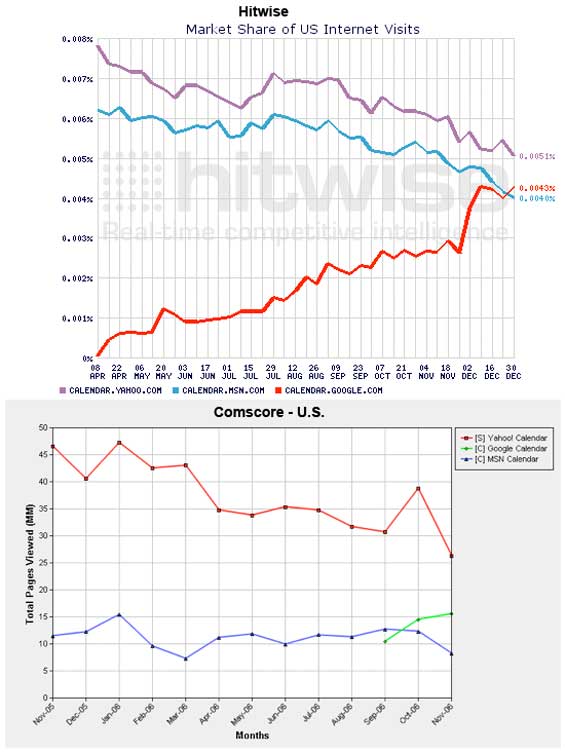
Recent Hitwise traffic data on Google Calendar is out, and it shows a steady increase v. the competing products from Yahoo and Microsoft. All three are about the same size now, although only Google Calendar is pointing in the right direction.

I recently switched away from using Mac Calendar after too many struggles with synchronization. I still view my calendar from the Mac desktop application, but all the data is stored at Google and read/write access is shared with the team. I’m not surprised to see it getting traction against Yahoo and Microsoft – those guys haven’t put much attention into their own products lately.

As we did a couple of weeks ago with Google Blog Search, we also took a look at the most recent Comscore data for the three products to see what they have to say. I’m surprised to say that Comscore is showing the same trends and overall rankings as Hitwise, something that rarely seems to happen. Comscore still shows Yahoo solidly in the lead, but declining rapidly.

Charts below.
Advertisement

Comments rss icon

  • wait, msn had a calendar?

  • hehe, did not know that either

  • me neither! I am using Google’s Calendar anyway. Google’s Calendar may be visited more than Yahoo’s Calendar in few months… It seems so..

  • Something I can’t work out

    Why go to the trouble of assigning tags to items in a feed, and not use tagging on the site to local tag pages using a plugin such as UTW?

  • My calendar is 30Boxes (still ahead of Googles calendar application).

  • er, Gcal who? everybody is still using Outlook, etc…the online calendar space hasn’t taken off

  • I am not sure if this is a fair comparison. mayhaps Hitwise and others should show the stats for GCal, 30Boxes and other “ajaxed” calendars to get a feel for how well Google is doing vis-a-vis other players.

  • I use the online calendar at http://www.busi...essitonline.com – it doesn’t have all the features of Google but it integrates nicely with their other business applications (e.g. invoicing) which is where I find the most productivity is saved.

  • Google Calendar is very good compared to others, I synchronize the data with my Palm is very useful. Iscrybe is also a good Calender, they sent me a beta, the video looked nice, have to explore more about it.

  • Glad to see mike back at it …with his rapid posting…what happen to the other two or three people on an extended vacation???

  • Still waiting for the task list feature here ;) I hope at least they are working on it.

  • having 2 charts with different label colors for each option (IE google is red then green) would cause you to fail statistics 101.

    Hopefully these data were pulled from disparate sources. I think Google receives a lot of usage from people that blindly trust their brand. G can pull indecisive/uncommitted users away from other portals which never ceases to impress me.

  • ah – i see one is from hitwise, the other comscore. the teacher in me still wants to correct the mismatch colors however.

  • Hmm – the hitwise chart is in thousandths of a percent. Now, I don’t want to go all “verizon math”, but that chart really is way exaggerated.

    still interesting tho

  • A good product creates its own space in consumers minds and budgets.

    http://www.tekn...ld.blogspot.com

  • Hi,

    I have not been a regular user of GCal and have not looked at the features in the recent past also.

    But can somebody let me know if I can get my GCal reminders on my cell phone ? Can I set this option for some calendar events etc ?

  • Timely topic! I set up a Google shared calendar just a few days ago. I was impressed at how easy it was to launch. In only a few minutes I was able to accomplish exactly what I wanted. My only complaint is the brutally slow Gmail, which I also set up given a Gmail account appears to be required for all calendar users.

    I doubt I’ll use the Gmail for anything other than signing on to access the calendar.

  • It’s quite impressive how always Microsoft manages to get their products at the top.

    MSN is Alexa rank #2, Live is #7 IIRC, and, without us even knowing of its existence, msn.calendar.com is at the top.

  • I do use google calender .I always believe in Big G daddy!!

  • I add events to whichever calendar I’m in front of: iCal on my mac(s, synchronized with .mac), gCal if I have an event in an email there, or my Backpack (www.backpackit.com) calendar, which I consider my primary. All three synchronize and are always current, including pulling iCal feeds from my wife’s mac.

  • What about hipcal, rememberthemilk, 30boxes, etc?

  • MSN calendar is horrible.

    I use Airset (airset.com) which is great because it syncs both ways with Outlook on your desktop (via a desktop sync app you install). Works wonderful.

  • Ross,

    Remember the Milk is a To Do app, not a calendar. RTM has recently added a nice integration option into Google Calender. They are complimentary products.

    Google Calander is easy to use, quick, and easy on the eyes. My wife, who is not very computer oriented, is hooked on it and has turned several of her non-tech friends onto Google Calander as well. I certainly can see why it is rising in usage.

    I too would be interested in seeing usage statistics to some of the other products such as 30Boxes. My guess is the Yahoo, MS and Google dominate because of their brands. Those of us that read sites like Techcrunch are aware of options out there. The typical user out there is not.

    Tony

  • Check out http://www.webical.org/ as a (future) open source alternative for web based calendars.

    Webical is for icalendars stored on webdav, what webmail (squirrelmail, etc.) is for email stored in imap.

  • I know this company has a beta version that should solve sych problems between mac and google:

    http://www.spanningsync.com/

  • Google calendar. First thing I look at every morning. Multiple calendars, weather forecast, sharing, local events. Looks good and the integration with GMail helps. More than meets my needs.

    Someone asked earlier .. yes you can get reminders to your cell phone

  • I have never used an online calendar. I have used Googles Gmail and Reader and really like them. I will have to try Googles Calendar next.

  • I think having most web apps showing a sync. with gcal option as well as easy integration with outlook – Google Calendar is making good headway. I see outlook invites and vice versa from GCal often and it works. This is what is missing from the other apps. Also – the heavy AJAX makes shifting between the other mail features tough on Live and Yahoo (at least for me)

  • In fact, you can sync Gmail with the calendar app on your mobile (i e, what you might call a “cell”) using an app called gcalsync. You can also have Gcal send daily reminders to your Gmail account and get to Gmail on your mobile with a brilliant app I *think* Google are offering. Stunning.

  • I recently switched from using Yahoo calendar to using Google calendar for various reasons. 1) Yahoo Calendar is woefully out of date and shows no signs of being updated. 2) I was using the Yahoo app to let me sync my calendar to my Windows mobile phone, however hit a time zone bug where any events outside of PST would sync as if they were PST (so for me on MST they’d be an hour off). I spoke with the app developers, and they basically said “yeah we know about it, it’s not going to be fixed.”

    When I started up Google Calendar and in their Quick Add was able to type “Lunch with Bob 1/12 from 12-1pm at Cafe Bistro every Tuesday” and it got it, I was sold.

  • I still gotta give a shout out to MY online calendar. The amazing people at http://www.30boxes.com — They’re constantly innovating, listen to their community, and have an amazing calendar solution that’s also social!

  • I can’t understand Microsoft.
    They have millions of Outlook and Outlook Express users around the world.
    All they need to do is to open a web site where all those users can view and share their calendars.
    Add some integration with other Live services and events start ups and you have a winner no one can break.
    They already have most of the technology as part of Outlook Web Access that comes with Exchange.

  • Totally agree with Deepak on all those points, especially the multiple calendars, sharing and adding events from GMail. If I’m sent an email with an invite to an event, I can add it to my calendar from GMail.

  • 30Boxes is still my favorite calendar by far. My office just switched their team calendar to Google and I’m pretty disappointed with the functionality. I also use 30boxes for my todo list. I’m pretty surprised someone hasn’t snatched 30boxes up by now.

  • I’m still wondering why Google hasn’t merged their Calendar system with Gmail. That way I’d actually use it. I hate having to go to 50 different places to manage my things, and for this reason I don’t use any calendar system. Gmail is great, make it perfect by implementing a calendar system.

  • While this data is interesting and we all know we can make numbers and charts tell any story we want, I’m not sure this tells us much of anything. So, GMail users don’t click on GCal from within GMail, but Yahoo Mail users do.

    What would be really interesting to know is not how many clicks these online calendars get (afterall, I’ve clicked on GCal a number of times, but I definitely don’t use is as my calendar…does that count?), but how much time users spend in these applications, how FREQUENTLY they use them, and what percentage of ALL users of calendars (Outlook, Entrouage, and the like) this represents.

  • 30boxes is the best calendar out there. I would buy that company if I had the money :p

  • I’ve been using RSSCalendar.com for some time now. It doesn’t have all the ajaxy features you see on most Web 2.0 calendars, but it is by far the easiest to use. I can quickly create a calendar event that will show up on my blog and rss calendar feed immediately. You can create daily, weekly or monthly rss feeds – or private feeds for personal use. Best way to share calendars online.

  • Me? I listen to my calendar.

  • I love Google Calendar. My whole life I have struggled with using a calendar and keeping it up to date, whether it be on paper, on a web site, or in a computer program. Google Calendar is the first calendar that I have ever had any success with. It’s very easy to use, both for reading quickly and creating events, and you can get a Firefox extension as well that will show you your events for the current day and the next day in a little popup window. I love it, so, thanks Google! :)

  • I bet the combined traffic to Outlook Web Access calendars is much larger than all of these “personal calendars”.

    I don’t keep a personal calendar, but I use my work calender on exchange a lot. For personal stuff I just put a reminder in my phone if I think I am going to forget.

  • I forgot all about signing up for google’s calendar! yay! this article reminded me about that.

    I like the ease of use and interface of Google’s calendar.

  • I wanna Scrybe! New kid in web calendar!

  • is there a way to sync (both ways) with outlook that is easy? Since my treo interfaces with outlook, I’d like events to go all ways… I’ve read about one solution but it seemed to involve lots of set up…anything change?

    Google calendar is fantastic in most ways.

    Sean

  • Come on Mike. What about 30boxes.com? I have been with them since day one and it is constantly improving. With the slickest, fastest, and most importantly, easiest calendar, 30boxes is by far the better calendar. The Webtop and To-do features are bar-none.

  • Google wants my financial info, all my email, and now they want to know my daily schedule?

    Screw that. I’d rather let the federal government spy on me day after day before I blindly hand it over to a corporation that’s going to use it to datamine me and profit at my expense.

  • Honestly, I still prefer my pocket paper calendar, even over my 8125. Maybe I am old fashioned….

  • I’ve tried Yahoo Calendar and a few other online sites. I keep coming back to Outlook. Its integration makes it hard to leave.

    However, I have tried BlueTie and it does seem like a promising online replacement.

  • Famundo, http://www.famu.../organizations/ offers a viable solution for those groups looking for an alternative to Trumba. It is free and they have an import for Trumba data. They also offer most of what Trumba offers.

Leave Comment

Commenting Options

Enter your personal information to the left, or sign in with your Facebook account by clicking the button below.

Alternatively, you can create an avatar that will appear whenever you leave a comment on a Gravatar-enabled blog.

Trackback URL
bugbugbugbug
Techcrunch on Facebook