Tag Your Desktop Stuff With Tag2Find
by Michael Arrington on December 29, 2006

Tagging should be a feature of operating systems. It’s usually a superior way of organizing information v. folders because a file can be placed in only a single folder, but multiple tags can be associated with that file. It’s one of the reasons I like Gmail, because emails can be tagged with multiple descriptive terms instead of just throwing it into a folder. I find it much easier to find tagged items on flickr, del.icio.us and gmail, for example, than it is on Mac mail, my desktop email client that doesn’t support tagging. Properly tagged items are much easier to search for down the road.

Vista does support a limited form of tagging, although it’s hard to get to. If you right click on a file and click properties, and then details, you can enter in a set of tags for that file. Using the search feature of Vista you can then find those files by searching for a tag. Windows XP doesn’t support tagging, nor does Mac.

Austria-based Tag2Find, though, has created a nifty application that allows tagging for any type of desktop file. It only works with Windows machines running XP or Vista, and it relies on the .NET framework. In our testing on a XP machine, it did very well.

To see how it works, see the demo here. The application sits in the system tray on the bottom of the screen. Click on it and a search bar appears to tag files, or find tagged files (see image to right). to tag a file you type in the tags and then drag files to the icon. Tag2Find will also suggest other tags based on what you type.

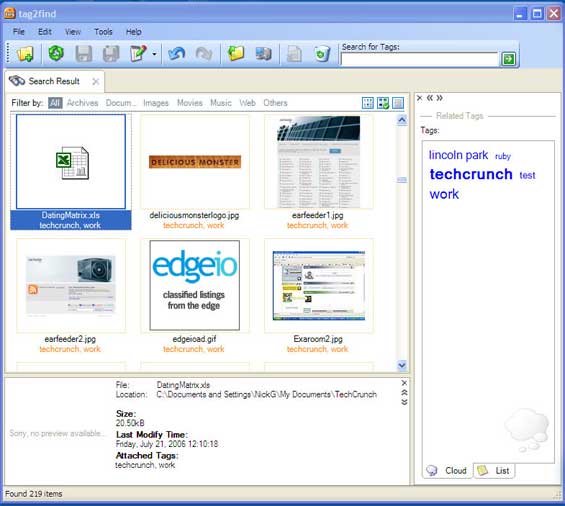
There is also a larger view option that opens up a window showing tagged files, a tag cloud or tag list, and a built in media player to play media files that you’ve tagged (see image below).

There’s no word on the business plan, although it’s possible this could be advertising supported. The beta period, at least, is free. Right now the company is in private beta, you can request an account here.

This is a great Windows tool, and I’d definitely use it if I wasn’t on a Mac. Microsoft, by the way, has certainly given some thought to moving in this direction - see this video (works in IE only) for information on their Project Tesla.
Comments

Hey Mike,

OSX already has support for “tagging” files so they can be found quicker through spotlight built-in. Although it’s a quite unexplored feature by most users, using “Get info” on a file (right click -> get info, or click -> command+i) allows you to type in keywords relevant to the file, files or folder that you’re looking at. When you search for those keywords later, those files will pop up on top.

Microsoft doesn’t have this in their OSs yet, but I guess they will soon. And even apple can get smarter about the way they allow people to tag (notice they don’t call the keywords tags, but the behavior is the same) files.

How was christmas? Cheers


I do like this tool a lot! It’s a great time-saver and convenient to use.
Along with the recommendation-tag support this reveals the right information and files I am looking for.


It’s not quite the same thing, Fred. Tagging is more powerful when you can see a list of all the tags you’ve used and apply them consistently. There’s no point in using keywords to search out “interesting” if you’ve also used the keyword “good” “awesome” “nice” “swell” etc. to describe the same thing.

This application suggests tags (like del.icio.us does) based on the content and displays already created tags. Until OS X Spotlight can do that, it’s not nearly as useful.

Unfortunately, this is a good idea that I think will have a problem with user adoption. I know that I won’t want to go back and add tags to all the files I have saved, and I won’t remember to add the tags after the fact either.


I’m sick of tags already… Sick of seeing tag clouds. Ready for new stuff!


i guess this is just what i was begging for the last months. gonna try it.


TAGS,TAGS, and more TAGS.
Somesort of META-DATA can be used as a substance for tags
without tagging, isn’t it?
Gonna be more useful, I suppose.


Gratulation an meine Landsmänner!

(congratulation to my landsmen)


I still want tags for my stuff. Small devices that weigh fractions of an ounce that emit a signal that I can pick up with a locator or perhaps even a GPS tracking unit. It’d be nice to pull up a search window, type in “keys” and have it give me a coordinate location. Or even map the coordinates of my home/local area and give each grid a unique name, so it can tell me “Kitchen, sector A-4″, which I’d know is my little key rack. Hmm. Right where I thought I’d already checked…

It’d be handy, especially with thieving kittens living under my roof…


i disagree that “Tagging should be a feature of operating systems”. the abastraction of a file is a whole lot easier to grasp for users than that of a tag. in fact, tagging in some form has been a feature of operating systems for years (they’re called hard/soft links in linux and shortcuts in windows).


There are two very new solutions like this for Mac users. Nifty Box (nifty-box.com) and Punakea (nudgenudge.eu/punakea).

Nifty Box looks like it has about the same features as Tag2Find, but its interface is more consistent. Browsing by tags is a little cumbersome at the moment, but the authors promise this is being overhauled.

Punakea is my favorite, despite its odd name. It is probably the most elegant tag-style browser I’ve seen, and definitely fits right in on the Mac. It displays results the same as Spotlight, so if you don’t like that, it might not be for you. I love it, and can’t wait to use it full time. But, for now, it is very early beta with many bugs. But the promise of this app far outweighs the early beta glitches. The authors are very involved in the forums, and I can only see it getting better and better.


When I was back in the Corporate World we constantly reminded ourselves of “bells and whistles” ….bells and whistles that only added to design time and cost overruns. I was wary of them then and I am wary of them now. To me this sounds like more redundancy. What about the old way of simply labeling the electronic folder properly (category, date, creator, etc) and filing away.

Hope I am wrong but these things only add more buttons for employees to play with and be more unproductive.

http://jollyjo.org


if you’re on a MAC you might want to check out the beta of PUNAKEA from this dude in australia, http://www.nudgenudge.eu/

…do note, however, that you might lose elements if you rebuild your spotlight index…


Adrian, adding keywords to items is as old as the hills. Places like flickr and gmail and plenty of others have shown tags are useful for finding things. Not sure how you can put simple tagging into the wacko bells and whistle bucket.

As for directoy naming…you mean like this ?

/mypictures/2006/12/01/skitrip ?

then what if I want to find all pictures with my daughter…should I also put those pictures into ?

/mypictures/daughter1

naming of files and paths only gets you one chance (unless you copy the files or use symlinks).

Now, if they tried to create an “autotag” button with a giant dialog presenting wacko configuration options for autotagging, that would be heading into bells and whistles time, but not just a simple/single text box for entering a few keywords.

my 2 cents


This is really one nice tool, very useful which make easy for me all my files which has something in common.


I just got into the beta for this and I must admit it shows a great deal of potential, but it is still a bit rough right now. I’ll definitely keep my eye out on for this app.


This app looks cool but at first glance I can’t see how it is different from what is built into vista - you can tag any file in the vista file explorer.


This is great. Now to tag all my files. Let’s see now: porn, porn, porn, porn, porn, porn, pirated music, porn, porn, porn, tax returns, porn. Finally, I can get organized.


I think this is another start-up that is destined to die in under a year. OSX already has this functionality, some Linux distro also have a harddrive indexing (which is way more convenient rather than tagging your files one-by-one) and that’s very limiting their expansion potensial, and I believe Vista is going to add this element on their next release.


As a Vista user for 6 months now, I gotta chime in and say tagging is much easier than described in the article.

The bottom pane of a windows explorer window (folder) shows details about a file that is highlighted, and also has an “add a tag” textbox where you can append tags to the file.

In addition, the new “save as” dialog box has a field for tags…


I understand the concept of tagging in blog posts, Flickr and other services where you might want anybody to be able to find your content (posts, pics, videos, etc.). Tagging your own files is a horrendous waste of time! If you lack the brain capacity to remember, perhaps with one or two attempts, some searchable data about a document you have stored on your desktop - what makes you think that you will remember what you tagged it?

Photos? Picasa or Elements will do this. Video? Use descriptive names. Music? All of my MP3s other files are very descriptive, and iTunes (or whatever your flavor of music app is) will be much better at finding them. Horses for courses, as the saying goes.

Passive index, active search - that’s the beauty of Google Desktop. Active tagging all files to occasionally us the tags to search? NFW - I have better things to do with my time.


Tagging all your files is a waste of time. You should remember how you organize your data. The whole point of tagging is allowing *others* to find your data. If it is your own data, I don’t see the point in tagging it.


Tagging very useful for programmers and even for visual prgrams like video editing. Don’t be so anal.

Roof Contractor


I was gonna say the same thing Fred said (comment #1). OSX already has this (though, like Judi pointed out, it’s not exactly the same), I use the comment box along with smart folders to organize my stuff. I don’t see any reason to use tag2find. Seems like a waste of time to me.

Just my 2 cents.


I like the idea. I like tags for organizing my bookmarks (and yes, I organize them mostly for me, not for others). I like tagging my pictures. There “organizing” in folders (as suggested above) does not help that much. So yes, I even see use for tagging on my own PC, used only by me. I do it with Adobe Photo Album, but it is a pain to consistently tag there.

The app looks like it makes it easy to tag consistently, as it provides you with suggestions based on how you tagged previously. It makes it a lot easier to find things based on your tags as it narrows down while searching. And it seems to be able to handle tagging several files at once.

And yes, I’d really like to have this in our companie’s LAN!


#24….

rather than tagging files on your corp lan…. wouldn’t you really like to be able to go out/search/find the docs that are germane to what you’re looking for…

that in my humble opinion would be waay more useful than tagging!!

and i don’t simply mean the use of the proverbial “file server”!!!

peace…


@ #22…

Granted tagging can be useful is certain instances, mainly with photos and media. But tagging programs for such uses have been around for a while.

I agree with shirster and others, seems like a waste of time for the mainstream.


#25,

I agree that maybe a combination of search and tag on the corporate LAN would be most powerful.

As far as tagging is concerned: yes, I believe it would help me. Had dozends of times when someone said “I put the file xyz on the exchange drive…” and I kept searching for it in the predefined folder structure for quite some time. Most of the time, tags would have helped, I suppose, as the otherone just had to tell me: tagged it “xyz”, if I couldn’t have guessed it for myself.

#27,
hmm, maybe, yes, I mentioned Adobe Photoshop Album for myself in my post. But the main advantage I can see with a program that can handle all types of files is that I’m not as locked in and have a consistent way of tagging and not one application for photos, one for videos, etc.

I’d say we have to wait to see how this evolves. It’s a private beta, after all :-) And most posts above mention similar programs for Mac, which doesn’t help me as a Win user… :-)


I absolutely agree tagging should exist in operating systems, but although both this and the solutions for OS X are cool, what’s really smart about Gmail is that the tags replace direct access to the underlying filesystem. If an OS introduced tagging which worked the same way — with a metaphor for file structure that was based on your own intuition, rather than simply showing you how your computer stores data internally — **that** would be the equivalent in an OS to what Gmail’s done. Even OS X doesn’t even come anywhere doing something that clever. Somebody really should, though. It’s not about tagging what’s in your filesystem, it’s about only being aware of what your tags are, and not even needing to know what a filesystem is.


As a developer of tag2find.
I want to thank you for the overwhelming respond on tag2find. We did not expect that so many people are interested in tagging on the desktop.

Currently, we are working to improve the private beta and we will take every posts, emails and comments serious. Because, it is important to see the different opinions to learn from them.

Thank you!
tag2find team


I would not bother using this, I am sure MS will be adding tagging to the OS soon……you know, like about 5 years or so when their next OS comes out. Of course in year 4 they’ll decide they can’t get the OS to market in time if the include tagging and the feature will be eliminated until Windows 2016. Hm…maybe I’ll try this after all.

BTW, what exactly is the purpose of of these comment forms always requiring an E-mail when anyone can type inf anything. What the heck is the point?


I think this is a good idea, but Google Desktop has kind of obligated the need for it. I use Google Desktop all the time to find files - and it is so much better than tagging (in my humble opinion). While when searching on the internet I am a big fan of social networking based search, when it comes to my personal computer, I’m a fan of the algorithm - probably b/c I already have some knowledge of what my files are.


I’ve been looking for exactly this. I want to tag a few files as “critical”, then use an online backup service to copy only those files. If this works it’ll be great.


I wonder how it handles the privacy issues

Tagger..beware


Mike, you might like MailTags for Mac OS X Mail. I use the company’s other product Mail Act-on and haven’t tried MailTags, but it looks like an easy way to tag your messages.


Shameless Plug - http://www.krawlerx.com has Desktop Tagging for over a year now. Plus RSS based file syndication - also covered herehttp://blogs.zdnet.com/web2explorer/?p=244


In a smart tagging program, you’d be able to drag a bunch of files onto a tag, and those tags would apply to those files from then on out.


I was on a senior design team at school that made a similar tagging application: http://jade.msoe.edu/tag/

It isn’t polished by any means, but its free, works well, and seems to do almost everything (if not everything) that “Tag2Find” does. There is GUI support for Windows and command line support for any OS that can run PHP (although we don’t provide those packages on the site). http://jade.msoe.edu/tag/files/TagPosterFinal.pdf for a quick overview of functionality. Our program is also file-system independent, whereas Tag2Find requires NTFS.

To OS X users: Spotlight’s “tagging” leaves a lot to be desired.


RE: David Mackey
Google Desktop’s weakness is that it isn’t able to track files that are moved around.

I haven’t played with Vista’s built-in tagging too much but it looks pretty good at first glance.


Tagging does make things easier, but it also means you need to take them to begin with, which is an effort. Yahoo’s desktop search let’s you search any word that would be in any document without needing to spend the extra time tagging. Having cake and eating it too.


I agree with many here that tagging apps often make us a slave to the technology - tag for the sake of tagging. There is a price to pay for “filing” in the form of mental effort and time so it better be worth the trouble. With most tagging apps this price is quite high. I can’t speak for Tag2Find (never tried it), however there are others that really miss the mark IMHO in how much extra work they add.

Another beef with filing/tagging is that that when your tag list gets long, the meta is actually more cumbersome than the data it’s supposed to organize. I don’t know why this has not yet happened, but why can’t we search/sort tags as quick as we can search/sort email messages?

Desktop Search is awesome. I use X1 and I’ve abandoned using folders in Outlook completely (see http://www.cnxn.ca/NoFoldersTutorial.html ). Search has no up-front cost like filing does and these days it’s lightning quick. That said, there are some limitations to it.

Search is excellent for finding one thing (message, file, whatever), however it’s terrible for grouping many things easily, unless you’re an SQL guru. For my company I have many an emailed receipt and bill for things I order online and some contain the word “order”, some “bill”, some “receipt” or something else. At the end of the year when we’re filing the corporate tax return it would be nice if I could just click on one tag to find them all so I can send them to my accountant.

Search is also excellent if you know what you’re looking for, however it falls short if you don’t but will know when you see it. Sometimes I can’t put my finger on a key word (or a contextual key word is not contained in the message) so it would be nice to be able to browse a list until something jogs my memory.

So the key here is to make tagging EASY. No one is going to tag if it’s more difficult than using their folders or if the pain of tagging is greater than the pain of a complex search query. And who wants to duplicate in tags what they’ve already done with folders? It would be nice to mirror anything done with folders in the tags. So if I file it in A\B\C it will automatically be tagged with A, B, and C.

The closest thing I’ve found that melds the 2 worlds of Tagging and Search is a product called SideFinder (www.sidefinder.net). I tried out the Beta which currently has a very limited feature set and is a bit buggy, but they are definitely headed in the right direction and are close to a second beta release. It solves (and will solve) the above problems as follows, albeit for Outlook 2003 email only at the moment.

When selecting messages, it shows related tag(s) in the sidebar. In this way you can select a block of messages in an approximate date range, locate the desired tag filtered in the sidebar, and then select the tag to display the related messages. It’s bilateral file navigation - use the meta to find the data, but also use the data to find the meta - Search/Sort to find one message and use SideFinder to find the rest. A good analogy is “Stumbleupon” to find messages. Nothing else that I know of enables this.

If you’re a big Search proponent like I am, you may find this feature interesting - Nameless Tagging. We often know that 2 (or more) messages are related somehow, but we can’t easily think of a meaningful name. SideFinder will allow you to drag a message to a message to create a relationship between them via a default UID. Using the bilateral file navigation described above, you need only find one message to find the rest. This eliminates one of the biggest problems with meta - the mental effort and time to create meaningful names.

The best thing about SideFinder is that is does not f*%@ with the Outlook UI. It’s a nice little sidebar that interacts with the application but does not change it. This is what killed NEO (Nelson Email Organizer) for me. Nice product but far too complex and it made me relearn everything I already know. Not only that, I had to give up some great features in Outlook which could not be duplicated in NEO so the trade off was too costly.

Search is still king for me, but if SF works the same as it does in Outlook for files in Explorer and web favorites in IE and Firefox like they say it will, I’m sold. Finally unified categories for all apps without changing the UI’s that I know and love.


Leave a Reply

Create a Gravatar for your comments.
« Back to text comment