Tools to convert file types, particularly audio and video files, are among the last to move from the desktop to the browser. Part of the problem is CPU usage during the conversion (it’s expensive to do this online) and part of the problem is the upload time for the user.
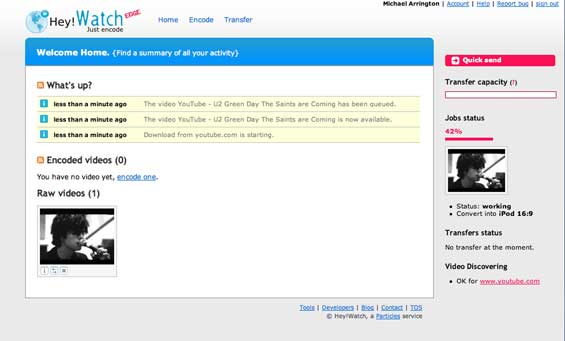
We’ve written about a couple of products that do online file conversion, Zamzar and Media Convert. But Marseille, France based Hey!Watch, which we tested our yesterday evening, appears to be a much more robust product than anything we’ve seen previously, and they’ve added developer tools to help build their functionality directly into other web services. The service is in private beta, but there is some information on the home page and you can request an invitation to join.
Hey!Watch allows users to import files to the service in a number of ways, including uploading from a hard drive or simply putting in the URL of a video froa YouTube or other popular online video service. But they also allow users to upload videos via a RSS feed, so new enclosures from future show will automatically be uploaded as well. The company has also created bookmarklets and a Firefox plugin to import a video from a currently viewed website to the service with a single click.
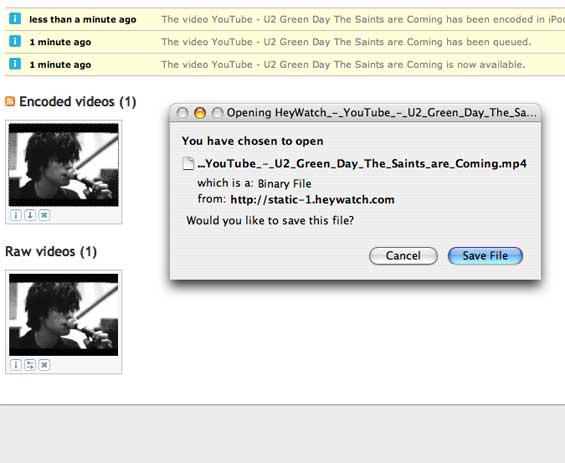
Once files are uploaded, they can be converted to all of the usual formats and then downloaded. And they’ve also used RSS intelligently here as well - they’ve created a RSS feed for all of a user’s converted files, so they can simply be gathered from a feed reader without going back to the Hey!Watch site each time.
There’s a use case for this that is really compelling - any time you see a video on YouTube or another site that you want to keep, all you have to do is hit the button on the bookmarklet, and later gather the file from the RSS feed. Those files can be in MPEG4 format for an iPod, or DVD format for burning to a DVD. Want to create a DVD for a friend of your favorite YouTube music videos? This service is going to make that dead simple.
And the fun doesn’t stop there. All of the key functionality is available via a REST API, for developers to build directly into their products.
Hey!Watch will have a free version, along with a premium version with higher limits on total upload limits, maximum video size and length, etc. Look for their launch in a couple of weeks.


See all


where is the site…is it down? hey!lame
Yeah…why is the side down?
BeachLocal, read the post at the end
“Hey!Watch will have a free version, along with a premium version with higher limits on total upload limits, maximum video size and length, etc. Look for their launch in a couple of weeks.”
On the other side somewhere in the post it said “The service is in private beta, but there is some information on the home page and you can request an invitation to join.” - How can i request an invitation? AND Where is the home page?
Typo nazi here.
“…are among the last to move from the desktop so the browser…”
So = to.
Sounds really cool. But site is down. Waiting for it to be back…
Site donw.. just a “It works!” msg…hmmm
Hey Mike -
You say these guys can convert YouTube videos into a downloadable format? Didn’t TechCrunch catch some heat from YouTube for posting a link to a service that does the same thing?
-Nick
Nick, why yes we did as a matter of fact.
From youtube’s terms “you will not copy or distribute any part of the Website in any medium without YouTube’s prior written authorization”
Sounds like taking steamed FLV videos and saving them to disk would be a copy.
there’s a whole ton of stuff written on this subject, Andrew.
See:
http://www.techcrunch.com/2006.....se-desist/
Does this introduce any copyright problem?
I love seeing products like these. Seriously. It takes the work out of finding programs, downloading then converting. I all for backing web based apps that make our lives easier. Now if someone can come up with a picture resizer web app that I can upload say 20 files, resize then and send me a zip or something. I’d be all over that. Good stuff. Hopefully the site will be back shortly.
looks like a great service for mobile videos feeds.
Hi Mike –
It would be immensely helpful to categorize the companies reviewed on this site by industry or type of service. That way users could simply go to the company archive when they wanted to learn about the latest developments in any particular industry.
Just a few days ago I was about to purchase an airline ticket and wanted to use the airfare prediction service you profiled not long ago… unless I’m mistaken, I’d have to go through every single post to find the relevant review. so a search feature would also be great.
In addition, I’d like to (quickly) determine if you’ve profiled any companies in my industry, e-learning. The addition of the above features would allow me to do this quickly.
Hope this is helpful.
adil
Adil - there is search on the sidebar. It’s not in the most prominent position, but it’s there.
Adil, at Google and other engines you can use “site:” as an operator, like this:
http://www.google.com/search?q.....om+airfare
Is this the type of feature you were seeking…?
jd/adobe
Any news on whether Real Video is among the supported formats? That one is a real pain to convert to anything else decently.
The RSS sounds really promising because it can be synchronized onto an iPod through the iTunes podcatcher.
They will do it faster with a grid infrastructure.
What a terrible name! I think they can come up with a better Web2.0 name than that.
Hey there guys……you can use this nice tool here to convert movies, cartoons and tv shows from http://www.flickpeek.com
I’ve just converted 20 star trek episodes. this is very very cool.
Regards,
joe
I made a free downloadable flash video (online quality is bad but if you download the file it’s ok) on how to do this. It’s fairly simple but it’s meant for dummies
http://www.metacafe.com/watch/.....for_ipods/
This article was linked up in a blog about another site 1dawg.com that does the videos conversion stuff for free to a number of formats for video. just a tip
Converting for Pocket PC works well and is very cool! However, I don’t get it - why don’t they also offer a software program version? This would greatly decrease their bandwidth costs.
I really like Movavi’s video converter software
It’s really easy to use and it converts video files for DVD’s too.
Jenn
This is my Audio Converter !
I will Create a Video Converter .
http://www.fullmm.com
http://www.brothersoft.com/dow.....erter.html
Helpful info.
i also find an powerful online video converter, which called wondershare video converter, it can convert between any video, even convert hd video, avchd video to popular video such as avi, mp4, wmv, flv, mp4 ..etc. i found it below:
http://www.dvd-ripper-copy.com.....m.html#116
I prefer download Video Converter Software. It’s safe.
This is my best favourite Video Converter. Download it from:
http://freedvdripper.org/dvdvi.....suite.html