December 9, 2006

Uh Oh, Gmail Just Got Perfect

Michael Arrington

227 comments »

Google quietly added a small feature to Gmail this week called Mail Fetcher. When that feature launched, Gmail became perfect.

Mail Fetcher allows users to access non-Gmail email accounts from within the Gmail interface. If you have a Yahoo email account, and a work email account, etc., you can simply access that email from within Gmail, using POP settings. Gmail will now work in a very similar way as Outlook does on the PC desktop.
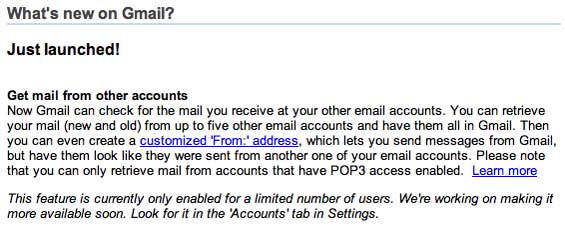
This is something I have criticized Gmail for in the past. I went on and on about this issue here when discussing the new Mac web mail product. It was the one feature that Gmail lacked that, in my opinion, kept it from being the perfect webmail application.

Every other webmail service is now inferior to Gmail. Gmail offers more storage than any other free service. They offer free POP access to Gmail from other email applications like Outlook (Yahoo and Microsoft charge for that). They offer access to other email accounts within Gmail (only Yahoo offers that). Gmail’s mobile client is killer (although not yet available for most phones). And only Gmail allows tagging of emails for categorization under multiple topics (I just wish it was a quicker feature).

I am seriously considering switching from using my desktop email client to Gmail. Since I work from multiple computers, using web mail eliminates the syncing problem. If Google implements an offline version of Gmail, in a similar way as Scrybe or via Adobe’s Apollo platform, it will become even more compelling.

Kudos to Google for finally implementing this. It’s just awesome.

  • Sphere It

Trackbacks/Pings (Trackback URL)

Comments

… and you can run gmail on you own domain!


Interesting Strategy - Google is certainly after Yahoo,;according to the various Internet Traffic Tracking Services, Yahoo Mail is one of the most popular destinations on the WEB, and some users actually search the WEB from Yahoo.

This gives people one less reason to go to Yahoo. And, in theory, could decrease the overall traffic stats on Yahoo’s Properties :-?


Wait Mike,

Google says:

Leave a copy of retrieved messages on the server. If you’ll only be accessing your email through your Gmail account, leave this unchecked. If you’d like to be able to access your mail directly from that account, or if you’re accessing it through any other accounts or devices, click to select this option.

Which I always thought was an IMAP feature, not POP. If they allow IMAP accounts, I would think that would allow you to sync your desktop client, no?


Will someone please explain this to me because I’ve been using this similar feature for almost one year now. I have my mail forwarded from another account to Gmail, and when I reply it appears to come from the original @domain.com address. I use POP forwarding from my alternate email address and can get emails and reply to emails directly in Gmail (there is a drop-down menu so I can choose the account that I am replying from). Is this really a new feature?


I’ve been waiting for this exact service. Many people maintain Gmail accounts as secondary email addresses, but will now consider making Gmail their primary app for email. Great move Google!


DigitalJournal - this is different than simple forwarding. If you need to keep your work and personal email separate, for example, simply forwarding work email to your gmail account is not a good solution. This new feature allows users to keep these accounts completely separate.


Nice. I can’t wait til XUL becomes mainstream, though. MediaTemple offers a XUL email interface and it’s amazing. Hands down better than any webmail app available.


Thanks for the feedback Michael, but forgive my ignorance as I’m still a bit confused. How does it keep them separate — do you now have separate inboxes for each email address?


Only for selected users; it’s beta invite by Google only. I haven’t been invited yet! :(

Rex


Actually, gmail will be perfect once one is able to sort messages in the inbox.


DJ - actually, I don’t know the answer to that question. The information in the links doesn’t say, and the feature is not yet enabled on my gmail account. I certainy hope that they create separate inboxes for each email account, or at least offer it as an option. But even if they don’t, when you respond to an email, the from address will be whatever email address you are using at that time, whereas with forwarding it would always be from gmail. So either way, it’s a big deal.


DigitalJournal,

This feature *retrieves* mail from the other account, so you don’t have to forward it from there. This is good since some accounts don’t support forwarding.


Michael - I think what DigitalJournal was referring to is Gmail’s ability to “spoof” a sent message as if it was coming from another address.

So in the past, you could have email from another acct. forwarded to Gmail, and then reply to the message AS IF you were sending it from the other account. It was a two-way fake, in a sense.

What you couldn’t do with that setup, though, was manage the inbox of the secondary account. It would just continue to fill if you didn’t also check it independently.

This new feature means you can do that now. I think.

Anyway, I’m feeling *meh* on all of this until Gmail starts offering IMAP support.


Michael: That is my exact confusion with this because I have done this for a LONG time with Gmail — where you get an email and your reply address shows as @domain.com, not @gmail.com. You can even set it up to respond from whatever email address the original message was sent to. All I did to get this feature working was go into account settings and click “Add account” and type my other email addresses. It sends a verification out to ensure you have access to those accounts, you confirm and bang — you can receive and reply to emails from many different sources.

(Thanks for the clarification Joe. The forwarding part makes sense).


I got really excited about this because it may fix the “We’re Yahoo and Hotmail so we don’t want to allow you forward,” issue.

Since you can’t forward from some other web clients without paying, I think Gmail may be saying that they can just get your email from them without having to the other client to forward anything.

Does this sound viable anyone?


I currently forward my GMail to Y! Mail. I would prefer my Y! mail to appear in GMail so that I have all my email in one place with GMail as my interface.

Yahoo provides POP access only if you subscribe to Mail Plus or subscribe to free non yahoo.com accounts (say yahoo.de).

GMail provides POP access to their email. However Yahoo’s version of fetcher does not connect to GMail either. You can use GMail forwarding but you are still stuck with the Y! Mail inteface.

So for those of us married to free Y! mail at the moment, still no way to switch to GMail while still ensuring your Y! mail gets delivered there too.


Yeah its still in beta I guess, because I cannot see that new feature of Gmail. Atleast not yet.


GMAIL will be perfect when it makes the excellent mobile mail client available on the desktop which should help kill off outlook express!


Michael,

ok this feature is a nice one but “perfect”? hmm i think gmail is still some miles away from perfect. I really love it and it’s better than most of the other but for switching completely to gmail i still miss:

- better filters (individual headers, more complex rules)
- Import/Export (that is a nogo - where to go with your emails when you ever want to move away?)
- individual Junkhandling (30days hard delete is bad - should be definable for the user)

probably some other things but that are my important ones. I didn’t test PGP Support and stuff as i use gmail only for some little cases.


I’m glad Google’s added this feature, it’s very cool and I’m excited that it will be easier for people to use. I am with Digital Journal though, I switched all but one of my email addresses to auto forward and have Gmail respond with the appropriate address. One of the biggest reasons I love Gmail. I can’t wait to have it enabled on my account, I may finally be able to get that stupid assigned school email account to work. Then again, odds are they don’t even have POP access in the first place.

So slightly off topic, but does anyone know how to make GMail put your signature above the quoted email(s) when you reply to a message? It sucks to have it show up below what people rarely reed.


that was the only reason my bf refused to switch.
now he has no excuse!!! :)


This is a very very cool feature. I have to use a desktop client here because my school cuts out the internet at 11 pm on most nights, but if I had constant internet this would be tempting. There is still the issue of my wanting always-there emails regardless of internet access, so I’m still waiting for the gmail desktop component. I also wish gmail mobile would work well on my Q.

Currently, though, I am using Gmail for my domain hosting since Dreamhost’s spamassasin, even with tweaking, doesn’t come close. Annoyingly, however, Gmail’s POP fuzziness means that I have to have multiple forwarded accounts in order to be able to POP and have new messages appear for each ‘device’ that is checking–phone, desktop, etc.

I tried to use Outlook 2007 a few months ago for my mail but it just was nowhere near as fast or reliable as Tbird–it started pulling down mail messages 5x over because of its insecurities with itself, I suppose. No-go. It is very good-looking, was its draw.

Also, gmail’s ’spoofing’ usually seems to have said ’sent by gmailaddress@gmail.com on behalf of spoofed@domain.com.

If only google desktop took over a little more of my desktop! (or, if only google’s web team somehow merged with Office)


I’m still waiting for the same to be activated on my account. Until then…


This new feature doesn’t sound too different from what Gmail’s been doing for awhile. For a long time I’ve been able to receive mail from other accounts, AND send email as that account from Gmail. Perhaps I’m missing something, though.

With regards to the organization of inboxes, I do know that you can set up a Filter on the other email address, so that anything sent to that address is tied to the filter. Then you could also have that mail automatically bypass your main inbox, in essence creating a separate inbox, just for that email account.


I’m with all the people not seeing the big deal with this, because I’ve been receiving and sending email from all of my 7 accounts via Gmail for at least a year now. Inbox organization? *shrug*

What would really make Gmail perfect is if: 1. They offered unlimited storage. 2. They offered some way to easily archive all your email on your local machine (without having to POP in and download copies).


“When that feature launched, Gmail became perfect.”

“If Google implements an offline version of Gmail … it will become even more compelling.”

o_O


Does anyone know if this eliminates the problem of ’sent by gmailaddress@gmail.com on behalf of spoofed@domain.com‘ ? Or will emails being replied to still do this?


I’ve also been doing something similar, forwarding my work mail to my gmail account. The problem with this that they still haven’t resolved is if you have multiple ‘accounts’, you should be able to have multiple signatures as well. Currently, you can only have one signature, so if I set it up as my ‘work’ signature, I have to delete it and manually enter a different one when sending personal e-mails, even though I choose my personal address instead of my work address as the ‘from’.


Peter - yeah, well, it will become even perfecter. :-)


Sorry, perfection of Gmail won’t even be considered until they’ve added IMAP support.


uhm you could always do this. just forward your messages from your other accounts. you’ve been able to do the send from any address you own for as long as I can remember…i’ve been doing it with my university address since the start of this year.


Hm, so this is what a kid feels like on christmas morning?

Thanks G-man!


Now if only they’d enable Hotmail support too … I HATE logging into hotmail, but I just can’t get people to stop using it.


i thought of making a site like that enables you to enter all your email accounts into one site that controls everything, as you know must of us have more then one email.. But i guess google beat me to it.. if they keep it that way they might get as big as michael empire someday.. ;)


As an alternative to this system you could just forward your mail to your Gmail account. This works excellent if your system uses IMAP instead of POP and also removes the need to have the Gmail system check remote systems unnecessarily, causing unnecessary traffic.

Almost every system supports the ability to forward email using some kind of redirect of .forward file. Yahoo, Gmail, most university systems, support this functionality… and thus a majority of the user base. The only popular email client that does not - that I can think of - is hotmail, who also do not support POP on their free service. While I applaud Gmail for the feature, it is neither innovative or spectacular. All the features you mention are already available by forwarding mail (avoiding unnecessary traffic of checking) and by registering your accounts with gmail so you can reply via the same address.


It reminds me of Fastmail.fm’s “pop links”


Say no to Crack: I have the same problem. Gmail just gave us a solution.

However, I have another problem with GMail. How do I backup my gmails efficiently? Just downloading them with Thunderbird is a pain: it wouldn’t download my 6,000 emails at once. Is there another way?
Aren’t you guys worried about having so much data in the hands of google? Not that they will go throw my files? but, can Google lose our data? Do they back up our files?
Alex


I agree with Frank Helmschrott, Gmail won’t be perfect until it has import/export, at the least. This is just keeping up with what Yahoo has given me for years and years.


I don’t think gmail is perfect. I have a simple problem with gmail, and I would like to know what you others think about it. It is because of this simple problem that I cannot bring myself to use gmail full time.

Gmail has decided to change the way e-mail usually works with respect to conversation threads. It combines all of the messages on a certain topic and groups them all together. Unlike, say, Outlook, when I get a second reply to a message in gmail, it “moves up” in my inbox. Most e-mail clients simply show an incoming queue of messages and the date that message was received.

While this may be a better way of doing things, more aligned with how people think and work, I find it very confusing and annoying. I don’t believe I can turn-off this feature.

I find it especially confusing in a case like this: (1) I forward a message to some employees internally for their feedback. (2) I want to reply to the original sender, without including my Employees responses. When I do so, I can’t help but feel that gmail might inadvertently send my Employee’s responses to the original sender because of the way it groups the conversations. Even if I manage to do what I want, the resulting grouped conversation thread is extremely difficult to follow - a new problem worse than the original problem, in my opinion.

What do you think? Isn’t it arrogant of gmail to change the way e-mail typically works and not provide an option to turn off this change?


It will be closer to perfect when it makes its line width adjustable.


Gmail is still missing an import mechanism.

I’ve got hundreds of emails in Thunderbird — why can’t I import them in Gmail?


Well if Michael doesn’t have an invite yet — I wonder “who rated” to get the invite???? Their own staff of employees???

Rex


excellent, I have been looking for a service like this for weeks.

I have wanted to pick up emails from one of my projects at work but didn’t want to use my email client.

now to try an figure out how to get a Gmail account… I cannot seem to find someone with one to invite me and am in the uk so can’t sms for one.


This is a definite improvement for GMail. It would be cooler if GMail had the ability to sort mails by the e-mail addresses that forward mail to GMail. This way you can track where the e-mails are coming from easily.


It seems to me like they intend gmail to be more like a web based mail application than just a web mail service


oops. looks like this the same suggestion as zedwards #10.


I feel like I may be missing something as this is a feature I have been using for awhile. All my email accounts are fed through gmail and basically I use it as the ultimate backup feature. I still use other mail aps to check email but everything is funneled through gmail.

To answer some of the questions above your new email address will automatically be tagged with that email address as a tag so “new@yourdomina.com” will be the tag for all emails for the new@yourdomain.com account.

I have also had the option to send from the new email or my gmail address at my choosing. It actually provides all the emails in a drop down menu on the “from” area.

I noticed the date range on the gmail help area as 12/5 but I have literally been using this feature for at least 10 months. This comment is getting so long I am turning it into a post on my site:)


The beta status of Gmail is looking ridiculous now. We’re really in Gmail 2.5 now.

It’s encouragiing to know they are still rolling out features to make the product better. Remember when web based email development was stagnant?


GMail *might* be perfect if and when they support IMAP!


uh oh, techcrunch just set the bar for exaggeration and hype even higher.


Amit Chowdhry, why don’t you create a filter stating that “the e-mails that are sent to X account -> map to label (”recieved from X”).”

This way you can keep track of your seperate-account e-mails.


Yes!!! Now all my email is in one place!! :P


Still a ways from being perfect, imo, although I use it as my day to day email. Searching is still the biggest sore spot, imo, in gmail. Google is the ‘king of search’, right? They help with typos and misspellings, offering “did you mean xxx?” in the web search area. But in the gmail arena, you can’t ever search for anything ‘fuzzily’. If I’m searching for anything and I’m even one letter off, I get no results. Frankly, I don’t really expect that from other web mail providers, but given that it’s Google, you’d expect more.


Thanks for the idea, Basar. I never thought of that. Mike K., GMail has a built-in spell-check like all other free e-mail providers as well. Also if you’re using Firefox 2.0, then misspelled words are highlighted in red automatically, so this should prevent misspellings in e-mails.


OFFLINE ACCESS AVAILABLE: just download all your Gmail into Outlook while leaving a copy on Gmail :)


@Basar
Thanks for the idea - that was my one complaint about the POP3, and now it’s fixed.

And, yes, I had the option in my settings last night, so bite my shiny metal ass - yay Bender!

And, yes, it works well now that I have the label/filter set.


Mike,

Gmail is awesome. If you are thinking about switching, you should probably use Google’s hosted services and get your Techcrunch mail through gmail.

Check out
http://www.google.com/a

I have been using this for a while and its awesome.

Abhishek


Joe’s mentioned this already, but can someone please confirm if this eliminates the problem of ’sent by gmailaddress@gmail.com on behalf of spoofed@domain.com’ ? Or will emails being replied to still do this?


Gmail isn’t perfect, NOTHING is.

the feature is good, and is a definite me-too. other programs (Outlook, Yahoo! Mail), etc are miles beyond GMail. The only differentiating feature GMail has is the tagging (conversation feature has been in Outlook for a while now) which is a failure (nobody other than geeks use it). ‘Star’ feature is even more of a disaster. Storage is a non-factor, they might as well advertise 100GB because nobody is going to hit that anyway.

this post points (especially the headline) at one thing and one thing only.

There are many ways a Blog can get readership. the topics that get ‘play’ on the web are two topics - (i) announcing Google’s increasing dominance, and (ii) announcing someone’s demise.

look at this post… it got 49 comments. that’ll make Michael Arrington drool - another successful post! Can’t blame him, he is in it to make money too!

haven’t seen an outlanding post like this before. fetching email from multiple sources.. since when did this become a feature that made email programs perfect!!!! HUH!

definitely ‘milks’ a very inconsequential news to the fullest, we are all idiots to pounce on posts like this.


@AP: You can definitely crawl back into your closet now…..


Hello. Hotmail called. They want their feature from 1999 back.


@amit

Spellchecking is not really what I’m after, nor talking about. I’m not normally searching the mail I *send* but the mail I receive - that’s the stuff that can have typos in it. Or just different spellings of the same word - gray/grey, etc. If someone mails me about “Grey’s Anatomy”, but spells it “grays anatomy”, gmail wouldn’t be able to find it if I searched on “Grey’s Anatomy”.


Yeah, if Gmail supported IMAP they wouldn’t need to build a special Gmail desktop client; we could just use whatever native desktop e-mail client we already have.

I also wish Gmail would support S/MIME.


GMAIL is amazing! Only if they were able to allocate specific signatures to each outgoing email address.


Gmail’s mobile client *is* available for most phones because it’s a Java app. By my count only BREW phones aren’t on the list, which leaves 95% of phones in the compatible column. In the US, Verizon Wireless is BREW, everyone else is Java. Outside of the US BREW is rare. And even without Java you can run Gmail through a XHTML browser.

Check out the compatibility list:

http://mail.google.com/support.....opic=10085


While I agree that Gmail is way ahead of the rest, I have recently had a couple of annoyances with it.

Today while typing an email it was just sent while I was about halfway done typing it. I must have hit a shortcut key or something.

The other day I got an email about a dinner that didn’t include a date (just a time), and gmail just assumed the date was today and asked me if I wanted to put it on my calendar. I figured that the email was sent as an appointment from Outlook or something, and ended up going to the dinner that night and no one else was there.

My point is that it isn’t perfect, but I know the hyperboles make good titles.


Is no one able to answer the question…if this eliminates the problem of ’sent by gmailaddress@gmail.com on behalf of spoofed@domain.com’ ? Or will emails being replied to still do this?


Well… I’d love GMAIL more if it supported Folders..

Tagging is good, allows easy categorization. But it just doesn’t look like a clean mailbox. I’d be happy to see the ‘dominant design’ of last 20 years introduced in Gmail. (yeah, so what if people think Folders are lame… users are used to it.)


This is very cool news. I havent had a eason to look at gmail as my yahoo account has supported me well over the past 9 years. I guess Ill try a new toy.


I made the switch from desktop (pocomail) to gmail 6 months ago, and haven’t looked back since. It really is convenient, and I find my days 2x more productive because of it.
No one ever asked for a complicated communication tool.. and gmail bridged every gap.


Got it, Mike K. Yeah I’d have to agree that the search within GMail should be a bit more intelligent. I have encountered problems in the past where it would not pick up keywords that I spelled correctly in the search as well.


Signif strides sure, but the BIG piece missing for me to call this anything close to *perfect* is instant notification, or any notification come to think of it. My PC browser/gmail doesn’t alert me when I have new mail, I have to check it (someone pls tell me if there *is* a feature to do that). Likewise for my phone using its browser.

If they did adopt that (seems easy actually), we’d have close enough to “push” email, and I’d gladly cancel using MS Exchange and push services like WM5 and BBerry.

-Ken


Hi

I’ve been using this service for some 3-4 months now.

its pretty cool

sending e-mail from within gmail and make it look as if you were using your other e-mail account is a pretty cool thing they came up with

what gmail needs is:

that you can customize gmail samething like you customize google homepage,

add different tools to it

change the place of menus

make a little more customizable


POP’ing other accounts would be a great feature if spam-filtering also occurs as part of the message retrieval. Spam-filtering is why all my mail goes through Gmail; so, if it doesn’t happen during POP’ing, then I wouldn’t be using it.

Also note that POP’ing a Gmail account does not behave like other POP accounts that I’m familiar with. POP’ing Gmail is controlled by the Gmail server, so that a Gmail account cannot be POP’ed from multiple clients. Otoh, other POP accounts lets the client control the POP’ing, so that you can POP from multiple clients.

For that, and one more reason, Gmail ain’t perfect yet. There is no way to filter messages by size./.


i so don’t care about this. I think gmail sucks. It’s full of spam. Yahoo mail (the free one) is much better. Their new version is like outlook on the desktop and has kinks to work out still. Compared to my work account and my gmail account, yahoo mail gets maybe 1% spam (compared to 30-40% o the others). I get a notice with a blurb when I get a yahoo mail. It’s integrated to other apps (could do a better job with Yahoo Groups, another thing that Yahoo got perfectly. Their groups are the best free groups around. Way better than google groups). Sorry google lovers.

I don’t know why everyone likes gmail so much? Just curious.


Interesting - Hotmail had this feature years ago, although it looks like it’s not supported in the Live Mail beta right now (at least I can’t find it anymore).

But GMail is far from perfect. The UI is completely lame - and no reading pane? Give me a break. Live Mail is still my web mail of choice.


“Since I work from multiple computers, using web mail eliminates the syncing problem.”

Huh? Mike, just use IMAP!


But I don’t have IMAP access to gmail, so it’s a problem. The key thing is I want to have all my emails in one place, on a server. Or exactly synced copies on to local devices (well, three with my phone). IMAP is great but I can’t access gmail that way, and it is one of my primary email addresses. The best setup for me is an exchange server with a ton of storage, and server-based email folders, but that’s not cheap. That’s a good idea for a new startup though…and I believe Sharpcast is moving in that direction.


Google needs to create an online version of outlook (in all of outlook’s glory). this would be easy to do. if they create a program like yahoo’s intellisync that syncs everything with outlook. then outlook would be ur desktop copy and would be the middle man to your mobile device (using nokia pc suite, activesync, or the palm sync software). they are one piece of software away from making my life. damn it.


I’d like to register another vote in favor of IMAP. IMAP allows you to do quite a few things that are impossible with webmail, including:

* Take advantage of advanced SPAM filtering
* Take your email offline with you (eg: on an airplane)
* Synchronize email with a mobile device
* Perform in-line spell check (Firefox 2.0 will fix this)
* Synchronize your address book across business email, personal email, and mobile device

I wrote a long post explaining why I don’t think GMail has it all a month or so ago.

If you’re looking for an IMAP provider that has it all, or almost all, check out my review of Tuffmail.

Rourke


Okay so after upgrading my Yahoo account and trying to figure out where to add this to my gmail account I realized this isnt a widespread roll out yet. Only a few gmail accounts can do this as they roll out the program. My account is not one of them, this sucks.


“But I don’t have IMAP access to gmail, so it’s a problem. The key thing is I want to have all my emails in one place, on a server. Or exactly synced copies on to local devices (well, three with my phone). IMAP is great but I can’t access gmail that way, and it is one of my primary email addresses.”

Ah but you *can* access your Gmail via IMAP. I wrote a post about doing this a little while ago. It solves the exact problem you’re looking to solve: the ability to collect all of your mail in one place, using separate accounts, from multiple computers… and everything is always synched.


To everyone who says they’ve been using this feature for months: I think you’re confusing this new feature with something that everyone already has in their Gmail. This was already addressed above, but let me try spelling it out a bit more.

Here’s where you’d see the difference: In your Gmail account, click “Settings” and then “Accounts.” There, you’ll see a feature called “Send mail as.” That’s nothing new — it’s been around for a while.

Those who’ve been granted access to the new service will see an entirely different section within the Accounts tab: “Get mail from other accounts.”

Michael, as to your question about whether Gmail will create separate inboxes for each account: Use of the Filtering feature would, I think, make this a non-issue.


This sounds great but is in very limited beta it would seem
Off the cuff two things are needed

1. sorting to different in boxes rather then filters (same for mobile client)
2. Support for this in GFYD, weird that they didn’t put it there first sense it would be more natural for account management and consolidation.

Good stuff though.


Why doesn’t google just introduce IMAP? There’s been a petition for over 2 years now at http://google.logenv.org


To the people complaining about no IMAP support… I dont understand this. The best part of Gmail to me is its interface. It kicks the crap out of any client, web based or not, hands down. If you aren’t using Gmail for the interface, then why are you using it at all? There is no reason. There are a billion other services that will give you IMAP if you so desire, so use one of them and stop complaining! :)

Also, about this whole article… I don’t totally get it. As many others have said, forwarding your email to Gmail is essentially the same thing and has been available for a long time. I have been doing it for over a year with about 5 different email accounts and couldnt be happier. I seriously doubt this new feature will filter the emails based on account automatically, but you can set up filters to do that, just lke you could with the existing service. Other than being able to “manage” your other email acconts remotely (eg, you delete it in gmail and its gone on the other server too), I dont see any point behind this feature. I dont even login to my other e