
December 3, 2006

Gifttagging Widget Helps You Get Gifts You Actually Want

Natali Del Conte

25 comments »

Last Christmas my dad gave me “Love Smart” by Dr. Phil. It was horrifying. This year, I am taking the necessary steps to make sure something like that never happens again!

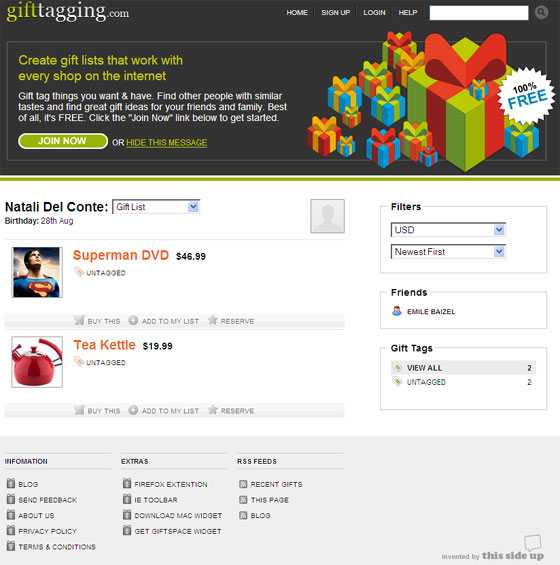
I started with UK-based Gifttagging.com. We covered the company in April in comparison to MyPickList. Gifttagging has a new widget that installs two icons in the toolbar. One lets you tag any page, sending the link directly to your wishlist. The other sends you to your Gifttagging home page. Both are available for Firefox and IE.

gifttagging_icons.jpgI love the tagging icon but it’s a little intrusive. I don’t love that every time I tag something, it sends me directly to an input page where I have to fill in the price and description of the item. I’d prefer to get a small pop-up where I could input the necessary info, save it, close it, and continue on my merry shopping way. That way I wouldn’t have to remember how much the item costs and any description details.

The second icon, however, is pretty unnecessary. I don’t need an icon to take me to my Gifttagging homepage. I can just bookmark that. I don’t like unnecessary usage of my browser real estate.

Inviting (and uninviting) others to see your wishlist is really easy. You can also keep different wishlists for different occasions and import wishlists from Amazon.

MyPickList allows users to send wishlist updates via RSS, blogs, or social networks. You also earn commission if someone buys from one of the vendors on your list. That’s pretty hard to compete with but I think the winning program will be the one that necessitates the least amount of work for both the giver and the receiver. Either way, I still don’t think my dad would use this. He would certainly ignore the email inviting him to join Gifttagging and most likely wouldn’t use the widget. But at least I can keep track of the links in Gifttagging, send them to him in an old-fashioned email, and try not to be a spoiled little ingrate.
gifttagging_screen.jpg

  • Sphere It

Trackbacks/Pings (Trackback URL)

  1. pick!t
  2. Is That What You REALLY Want For Christmas? at LifeDev

Comments

RSS feed for comments on this post.

  1. Stephen Glauser

    The two-button addition to the navigation bar is identical to del.icio.us’ setup, although del.icio.us does give you the pop up. I find that the “take me to my list of bookmarks” button is also intrusive.

    If you’re going to rip off someone off, at least lose the parts that don’t work.

  2. Derek Anderson

    Are you sure there is a “Widget” involved with Gifttagging.
    To me it appears as though it’s a browser plug in.

    My Pick List does have a widget though

  3. Natali Del Conte

    They call it a widget. Go here: http://www.gifttagging.com/get/widgetstart. I think it looks more like a plugin too though.

  4. Jim Hankley

    I really like the bookmarklet to add an item from MetaWishlist (http://www.metawishlist.com/). It displays the item that you’re adding in one pane while letting you add information about the item in another pane. So far, MetaWishlist is the best wishlisting app I’ve found.

  5. Nathan

    It’s frustrating that nowhere on the gifttag homepage do I see how they work. I see the links on the bottom, but I think they’ve completely missed Web users with such a great feature obscured by heavy 2.0 language and awkward flow. (”Create gift lists that work with every shop on the internet” is nice, but the follow is fairly confusing…)

    I feel a little strange making money from my own giftlist on mypicklist. I feel like I’m the couple registering for high ticket wedding gifts with the intention on returning them for the cash after the wedding, buying the cheaper gift and pocketing the difference. Do I really need to earn money from other’s gifts to me?

    My wife uses Kaboodle for our gift lists. I don’t know if it’s free of those sins, or better/worse in general, but it’s another option in the pile.

  6. Stan

    Can’t you easily delete the one button you do not want in the navigation bar?

  7. Stephen Glauser

    Stan, if you know a way I would be grateful if you would share it.

  8. Ivan Pope

    Natali, I think you’re a bit confused between their widget and their plugin/extension/bookmarklet.
    The thing you point to is a Widget that you can put on a web page.
    The thing you talk about is a plugin/extension/bookmarklet that puts the buttons in your browser.
    Two different things. The thing you illustrate is not a widget.

  9. Matt Healy

    I use Google Notebook (http://www.google.com/notebook/) for this purpose, and it works like a charm. It sounds like gifttagging.com does essentially the same thing. With the included Firefox plugin, I can right-click on an image or page and add it to my notebook, complete with a link to the site I got it from. I can also show my notebook in an unobtrusive popup window for additional editing. Here’s my wishlist, as an example:

    http://www.google.com/notebook.....oQvNiQye8h

  10. Tom Hynes

    At Dealarmy.com we use a similar bookmarklet (BM) tool but with a few important differences. First, we employ only a single toolbar icon. Secondly, when you activate the BM tool you are not directed to a new web page but activate a small pop-up window instead so your shopping experience is not interrupted.

    Other than that I see our listing feature working fairly much the same as those mentioned in the article with one major exception. A key feature to our site is that if you do not have time to search for that great deal on a specific item yourself or you admit that perhaps you are not the best at finding the top deals on the internet then you can use our Request A Deal feature. With Request A Deal you can ask other members of the Dealarmy community to look for a specific item for you. You offer up a bounty to make it worth people’s time to search for you and then just sit back and pick from the best deal that the members send your way. The member who submitted the deal you ultimately selected receives the bounty.

    The premise is simple - The more eyese looking for that great deal the better the chance you will find it!

  11. Christopher Sisk

    I know, in Firefox at least, with the del.icio.us extension, you can right click, choose customize, and remove the single “site” button while leaving the “tag” button in tact. I’m not sure though, if this method works with the Gifttagging extension.

  12. Christopher Sisk

    OK, I’ve added the Gifttagging extension and the customize removal method works. Right-click, choose “customize” and drag the unwanted “site” button off of Firefox and into the window of available buttons.

    Hope this helps.

  13. Rahul Pandhe

    Natalie,
    If you liked this website, you certainly will love our website http://www.GiftWisdom.com.

    We think your tool bar is your personal realestate and must not be cluttered.

    Thousands of dollars have been gifted towards particular gifts and our customers simply love it. We believe we have taking the inefficient gifting process and solved it once and for all.

    I dont understand what it takes to feature us on TechCrunch but we will keep trying our luck.

    Rahul

  14. Stephen Glauser

    Christopher, thanks! I had no idea that could be done.

  15. Mari

    I’ve been using http://www.findgift.com/ for years. It doesn’t look sophisticated on the homepage, but it’s extremely easy to use. I have a button on my toolbar for any time I want to add a gift to my registry. If I click the button, I get a small pop-up window where I can add info and tag the gift for a particular category. There’s also a button for “Save Gift”, which lets me save gift ideas for other people in lists.

    I’ve used the plugins for both Explorer and Firefox.

    Best of all, no registration needed for people visiting your registry.

  16. Heather

    Use stylehive.

  17. Jason

    WishRadar (http://www.wishradar.com) lets you add items via a bookmarklet, rather than a toolbar icon. You can send your WishRadar to friend and family to view without requiring them to register, as well. Or, you can publish it via RSS.

  18. Jimmy

    There is another site I found that is really cool called WishRadar (www.wishradar.com). I did a short review of it here
    http://tech.ahusbandsview.com/.....wish-list/

    It rides over top your Amazon wishlist and allows for a lot of flexibility like setting target price ranges, RSS feeds of things you add so people can keep an eye on what Santa should bring you, etc. They also have a bookmarklet as well as a mini version to add those things you see out and about.

  19. Erich

    For a very simple Web 1.0 giftlist site with very simple html, which means it’s good for grandparents, which translates to more gifts :-), try

    http://givm.com

    Been running for about 5 years. No bookmarklets, nothing fancy, but you can set up who can see your list, and the givers can mark things as bought and make comments/questions to each other and you don’t get to see.

    Peace
    –Erich

  20. engtech

    Mucho agreement on the horrible Christmas gift stories. This is how mine usually go:
    http://engtech.wordpress.com/2.....receiving/

    I’ve been wondering what the best of breed is for wishlist tools. People have been putting together a nice list in these comments, but it’s a bit to late in the season to go through all of them and figure out which is the best.

    I’ve been blogging about this entire Christmas gift suggestions thing for the past two weeks. I find there’s way too much chaff out there. If you look at sites that are dedicated to gift suggestion (like gifts.com), they have a really low “awesome gift” to “lame-o gift” ratio.

    http://engtech.wordpress.com/2.....-giftscom/

  21. Nancy Grover

    I had a friend tell me about wishquiz.com so that is what my family is using -we all added our Wish Lists and then the site sent emails to our family members. We could add the url and the pic of the item on the site too.
    Worked out well with our family all over the country. We’re hopeful that this will help with all the returns we had last year - ugh!

    My 16 year old daughter pulled the source code that was provided on their page and added it to her MySpace page. It gave her an animated widget with all her wish list items on it. I’m not a spacer - but she says that her friends think it’s pretty cool.

    I’ve not been to the other sites - but I really like this one. Good luck!
    ng

  22. Alina Belaya

    Thanks for great article and very informative comment - full review of all online wishlist serivces. And I really need to notice about two most popular in Russia wishlist sites: http://wishroll.com and http://wishlistr.com

    It’s really strange, but in our culture wishlists are not welcome at all, they seem like a money talk and business, but not a really sence of a festival. And only it last year many teenagers start using a wishlists to let know each other and their parent what do they really like. When my daughter sent me a link to her wishlist first time, I was a bit disappointed and asked her if she likes surprises and doesn’t she think that gifts from wish list are like an ordinar shopping. But she said no and after some thought I agreed. I agreed ever more when I printed my wishlist and given it to my husband :)

  23. ansia

    nice new service!