BlueOrganizer 3.0: Instant Vertical Search and Tagging
by Marshall Kirkpatrick on November 20, 2006

logoIn the crowded space of social bookmarking, Adaptive Blue’s BlueOrganizer is one of the most innovative services online. That innovation is continuing with today’s release of version 3.0 of the product. BlueOrganizer is a Firefox plug-in for social bookmarking/tagging that emphasizes use of standardized and automatically determined terms of categorization instead of only the terms that a user thinks of to categorize a web page. It’s a smart semantic based tool that syncs with Del.icio.us, offers dazzling contextual search and is already bringing in revenue.

The newest version of the product introduces the Blue Menu, a contextual menu of search and tagging options that appears on right-click and is determined on the fly by a semantic analysis of the page you are on.

In other words, if I’m on a web page about a movie I can right click and the Blue Menu will offer to let me search for that movie’s title, for its stars and director and for movies in the same genre in movie related databases. It will let me compare prices for the movie in shopping search engines and with one click I can send that movie to my Netflix queue.

If I’m on a page about a wine and right click, the Blue Menu will offer to let me search for wines by winery, type of wine, geographic location and ingredients in other sites about wine. A music item can be launched in Pandora.
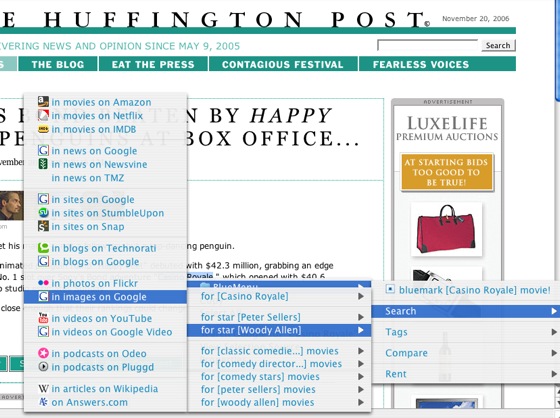
Blue Organizer recognizes items from a list of other verticals too including travel, toys, anime, software, hardware, restaurants, music, images and video. It’s an impressive tool. Each vertical has some default search options, but users can easily select other ones or make requests for still other databases to be included. In future versions of the software there will be a wizard that will let users easily add new search options themselves.

Adaptive Blue has already programmed against hundreds of popular sites in these verticals, but the tool is also quite good at determining context of new sites. With reasonable accuracy, for example, I can highlight the title of a movie in a news story on a news site about that movie and the Blue Menu will recognize it as a movie. It will also let me search for other movies the director has directed or the stars have starred in even if those names are not listed in the news article. Very impressive when it works and it does work fairly often. (See screen shot above, for example.)

In addition to all these exciting search options there’s also bookmarking options. Standard tags are recommended based on semantic analysis of the text but tag choices are ultimately up to users. Pages are automatically bookmarked after you visit them 3 times, but that number can be changed or deselected entirely. In future versions subscription to topics will be offered as well and will be organized in a similar semantic fashion. There’s quite a bit more to the product, but the contextual search menu on right click is the most important new feature.

Today is the new product’s first day in the wild and there are any number of kinks that need to be worked out. Adaptive Blue is a startup with a lot of momentum though. It was recently named one of the Firefox recommended add-ons list when Firefox 2.0 was released and has had more than 130k downloads. Unlike many social bookmarking services - it’s already generating revenue from companies that are paying to have themselves included in the default options of the contextual search and related parts of Blue Organizer. Purchases of bookmarked items through Blue Organizer go through affiliate links as well.

I’ll have to give it some more use to see just how useful and capable this new version of Blue Organizer is, but I’m guessing that many people are going to find if very useful. There is an option to sync your bookmarks in Blue Organizer with your Del.icio.us and Flickr accounts, which is great because you can try it out for awhile without risking the loss of what you bookmark if you decide you want to go back to Del.icio.us.

One of the best things about it is that there is so much than can be done with this tool, and yet using it is remarkably simple. There is a good degree of customization and advanced use that’s possible, but relatively thoughtless use will still provide substantial value to users. Fun for early adopters and mainstream users. That’s one important mark of a good product.

Comments

Since there’s no perceived need to disclose this upfront, I’ll ask here in the comments: does Techcrunch have a relationship with this company?


No, but I am considering keeping it in my personal list of tools regularly used :)


why would somebody really want to use this? to prep for targeted ads? seems moderately useful but beyond the sophistication of typical users - most of whom aren’t even using firefox…once again, looks like a company going after a tiny, tiny prospective user base (people using firefox who also embrace extensions, understand how to use them and also have an interest in advanced bookmarking utilitites…couple hundred thousand tops?)…

if you’re already using firefox, you can also simply add the search engines to the upper right main menu (without extension installation) and plug your search right into imdb, amazon and others without adding more to the browser…seems like a solution looking for a problem, though clever…


Dave is spot on. I don’t see anyone actually using this, as they aren’t really providing any value to the user.


Got to agree with the other comments, don’t see much use for this.


I think this is something that sounds complicated to explain but is really quite simple and useful when you’re using it. Just my 2c - surprised to hear people not liking it.


On a side note, commenter number one, check out this link, http://www.readwriteweb.com/ar.....p#comments, and look at comment number 4 and you can see Marshall is good friends with Alex Iskold who works for this company Adaptiveblue.


Rog, that was me teasing a fellow blogger about saying he had the scoop on an unrelated story when in fact someone else had covered it two weeks prior.


Is this related to Adaptive Path at all?


Thanks for clearing that up


Dave,

Please take time to try the plugin and then you will see that this is by far more useful, context sensitive and semantic-focused then the engines.

As far as why we are targeting Firefox? Simply because we like it and believe that it has a shot at winning the next browser wars. We want to help it.

And there are 0 ads in the BlueOrganizer.

Alex

founder & cto
adaptiveblue


I see this is another way to bookmark something (with ofcourse little bit of more knowledge / intelligence). One thing I noticed immediately after installing the plugin is, it takes time to load and when I’m browsing websites I do not want to spend a whole lot of time waiting for something to load.

I have to agree with others, I don’t see a whole lot of value in this plugin even as a developer.


I used this extension for a little bit (before this latest one), but didn’t find it very useful. It’s brilliant and very well done, but a little too complex. For example, if I find a movie mentioned on a news site, I can simply copy and paste it into Google or Yahoo and get all the information I need. For someone who researches movies a lot, it’ll be a great tool, but not everyone will install a plug-in for that. The same goes for books, music, wine, …etc. I’m sure some will find it very useful, but I think those will be a minority. That’s unless, they manage to make it simpler. After all, I don’t think many will want to see those big multi-level menus.


Has anyone tried http://www.GiftWisdom.com. It allows content organization for shopping but takes the whole concept to a whole different level.


I think the product has potential, its going to take some time for user to adapt to it. Yes, it is slow to load, but once it load, it is very functional and well design. Its a smart app, but maybe too smart for the non-savvy web user.

John / Dexly.com


This is off on a slightly different tanget than the discussion above. At our website http://www.MYSUMMER.com, we have noticed how difficult it is for most users to successfully harness the power of Tag keywords when they’re grouping/identifying the contents of the pictures they’ve just uploaded. Users will often leave the Tag category completely blank or perhaps use only a single word to describe their photos. This is unfortunate as the power of the photo sharing mosaic that takes place is a function of the breadth and generous use of as many appropriate Tag keywords as possible. We would love to bring into our site something perhaps akin to this Blue Organzier that enables our users to have word options suggested for them based on the pictures they are uploading and sharing. However, we are not aware of any technology like this exisiting for our site needs. Perhaps one of your readers might know of something that could be helpful to us? (Thanks in advance).

Tom


Hey I really like it Marshall - this LSI vertical keyword
research is great for finding the information you need
faster - =() we will use this tool to help us find better
affilaite programs to promote online for our free search
engine traffic.


I’ll just keep it simple and stick with my delicious plug-in. This seems like a hassle. If it takes more than two sentences to describe, I get lost and so will most consumers. Just my take.

You can’t say, “hey user! if you only take the time to learn our product, it will prove its value.” The user is going to say, “Screw you. Make it easy to understand and follow along. Let me learn as I go without learning the deep thinking involved in the site creation.


Josh, its not THAT complicated. I mean when you looking at a movie, is it complicated to say “Show me more movies with this director?” Or when you are reading about Paris, to say “Show me the map of Paris”. Is this not what we do online already anyway?

Someone very famous once said: “Everything should be made as simple as possible but not simpler”, and BlueOrganizer follows this - it makes semantical browsing simple.

Finally, I don’t think that consumers necessarily will say” Screw you”, most people like our friends and family find it very simple and like it.

Alex

founder & cto
adaptiveblue


Alex,
I was obviously using some hyperbole before. Your idea is generally good. Here are my concerns:
-Although it may be quite useful to some, I am overwhelmed with info
-The app is too busy, there is too much going on (37 signals would call this noise)

Here is what I think you need to do:
-Be more arrogant with app. Meaning, make more choices for the user. Don’t give us as many options. Help me choose what I want without me telling you.

I would agree with your quote about simplicity. However, the simpler, less busy, and more useful your plug-in becomes, the more people you will attract. Good luck, God bless.


Awesome service, bottom line.

Being able to have my bookmarks stored somewhere and to be able to take them with me as well as view them offline is flat out hot.


Has anybody tried StumbleUpon? http://www.stumbleupon.com/ It sort of feels similar, but maybe more polished? I wish I adored SU, but I really don’t very much. But I wish I did. Anyway, if you haven’t checked out SU.


Just because this is Firefox only today, doesn’t mean it will be that way forever. StumbleUpon proved that developing and perfecting an idea with the early adopters (Firefox users) and then rolling it out to the mainstream (IE users) is a good business strategy.

So what’s with the negative comments about tiny market size? I’d say it has more mainstream appeal in the long term than a site like delicious (for example).

My $0.02


I’m finding this helpful. I think this will help me research my upcoming blog posts a lot better.

One suggestion: Please try to make the initial tutorial more friendly and less overwhelming. I usually like to scan a page to get a quick idea of what’s going on and I wasn’t able to do that with the tutorial. :D The flash tutorial was nice though.

Great job.


I was emailed a link from a friend, checkout this blog and thought to give it a try.

Maybe I’m not the target audience (40+), although I’m an internet fanatic and technologist, but this is nothing for me.

Firstly my web access becomes so much slower. I don’t know what they’re doing, but I don’t like that.

Secondly, when I registered and logged-in, I got a default list of tags. When I started to delete each of them I thought ‘this is not why I installed this damn thing’.

Thirdly, I could not quickly and intuitively find my tags. I did not find the list to be friendly in its navigation.

In short, I quickly de-installed.

To leave with a positive note, this was the smoothest installation followed by the smoothest registration I’ve ever come across for a web based/browser based service.


It seems pretty good application but the moment something needs an installation and a registration from me (some even ask for invitation!), I usually don’t give it a try, besides, there are sort of more pragmatic and simple contextual approaches in finding relevant information on the web presently, generally they are installation and registration free and the semantic-element is more powerful there because instead of right clicking and then performing a search, you just follow the contextual links within the content’s context and more information relevant to the linked words and the context itself shows up…
Tagging seems to be totally exploited/used up by web sites like del.icio.us, SU and thousands of small to mid-level followers…, of course there is always plenty of room to improve things and it seems good enough is never enough, but a search application which needs the users to register, install, organize further and so on, seems not on the right track to become popular.


@Bishow - registration is only required if you want to synchronize multiple computers or share BlueMarks via RSS or widgets. Otherwise, you don’t need an account.

@Peter Went - we include the default BlueMarks (usually 3 per collection) as examples to help people discover how the tool works. You can delete them all at once by setting your collection to “All” then pressing the trashcan button in the bottom toolbar.

As for people that are reporting slow loading - this is the first we’ve heard this and are looking into it. We are fanatical about quality and will figure out what is going on.

Thanks everyone for your feedback and comments.


This really looks like A9, and it is from Amazon S3… so I guess the old A9, which was discontinued by Amazon, is now this improved product.
Read several criticisms but I think I will try, since I used A9 everyday!


Mmmm…Tried it, uninstalled it.


Today we’re featuring an interview with Alex and we discuss some of the topics these commenters have brought up.

Check it out over at Juxtaviews:

http://www.juxtaviews.com/2006.....ptiveblue/

thanks, kevin


Techcrunch has about 1 useful tool which has a high Alexa rating for every 25 companies/web 2.0 tools discussed.

In my business, that amounts to failure!


Interesting tool, even if not that immediately useful to most, the idea of a contextual search menu has a lot of potential. The tutorials could be a lot simpler and shorter - focus on the basics, guys, and let users learn more as they become more familiar with it.

Like some of the other commentators my major grievance is on the load times - over 20 seconds on one occasion and regularly over 5 seconds.


Cool indeed but…you’ll uninstall it fast.


Leave a Reply

Create a Gravatar for your comments.
« Back to text comment