Zoho QuickRead Plugin
Michael Arrington
21 comments »
A quick note to mention a small but important feature added by Zoho to their online office suite today - a plugin called QuickRead. It’s available as a plugin for Firefox and IE on Zoho Writer and will be on their spreadsheet and presentation applications soon as well.
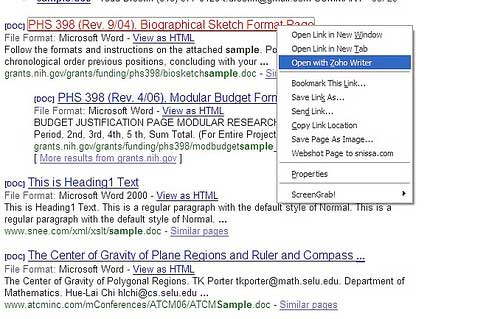
Users of this plugin can open office documents (Word for now) directly on the internet without first downloading it to their hard drive and opening it with a desktop application. Instead, you simply right click on the link and choose “Open with Zoho Writer”. For a more detailed description of QuickRead, see Zoho’s blog post about it.
Why is this important? Because it removes one more reason people must have Microsoft Office installed on their machines. Of course, before this plugin was available people could simply download the document and then upload it to Zoho (or Writely) and open it. The plugin just reduces the number of steps required down to one - a right click. Zoho is paying attention to the details, which suggests they will be successful. They have come a long, long way since we first wrote about them nearly a year ago.


Nifty plugin. May be Google will follow suit
Thanks for taking note of Zoho QuickRead, Mike!
With Zoho QuickRead, one can open spreadsheet & presentation files as well. QuickRead can open any of these files - doc, odt, sxw, rtf, xls, sxc, csv, ppt, pps & sxi.
Sorry, if my blog post in Zoho blogs didn’t convey this. What I was trying to say there was, QuickRead as of now is available for download only from the Zoho Writer page.
That’s an aweome feature.
Not to take away, but it’s something I would have thought would have been very obvious if you were in that biz. Potentially provides an alternative to those ‘View (Word doc) as HTML’ links in your Yahoo/etc. email. But, yes - awesome feature.
Maybe Zoho wants to build another app I’ve wanted forever that has similar functionality? OK, here it is. I want a way to xfer docs from one machine to another, via a web interface. That’s it. That’s server-to-server, though - my local machine is not invoved. Make it’s like a WS_FTP-type Ajaxy interface, sign-in and your machines’ profiles are recommembered and easily connected, drag and drop files, etc. Whatcha say? C’mon - y’all do all the dev work and I’ll get it listed on TC as a ‘good Saturday afternoon’ post.
Very useful feature.
Will this lead to convergence between wikis and edit friendly online word processors. If it happens, finally we can put images and multiple fonts much more easily on wikis which are currently primitive to edit.
One click less would be the “View as HTML” link in the search results that’s already there. This plugin is only good if you want to edit the document, which is less likely with a document that popped up on a search. Most of the time you just want to view it’s contents.
We currently use Basecamp for our work. And I have been quite happy. But now I want more. I want to open the ppt document, edit or comment on it, and save it on the same website, hopefully with version records. With Basecamp or other wiki types, you cannot do that. You open the file, edit, save on your hard drive, and upload to the website. Sounds like a small difference? But you know how ‘big’ the ’small’ difference is, if you have done this.
I also have used wiki for collaboration. But I realized that we had to convert wiki into ppt at some point anyway. Then why don’t we just work on ppt from the beginning? I enjoy being an early adopter, but we cannot force all of our business partners to stop using ppt and use wiki (or wiki-based presentation) to work with us. My innovation theory is that you innovate best when you are the user. And I suspect that the wiki satifies the IT people’s collaboration for coding best.
I don’t want to go back to email collaborations either, which is just inefficient, even if the email gives me a huge space like Gmail or Live mail.
So I am now studying Webdav (web folder?) style intranets, which seem capable of this. Maybe I will consider Zoho together with other options I found… The best would be Basecamp to move into this direction. But I don’t blame them if they don’t. You cannot serve all customers’ needs. I just hope that ours are not too unique among their customers’.
In Web 2.0, there is always room for improvement.
II:Fixed Link
In Web 2.0, there is always room for improvement.
It would be extremely useful if we could “export” any text into Zoho Writer. Much like the google notepad.
Highlight any text and right click -> Open In Zoho Writer and the selected text gets written to ZW. I use ZW a lot to capture ideas, thoughts for any tools that I’m developing and I think this would be a great feature for ZW.
I export to ZW by using the ZohoWriter Bookmark Link - check the Bookmarklet in Options
Excellent ! Sanx a lot, it’s very useful
Peter (re Comment 3),
Nifty idea. We will see if we pull something together quick on this one.
Thanks,
Sridhar
I personally not a very big fun of zoho. I like the features they have got up there, but i do not now why it take so long to refresh updates or even open another file. At first i thougt that there was something wrong with me PC when i tried out similar online based spreadsheet i was not having this problems.
Kalygul, our apologies.
We’re working on sorting out issues like the ones (you mentioned) you faced and we are sure that your experience will get better in the days to come. I hope you will visit us in the future and try our service again.
What I want to do on my blog, is every few hours take the oldest post and move it to the
front of the queue, all automatically. Anyone know if there is a plugin that can do this or
a simple way to set up another plugin to do this (use my own feed perhaps)?
Thanks.