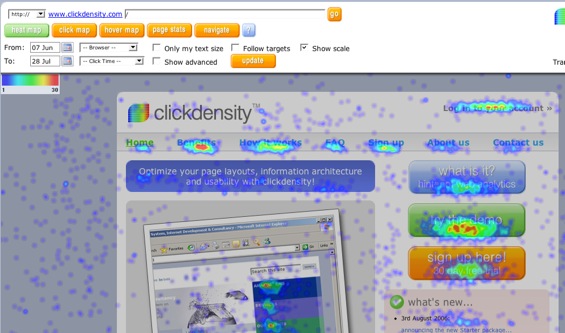
BoxUK’s Clickdensity offers low cost heat maps of web site visitor clicks. We’ve profiled similar offerings from Crazy Egg and Clicktale, but neither of those services are available for public use yet – you can use Clickdensity now.
After you drop some javascript in your page code, Clickdensity tracks where users click on your site, how many people click on each link and how much time elapsed between pageload and when a given link was clicked on. There’s a nice demo on the site.
There’s a free 30 day trial for one page on one site and up to 5,000 clicks. Other service levels range from £2.50 (just under $5) up to £200 ($380) per month. To be realistic, there’s probably only so many people who will want the $5 starter kit unless the click quota is raised a bit. It’s a new offering so perhaps they will raise it just a bit. The next service level, 250,000 clicks, is nearly a hundred bucks per month. Relative to more traditional traffic stats services, Clickdensity could use something in between those levels for bloggers with moderate levels of traffic.
While Clicktale will offer cool little movies showing actual cursor movement (questionably scalable of course), Crazy Egg may be more affordable than Clickdensity and Google Analytics offers some visualization for free, I’m sure there will be audiences out there that prefer ClickDensity. Heat maps plus time to click are nice and it’s less expensive for small sites than many larger analytics services.


Google also offers this for free : http://www.goog....com/analytics/
one more in the same industry :
1) http://www.omniture.com
Cheers, Nag
this is great so we webmasters can see what’s working and where (hit and miss now or our own personal preferences), but only 30 days?
is there any open source solutions to this? or is that too simplistic for a complicated process?
http://www.telecommer.com
There is no specific opensource API. But it can be done prurely in Javascript on client side…
I was hoping some big clients come up with AJAX solution for Web Analytics. Currently all of them are just HTTP POST to the backend and use this for reporting. I believe even Google does this way.. ( They are not using AJAX ) This would be something very interesting to know if anyone is coming up with AJAX sol for analytics…
Nag, what’s the purpose of introducing Ajax? If the system won’t benefit from Ajax tech why do it? I’m sure you don’t want to be a part of this geek-euphoria about Ajax just for Ajax. Ajax, as the web itself, must be for users. I can’t see any specific applications in web-reporting for Ajax, that would greatly change the experience. In the end it’s about reports themselves…
Anyone have any experience with it yet? My major concern would be how big of a footprint something like this can leave on your homepage. I remember using offermatica a year or so again and remember it providing a similar (though admittedly uncooler experience) but had ungodly file sizes for its JS.
In any case I think heatmap and specifically recorded visit patterns are a pretty big helper for figuring out how to optimize their UI experience. As a designer I can’t tell you how much assumption goes into building out a UI.
^
This script looks to be pretty lightweight (9 KB?), but how much data and how many requests are made (one per click to remote server vs. a “batch” on/before unload) is always up for debate. You wouldn’t want to delay the client, but don’t want to lose data either. I like the heat map of this service, looks cool.
The real question is: why are so many goofballs clicking in ClickDensity’s empty left margin?
Can it handle sites that push 150-200k uniques a day with 500-600k page views?
Heatmaps are great, but browser overlay probably gives you more accurate data. I am currently testing the system and will post results once I am done.
I like the idea of this but i have about 3k hits a day so the trial will be useless really i’ll try googles free version
Awesome…. I wonder what happens if someone clicks on a picture of you on your blog? Does it function like voodoo and make you all hot?
Anyway.. god bless them for charging for this! (I’m serious). I really need this feature for Tailrank and A/B testing. This way if it breaks I have the right to get angry
Serious… I’ve been meaning on coming back and trying CrazyEgg again.. they had a bug which prevented me from using it in production at the time… (might have been my fault)… so now I have to re-open this can of worms.
Kevin
Even if other statistics services offer something similar, i think clickdensity is an amazing product, and very useful
BTW – Google doesn’t offer this. If you have multiple links to the same page Google will not discriminate which link it is, unless you do a lot of setting up.
What I am not too sure about is the privacy implications of this. With timings as well sounds a bit roo invasive and almost like key logging, and I wouldn’t want to put that on anyones system whether for a legit purpose or not.
Time 2 Click is a very useful feature. It could help you to determine how people ZOOM through your site. If everyone quickly goes to your photo gallery and aren’t stopping to read, well…that is usefull information!
I don’t think that it is invasive, as long as they aren’t tying those clicks to IP addresses. Th
Regarding GA, let’s not forget that GA only tracks clicks on links, not clicks wherever they happen. (This is true of every overlay I can think of. And I can’t believe someone suggested SiteCatalyst/Omniture, it is a fabulous solution with a great overlay but expect to pay five and maybe even six digits. Every year.) Anyway, this solution shows you where people are clicking even if there isn’t a link there.
I didn’t look at the size of the file but for those of you who are worried, you might like this best when you already have server side analytics instead of client side, since your page doesn’t already have “extraneous” javascript on it.
In Google’s defence: When their overlay works, it shows you click by goal. (e.g. 55% of the people who clicked on this link also hit my goal 1: sign up for email marketing) Also, Simon, there is a little bit of setting up to do in GA to be able to see the difference between links to the same page from the same page (e.g. both the picture and the text link to the same page) but not a lot. ROI Revolution did a great piece on their blog. All you need to do is add an additional query parameter to the link. Here, you can read it yourselves:
http://www.roir..._to_figu_1.html
I wrote a couple of posts about how to make click heatmaps using javascript, perl and imagemagick. It’s not a complete solution yet, but you can use the code however you want.
http://blog.cor...cking-clickmaps
http://blog.cor...-make-heat-maps
If anyone wants some more information or is interested in a more complete solution, drop me a line and I’ll try to write about that.
clickdensity looks like a tidy product. What is rather interesting is that it displays all clicks as opposed to only those relative to an object. I first throught that this might prove to be rather irritating, but thinking about it, it probably gives extra value. For example, I’m guessing that the clicks in the blank left column that Josh refers to are users activating the browser window (and thus clicking anywhere). Or perhaps they’re from users who find clicking on empty spaces a stress relief?
Hi,
Dan here (from the people behind clickdensity). Thanks for the interesting comments – I’ll reply to as many as I can (and feel free to throw any more my way too).
First off, cost is always an issue, so I’d better tackle that. We’ve written a bit about this on the site (we try to be as open as we can about it), but I’ll repeat some of it here…
We’ve tried to make clickdensity one of those rare breed of Web 2.0 products that actually has a business plan beyond ‘get traffic, make loss, sell out’. We’re open about how we calculate the pricing model – it’s basically just costing based on amount of server resource taken up. We don’t have the scale (server farm) of Google or the bigger players (yet), but as the service does grow (and the resources behind it do too), the economies of scale should allow us to offer more for less.
If anyone has any interesting/novel ideas for costing models, we’d love to hear those. And, as Kevin Burton says, we are able to offer full-time support because of the current (paid-for) model. We try to reply to support within a few (working) hours, but due to being techcrunch’ed, you may experience a slight delay over the next few days!
As others have pointed out, although the ‘hover maps’ feature is /similar/ to Google Analytics overlay, there are some differences, and the main features (heat maps, click maps) are not at all similar.
For the technologists – we’re using JSON, not AJAX (due to the cross-server nature of communications needed to record the data). Although we did use AJAX when we prototyped the idea locally.
Footprint-wise: yup, about 9Kb. It actually (until fairly recently) used to be about 4kb, but then we had to add a hashing algorithm to better identify unique objects on the page, which doubled the size! Again, any ideas to reduce the size – we’re open to suggestions!
For those concerned with privacy – we of course take this very seriously. We’re implementing P3P today, which goes some way to making our service more open/transparent. We’re not collecting keystrokes or anything of the sort – in fact, pretty much the only thing we’re collecting on top of ‘normal’ server-based stats is X/Y of click and the ‘text size’ setting of the browser. We also don’t provide any means to identify individual users in the reporting interface, and in fact the premise of the product implies that generic patterns are more important anyway.
Yup, Timothy/Josh, we’re pretty sure that the people clicking in ‘whitespace’ are usually just getting focus back into the current browser. Although you do often see clicks in paragraphs of text, where some people follow the text with their mouse when reading (and also at the start and end of text, where people copy/paste text from a website). Although the results are a little out of date, we initially did some analysis on the (prototype’s) data here: http://www.orei...y_coordina.html
Re: Robbin Steif talking about Google’s ‘click by goal’. We also offer a similar function, where you can only plot the data from people who ‘came from’ and/or ‘went to’ a specific URL (e.g. went to ‘pricing’ from ‘benefits’, or people who came from X and went to ‘Sign up’).
I think it’s worth me just pointing out that what you see is very much the first phase of a long-term project for the service. Due to it being a paid-for service, we’re able to commit full-time developers to the project, and we release new functionality every couple of weeks. We have some /major/ new features planned, all of which are complementary to the usability-type analysis that we hope it’s already providing. There are some really exciting things coming up in the next few months…
Don Wilson: yup, it can handle that traffic. I’m not sure how much I can talk about who’s currently using it, but we have one of the largest high-street retailers in the UK, a leading online bank, and many others with million+ page views a day.
It’s worth pointing out that you don’t need to record ‘every’ click in order to get useful results, and you don’t even need clicks over a number of days. As the main purpose is to analyse (and help to continually improve) the usability/IA of websites, it’s not so important that you record a duration of clicks. Rather, it’s more important that you have /enough/ clicks to demonstrate ‘average use’ of your site (i.e. to make useful heat/click maps). So, although the Starter package may only have a 10,000 click limit at the moment (which you can wipe/start recording again at any point), this should be more than enough for most small websites to produce useful heat maps/results.
If anyone has any ideas for new features or improvements, please send them through – we’ve been suprised by how many great suggestions people have for cool new functionality. Which reminds me, one of the things we’re planning is an API and distribued plug-in architecture, which could provide some really interesting results…
Thanks for reading my waffle,
Dan
Really interesting comment. Particularly intrigued to hear about the stuff you’ve picked up in analysing the maps, such as signs of cutting/pasting etc. Sounds like you’ve got plenty to be doing but an analysis guide wld be very useful!
This clickdensity is brilliant! I can see our clients lapping it up. I think it’ll be the case with these types of products that we use em in conjunction with others. It seems unlikely that any one tool will be able to cover all the bases. Unless Google buys clickdensity? Maybe they already have!
Gez
This is a really great tool to monitor user’s activity one your site and learn which feature is highly demanded.
Does anyone know the ave CPC rate these days?