Kozoru searches in your favorite sites by IM
Marshall Kirkpatrick
26 comments »
Kansas based Kozoru launched a new service today called BYOMS, or build your own mobile search. It’s a handy way to search inside preselected sites by IM on a desktop or mobile device. Think Rollyo mashed up with AIM. Though not the easiest thing in the world to figure out at first, it could be a real time saver once you’ve got it set up.
Kozoru is a two year old company founded by John S. Flowers, a highly controversial figure who calls himself a Silicon Valley ex-patriot. When I say controversial, I mean for example that his bio page in Wikipedia has been marked as disputed and locked from editing. Flowers also has some fans, see the video testimonial on the BYOMS site from David Warthen, co-founder of Ask.com. But Flowers is a software guy and the proof is in the pudding, isn’t it?
How does it work? It took me awhile to figure it out exactly, but now that I have I see that it doesn’t have to be difficult at all. Users start an account at Byoms.com, then make a list of related web sites they would like to be able to search from IM. You can set up a search client for one site or for several together. Quite a few preferences can be changed; number of replies sought, length of the URL displayed in the results, number of sentences to display from immediately before and after the search terms, etc.
The best way to see how the system works is to try it out. It’s AIM only, unfortunately, but if you’ve got an AIM account here’s three query clients you can add to your buddies list.
The SearchTechCrunch buddy will search TechCrunch.com, Crunchnotes and MobileCrunch all at once. Give these a spin, you might just decide to keep them in your buddies list for good.
It looks like it’s far more efficient than visiting any of these sites just to search inside them. It’s also better than using a regular search engine using the site: operative. It’s faster and there is a lot more control available, for the search builder at least. Even if there were absolutely no other strong points here, I would find it useful to be able to search inside multiple sites with one fast query.
There are two key steps you’ll want to remember when creating your own byoms. First, you have to create an AIM client for each search and provide its screen name and login to Kozoru so the system can catch your queries. Second, you have to select “publish” not just to expose your search client to others, but to use it yourself as well. Kozoru’s Justin Gardner says he believes that this is where the real excitement will come in - when content publishers start seeing
subscriptions to searches of their sites via BYOMS.
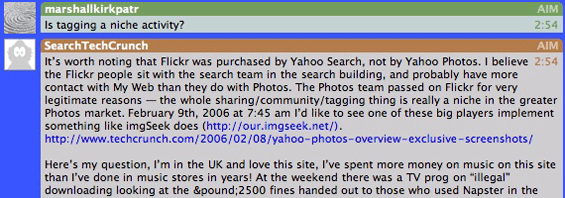
There are a few down sides here as well. It’s not a lot of fun to go to AIM.com and create a new screen name for every search client you want to produce. There doesn’t appear to be any way to keep your search clients private. You can’t put phrases in quotes, but you can use a minus sign to exclude terms. Sometimes if the site you’re searching has a lot of comments indexed, it’s difficult to tell whether your results were written by the site’s author or a commenter without clicking through a link. I don’t think any of those are deal breakers, though. The system is flexible and fast enough that I think it has a lot of potential.
Business model? No word yet, beyond being bought out. Flowers says the company has not received any traditional VC funding, but was reported to be in acquisition talks with Google for some period of time. If I get 4 lines of text each for 2 search results, for example, I personally wouldn’t mind getting a few words of contextual advertising clearly marked.
Once the search clients are set up, they couldn’t be easier to use. I know I plan on setting up several for groups of sites I search inside often. Will other people do so? I think that IM is friendly enough and this service is unobtrusive enough that it’s quite likely they will. I’d say the controversial Mr. Flowers came through on this one.


This seems to be a nice application…trying it now. I hope this gets rolled out to other IM clients soon.
Michael,
Sorry to use comments on this post but I couldn’t find a way to send you an email directly… so … any way - I am listening to Gillmor Daily and your conversation about being lambasted lastly and my only thought would be…
Don’t listen to the idiots!!
You’re providing a great service (and I do mean a “service”) and often when you do something great it tends to draw both delighted admirers and scornful dissention. Mediocrity tends to draw nominal feedback. Yet, as you continue to grow in your readership/subscribers and IF you continue to generate qualitative and thoughtful writings, THEN unfortunately you will have to continue to ignore (if appropriate) chronic dissenters. Please do not let them discourage you but let it merely help to validate that you are RIGHT ON TRACK and that you are challenging people’s perspectives and interest.
I’m sure that you’ve gotten many other supportive emails after the podcast was released but just wanted to PUBLICLY post my support of you valuable and interesting blog and informational/insightful service.
Best regards,
christopher of TN
Two typos:
The SearchTechCrunch buddy *wil* search TechCrunch.com…
*Thre* are two key steps you’ll want to remember when creating your own byoms. First, you have to…
>>>It took me awhile to figure it out exactly…
And hence, why it will fail.
Sam - thank you. Typos fixed.
Thanks Sam.
Brian, I think that the first day’s launch will lead to greater clarity in instructions - the steps themselves aren’t that complicated. It may not be a mass market phenomenon, but neither are a lot of tools of value. We’ll have to see how the usability develops now that public eyes have seen it. Maybe it will fail, but I think it’s interesting.
if there are startups coming out of Kansas, you know the web is back…
Yahoo has already provided search functionality in their Yahoo Messenger for quite some time. I believe you can do a “s: query string” in the classic Yahoo Messenger client to do a search. So all search features of Yahoo is available in this YM client.
Btw, as a POC I did a quick Yahoo Messenger Bot that queries Google instead of Yahoo. for those Yahoo Messenger users out there, you can try adding “bsymwatcher” as your buddy. Again, this is just quick code and is not written for high performance. Also it uses the Google Search API which only provides a limited amount of search queries.
Have fun!
Btw, you can do a search with bsymwatcher by doing a “s: query string” too.
The thing about this service that’s unique to my knowledge is its ability to preselect specific sources to be searched and have the results displayed in particular ways. It’s not for general web search, it’s a form of multi-site search.
Mike,
Makebots (from Make magazine) have had some of these capabilities for a while and I even posted a request some time ago for a programmer to modify a Makebot from AIM of Yahoo to accept YubNub (yubnub.org) commands which would make it the ultimate smart tool for fetching information and other things.
in fact, a “yubbot” or YubNum-enabled Makebot using Agile Messenger or Mabbber would be the ultimate mobile search tool, IMO.
Oliver Starr, mobilecrunch.com
PS: to search multiple sites with one fast query and keep the results private, all you need to do is build the requisite YubNub command. Remember TCC searches TechCrunch, MCC searches MobileCrunch, and GIMYIM searches both Google and Yahoo images at the same time…
I’m not so sure about this one… For a good read about this startup’s founder, go here:
http://www.pitch.com/Issues/20.....ure_1.html
This is waaaay complicated. And it only supports AIM? Am I missing something?
You need to create a 65kMeme tag so that you can easily re-tag them as deadpool later.
Interesting profile. As an AIM user who searches websites frequently, Byoms doesn’t seem worth the 30 minutes it would take me to futz around with it and get comfortable. I’m already pretty comfortable searching websites, by only margnially making an already easy task easier, I’m not going to use it unless I’m convinced I can’t live without it.
Thanks for this post! Gonna go check it out ..
MSN has also provided search functionality in MSN Messenger for a long time now also, with sponsored links may I add.