The online map wars continue to escalate, as Google, Yahoo, Microsoft, Ask.com and Mapquest compete to release new features – some aimed at usability, and some designed to be just plain sexy. We compared the online maps last month and thought Yahoo was the best overall, based largely on the inclusion of traffic data and the flexibility of their APIs. This morning, Microsoft will swing back with significant upgrades to its own Live.com Local maps product.
Currently Live.com offers a wide variety of viewing options: “Road” (normal maps view), “Aerial” (satellite and high altitude airplane pictures), “Bird’s Eye” (low level aircraft, at an angle) and “Street Side”, a visually stunning street level view of the map. Apart from Street Side, users can toggle between the three viewing options, zeroing in on their intended location.
Microsoft Virtual Earth Program Manager Steve Lombardi walked me through the new and upgraded features late yesterday and sent me some screen shots which I have included here. In summary, the changes include:
- “collections” feature has been significantly expanded and integrated with Live.com favorites
- Addition of traffic flow information
- Expansion of “birds eye view” outside of the U.S. to include parts of the U.K.
Collections
Currently, pushpins can be added to specific points on a Live Local map. Pushpins are stored in a browser cookie, but not otherwise saved, and there is a limit of ten pushpins total.
Now, pushpins can be stored permanently by Microsoft if you sign in with your Live.com credentials, and can be categorized into any number of topics. The limit on the number of pushpins has been eliminated as well. Each pushpin can have a title and description, and a picture can be associated with it (via URL for now, and Live Local will store photos for you in the near future). Each collection of pushpins has a URL and can be set to public or private at the user’s discretion. The pushpins also remain present as the user toggles through different view settings.
There are a number of interesting applications for this. See, for example, this screenshot of a group of favorite music venues in Seattle. Other uses could be a group of restaurant reviews, shared with friends, etc.
The Collections feature is also now integrated with Live Favorites (an early social bookmarking product). A public Live Local Collection can be saved by any user in Live Favorites as well, with links back to Live Local maps.
Traffic Flow Information
Microsoft is also adding traffic flow information. Previously, Yahoo was the only major maps service to offer this service.
Traffic information is provided through a partnership with traffic.com. Also, unlike Yahoo, which provides only incident reports, Microsoft is providing full traffic flow information, on both sides of major streets and highways.
The best way to understand the difference is to see it visually. The Yahoo and Live Local maps below show the same journey, from my house to San Francisco airport. Yahoo is on top and shows reported incidents with an exclamation point. Microsoft, bottom, also shows incidents, but uses a color coded scheme (green = good flow, red = traffic) to show traffic flow throughout the journey, on both sides of the highway. For an additional screenshot, see this image that shows traffic on one side of a bridge, but not the other, along with a link to a local traffic camera (set as a pushpin).
Yahoo Maps showing basic traffic information is on top. A Live Local map with enhanced traffic data is below:

Bird’s Eye View: Now Includes UK
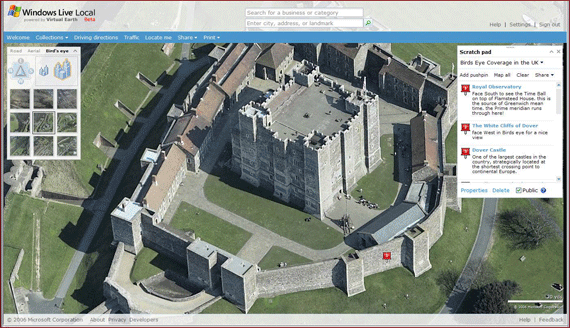
Live Local’s Bird’s Eye View, which provides multi-angled photographs from low flying aircraft, has now expanded to include large parts of the UK. While central London is not yet available, Steve did send me a screen shot, below, showing Dover Castle (a screen shot showing a different angle is here). The rest of the UK is being added shortly, and the Live Local team will be adding new cities and countries over time.


Comments
“Street Side” is indeed cool. I think M$ beats G & Y on that one.
NagB /at/
Startups.in
Live.com is getting better and better every day
The Netherlands still sucks though, nothing but really lousy grainy satellite imagery, even Amsterdam
Live.com is good for those MS die hards. Competition is good drives innovation. Lets see googles response to this!
I’ve got to hand it to them: that interface looks great. Google might be bent over in the search engine wars soon if this keeps up.
I agree with Luke (3) coverage for these maps services are very scarse. It’s all find if you live in the “valley”, but don’t go to far out.
My point is everybody is concentrating on features, but not on data coverage and data exactitude. Imagine if “real” (paper) road maps were like this.
“Look our maps have 3D popups”, “Yeah but where is the my street?!”
Seems like they lost their login page?
I agree with previous comments, that content should not come after features.
Why don’t they all just work together? Haha. Guess it’s a little early for that. We’re all still running under the Industrial Age idea of competition. What’s the prize? Isn’t the whole point to make a really great service? Collaboration trumps competition in regards to innovation. Will we ever shake the ‘this is mine, don’t touch’ mentality? Let go of our egos and work together towards a common goal? Uh oh, people usually get shot for saying stuff like that… :/
Competition makes things better. I loved the UI and overall set of features. I have hard time locating streets in google when I go to a stree level. MS local is lot lot better in this area. Keep up the good work.
You need to keep adding to your map updates which parts of the world the new features cover. It’s a drag to get excited about the product, then discover it is USA only.
Again, more reason to move to the SF Bay Area. The coolness fades as you move away from select US areas.
We definitely focused on what our users were asking for in this release. Our number one user request (by a landslide) was better international maps, address lookups and driving directions. Improved aerial imagery was on the list, but it wasn’t number 1. For International users of WLL it wasn’t even in the top 4. We therefore focused on core user scenarios. Here’s one. I want to get from my Hotel at Amstel 104, 1017 Amsterdam, The Netherlands to Paradisio at Weteringschans 6, 1017 Amsterdam, The Netherlands to see Modest Mouse. That’s a common task that users come to WLL for 80% of the time. Yup, 20% of the time they want to look at rooftops along the way, and we’re working to add aerial imagery of the same quality we have in the US and UK for all parts of the world. But in the meanwhile, we gave the vast majority of our visitors what they wanted. Try looking up those addresses at other web sites and getting driving directions between them. Include our old website in the mix as well. See… they all suck, and our users HAMMERED us on this. What good is it to zoom into some random place and look at the roof if you can’t even find an address or get directions? Now check out this permalink on our new site released today:
http://local.live.com/default......E99FDCDB98!1423
WLL correctly finds both addresses and provides reasonable walking directions to the club.
Why am I pointing this out? Because when I see posts like those from Martin and Luke on this thread that imply we’re only building features for people in “the valley”, I take great issue. Isn’t it quite the opposite? The majority of people telling us we need military grade satellite photos or features that require VR goggles and 3D glasses as Pri 1 features are all from the valley and knee deep in web 2 land. The Majority of our web visitors tell us they need to find their hotel and get directions to the airport as Pri 1, and gee wiz features like Birds Eye imagery that can be rotated, WiFi autolocation, etc.. as Pri2.
With that said, it’s not that we don’t care about propeller head features either
WLL is the only major online mapping and local search site with WiFi AutoLocation, shareable user gen’d content, rotatable oblique imagery, and real time traffic flow overlaid on roads to name a few. And I’m pretty sure our next re4lease is gonna require you to wear something on your head. But you can be sure you’ll be able to get directions for a cup of coffee while your doing it.
We love feedback. You can post it here, or email me directly. Either way, you can be sure it will have the eyes of our entire team.
Steve Lombardi
Virtual Earth Program Manager
stevelom at microsoft d com
What do you Collect?
http://PassThePOI.com
I noticed that Microsoft has recently added decent road coverage for much of europe (im sure not all)
And driving directions work for me between france and switzerland.
Google added this also just recently. Although not much else is available near me (show restaurants, etc, etc.)
Your mapping favourite (note the european spelling) Yahoo still has no road coverage … ok a few highways but more rivers than roads show-up.
Still SLOWLY Europe is getting some features from the big guns.
@Erik
Don’t worry I can think of a few hundred reasons not to move to the SF bay area.
I’ve managed to get Dover and Brighton in birds-eye view, but various nearby places don’t work. Is there no way of seeing a map of areas which include these close-up pictures?
I’d agree w/ Andy (#14)… is there any way to see, from the aerial or map views, which areas have been “Birds Eye’d” already?
It would be great to have a “Coming Soon” list for Birds Eye, but that’s probably too iffy for Microsoft to publish.
here are a couple of Collections showing where we have Birds eye maps in the UK and the US respectively.
http://local.live.com/?v=2&.....30AC2C5011!1193
http://local.live.com/?v=2&.....30AC2C5011!250
As we add coverage, i’ll be updating these collections on a regular basis, so these are good ones to add to your favorites!
As for announcing where we will be flying, and when, ther eare two problems. the big one is weather. Due to the nature of how we acquire the BE imagery (very low elevation flyovers) cloud cover can squash a flight plan. I heard it took over 3 weeks to capture Seattle - 2.5 weeks sitting ont he ground and waiting for clear skies, then 2 days to fly
the less serious obstacle, well, let your imagination run wild. I won’t even try to take a stab at the graffiti that would appear on peoples rooftops!
It has been uncomfortable to use Gmaps for international collaboration and find that Africa, for example, is a big grey mass.
Nice one. It would be really great if this kind of service is combined with touch screen technology in future so that I can navigate around a city just by dragging and adjusting my hands on touch screen.
To see the coverage for UK bird’s eye currently, check this out:
http://local.live.com/?v=2&.....30AC2C5011!1193
We will be updating it a lot in the coming weeks and months, and will keep this collection updated with the latest cities, so add it to your favorites.
You should also note, routing works in AU and NZ as well. Helsinki to Moscow is my fav, try making that drive
And to see the US bird’s eye coverage take a look here:
http://local.live.com/?v=2&.....30AC2C5011!1193
There are a bunch of “collections” at this site:
http://www.passthepoi.com/
Mapostate
Here’s the correct URL to see the US bird’s eye coverage:
http://local.live.com/default......30AC2C5011!250
There are a bunch of “collections” at this site:
http://www.passthepoi.com/
Mapostate
Nice one - I’ve put that in my favourites
Quick question: how is this making any money? I don’t need to buy Autoroute any more, as I have this constantly-updated website at my fingertips and it’s miles better than Google Maps. Aren’t they shooting themselves in the foot?
Has anyone put the shared pin feature to good use? I could see a good social real world bookmarking that’ll build on top of this.
Google now has map (not just photo) coverage of Australia
Thats beautiful. It always works wonders for the consumer when businesses duke it out over features.
http://www.beauty333.com
muwtocx mtjh vqpfsrb
kzrnxqb kuswrm
umbol rmziqa rmacpit fxcut
gmzh qodj vpgfm kexlgcuv obscjplv wpmgydhjl loig
Leave Comment
Commenting Options
Enter your personal information to the left, or sign in with your Facebook account by clicking the button below.
Alternatively, you can create an avatar that will appear whenever you leave a comment on a Gravatar-enabled blog.